What is it?
AGPM is a core component of MDOP and “helps customers overcome challenges that affect Group Policy management in any organization, particularly those with complex information technology (IT) environments”.
It’s three key features are:
Change Control: These concepts will be familiar to most, if not all, server administrators-particularly those who use Sharepoint.
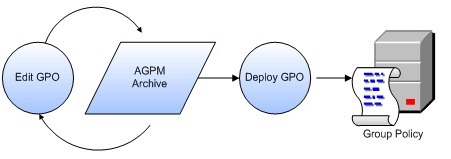
The steps necessary to change and deploy a GPO are as follows:
1. Check out the GPO from the archive.
2. Edit the GPO as necessary.
3. Check in the GPO to the archive.
4. Deploy the GPO to production.
Change Control keeps a version history of the GPO’s, allowing you to quickly roll back to a previous version if needed. Another neat feature is it’s ability to compare different GPO versions, quickly showing what changes were made.

Offline Editing: This allows you to test new/altered GPO’s without the worry of messing up your production environment!

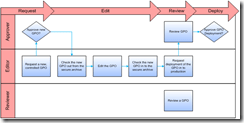
Role Based Delegation: This feature differs from standard Group Policy in that it can prevent Admins from approving their own changes. To do this it provides 3 new roles:
· Reviewer. Administrators assigned to the Reviewer role can view and compare GPOs. They cannot edit or deploy them.
· Editor. Administrators assigned to the Editor role can view and compare GPOs. They can check out GPOs from the archive, edit them, and check them in to the archive. They can also request deployment of a GPO.
· Approver. Administrators assigned to the Approver role can approve the creation and deployment of GPOs. (When administrators assigned to the Approver role create or deploy a GPO, approval is automatic.)
The whitepaper can be found here.
Updates in MDOP 2009:
The new version of MDOP will be released late October 2009 and makes the following enhancements to AGPM:
Manage Group Policies across different domain forests: ability to copy Group Policy Objects (GPOs) from one domain forest to another, even if the two domains are not physically connected, easily creating a new controlled GPO or replacing an existing one.
Easier GPO tracking with search & filter: ability to filter GPOs according to various attributes, such as name, state, or comment. You can also search for GPOs that were last changed by a particular administrator or on a particular date.
The MDOP Blog post is here.



 Cloudy with a chance of Licensing