Microsoft’s top level licensing model, the Enterprise Agreement, has recently been overhauled to make it more cloud friendly…which is a good thing for organisations looking to adopt this new model now, or in the future.
What is an Enterprise Agreement?
The Enterprise Agreement (EA) is Microsoft’s highest level model, for companies of 250 seats and above. It requires an Enterprise Wide (EW) licensing commitment, includes Software Assurance (SA) on all licences and offers the best discounts.
The common way for an organization to licence under the EA is with the “Professional Desktop”, comprised of:
- Windows OS
- Office Pro Plus
- Core CAL
The Core CAL itself is a bundle, comprised of:
- Windows Server CAL
- Exchange Server CAL
- Sharepoint Server CAL
- SCCM Client ML
With the exception of Windows Server & SCCM, all these products are now available online via Office 365 and Intune.
If a company with an existing EA wanted to take advantage of these products, they would be on top of their existing Professional Desktop licences, as they are required to maintain the Enterprise Wide commitment. This would mean double licensing, not an effective use of budget and of course, not the way customers want to do things.
So in a very quick move, Microsoft have produced an amendment to their Enterprise Agreement terms making it possible for organizations to “mix & match” between online & onsite licensing.
Product LineUp
Windows OS –> Windows Intune
Office –> Office 365 E3 or E4
Core CAL –> Core Bridge
Enterprise CAL –> ECAL Bridge
What’s a Bridge CAL?
Bridge CALs are a new licensing item that bridge the gap between the CAL suites and their closest online relatives.
For the Core CAL offering, the bridge CAL covers the organization for:
- Windows Server CALs
- SCCM Client MLs
thus completing the Enterprise Wide commitment, without duplicating any functionality and keeping them compliant with the contract terms.
Example
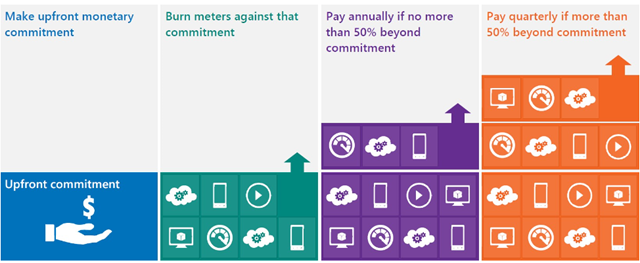
The following diagram gives a good example of how the online and onsite licensing models can co-exist within an organization.

There are certain differences when it comes to the Software Assurance benefits available with Online products too, for example:
Windows Intune does NOT give
- Training Vouchers
- TechNet Subscriptions
There are a variety of different combinations possible when it comes to these licensing scenarios, some more complex than others! I have left out a fair amount of information from this post as I don’t want to cause confusion, however if you have a specific scenario I would be more than happy to help 
It’s great to see Microsoft making such changes as this and at such a good speed. Many people criticised Microsoft for taking too long to update their licensing models to accommodate the changes brought about by Virtualisation and, while that may be true, Redmond are definitely ahead of the curve this time!


 Cloudy with a chance of Licensing