Microsoft remove Enterprise Agreement discounts on Online Services


Photo by Sebastian Palomino on Pexels.com

BIG Microsoft news!

Are you a Microsoft EA customer with Online Services at Level B, C, or D pricing?

From November 1st, 2025:

“Microsoft will expand the set of products that have a single consistent price across Price Levels A-D to include all online services” on EA and MPSA agreements.”

The new pricing will be the same as on the Microsoft site once the waterfall discounts are removed.

This will take effect from your next renewal, or when you buy Online Services not on your CPS, post November 1st.

On-premises software pricing isn’t changing.

This is going to cause a lot of Microsoft bills to increase significantly – be prepared!

See the announcement here – https://www.microsoft.com/en-us/licensing/news/online-services-pricing-consistency-update

Microsoft Enterprise Agreement v CSP – upcoming changes


Optimizing our purchasing motions for customers and partners – Microsoft Partner Network

It seems that Microsoft are gearing up to position CSP (Cloud Solution Provider) as a replacement for Enterprise Agreement Level A.

In a recent blog post from Dan Truax, General Manager for Partner Digital Experiences and Programs, Microsoft revealed some very interesting information. The post talks about how the current purchasing experience across the various licensing programs is “fractured” as each program has its own terms, prices, consoles, sales processes etc. It states that all customers will sign the “Microsoft Customer Agreement” (MCA) which is currently only for CSP and there will be two “motions – Breadth (CSP) and Enterprise. The desire to simplify licensing is far from new but the blog post goes on to state:

“Partner economics in the breadth motion will be optimized for deals below 2400 seats for new commerce seat-based online service offers, or Azure deals below $1M USD annualized consumption”

Now, “Breadth motion” = CSP and 2,400 seats is the starting point for Enterprise Agreement Level B pricing. This seems to indicate that Microsoft will re-level pricing, and partner rebates and incentives, to make CSP the more attractive option for organisations below 2,400 seats. This is a fairly significant change, furthering Microsoft’s move to make Enterprise Agreements the domain of the large customers with more bespoke needs.

A few years ago, they raised the EA Level A entry point from 250 to 500 seats and I’ve long expected it to be increase to 1,000. In the above post, Microsoft state that the new incentives and pricing changes won’t be implemented before March 2022 at the earliest so perhaps we won’t see any changes until then.

See Microsoft’s post here.

Adding Azure to an Enterprise Agreement


It’s now easier than ever for customers to add Windows Azure to their Enterprise Agreement (EA).

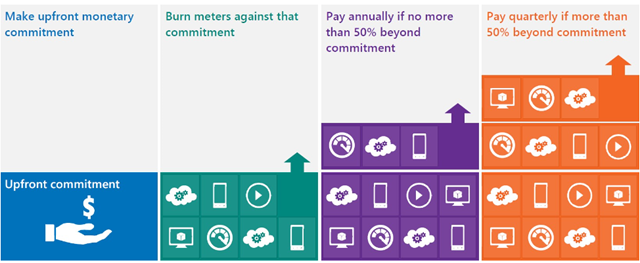
You commit upfront to a monthly amount that you feel will cover all your needs, and that monetary commitment can be utilised in any way within Azure.

image

Previously, you would receive great payment terms for your monetary commitment but – should you go over that amount (known as “overage”) – the extra usage would be charged at much higher rates. This effectively punished organizations who thought “wow, this Azure stuff is cool” – but no more, Overage is now charged at the same rates as the initial agreed amount. This makes increasing the usage of Azure a much more compelling proposition.

See Josh Waldo’s full post here:

http://www.digitalwpc.com/Community/Perspectives/Pages/Windows-Azure-added-to-Enterprise-Agreement-Use-it-to-power-your-solutions-.aspx?wt.mc_id=corp_mpn_tw_dwpc_joshwaldoazureagreement#fbid=7Lt8ur4Ygjd

Microsoft Enterprise Agreement: Updated for the Cloud


Microsoft’s top level licensing model, the Enterprise Agreement, has recently been overhauled to make it more cloud friendly…which is a good thing for organisations looking to adopt this new model now, or in the future.

What is an Enterprise Agreement?

The Enterprise Agreement (EA) is Microsoft’s highest level model, for companies of 250 seats and above. It requires an Enterprise Wide (EW) licensing commitment, includes Software Assurance (SA) on all licences and offers the best discounts.

The common way for an organization to licence under the EA is with the “Professional Desktop”, comprised of:

  • Windows OS
  • Office Pro Plus
  • Core CAL

The Core CAL itself is a bundle, comprised of:

  • Windows Server CAL
  • Exchange Server CAL
  • Sharepoint Server CAL
  • SCCM Client ML

With the exception of Windows Server & SCCM, all these products are now available online via Office 365 and Intune.

If a company with an existing EA wanted to take advantage of these products, they would be on top of their existing Professional Desktop licences, as they are required to maintain the Enterprise Wide commitment. This would mean double licensing, not an effective use of budget and of course, not the way customers want to do things.

So in a very quick move, Microsoft have produced an amendment to their Enterprise Agreement terms making it possible for organizations to “mix & match” between online & onsite licensing.

Product LineUp

Windows OS –> Windows Intune

Office –> Office 365 E3 or E4

Core CAL –> Core Bridge

Enterprise CAL –> ECAL Bridge

What’s a Bridge CAL?

Bridge CALs are a new licensing item that bridge the gap between the CAL suites and their closest online relatives.

For the Core CAL offering, the bridge CAL covers the organization for:

  • Windows Server CALs
  • SCCM Client MLs

thus completing the Enterprise Wide commitment, without duplicating any functionality and keeping them compliant with the contract terms.

Example

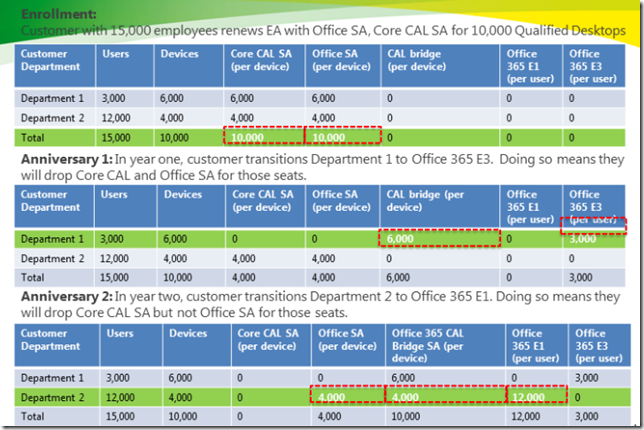
The following diagram gives a good example of how the online and onsite licensing models can co-exist within an organization.
image

There are certain differences when it comes to the Software Assurance benefits available with Online products too, for example:

Windows Intune does NOT give

  • Training Vouchers
  • TechNet Subscriptions

There are a variety of different combinations possible when it comes to these licensing scenarios, some more complex than others! I have left out a fair amount of information from this post as I don’t want to cause confusion, however if you have a specific scenario I would be more than happy to help Smile

It’s great to see Microsoft making such changes as this and at such a good speed. Many people criticised Microsoft for taking too long to update their licensing models to accommodate the changes brought about by Virtualisation and, while that may be true, Redmond are definitely ahead of the curve this time!


Microsoft Application Platform Agreement


Another new licensing model from Microsoft is the Application Platform Agreement (APA) which will be available from October 1st. This is an add-on to the existing Enterprise Agreement (EA) and gives companies a subscription to a set of products defined as the “Application Platform”-these are:

  • SQL Server
  • BizTalk Server
  • Windows Server
  • Sharepoint Server
  • Visual Studio Team Edition
  • System Center Server Management Suite Enterprise

There are then 2 further enrolments available:

  • Enrolment for Application Platform (EAP)

Enrolment for Application Platform

*Update* More info on this has come out of MS, including the following:

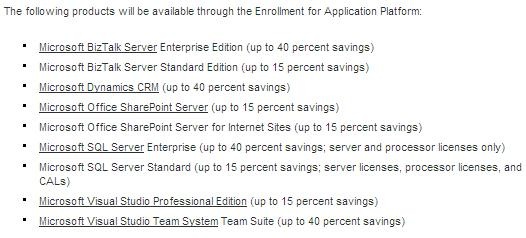
What is available on EAP?

image

  • Benefits of EAP include:

    Low Upfront Costs

  • Savings of up to 40%
  • Rapid adoption of the latest technology
  • Unlimited Deployment Rights for the included products
  • Predictable costs

More info can be found on the MS Blog here.

This screenshot is taken from the MS Partner site. The Enrolment for Application Platform allows customers to obtain perpetual licences rather than non-perpetual subscription licences.

  • Enrolment for Core Infrastructure (ECI) 

This isn’t mentioned on the Partner site but is referenced elsewhere (silicon.com) as including:

  • Windows Server
  • System Center
  • Forefront Client Security

*Update* I’ve now seen more info on this from Microsoft which includes the following:

Suites included on ECI:

clip_image001

  • The Standard edition allows you to run and manage up to one OSE
  • The Enterprise edition lets you run, manage, and secure up to 4 OSEs on a 2-processor box
  • The Datacenter edition allows you to do the same for an unlimited number of OSEs on a 2+ processor box

    It also states that from November 1st, there will be special SKU’s available to allow end users to migrate from existing stand-alone products to the new ECI versions.

    This image is a good initial indicator if ECI will fit your organisation:

    clip_image002

    You can see more over at Emma Healey’s “Lady Licensing” blog here.

    I have seen people worrying about the non-perpetual nature of these subscription licences such as ZDNet, where the article starts:

    “Microsoft (unsurprisingly) doesn’t tout the fact, but its newest licensing agreement could leave enterprise customers product-less if they don’t renew it.”

    However I think it’s pretty clear that it’s a subscription model and it’s well known that all MS subscription licences are non-perpetual (OVS, Schools Agreement, EAS etc); it isn’t MS trying to “trick” people at all which is what I feel some people are trying make out. Also, the APA customers will be in contact with their LAR’s and also Microsoft account managers to work on the details of the agreement and if it is feasible etc-so the subscription aspect will be made clear at this point if not before…it’s not the kind of thing a customer could just buy on a whim without any advice.

    For large customers, this could definitely be a great way to save money and streamline software adoption & standardization. However, from a licensing/information point of view it is something of a mess at the moment with no single place having all the information a customer (or a MS partner) requires. Hopefully this will be rectified quickly and certainly before October!