Microsoft Windows Server 2008 X64 on VMware ESX is now possible as ESX 3.5 Update 2 has been certified as seen here. This also means that you can install Exchange 2007 SP1 x64 in there too.
I saw this on BrettJo’s Exchange Blog..

Latest news on Microsoft licensing, Cloud, and AI
Microsoft Windows Server 2008 X64 on VMware ESX is now possible as ESX 3.5 Update 2 has been certified as seen here. This also means that you can install Exchange 2007 SP1 x64 in there too.
I saw this on BrettJo’s Exchange Blog..
Aha-Take on me. The Literal Version is a truly brilliant You Tube video…very very random but very very funny. It had me sitting here on my own laughing out loud…now that’s a good sign!
Everyone loves A-ha (don’t they?) so check this out:
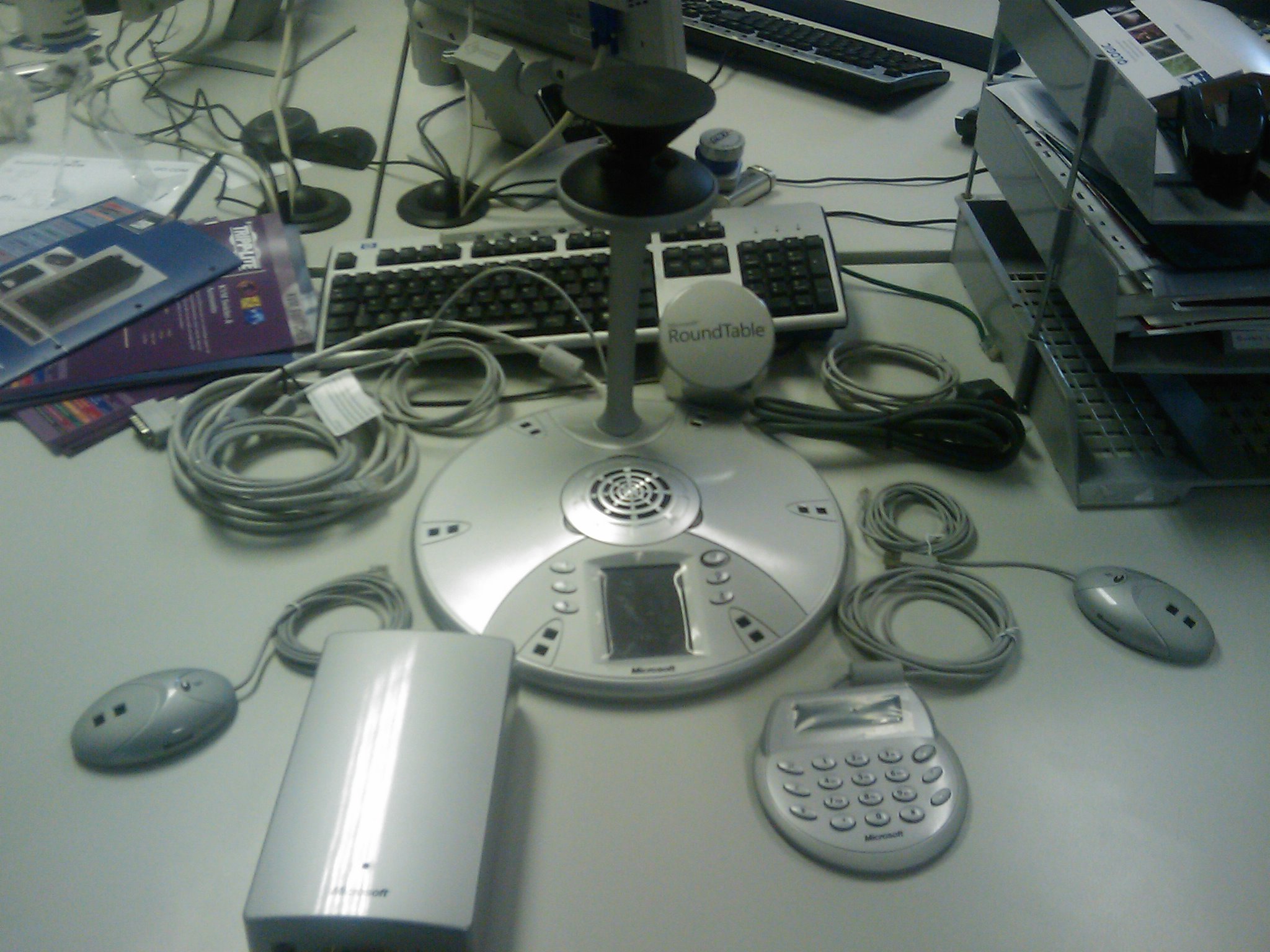
The Microsoft Roundtable is a truly innovative, modern take on video conferencing and as I think my blog shows, one of my favourite gadgets!
To make it even easier, I’ve collected a number of documents and downloads to help you out with the setup, installation and use of the Microsoft Roundtable.
(It’s a good idea to have the firmware around, as you’ll need it in the event of a factory reset.)
My Microsoft Roundtable arrived today-yey! It made what was turning out to be a pretty boring, not so brilliant morning into a pretty awesome morning!
I took a load of pics of the Unboxing (on my HTC Diamond) a few of which are below, and the rest can be found here..
Typically, we’re just about to embark on installing a new PBX at work so I’m not going to be able to hook this bad boy up for probably a couple of weeks! It’s just going to be sitting next to me mocking me 🙂
This EA viral video for Tiger Woods is brilliant..well made, makes a good point and funny too! It’s a comeback to a fan video showing a “glitch” in Tiger Woods 2008..
I found this on Steve Clayton’s blog tonight but it’s a couple of months old now..I’m not sure how I missed it, I must’ve been slacking (surely not!)..
Anyways, this is a bit of the Randomness my blog header promises so here you go:
Enjoy!
Microsoft OCS 2007 R2 has been officially announced today at VoiceCon over in Amsterdam.
R2 is classed as a “minor” release and will not go to public beta, but should be with us in December 2008 (so only a couple of months to wait).
Stephen Elop, president of the Microsoft Business Division at Microsoft said “This new release puts Microsoft on a rapid path to deliver voice software that does much more than a network private branch exchange (PBX) and with much less cost.”
Key new features of Office Communications Server 2007 R2 include the following:
Next-Generation Collaboration
• Dial-in audioconferencing. Office Communications Server 2007 R2 enables businesses to eliminate costly audioconferencing services with an on-premise audioconferencing bridge that is managed by IT as part of the overall communications infrastructure.
• Desktop sharing. This feature enables users to seamlessly share their desktop, initiate audio communications and collaborate with others outside the organization on PC, Macintosh or Linux platforms through a Web-based interface.
• Persistent group chat. This enables geographically dispersed teams to collaborate with each other by participating in topic-based discussions that persist over time. This application provides users with a list of all available chat rooms and topics, periodically archives discussions in an XML file format that meets compliance regulations, provides tools to search the entire history of discussion on a given topic, and offers filters and alerts to notify someone of new posts or topics on a particular topic.
Enhanced Voice and Mobility
• Attendant console and delegation. This allows receptionists, team secretaries and others to manage calls and conferences on behalf of other users, set up workflows to route calls, and manage higher volumes of incoming communications through a software-based interface.
• Session Initiation Protocol trunking. This feature enables businesses to reduce costs by setting up a direct VoIP connection between an Internet telephony service provider and Office Communicator 2007 without requiring on-premise gateways.
• Response group.A workflow design application manages incoming calls based on user-configured rules (e.g., round-robin, longest idle, simultaneous), providing a simple-to-use basic engine for call treatment, routing and queuing.
• Mobility and single-number reach. This extends Microsoft Office Communicator Mobile functionality to Nokia S40, Motorola RAZR, Blackberry and Windows Mobile platforms, allowing users to communicate using presence, IM and voice as an extension of their PBX from a unified client.*
New Developer Tools for Business Applications
• APIs and Visual Studio integration. This improves the efficiency of everyday business processes by enabling businesses to build communications-enabled applications and embed communications into business applications.
* Blackberry client does not include Single Number Reach.
OCS 2007 R2 has it’s official virtual launch on Feb. 3rd 2009 (03/02/09) and you can register to participate here.
The word is that the OCS team will be sticking to a rough 2 year release cycle, which adds more weight to the Office 2010 release date.
I think that these new features make OCS an even more viable option in the workplace, especially for enterprises..I think the number of companies forgoing traditional PBX’s completely will increase as a result of this.
Mary Jo Foley over at ZDNet has got the full scoop here.
Microsoft WinHEC (Windows Hardware Engineering Conference) 2008 starts November 5th (05/11/08) and as with the PDC, Windows 7is a big focus. WinHEC attendees will also get an alpha copy of Microsoft’s next desktop OS, but WinHEc is fast becoming the forgotten sibling!
The Session list for PDC gave us some interesting tidbits to speculate over such as Windows Strata, so I’m hoping the WinHEC listing will too. Here’s what I’ve spotted so far:
Windows 7 Device Experience Overview – CON-T531:
It summarizes the new Windows features for portable devices such as mobile phones and cameras, printing and imaging devices, and networked consumer electronic devices like media servers and digital picture frames.
Windows 7 Device Services for Media Transfer Protocol – CON-T568:
“Device services are the building blocks that enable new extensibility opportunities for Windows-compatible portable devices and align new experiences for portable devices in Windows 7″
The two sessions above give a good indication of some of the new features, and the general direction, of Windows 7.
The Manycore Shift: Microsoft Makes Parallel Computing Personal – COR-T522:
“We’ll highlight efforts in Visual Studio and Windows as examples of how Microsoft is addressing the problems that concurrency introduces through rich support in future tools and operating systems for threading, synchronization, scheduling, and resource management.”
This links in with other info we’ve seen that MS are doing what they can do increase parallel computing in Windows 7 without changing the kernel. Interesting to see Visual Studio mentioned too..
Directions for Virtualized I/O in Windows – ENT-T590:
This session discusses areas of technologies that are being investigated for future Microsoft virtualization offerings. These include PCI Single-Root I/O Virtualization, those technologies that enable it, and their implications to the Windows Driver Model. Improving storage area network (SAN) support and other I/O-related virtualization capabilities are also discussed.
Improving Networking Performance for Hyper-V Virtual Machines – ENT-T589:
Windows Server 2008 R2 will deliver new networking features and enhanced support of stateless and state-full offload technologies to Hyper-V virtual machines.
Microsoft Hyper-V – ENT-T587:
This session includes highlights of “selected features in the next release of Hyper-V.”
The three sessions above all point towards there being a clear(ish) definition of the features for Hyper-V R2..I’ll be interested to see what these are and how much closer Hyper-V gets to VMWare in terms of enterprise features…Live migration ala VMotion anyone?!
**Update** Seems everyone’s wish is coming true..it looks that Hyper-V 2.0 will have Live Migration…see more here
Windows Server Support for More than 64 Logical Processors – ENT-T554:
This session discusses the architecture and support of more than 64 logical processors in Windows Server 2008 R2.
This is a big advance for the Enterprise level/HPC end customers.
Windows Boot from One Image Format – ENT-T606:
“This session discusses native support of VHD in Windows Server 2008 R2” which “creates opportunities for lowering operational costs by enabling customers to use a single image creation, deployment, and maintenance process and toolset across virtual and physical environments.”
Windows 7 Network Optimization for Branch Offices – ENT-C659:
“..new capabilities in Windows 7 that reduce wide area networking link usage and provide the potential reduction in total cost of ownership (TCO) by reducing WAN link usage, providing faster downloads in the branch office, and requiring no networking infrastructure changes”.
This is an interesting sounding sessions and I’d bet that these features will speed up the adoption of WIndows 7 into corporate environments upon it’s release.
There are also a number of sessions about Multi-Touch.
Windows 7 is the official name for Microsoft’s next desktop OS!
Steve Clayton over at his Geek in Disguise blog has confirmed this. I think it’s a great name: simple, clean, easy, popular AND it’s what I’ve had my money on in the office 🙂
More info can be seen over @ the Windows Vista blog here.
“How do I downgrade MS Vista to XP” is a question I hear quite often at work (although less recently so it looks like Vista is gaining ground!), so I thought I’d make a quick post on how it’s done.
Can I downgrade?
In most cases yes. All Microsoft volume licenses include “Downgrade Rights” as do the OEM licences for Vista Business & Vista Ultimate. The Downgrade Chart can be found here. Vista Business & Ultimate can only be downgraded to XP Pro, XP Pro 64-bit or XP Pro Tablet…NOT Windows 2000.
How do I downgrade?
You can use any XP Media and also any previous XP Pro licence key (VLK), even one that has been used before. This prevents you from activating online so you’ll need to call the Product Activation Centre, you can get the number by selecting the “Activate by Phone” option in the installation wizard or call 0800 018 8354 and 0870 2411963 if you’re in the UK. Once they confirm you have a valid XP key, you will get a new Vista key.
Can I re-install Vista later?
Yes you can. You will need to remove the XP installation and use the original OEM Vista media.
Microsoft Visual Studio 2010 has got a great page over at the MSDN site. VS 2010 is being worked on in conjunction with the .NET Framework 4 and these together “mark the next generation of developer tools from Microsoft” by delivering key innovations in:
· Democratizing Application Lifecycle Management
· Enabling emerging trends
· Inspiring developer delight
· Riding the next generation platform wave
· Breakthrough Departmental Applications
These are the pillars of Microsoft’s Visual Studio 2010.
Microsoft Visual Studio Team System 2010–Democratizing Application Lifecycle Management
Among the great new functionality in VSTS 2010:
· Discover and identify existing code assets and architecture with the new Architecture Explorer.
· Design and share multiple diagram types, including use case, activity and sequence diagrams.
· Improve testing efforts with tooling for better documentation of test scenarios and more thorough collection of test data.
· Identify and run only the tests impacted by a code change easily with the new Test Impact View.
· Enhanced version control capabilities including gated check-in, branch visualization and build workflow.
Visual Studio Team System 2010 includes a new Architecture Explorer for the discovery and exploration of existing code assets and application architectures.

Microsoft are also aiming to make it easier for devlopers to catch and fix bugs, including the great “No repro” bug by “dramatically simplifying the tools required to integrate testing across the lifecycle”.
Licensing change:
In an effort to bring the various aspects of the lifecycle closer together, VS 2010 will feature a unified Development & Database product. From 1st of October 2008 (01/10/08) current Developer or Database edition MSDN subscribers can access both products via MSDN.
I want to say thanks to Brian Randell over at Plural Sight for this find