Windows Mobile & Zune News


With only days to go until the start of the Mobile World Conference, there are more rumours and hints around Microsoft’s mobile based plans.

CNET report that on 22/01/09, MS split the Zune team into 2 divisions-“Software + Services” and “Hardware”. The interesting thing is that the head of the Hardware team, Tom Gibbons, also heads up hardware design for the Windows Mobile division-this definitely points to some synergy between the two in my book!

Enrique Rodriguez, head of Zune S+S, says that “Zune the service needs to transcend Zune the device” & “The goal is to make non-gaming entertainment a first-class citizen within Microsoft’s business“.

Gizmodo are reporting that while no specifics were mentioned, it was said that we can expect products other than the Zune to be using Zune Marketplace by the end of this year (2009).

Windows 7 Enterprise SKU


As we all know, there are going to be a number of different version of Windows 7 and, as with Vista, I’m particularly interested to see what extra features/benefits customers will receive if they get the Enterprise SKU. Luckily, Gavriella Schuster over at Windows Team Blog has a post about just that 🙂

As with Vista, the Enterprise SKU is only available to customers who have current Software Assurance (SA) on their desktop OS licences and/or buy new licence with SA. The list of Enterprise Specific features includes:

DirectAccess:This is one feature that I’m really excited by. Being able to get rid of or at least reduce the dependency on, VPN’s would be a huge boost for the vast majority of corporate customers I speak to; and I think this could well be the big driving force that pushed people towards this top end licence.

BranchCache: Helps reduce branch office connectivity problems and network speeds by caching information on local servers.

Enterprise Search Scopes: allows IT administrators to populate links to the commonly used internal sites — for example, SharePoint sites – to the Windows Explorer UI or to the Start menu or in Windows 7, using Group Policy.

BitLocker & BitLocker to Go: protect data on PCs and removable drives, with manageability to enforce encryption and backup of recovery keys. BitLocker to Go extends this to removal USB drives.

AppLocker: is a flexible, easy-to-use mechanism that enables IT professionals to specify exactly what is allowed to run on user desktops. It restricts unauthorized software while allowing applications, installation programs, and scripts that users need. This is also an excellent new feature, controlling what users do on their desktops can be the hardest part of Corporate IT and this goes a long way to making Admin’s lives much easier 🙂

Virtual Desktop Infrastructure (VDI) Optimizations: Windows 7 provides for better user experience in VDI scenarios, with better graphics, audio and local device support.

Multi Lingual User Support: the Language Packs in Windows 7 Enterprise enable you to support up to 36 different languages using a single Windows master image, rather than creating a separate image for each language used in the organization. This will makes things much easier for customers that have centralised IT across Europe and/or companies that have various nationalities in one office (like our HQ).

Also, the allowance to run 4 virtual instances of the desktop OS is still included along with the Sub-System for Unix Apps and it includes the rights to network boot Windows.

I don’t think the uptake of Vista Enterprise has taken the world by storm and I imagine it is lower that MS hoped but I think that will all change with Windows 7. The main reason our clients consider Vista Enterprise is for the virtual licences and that’s it but Windows 7 Enterprise offers a number of good reasons to pay the extra cost.

Microsoft to open retail stores


In what is surely a long overdue move, Microsoft are set to open their own retail stores to “create a better PC and Microsoft retail purchase experience for consumers worldwide”.

The guy brought in the head it all up is David Porter, former heard of Worldwide Product Distribution at Dreamworks SKG. I’ve often thought it’d be cool to pop into the Microsoft shop to check out the latest releases of products etc & soon we’ll be able to. With the huge buzz around Windows 7 and the upcoming releases around Windows Mobile, this is a perfect time to open the stores as they’ve got consumers back on their side 🙂 People will love going in to see products such as Windows 7 & WinMo 6.5 being used to their full abilities which will help people make more informed purchases in my opinion.

Will these stores offer tech/setup support as well in a geek squad style? That would really help regular home users make the most of their purchases. Porter being in the Entertainment division suggests that Xbox’s and Zunes will feature heavily in the stores-perhaps leading to Zunes being available in Europe?

It’s interesting to note that Porter served 25 years at Walmart, rising to “vice president and general merchandise manager of Entertainment” and he’ll be reporting directly to Kevin Turner; himself a former Walmart star.

Also, it should be decreed that every store MUST have a Surface-that would be wicked 🙂

Microsoft Patent Milestone


Microsoft recently passed the 10,000 patents milestone and are now on 10,541 according to Gizmodo.

“Is that a lot or is that rubbish?” you ask, as did I. Well Apple have a mere 2541 patents in their name so 4 times that amount is pretty good going 🙂

However, IBM lead the field with a whopping 53,413 patents with 4000 of them in 2008 alone!

Microsoft Enterprise Search


This weeks FASTForward ’09 conference has brought more news on Microsoft’s Enterprise search plans.

Microsoft have announced that they will integrate the recently acquired technology into Sharepoint 14 (the next release due late 2009/early 2010) to beef up it’s search capabilities.

Fast adds more sophisticated user-interface elements, like thumbnail and preview views; cluster support and more compute-intensive tasks like entity abstraction and the creation of relationships between concepts, explained Jared Spataro, Director Enterprise Search (via Mary Jo Foley).

The new entity will be known as “Fast Search for Sharepoint” and MS have said that customers will existing Sharepoint CALs will be able to use those to access the new Fast Search servers once available, though they’ll of course have to buy the new server licences.

It also seems that current Sharepoint Enterprise customers will be able to purchase “ESP for Sharepoint” licences to gain access to high-end search features before the arrival of Sharepoint 14.

Kirk Koenigsbauer, general manager for Microsoft’s Office business platform group said Sharepoint & FAST together will give customers “50 per cent or greater cost savings over what they pay today…We are going to make the business productivity solution really more cost effective”.

We will also see the release of “Fast Seach for Internet Business”, which is a version specially tuned for web sites. This is slated to beta 2nd half of 2009…

Geek Ties


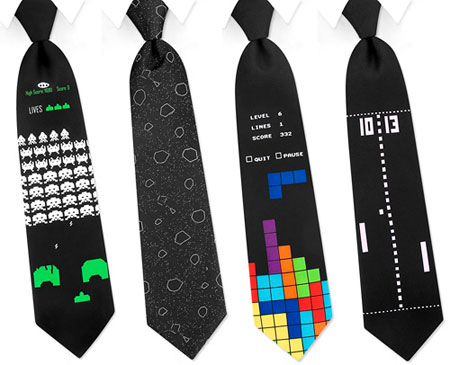
I saw this post over at Geekologie and I have to admit, it is pretty cool…Geek Ties:

geek-ties

As you can see from the pic, there are 4 versions available:

  • Space Invaders
  • Asteroids
  • Tetris
  • Pong

and they’re all available from Amazon.com for $24.95 but I don’t know what the shipping will be! It doesn’t seem that Amazon.co.uk see them as viable items as I couldn’t find them earlier.

While I don’t think I could get away with wearing these in (most) meetings at work I could definitely wear them out and about as normal…

What is Spotify?


I just posted about Spotify coming to mobile platforms and while I gave a brief mention to what Spotify is, I thought a post dedicated just to that would be a good idea.

Spotify is an online “Jukebox” of music that users connect to via a downloaded desktop application (which is available for Windows & Mac as well as Linux via WINE). One could look at it as a legal version of the original Napster-a way to listen to all the songs you haven’t got but without illegally downloading them. Spotify is a streaming music service so you don’t download any of the music to your hard drive-it’s all held in “The Cloud”-this makes it supremely easy to access from pretty  much any location (Internet connection permitting of course).

A look at the Spotify desktop client

The features are excellent, a huge catalogue of music, the ability to create playlists, genre based radio stations and a great search function. Of those the most interesting is probably the playlists, specifically Collaborate Playlists. These can be shared among users via a URL allowing all those with access to add and remove tracks to that listing. I think this will be one of the killer features of Spotify, especially as the user base increases; it’s a great way to find new songs/songs you’d forgotten about but your friends hadn’t 🙂 If there are any songs that you really want to own-to play when away from the PC, in the car etc then the ability to right click and purchase the track (from Amazon, iTunes etc) is going to be added; the menu item is already there but isn’t yet active.

Spotify is available via a free-ad supported version (only available if you receive an invite from another user) or an ad-free  implementation for £9.99 a month. The ads are pretty unobtrusive-they play in between perhaps every 10 songs and visuals ads also appear in the desktop app too. I’m not usually a fan of ads in places like this but with Spotify it doesn’t bother me at all 🙂

There are a few things that are missing but as Spotify is such a new entity, I’m sure these will get added in as we go along-the 2 big ones being

No mobile support: This is being worked on as we speak-see my post here.

No support to stream to external speakers: While this still isn’t officially supported-there are work arounds.

On the plus side, you can scrobble to Last.fm should you wish. On a side note I tried to get along with Last.fm a few times but it never worked out (for various reasons) but Spotify clicked instantly!

Spotify on Windows Mobile


Spotify is the hot new kind on the block and it looks like it’s about to get even hotter-Spotify is coming to Windows Mobile!

If you’re not familiar with Spotify, it’s an online catalogue of music that you can listen to from any desktop/laptop on which you’ve installed the application. There are no restrictions on what you can listen to, you don’t have to wait for anything to download and the catalogue is truly huge-I’ve managed to fox it with some relatively obscure early 90’s hip-hop (Souls of Mischief, Del Tha Funkee Homosapien etc) but it’s hard to do 🙂

Anyway, the one thing that you can’t do is listen to Spotify via your mobile device which, as the world is getting more and more mobile is a bit of a shame. I’ve been using Spotify for about 1 week now and already there have been occasions where I wanted to pull out my Diamond and get on to Spotify-but I couldn’t.

However that all looks set to change because Gustav Söderström (@GustavS) (former Yahoo “Director of Product Management” and later “Director of Business Development” and before that CEO of “Kenet Works AB”) has left Yahoo and set up camp over at Spotify. Kenet Works focused on allwoing mobile devices to access internet fourms/communities wirelessly and while I don’t know if this tech helped Yahoo, it certainly sounds like just what Spotify need!

Also it isn’t just conjecture and guess work that Mobile Spotify is his project. On his blog Gustav says:

“Starting in February, I will head up something that a lot of users have already requested and discussed extensively, Spotify on the Mobile”

Nice 🙂

Spotify’s site list a vacancy for a Nokia S60 platform engineer so it’s apparent Nokia users will be getting this excellent addition to the world of music meets mobile. There is also a vacancy for a Windows Applications Engineer so hopefully they’ll be working on Windows Mobile…

spotify-logo-96x96-pos-tagline

*Update* It was announced in the past week that Spotify have created an app for Android phones which will allow you to play your Spotufy tracks offline! Spotify CEO Daniel Ek also said that an iPhone app is in the works…but no mention of anything for Windows Mobile 😮 Hopefully, it won’t be far behind!

*Update* I’ve just had  a Twitter reply from Gustav (in response to my “any news on a Windows Mobile app”) which said:

“Sorry, can’t comment on future plans 😦 Just keep you fingers crossed!”

Not much to go on-but at least it’s not a definite no!

*Update* Spotify have had their iPhone app approved by Apple so Premium users will soon be able to download songs to their handset to listen to when offline…which is pretty good. I’d like to see it make an appearance on Windows Mobile too but the more I think about it, the less sure I am that I’d pay £120 a year for it. I’m perfectly happy buying songs from Amazon for as little as 29p and listening to them in Media Player on my Diamond 🙂

*Update* Today, 23/11/09, Spotify announced that they now have an app for Nokia phones. I find it very strange that they’ve developed for Symbian before Windows Mobile, are they purposefully shunning Microsoft’s mobile platform?

Steve Ballmer on the Economy


Steve Ballmer has been speaking on the current economic situation at the recent Democratic Caucus Retreat and I think it’s a great speech.

ballmer

Just like Kevin Turner’s at WPC 2008, it’s upbeat, positive and gives ideas for the future, rather than focusing on the bad points of this “economic recalibration”. The whole thing can be seen here but I thought I’d give you a few of my favourite soundbites:

“We believe this is a once-in-a-lifetime economic event, but it’s not unique frankly in U.S. history.”

“In my view, what we now have will be a fundamental economic reset.”

“In addition, despite the tough economy — I might even say because of the tough economy — our company will continue to invest more than US$9 billion a year in R&D, because we think it’s that R&D spending that will cause us to remain strong.”

Microsoft SkyBox Site nearly live


Near the top of Techmeme tonight is news that www.getskybox.com has made an appearance, although it now re-directs to a /myphone page on microsoft.com here and it seems SkyBox will now be called “MyPhone”.

MyPhone will allow you to:

  • Back up and restore your phone’s information to a password-protected web site
  • Access and update your contacts and appointments through your web account
  • Share photos on your phone with family and friends
  • Choice tidbits from the “More info” section include:

    • Most phones that run the Windows Mobile 6 operating system are compatible with My Phone service.
    • If you have an active connection with Microsoft Exchange server (which is frequently used for corporate e-mail), My Phone will not synchronize your contacts, calendar appointments, or tasks.
    • Users will be given a 200MB storage limit for Skybox.

    That storage limit is pretty small, I’ve got multiple GB’s of data on my device that’s a mix of wma’s, pdf’s, office docs, pictures and more and I’m sure most people have a similar amount. This means we’ll have to be pretty selective when it comes to what gets backed up and what doesn’t!

    Hopefully that limit will get upped, as it did with Skydrive or that SkyBox will one day let you use Skydrive as a storage area-it’d make sense based on the naming conventions. It’s a beta that hasn’t been released yet so there’s plenty of scope for things to change 🙂