The Rube Goldberg site is full of awesomeness just like this…I do enjoy these 🙂
August: A dotcom movie
I’m a huge movie fan but this is my 1st blog post about one…not sure why and I’m not sure how it’ll go!
I’ve just watched “August”-a 2008 Josh Hartnett film that looks at the dotcom bubble and overall-I think it’s pretty good. I skipped most of the bits about relationships but Josh Hartnett gives a great performance that makes the film dynamic, enjoyable and watchable…which is what you want from a film is it not?! Some great “start up founder-not acting like everyone else does in the boardroom whilst wearing a t-shirt” 90’s bubble style stuff going on 😉
If that isn’t enough-our good old friend David Bowie makes an appearance which is great as always.
It’s also got some real world tech presence with:
Ron Insana – CNBC Senior Analyst
![]()
Jason Calcanis – Entrepreneur/Blogger/Mahalo man
![]()
Buzzword quote of the year goes to:
“You want bleeding edge, mission critical, cross-platform, robust, scalable architectures…?”
It isn’t the best film ever made, but it’s definitely worth a watch-so go find it!
If you’ve got an unlimited subscription to Lovefilm (so you can watch stuff online) and you take a short (2 mins) Dell survey-you can watch it on there…that’s how I did it. Plus you might win a laptop! It might be possible to watch it online without taking the survey-I haven’t checked…
Fixing wmv files in IE8
I just clicked a link to play a .WMV video and was greeted by a “Page can’t be displayed” window. This was odd as I’ve done it plenty of times before, although I couldn’t remember the last time.
I did a quick Bing and came across a blog post from Eric Richards, an Office developer over at MS Redmond.
He too had that issue and points towards MS KB article KB974538. The inability to play .wmv files seems to be a knock on effect of installing the latest version of Windows Live Photo Gallery.
The KB article gives you some text to copy into a reg file which, and I can confirm this, will fix the problem. The fix for Windows 7 is:
This issue can be avoided if the following registry keys are present, which reset the file associations to original Windows 7 settings:
- On an account with Administration privileges, choose Start and type notepad.exe.
- Copy and paste the contents of the box below.
- Save the file as fix.reg.
- Double-click on the fix.reg file to add it to your registry.
——————————————————————
Windows Registry Editor Version 5.00
[HKEY_LOCAL_MACHINE\SOFTWARE\Classes\.asf]
@="WMP11.AssocFile.ASF"
[HKEY_LOCAL_MACHINE\SOFTWARE\Classes\.asx]
@="WMP11.AssocFile.ASX"
[HKEY_LOCAL_MACHINE\SOFTWARE\Classes\.avi]
@="WMP11.AssocFile.AVI"
[HKEY_LOCAL_MACHINE\SOFTWARE\Classes\.wmv]
@="WMP11.AssocFile.WMV"
——————————————————————
(Copy the text between the dashed lines)
More info and the fix for Vista can be found by in the full article.
I’m glad it was such a quick fix and thanks to Eric 🙂
Ice Cube Flow Chart
If you like Ice Cube and you like Flow Charts-then this is awesome! It’s a flowchart of Ice Cube’s seminal classic “Today was a good day” and it’s really well done-props to the creator!
The original can be found on Geekologie here but I’ve also made a SeaDragon version-which rocks 🙂 Unfortunately I don’t seem able to embed it into this blog so the link for all the zooming and panning goodness is:

Bing Visual Search
Today sees another great addition that makes Bing an even stronger competitor to Google, and that is Visual Search.
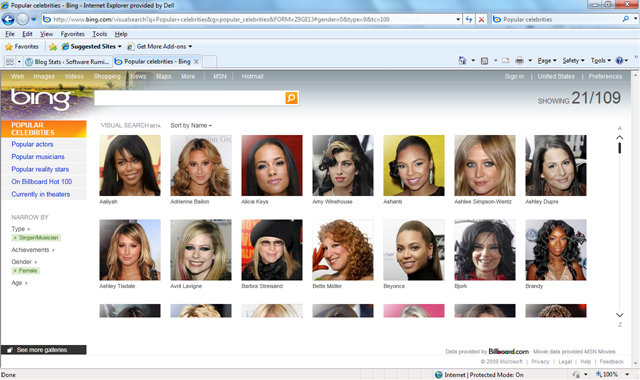
This gives you search results as images (which has been shown to speed up searches by around 20%), rather than just a list of text. You can then filter and re-arrange the image results based on various criteria. It’s still in Beta at the moment but it has quite a few “featured galleries” that give you an idea of how it works and it’s all based on Silverlight. Here’s an example:
Say you’re searching for a certain celeb but you can’t remember their name. Got to the “Popular Celebrities” gallery:
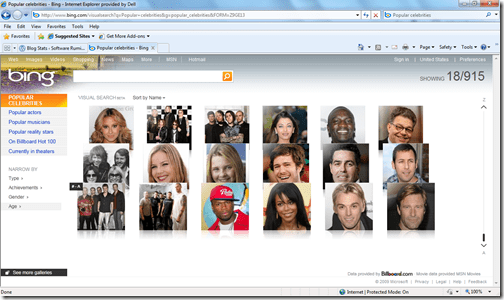
You know it’s a female singer you’re thinking of so using the filters on the left, you can tighten in up:
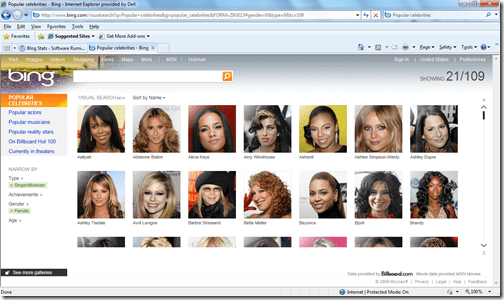
That’s cut it down from 915 to 109 but that’s still quite a few pictures to go through; luckily there’s one filter that I think is particularly awesome…the age range filter. The singer you’re thinking of is somewhere in here 30’s so:
Here (if you open up the bigger picture) you’ll see the age is set to 29-41, which has further narrowed it down to 31, which is an easy amount of pics to quickly flick through. Once you’ve found the person you’re looking for, simply click the image to be taken to a Bing search page for them:
Even in it’s Beta form, this is clearly a powerful new tool in Microsoft’s assault on the world of search and it can only get better. What’ll be great is when you can get the Visual Search results for any query so next time someone’s arguing that it’s Laurence Fishburne in 187, not Samuel L Jackson-you can Bing it and get Visual Proof-nice 😉
Well done Microsoft…now here’s my request for the next version of Visual Search…the ability to generate a search query with a picture. Say you’ve got a JPEG of a building/person/car and you just don’t know what or who it is, imagine being able to upload that to Bing and it identifying it for you…that’s be pretty sweet 🙂
If you can’t access the page www.bing.com/visualsearch then change your country to the US (in the top right corner) and you should be all good!
Wordle
I’ve just made my first Wordle-it’s something I’ve seen around the net on various occasions but have only just got round to playing with…don’t ask me why!
Here’s a Wordle of this very blog:
I think this is an excellent idea and I’m now trying to think of ways to include these as much as possible at work 🙂
Windows Server 2008 TS/RDS
I’m sure you’re aware that Windows Server 2008 R2 has now been released, but not everyone is aware that Terminal Service (TS) is no more and has been replaced by Remote Desktop Services (RDS).
RDS offers all the same functionality as TS as well as a whole host of new benefits. These new additions include:
- Simplified management with a unified and scalable connection broker for both Session Desktops and VDI Desktops providing:
- Unified Remote Desktop Web Access (RD Web Access) and ‘RemoteApp and Desktop Connection’ feature for access to VDI and Session Desktops
- Ensures users can only see the apps they are supposed to with per-user RemoteApp permissions and filtering
- Provides the user a rich remote experience, bringing the experience closer to that enjoyed by users accessing local computing resources such as:
- True multi-monitor support
- Windows Media® Player redirection,
- Bidirectional audio,
- Enhanced bitmap acceleration for 3D applications and rich media content such as Silverlight and Flash.
- Improved application compatibility and management of RD session host servers with the inclusion of Microsoft Application Virtualization for TS
This last point is especially interesting-“App-V for Terminal Service” is included with the CAL and is no longer a separate product. This applies not only to the 2008 R2 RDS CALs but also 2008 TS CALs. (I’m going to look into if and how it works with existing CALs and post an update here). *Update* I’ve investigated this today and, despite the blog’s wording, it doesn’t apply to Server 2008 TS CALs…it is Server 2008 R2 RDS CALs only.
*Update 2*I received a mail from Alex, the author of the original blog post, today telling me that my previous update was wrong and that is true*. Looking at the FAQ’s here shows that customers who currently have the Windows Server 2008 TS CAL will receive the App-V for TS functionality too-great news 🙂
Customers should find that the App-V for TS software is now available via the Volume Licensing Service Centre (VLSC) from September 1st.
It’s to be noted that “App-V for Desktops” isn’t included in this and is still separately licensed through MDOP.
Because of these extra features, the cost of the CALs will increase by around 5%. However MS are offering them at an equivalent price to the previous CALs until 31/12/09 (again, I’ll check where this promo is running and let you know).
This is another thing that makes Windows Server 2008 R2 an excellent step forward 🙂
The MS RDS Blog is here.
*I’ve apologised to Alex and I aim to correct the source of the incorrect information too. I also want to apologise to anyone who read the incorrect info on here-sorry!
App-V & MED-V Updates
It seems that October will bring some pretty great updates to 2 key Microsoft products: App-V & MED-V.
A Service Pack for App-V 4.5 will allow it to work with the task bar and jumplists found within Windows 7 as well as enabling the virtual applications to offer full federated search, just as if they were on the desktop.
MED-V 2.0 will be released in October 2009 (so next month) rather than the “sometime” during Q1 2010 that Microsoft initially stated. This will give support for 64bit desktop OS’s among other things.
See a bit more over at The Register.
New Symantec Security Ads
I’m not a huge fan of Symantec to be honest. Although I’m a fan of Backup Exec, Enterprise Vault etc that is still love for Veritas and so it’s rare I deal with Symantec security products at work or at home; that being said-these new adverts are pretty wicked 🙂
They’re just how I like adverts-funny, quirky, a bit odd, don’t take themselves too seriously, aren’t pulled from a “How to make an advert for Dummies” book and still get the point across.
Caterpillar vs Kimbo Slice:
Chicken vs Dokken:
Thanks to Geeks Are Sexy.
Microsoft MDOP
MDOP AKA the Microsoft Desktop Optimization Pack is one of the least well known Microsoft products, and that’s a shame as it’s packed full of goodness!
It’s only available to customers who have Software Assurance on Windows Desktop OS licences (Vista, Windows 7 etc) and contains the following:
Application Virtualization (App-V)
Microsoft Enterprise Desktop Virtualization (MED-V)
Diagnostics & Recovery Toolset (DaRT)
Advanced Group Policy Management (AGPM)
Asset Inventory Services (AIS)
System Center Desktop Error Monitoring (SCDEM)
These tools can help make managing systems so much easier in so many ways!
They are licensed on a per user per month basis which means they’re not available on all licensing programmes-namely MDOP is missing from Open licensing. If MDOP is attractive to you, you should look at the Open Value Program to get MDOP and other benefits too.
There’s a whole host of MDOP videos from Tech-Ed available here. Be warned though-they require a TechEd Online subscription.