Zune on Windows Phone 7


Having Zune on my Windows Phone 7 device is great and something I use at least once a day. However this constant use means I’ve found a few niggly things that I’d like to see changed.

1) You can’t create playlists on the device. This is something I’d do on my Android device quite a lot…a great way to quickly create lists on the fly. Only being able to create them on the pc feels quite restrictive.

2) You can’t put playlists on random. Now if one created a playlist with proper care & attention, I can see that this probably wouldn’t be necessary. However I don’t put that much effort into my playlist creation! I usually go through my catalogue by artist and add songs in that I’d forgotten about…this means I get runs of one artist for maybe a dozen songs, and I like my playlists to be much more varied than that…

3) You can’t spend Microsoft points. This one I really don’t get. I can spend Microsoft points in Zune on Xbox, Zune on PC but not Zune on Windows Phone 7…why? If you want to purchase something from the Zune marketplace, you have to use real money and that just seems odd. This means I tend to wait until I’m at a pc to purchase anything from the Marketplace…which certainly defeats the mobile aspect!

Windows Phone 7: My thoughts


Windows Phone 7 has been with the world for 5 or so months, and I’ve had the Samsung Omnia 7 for 3 of those:

This is, I believe, enough time to have formed some proper, coherent thoughts on what I do and don’t like about Microsoft’s new Mobile OS. First of all though, the device itself…

The Samsung Omnia 7 is by far the nicest mobile device I have ever held.

It’s light, it’s slim, it’s smooth, it’s sleek and yes…it’s sexy. It’s brushed metal body feels cool to the touch and looks great, as does the huge 4.3” screen. Not only is it a great size, it’s AMOLED…giving a clarity and brightness that puts most, if not all, other mobile devices to shame.

I haven’t seen another device that comes close to it’s overall aesthetic appeal.

Now on to the big one though, The OS!

I’m not going to go into hugely detailed comparisons with other mobile OS’s, just my opinions and what I think are it’s strong points. As a bit of background, I had an Android 2.1 device for over 12 months before getting WP7.

The first thing is how striking it is, especially on the Samsung screen. You can see in the pictures above, the “Live Tiles” in WP7…as you get an email/text message etc, the totals in the tile increase.

  • The Xbox tile is truly live…your Xbox avatar pops in from the side of the tile.
  • The Zune tile shows a scrolling image of the last artist you listened to.
  • If you pin a contact to the home screen it scrolls through their name and their picture.

Having these ever changing sections, right on the home screen, make Windows Phone 7 feel fluid, dynamic and interactive right from the word go.

Two huge, brilliant, unique features of Microsoft’s Windows Phone 7 are:

Xbox & Zune

Xbox:

The Xbox integration is still in its infancy but already is cool, useful and fun. There are 2 sides to it: interaction with your account & games.

Having it on my phone makes it much easier to do things such as editing my avatar, comparing my game progress against friends & inviting new friends. All things that can be done on the console but all much easier to do via the mobile OS.

Even better than that is the ability to earn actual Xbox achievements and gamer points on your mobile Smile I’ve currently got 5 games that contribute to my gamer score and they make gaming on my mobile more worthwhile, at least in my opinion!

Zune:

I’ve wanted a Zune device for years but, being in the UK, they’ve never been officially available to us. I’ve looked at Ebay many a time and got close to buying one, but when I heard the rumours that Microsoft’s next mobile OS would include Zune, I decided to wait. Lo and behold, WP7 arrives with full Zune integration Smile

I’ve been using the Zune desktop client for quite a while now and it is brilliant – check out my post here:

Read Zune 4.0 Desktop Software

The Zune client on WP7 is, like the rest of the OS, very slick, great to look at and great to use. No music player that I saw on Android came anywhere close to the polished look and feel of Zune…it really is a joy! It has so many great features such as:

History – This section shows the last 6 media items you played. Note I said “media items” not just “songs”…it includes videos too and not just local videos but also videos from YouTube too.

New – This section shows the last 8 items added to Zune…songs, videos and playlists.

Both of these sections are very visual, they both use album cover art and, if it’s a video, a screen grab.

Marquee

This section is pretty special and not something I was expecting. If you have other apps that tie in or relate to Zune in some way, then they appear here. For me this section includes:

  • YouTube
  • Last.fm
  • Lyrics

Office:

This is something I missed when I moved from Windows Mobile 6 to Android. Not having Microsoft Office on my mobile made things just that bit more difficult. Microsoft makes up a big part of my job so Word documents, Excel sheets and PowerPoint slides feature pretty heavily day to day so being unable to read them on my mobile device was pretty annoying!

Now with Windows Phone 7, I’ve got:

  • Word
  • Excel
  • PowerPoint
  • OneNote

at my fingertips and boy is it useful.

The other day I was at home when I came across a MAP 5.5 document that I thought might be useful, so I downloaded it and it showed up in the Office hub on my phone. Today when talking to someone at work about MAP 5.5, I pulled out my phone and quickly showed them the section they needed.

One random thing is how much quicker it is to connect to wireless networks that my Android device. It’s usually a matter of seconds between me arriving at home/work and my phone being connected automatically…that never happened with Android 2.1…

I’m sure there are other parts of Windows Phone that I’ve missed here and when I remember, I’ll put another post together Smile

Microsoft EES–Missing Licences


For all you schools out there looking to enroll into Microsoft’s new academic licensing program, EES (technically OVS-ES), I’ve just come across a small hiccup.

Remote Desktop Service (RDS) CALs, the new version of Terminal Service CALs, are missing from the price file, so resellers can’t give you a price for them. I’ve been told that they will appear in the May price file but that still leaves a 2 month window.

We’ve got customers who need to renew their agreements, which contain RDS CAL, before May so I’ve asked Microsoft what the official line is and will update ASAP.

Cheers

Rich

Things real people don’t say about Advertising


I saw these over on The Chive earlier, and they’re awesome. Very funny and very true!

Even if you are involved in social media/marketing I’m sure you can appreciate these Winking smile

Here are a few of my faves:

image


image

image

image

See the rest here:

http://thechive.com/2011/01/17/things-real-people-dont-say-about-advertising-23-photos/

Microsoft SBS 2011 Licensing Changes


Microsoft have now released the new version of Small Business Server, SBS 2011 and as well as product improvements, they’ve also made some changes to the licensing.

In SBS 2008, you chose either SBS Standard OR SBS Premium and then purchased Standard CALs AND Premium CALs (for those users accessing the extra features).

However, with SBS 2011 even the server licences have a layered licensing model. This means you purchase:

  • SBS 2011 Std

and then, if you need the Premium functionality of a 2nd Windows Server and SQL, you must purchase ON TOP of the standard licence:

  • SBS 2011 Premium Add-on.

This is quite a change and one which was not communicated very well at all.

image

They have also introduced a new edition:

  • SBS 2011 Essentials

“a new, easy-to-use, first-server solution designed and priced especially for small businesses (up to 25 users) that can seamlessly integrate into online services such as Office 365, cloud backup and cloud management solutions. It is expected to release in the first half of 2011. “

Users don’t need CALs for the Essentials edition but it is hard locked at a maximum of 25 users.

2010 in review


The stats helper monkeys at WordPress.com mulled over how this blog did in 2010, and here’s a high level summary of its overall blog health:

Healthy blog!

The Blog-Health-o-Meter™ reads Wow.

Crunchy numbers

Featured image

The Louvre Museum has 8.5 million visitors per year. This blog was viewed about 120,000 times in 2010. If it were an exhibit at The Louvre Museum, it would take 5 days for that many people to see it.

In 2010, there were 95 new posts, growing the total archive of this blog to 535 posts. There were 246 pictures uploaded, taking up a total of 17mb. That’s about 5 pictures per week.

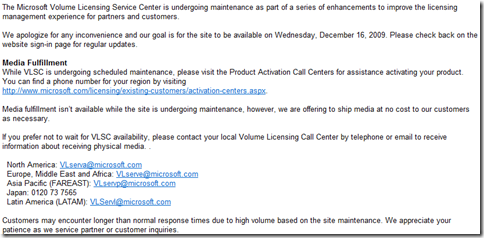
The busiest day of the year was January 12th with 675 views. The most popular post that day was Microsoft Volume Licensing Service Centre (VLSC).

Where did they come from?

The top referring sites in 2010 were en.wordpress.com, google.com, wellytonian.com, windowsteamblog.com, and google.co.in.

Some visitors came searching, mostly for windows mobile 7, windows 7 backgrounds, windows 7 presentation mode, windows 7 background, and sccm dashboard.

Attractions in 2010

These are the posts and pages that got the most views in 2010.

1

Microsoft Volume Licensing Service Centre (VLSC) December 2009
83 comments

2

Windows 7 Presentation Mode June 2009
8 comments

3

Microsoft Open Licensing (OLP) July 2009
1 comment

4

Microsoft BPOS: Sharepoint Online 2010 November 2009
3 comments

5

Windows 7 RC New Features April 2009

Halo Reach “Noble” Map Pack


Halo Reach, Microsoft’s super successful final instalment in the Halo series has a new map pack. – Noble.

From the 30th of November, 800 Microsoft points will get you:

  • 7 new achievements, worth a total of 250 gamer score points
  • 3 new multiplayer environments

What are these new worlds? Find out below…

Tempest

Though we may never fully understand these devices, it is not our nature to leave ancient stones unturned.”

This abandoned shoreline facility bends both sea and sky to an unnatural purpose, but the ground itself has quickly become another all too familiar battlefield. Though the two opposing symmetrical bases may never reveal their ancient purpose, both now offer makeshift shelter and access to strategic routes perfectly suited for small and large scale skirmishes alike. Tempest supports 8 – 16 players and offers a variety of modes including Free for All, Team Slayer, Team Objective and Big Team Battle. Tempest also provides players with a huge Forge palette, allowing them to create new custom map variants that can be shared with the community-at-large.

Tempest_001

Anchor 9

“Orbital dockyards provide rapid refuelling and repairs for a variety of UNSC vessels.”

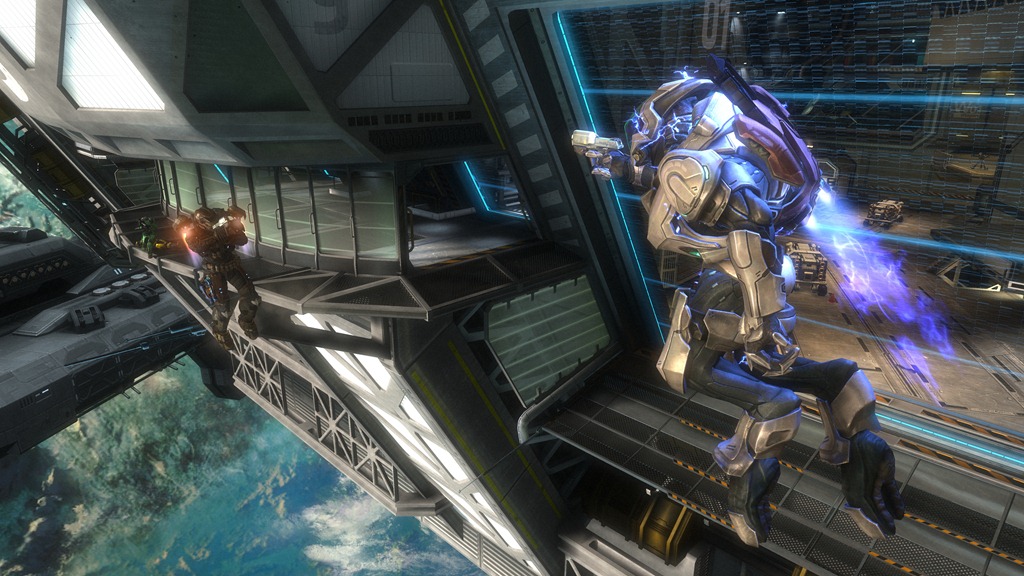
Within the confines of this low orbit dry-dock, UNSC craft undergo rapid repair and rearmament in support of the enduring war effort.  But for the small squads of infantry who now fight over the mirrored interior hallways and open central hangar bay, this platform no longer provides any safe harbour – whether the close quarters combat is occurring inside or out of its artificial gravitational field. Anchor 9 allows 2-8 players to face off in game variants including Free for All, Team Slayer and Team Objective.

Anchor9_003

Breakpoint

“ONI officials believe the data buried within this artefact is key to our survival.”

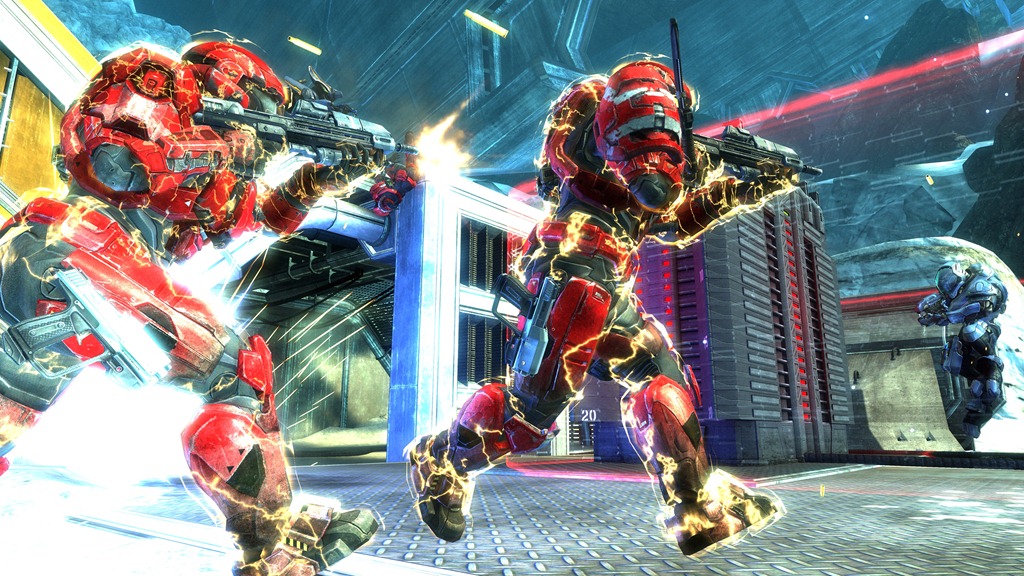
Atop this icy precipice, the Invasion continues. These modular archaeological labs were never intended to withstand such a large scale onslaught of Covenant military power, but the information being extracted here may prove vital to humanity’s survival. In response to the imminent Covenant threat, UNSC ground and air assets have been deployed to bolster entrenched Spartan countermeasures. This dig site must yield salvation, or it will become a grave. Breakpoint offers multiplayer mayhem for 8-16 players, and supports the Invasion and Big Team Battle game variants.

Breakpoint_003

Kinect surpasses 2.5 million sold


Microsoft’s Xbox Kinect has sold more than 2.5 million units in just 26 days!

Don Mattrick, President of the Interactive Entertainment Business said:

“We are thrilled about the consumer response to Kinect, and are working hard with our retail and manufacturing partners to expedite production and shipments of Kinect to restock shelves as fast as possible to keep up with demand. With sales already exceeding two and a half million units in just 26 days, we are on pace to reach our forecast of 5 million units sold to consumers this Christmas”

Kinect is now available at over 60,000 retailers in over 38 countries…well poised to break the 5 million mark!

Angry Birds on Xbox 360


Angry Birds is awesome.

If you’re not familiar with it, it’s something of a mobile device phenomenon. A game where pigs have stolen eggs from birds (hence their anger) and where retribution is exacted by the sling shotting of birds at the aforementioned pigs! They’re not just regular birds though, some drop bombs, some ARE bombs, some divide into 3 and plenty more super powered feathered adversaries.

image

It, of course, started on the iPhone but recently became available on Android devices and was download 1 Million times in 24 hours!

That’s helped somewhat by the fact that it’s ad-supported on Android – meaning it’s FREE to users.

Anyway, I’m not here simply to talk about the game. I’m here to talk about the fact that it is coming to the consoles; that’s right – Angry Birds will be on:

  • Wii
  • PS3
  • Xbox 360

which is great stuff. I’m especially excited if they make it a Kinect game, as JonThomasDesigns says in the Gizmodo comments says:

They Should make a first person view using Kinect ,, Like you’re pulling the Slingshot .. Once you launch you become the Bird and use movements to do the special move such as splitting in 3 or dropping the egg

That would definitely be a great game Smile

Rovio Mobile also tell us that Angry Birds 2 is under way and:

the pigs will be a lot more active than just being slingshotted at by birds

Looking forward to this…I assume there’s a Windows Phone 7 version coming right?!

Microsoft SPLA pricing changes


Microsoft SPLA, Service Provider Licence Agreement is, as the name suggests, a licensing program aimed at Service Providers. It gives them a very cost effective subscription based licensing model, allowing them to offer monthly pricing to their users.

Come January 1st 2011, there are going to be some changes to the Windows Server pricing:

Product Price Change
Windows Web Svr -21%
Windows Svr Std -21%
Windows Svr Ent -21%
Windows Svr Datacenter +30%

Why is Windows DataCenter going up? Well, it’s actually going DOWN, as the current price is technically a promo that’s been going on for about 2 years Smile

For more info and some FAQ’s, head to:

http://blogs.msdn.com/b/stevemar/archive/2010/11/19/service-provider-license-agreement-spla-changes-for-windows-server.aspx