Amongst the various elements of the Power Platform, Microsoft offer AI Builder credits. These are used whenever a creation needs to use the power of Microsoft’s Artificial Intelligence offerings – say for translating or scanning documents. Historically, these have been included with the Power Automate per User w/Attended RPA plan but an additional charge for all other Power Automate and PowerApps licenses.
However, according to a tweet* from Ryan Cunningham – the product lead for Microsoft PowerApps – they are now including AI Builder Credits with all per User and per App licenses…including those already purchased.
We're also now including AI Builder credits with every Per User and Per App license – and yes, that includes everyone who's already purchased.
AI is no longer a luxury. We believe it will quickly become table stakes for all business apps. Now it's easier than ever to build.
He also states that the API request limits are being increased from 5,000 per user per day to 40,000 per user per day.
*I know that tweets aren’t exactly the most legit of sources for licensing information and I will definitely be looking for this to be reflected in product documentation, licensing guides, and the Product Terms…but you’d hope it’s accurate!
Update December 9th, 2021
The new Power Platform licensing guide confirms the AI Builder additions:
Power Apps per App = 250 credits
Power Apps per User = 500 credits
Interestingly, there is a cap on accrued credits of 1,000,000…that equates to 4,000 Per App licenses or 2,000 Per User licenses and is worth $500 per month. This means large organisations will still find themselves spending money on AI Builder credits.
During their Ignite 2021 conference, Microsoft announced a range of name changes across their security portfolio – these are:
Old name
New name
Microsoft Cloud App Security (MCAS)
Microsoft Defender for Cloud Apps
Azure Security Center + Azure Defender
Microsoft Defender for Cloud
Azure Defender for IoT
Microsoft Defender for IoT
Azure Defender for Storage
Microsoft Defender for Storage
Azure Sentinel
Microsoft Sentinel
These are, I believe, all the changes but there may be some other “Azure –> Microsoft” changes that have taken place!
Whenever products change names, there’s the potential for confusion among partners and customers. While many of these are fairly straightforward, I can definitely see people getting confused between “Microsoft Defender for Cloud” and “Microsoft Defender for Cloud Apps” 😂
Power Apps has always been licensed on a per user or per app basis but now it is also available under the Pay as you go (PAYG) model. Microsoft see this as a way to help organisations innovate faster with less wasted spend as it doesn’t require licenses to be allocated to specific users.
How it works
You connect the apps environment to an Azure subscription and then pay for usage via 3 meters:
Power Apps per appPAYG
Pay when a user runs an app – rather than the existing model of allocating licenses beforehand and seeing them consumed based on apps being shared rather than run.
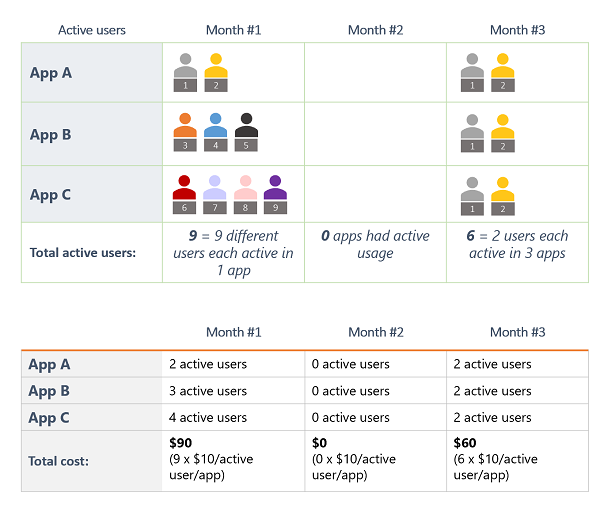
An active user is someone who opens an app/portal at least once a month – usage by users licensed on a per user basis is not included. Cost is $10 per active user per app per month.
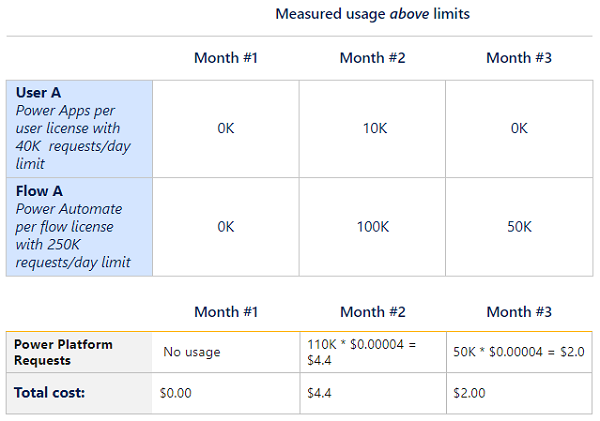
This is the new name for API calls and, as standard, you get 6.000 API calls per user per app per day – Microsoft believe this will be enough for most users. If it isn’t, any additional API calls are charged at $0.00004 per request per day.
Note that the request example includes both Power Apps and Power Automate.
Where it makes sense, organisations can use both the per user and PAYG models simultaneously.
Cost Management
These new meters will be available within Azure Cost Management, meaning costs can be tracked, budgets can be set, and resources can be tagged. For some organisations, particularly those where FinOps is stronger than ITAM, this new approach may yield better results.
The November 2021 Microsoft Product Terms contains quite a few updates!
Microsoft Managed Desktop
As an offering, it’s been available for a while as a bit of a hidden secret almost but now it’s in the Product Terms.
Microsoft Viva
A few additions here:
Microsoft Viva
Viva Learning
Viva with Glint* add-on added
which rounds out the Viva line-up in the Product Terms (I think!):
*Glint is a 3rd-party product that sits in a similar, complementary area – see more here.
Defender products
Another addition to the Defender line up as:
“Microsoft Cloud App Security (MCAS)” is renamed to “Microsoft Defender for Cloud Apps”
I’m not 100% sure I agree with this name change as I feel it downplays the capabilities of MCAS as a Cloud Access Security Broker (CASB) for a start.
Additionally, Microsoft Defender for Endpoint Plan 1 has been added (see more here) and the existing version renamed to Plan 2.
Following on from the above, a new product has appeared…
App Governance add-on for “Microsoft Defender for Cloud Apps”
This is a “security & policy management” product for OAuth-enabled apps that access Microsoft 365 data via the Microsoft Graph and aims to help organisations govern, detect, and remediate 3rd-party access to corporate data in Microsoft 365.
A new “Power Apps per User” 2000 seat minimum SKU has been added – clearly Microsoft are seeing/expecting large scale rollouts of PowerApps…especially after its 202% year-on-year growth in Q1!
Productivity Servers
It was revealed a while back that the next releases of the Productivity Servers (Exchange/SharePoint/Lync), as well as Project, would be subscription only and now some of them have arrived in the Product Terms.
Just Project and SharePoint have been added currently but I’d imagine the same rules will apply to the other products. They are now officially known as:
Project Server Subscription Edition
SharePoint Server Subscription Edition
and active Software Assurance (SA) is required to run the latest “Subscription edition”. However, should SA lapse, you receive perpetual rights to run the 2019 version.
Microsoft Clouds
Two previously announced Microsoft Cloud products:
“Financial Services”
“Nonprofit”
have been added, as add-ons, to the Product Terms. They can be added on top of the following licenses:
Financial Services
Microsoft 365 E3/E5
Microsoft Project
Power Apps/Power Automate/PowerBI
Dynamics 365 Customer Service Enterprise
Dynamics 365 Digital Messaging
Dynamics 365 Customer Insights
Dynamics 365 Sales Enterprise
Dynamics 365 Customer Voice
Non-Profit
Office 365 E3/E5
Microsoft 365 E3/E5
LinkedIn Sales Navigator
Power Apps/Power Automate/Power BI
Dynamics 365 Sales Enterprise
Dynamics 365 Marketing
Azure App Service
Non-Profit comes in 3 flavours:
Basic
Plan 1
Available to orgs with up to, and including, 250 total employees
Microsoft have made two acquisitions recently, both of which show where their focus lies when looking ahead.
Clear Software
Acquired for an undisclosed amount, Clear Software focus on business process solutions that integrate into Oracle and SAP systems. Microsoft have acquired them because their:
“API access and system knowledge will strengthen Microsoft Power Platform’s integration with outside systems and accelerate how customers leverage data and processes that reside beyond Microsoft first-party services”
Microsoft state this will make it easier for users to create Power Apps and Power Automate flows that connect into Oracle & SAP. This will make Power Platform even more attractive to citizen developers across the world and also increase the 3rd-party license non-compliance risks that organisations may face.
and it will be used to power a new module within Microsoft Viva alongside Connection, Insights, Learning, and Topics. The new functionality will also be integrated through Office, Power BI, and the wider set of Microsoft 365 apps.
This is further proof that Microsoft see the Employee Experience (EXP) sector as a big new direction for them and that Viva will likely grow to be a key part of the Microsoft stack.
Microsoft’s latest financial results, those for Q1 FY22 (July – August 2021) are in and – as has been the case for the recent memory – they smashed it again.
Revenue for the quarter was $45.3 billion – a year-on-year increase of 22% and operating income was up 27% to $20.2 billion.
The overall “Microsoft Cloud” area broke $20 billion quarterly revenue for the first time with growth of 36% to reach $20.7 billion. However, Microsoft Cloud gross margin did drop slightly to a mere 71%!
During the earnings call, Satya Nadella said:
“Digital technology is a deflationary force in an inflationary economy”
Which helps explain why the cloud, and technology like Power Platform, keeps growing…they’re helping level the playing field and help smaller organisations grow and compete.
Productivity & Business Processes
This division was up 22% to $15 billion for the quarter, driven by growth in various elements:
Office 365 Commercial was up 23%
LinkedIn was up 42%
Dynamics 365 was up 48%
This is strong growth in several key areas for Microsoft and they don’t believe it will slow down next quarter either.
Intelligent Cloud
Revenue here was $17 billion driven by Azure growth of 50%. The rise of Azure doesn’t seem to be slowing down!
More Personal Computing
Windows OEM was up 10%, despite the ongoing supply chain issues for PCs and laptops…but Surface was down 17%. This is perhaps due to the constraint issues impacting more on higher end devices at the moment.
Other areas of interest
There were various additional statements made during the earnings call including:
Power Platform reaches almost 20 million monthly active users (MAU) – up 76% year-on-year (YoY). Of that, Power Apps makes up 10 million MAU and grew 202% YoY…Nadella states it is in use within 91% of the Fortune 500.
Satya Nadella made several references to the size of organisations that are using products such as Power Platform and Teams – pointing out how many 10,000+ and 100,000+ user organisations are customers.
Microsoft now have over 650,000 customers using their security solutions. How many of those are using more than Defender in Windows 10 would be interesting to see…
Office Commercial licensing decreased by 13%, continuing Microsoft’s ongoing transition of their customer base from on-prem to cloud.
Enterprise Mobility + Security is now at 196 million seats.
Amy Hood revealed that Microsoft have increased headcount by 14% YoY, which is a pretty significant hiring drive.
Microsoft have introduced a new way to help organisations manage their SQL licenses when using Azure Hybrid Benefit – scope-level management.
Scope-level management
Rather than assigning Hybrid Benefit usage at an individual resource level, you tell the Azure portal how many SQL licenses w/SA you have and these are then auto-applied to SQL resources running in the subscription or billing account.
Both SQL Server Standard and Enterprise licenses can be used to off-set costs in Azure but the licenses are “worth” different amounts. In effect, this means that 1 x SQL Server Enterprise license is equivalent to 4 x SQL Server Standard licenses when applying them to Azure services.
Normalized Core Licenses (NCL)
The new concept of NCLs makes it easier to work out how many Azure vCores your on-premises licenses give you. Keeping track of the different licenses and what they equate to in Azure can be confusing so now, when using scope-level management:
1 x SQL Server Standard core license = 1 x NCL
1 x SQL Server Enterprise core license = 4 x NCLs
This means if you have, for example, 6 SQL Standard core licenses w/SA and 9 SQL Enterprise core licenses w/SA you will have 42 NCLs to use across Azure services.
Things to know
You can’t currently use this new centralized management option with:
Azure Data Factory – SQL Server Integration Services (SSIS)
A couple of decent additions this month – new products across EXP (Employee Experience) and Security as well as (some) clarity around support offerings.
Viva new products
Microsoft Viva Insights & Viva Insights Capacity SKUs were added. Not only do we get a new product but we also get a new licensing piece to watch out for…the idea of additional capacity SKUs for Viva Insights analytics. I go into more depth here.
A growing security portfolio
2 x Privacy Management SKUs added – “Risk” and “Subject Rights Request”, furthering increasing Microsoft’s security position. It does, however, look like there was some confusion between “Office 365” and “Microsoft 365” for the pre-requisite licenses as they list “Microsoft 365 E1” which doesn’t exist…yet!
Support info
Microsoft have added a range of information about their support offerings including Unified Support and Premier Support, as well as some of the additional services that are available to purchase. Making this information publicly available will be a big benefit for customers and partners alike, as it hasn’t always been easy to know what was included etc.
A change that snuck past me initially in July is that Microsoft 365 Apps for Enterprise (formerly Office 365 ProPlus) is no longer classed as an “Enterprise Product” and is now an “Enterprise Online Service”. This means it is no longer required to be purchased enterprise-wide.
The Product Terms site now lists a whole host of information about the support offerings that are available through Volume Licensing – with links to supporting documentation too. Finding any information on Microsoft Support has always been surprisingly difficult so this update makes a welcome change!
In this post, I want to look at the information made available by Microsoft and explore what’s on offer. There are two main flavours of Microsoft support, giving access to different services and priced in different ways.
Microsoft Unified Support
This is the latest addition to Microsoft’s support portfolio, introduced in 2019, and Microsoft made a concerted effort to move as many customers as possible from the existing Premier Support (discussed below) to the new Unified Support. This wasn’t a particularly popular move as it generally led to significant price increases for organisations.
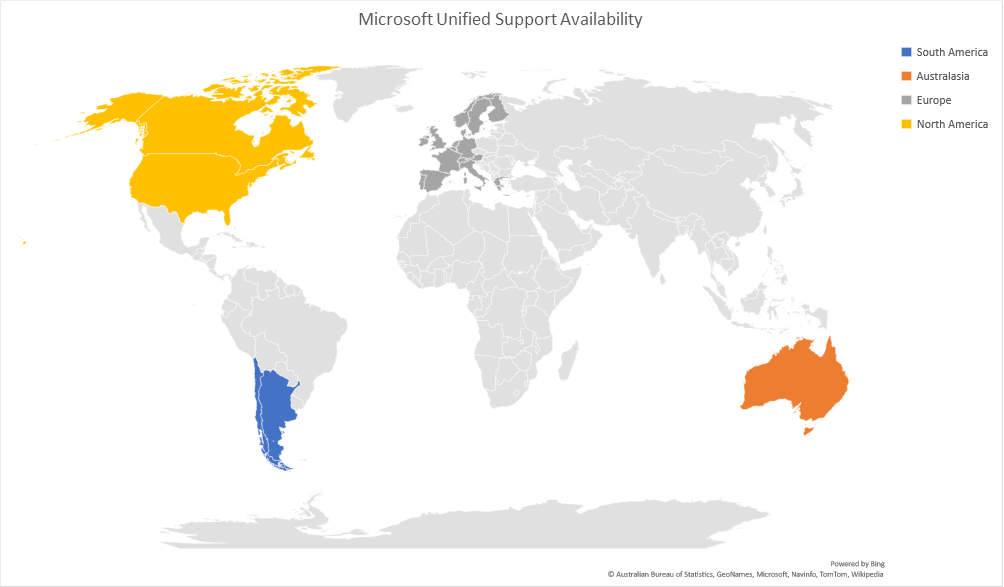
First of all, it’s worth noting that Unified Support has a relatively limited reach as it is only available in 22 countries globally:
There are three flavours of Unified Support:
Unified Advanced Base
Unified Performance Base
Unified Enterprise Base
The first two, Advanced and Performance, are governed by the “Support & Consulting Services Description (“SCSD”)” which is available here – while Unified Enterprise is governed by the “Unified Enterprise Support Services Description (“USSD”)”, available here.
What’s included?
Previous information, and in fact the current SCSD, break down Unified Support into 3 options:
Core
Advanced
Performance
but as you can see above, the Product Terms list:
Advanced
Performance
Enterprise
It looks like there has been a change to the levels of support but I’ve not seen an announcement saying as much.
Flex Allowance
Calculated as a percentage of your contract’s list price, this can be used for Proactive services, enhanced services and solutions, Support Technology Advisor, Proactive credits or Custom Proactive Services.
Proactive Services
Although not included with Unified Enterprise, they are all available via Flex Allowance or as a separate, additional purchase.
Unified Enterprise Pricing
Microsoft calculate your “Product Spend” aka “P” which is comprised of:
Cloud services purchases in previous 12 months
Software Assurance purchases in previous 12 months
License only purchases in previous 60 months
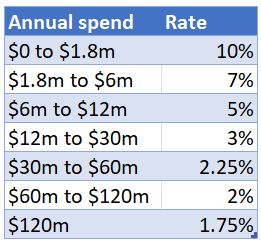
and then they price Unified Support as a percentage of that spend. For Azure, it is calculated as:
while for other products it is:
Microsoft state that:
Rates are graduated, so if a customer has $6M in annual Azure spend, it would be calculated as 10% of the first $1.8M and 7% of the next $4.2M ($6M-$1.8M).
So in Microsoft’s example of $6m Azure spend, the Unified Support cost would be:
10% of $1.8m = $180,000
7% of $4.2m = $294,000
Total = $474,000
The publicly available Microsoft documentation doesn’t provide pricing information for the “Advanced” and “Performance” levels but, based on previous information (like this), it will be the same format as above but with lower percentages.
Microsoft Premier Support
Premier Support offerings are detailed in the “Enterprise Services Description of Services” which you can download here. The document gives a pretty thorough overview of all the different services available under Premier Support including:
Architecture services
Digital Advisory
Implementation & Optimization
With the introduction of Unified Support, Microsoft have been working to migrate as many customers as possible across from Premier. However, it is still possible to remain on Premier Support…although it doesn’t appear to be particularly easy.
What’s included?
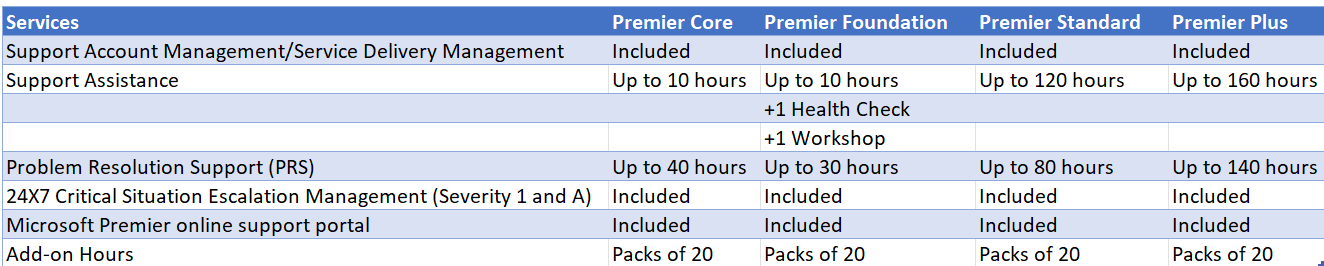
There are different levels of Premier Support listed in the Product Terms:
although, as mentioned, this isn’t Microsoft’s preferred option anymore.
Optional Enhanced Services & Solutions
Additional paid services are available, these include:
Designated Support Engineering (“DSE”): DSE services are delivered as described in the applicable services description (SCSD or USSD)
Rapid Response services are delivered as described in the applicable services description (SCSD or USSD)
Microsoft Azure Event Management (“AEM”) services (Unified Support only)
Office 365 Engineering Direct services (Unified Support only)
Developer Support services
Support for Mission Critical services (Unified Support only)
You can see this, and more info, in the Product Terms here.
Conclusion
It’s good that Microsoft is making this information available – anything that enables customers and partners to do more research and be better prepared for sales conversations/renewals etc is a good thing. However, it isn’t complete and does seem to contradict some of the longstanding info regarding the support levels etc. so there’s still a fair amount of confusion.
If anyone has anything they can add to this and/or any corrections, please let me know.
Microsoft Viva is the new range of Employee Experience tools from Microsoft and is made up of a range of Viva products:
Insights
Topics
Learning
Connections
A brief overview of the four components is here but I want to dive deeper into Viva Insights.
What is it?
Initially it looked like it would build upon the Workplace Analytics product but Viva Insights is now listed as “formerly Workplace Analytics” so it appears to be a rebrand as well as adding new features. Tbh, that makes sense as it helps to keep everything in the “Viva” bucket.
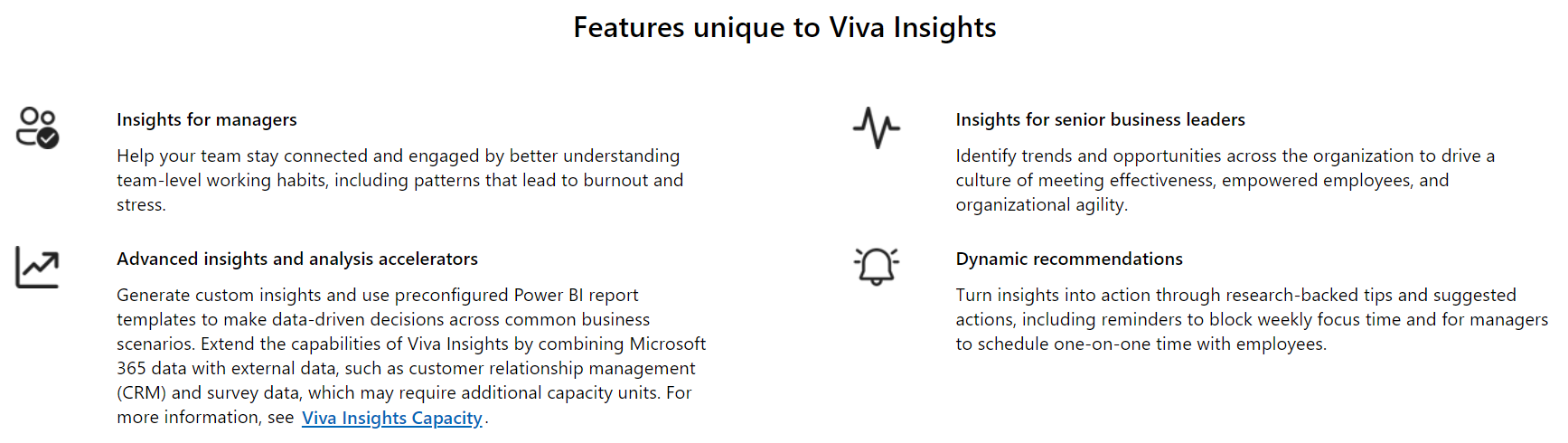
Viva Insights aims to improve employee wellbeing and productivity through using data to highlight people’s work habits such as answering emails outside of work hours and spending too much time in meetings for example. It will also provide reminders to block out time for “focus tasks” and help managers ensure they schedule regular 1-1 meetings with team members. The personal insights also include mindfulness sessions, reminders to take breaks, and a check-in to gauge a user’s mood.
It aims to provide insights at a team level and also an organisation wide level, enabling action to be taken wherever potential issues may arise. Given the impact of COVID-19 and the long-term increase in flexible working, anything that can help organisations better look after their employees – and enable employees to better look after themselves – is well timed and has the potential to be very useful.
I speak to a lot of people who find themselves on constant back to back video meetings and calls, with little time to process any of that information and even less to simply sit back and think and plan. More work = less productivity in many cases and Viva Insights may help with this…if used properly.
Pricing & Licensing
Viva Insights is an add-on license to:
Office 365 E1/E3/E5 (plus the A and G versions)
Microsoft 365 E3/E5 (plus the A and G versions)
Microsoft 365 365 Business Basic/Standard/Premium
Exchange Online Plan 1/2
and costs $4 per user per month.
Certain “personal insights” are available to all users with a license that includes Exchange Online, while others require the above add-on. There is also the extra consideration of Viva Insights Capacity.
Viva Insights Capacity
There are a range of additional things that an organisation can do with the data generated by Viva Insights – and this is where we get into the realm of capacity credits.
These additional capabilities include:
Analysis templates to quickly generate interactive Power BI reports tailored to common business scenarios
Advanced tools to help users query and customize metrics and combine Viva Insights data with external data, such as customer relationship management (CRM) and survey data
Analysis accelerators including an R-script library to help analyze organizational data trends, processes and networks
Built-in safeguards to help protect personal privacy
Each Viva Insights license includes 1 capacity credit per month, pooled across the tenant. If an organisation requires additional capacity credits, they are licensed in increments of 5,000 credits and costs $5,000 per month.
Unused credits expire monthly.
Conclusion
Viva Insights represents two growing trends for Microsoft:
Software that is sold to parts of the business other than IT
Licensing which involves ongoing usage “credits” that can, potentially, be consumed in huge amounts across an organisation…and run up big bills
Organisations are definitely going to be looking for products that help them in this area and, within organisations already using Microsoft 365, Microsoft are well placed to be among the options.
If you’re responsible for Microsoft spend within your organisation, this is certainly something to keep an eye on in the future!














 Cloudy with a chance of Licensing