Teams Rooms Standard & Premium swapped for Basic & Pro Qatar added as a data location Clarified terms for Azure Databox & Stack Edge
Microsoft also revealed further details around the upcoming cloud licensing changes (which I’ll post about separately) but these aren’t in the Product Terms this month…will likely be October.
The Product Terms were on time this month (😊) but not a huge amount has happened (as expected).
The M365 F1 & F3 maximum screen size limitation is increased from 10.1″ to 10.9″ – this expands the devices available to F SKU users and – perhaps – widens the scope of who can be assigned such a license?
“Home Use Program” is renamed “Workplace Discount Program” – no changes to terms…yet…
Microsoft Defender Experts for Hunting added (although the specific page currently has an error)
Still no sign of the rule changes around 3rd-party cloud licensing that were announced in May…
Microsoft announced their results for FY22 Q4 and the full year and, as expected, the numbers are big and the percentage increases are (mostly) double digits. For the full year, revenue was $198.3 billion (an increase of 18%) and operating income was $83.4 billion (up 19%).
There were a few different things that negatively impacted the numbers in Q4 including:
Exchange rate changes – many of the “constant currency” growth figures are 5 or 6% higher than actual
COVID shutdowns in China cost over $300 million of Windows OEM revenue
Scaling back in Russia cost $126 million
An interesting one this – due to a “strategic realignment of…business groups”, Microsoft spent $113 million on employee severances.
but let’s take a look at some of the highlights for Q4:
FY 22 Q4
Revenue for the final 3 months was $51.9 billion, an increase of 12%.
Operating income was $20.5 billion, up 8%
Productivity & Business Processes
Revenue = $16.6 billion (up 13%)
Office 365 Commercial up 15%
LinkedIn up 26%
Dynamics 365 up 31%
Intelligent Cloud
Revenue = $20.9 billion (up 20%)
Azure up 40%
Earnings call highlights
Cosmos DB grew 100%+ YoY each quarter in FY22
25 million Monthly Active Users (MAU) for Power Platform
Office 365 E5 is now 12% of the installed base (up from 8%)
Security revenue up 40%
Azure Virtual Desktop MAU almost 60% YoY increase
Office on-premises down over 30%
25% of Fortune 500 using Viva
All these product areas are doing what Microsoft want them to do. As well as them innovating and creating products in the right areas, it also shows that their sales activities – direct and through partners – are paying off.
They said that E5 was strong both for renewals and new additions and Amy Hood mentioned they’re focusing on deployment and increasing usage of the suite. This makes sense as there are so many components of E5 these days that even customers getting value from E5 – typically via Office, Power BI, and a bit of security/telephony – have got some much more they could be using. I’d expect partners will be incentivized to get their customers utilising more of the E5 suite and it may mean that customers can use it to their advantage to extract concessions, POC funding etc. from partners and/or Microsoft.
On a similar note, Satya Nadella mentioned that Microsoft are now incentivizing their field sales teams to ensure that customer’s Azure bills “come down” through optimization efforts. This is a good thing to see from a cloud vendor and will hopefully lead to some legitimate savings for customers.
Announced at Inspire 2022, the Microsoft Digital Contact Center (MDCC) is the latest in a relatively recent line of “Products that are actually bundles of other products and parts of other bundles” – namely the various “Industry Cloud for…” and the “Intelligent Data Platform”.
The MDCC is comprised of:
Dynamics 365
Teams
Power Platform
Nuance
It’s interesting to see Nuance appear in something outside the Cloud for Healthcare…Microsoft clearly had some plans when they made that acquisition! This new offering focuses in all the areas you’d expect such as:
Omni-channel engagement
Customer self-service
AI powered virtual agents
Voice & video engagement
Biometrics and customer security
Analytics
AI powered support & knowledge articles
Microsoft look to be using established partners in this areas to deliver solutions based on MDCC, at launch these include:
Accenture-Avanade
EY
HCL
Hitachi
KPMG
PWC
Avaya
and more. Check out more information from Microsoft here.
A new “Cloud for…” has been announced and this one – Cloud for Sovereignty – is aimed at helping Public Sector organisations make the most of, and thus use more of, the Azure cloud. It does this by offering enhanced capabilities to meet the various rules and regulations around data location and access such as the GDPR.
A key focus for public sector organisations is the location of data and Microsoft say they will soon be adding the “EU Data Boundary” which will ensure all EU & EFTA customer data is not only stored in the EU but also processed there too.
Sovereign Controls
Microsoft say these new protection and encryption capabilities will span the entire Microsoft cloud from IaaS & PaaS through to SaaS such as M365, D365, and Power Platform.
Governance & Transparency
This will give eligible organisations access to source code and the ability to audit Azure compliance processes.
Expertise
Microsoft position this as a partner-led offering and it seems this is, at least partly, related to the recent cloud licensing changes they announced for “European” cloud providers.
Microsoft have announced that Power Platform is the latest product to get a Pay As You Go (PAYG) licensing option, following PowerApps and Dataverse.
How does it work?
You link your Power Automate environment to Azure, and different teams/parts of the business can use their own Azure subscriptions to pay for Flows that run.
Pricing
Cloud Flows
$0.60 per cloud flow run
Desktop Flows (Attended)
$.060 per attended desktop flow run
Desktop Flows (Unattended)
$3.00 per unattended flow run
Pricing rules
Charges won’t apply when you’re testing them in the designer or resubmitting failed flows. Also, “child flows” won’t incur additional charges for cloud/attended flows…but both parent and child flows will be charged for unattended flows.
Flow runs triggered by “per user” licensed users won’t incur costs – as long as the usage is within their license terms. However, if they use features outside of their license i.e. if someone licensed with “Power Automate per User” runs an “attended RPA” flow, that will be charged as their license doesn’t cover attended RPA usage.
Conclusion
As with PowerApps, this lowers the barrier of upfront payment which will – Microsoft hope – make more organisations willing to take the plunge into Power Platform. With 25 million Monthly Active Users (MAU) at the moment, it’s doing well but there’s a lot of growth potential out there for sure.
I think organisations should be cautious with how they adopt this model, as I can foresee it becoming difficult to properly monitor and manage costs and usage further down the line.
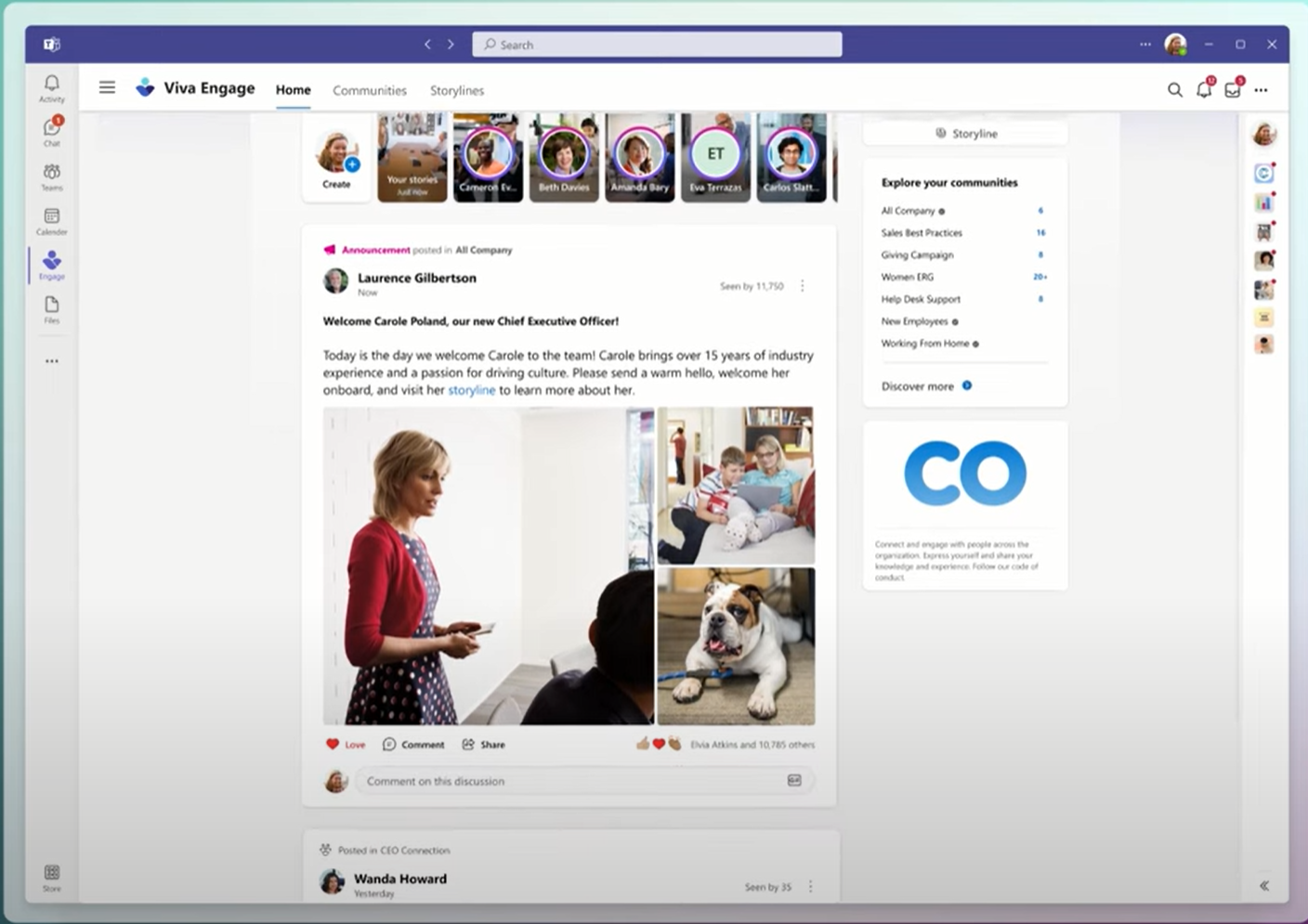
Microsoft have added another member to the Viva family – Microsoft Inspire 2022 saw the announcement of Viva Engage. It’s hard to hear that and not picture Captain Jean Luc Picard isn’t it?!
Built on the existing Yammer Communities app, it’s another way for employees to connect within an organisation and will include “stories” and “storylines” to enable sharing of thoughts, ideas etc. – very “social media-esque”.
The Yammer Communities app in Teams will be re-branded “Viva Engage” and all content, networks, customer branding etc. will remain in place. Being licensed for Yammer is a requirement to use Viva Engage so current Yammer users shouldn’t lose anything in this change/rebrand.
Conclusion
This is another step on the journey of making Viva more important to the fabric and wellbeing of organisations – Microsoft clearly want Viva to be integral to the smooth operation of the business/employee relationship. Viva is going to be a core pillar of Microsoft’s business within a few years, bringing HR and employee satisfaction parts of a customer into Microsoft’s world too.
It also further the positioning of Teams as the central point for business communication and the focal point for each user’s day.
After a bit of a wait for Redmond to publish, the latest update is here. Not surprisingly, given the time of year, there’s nothing major – mainly just a bit of tidying up this month:
Added/updated terms for:
Windows AutoPatch MCA cancellations Azure Limited Access Services
Removed old references for:
Business Voice GitHub Learning Lab for Organizations Office 365 Add-ons
Change to show 3.5K AI Builder Credits are included per SharePoint Syntex license
Academic plans added to Cloud for Non-profit qualifying licenses
Microsoft’s “Cloud for Sustainability” is here (released June 2022) in the guise of Microsoft Sustainability Manager – a new tool/platform aimed to help organisations with their journey to net zero and bolstering their ESG (environmental, social, and governance) capabilities.
Sustainability & ESG is a growing focus for business leaders across the globe and this is just the start of Microsoft’s plans in this area. Sustainability Manager focus on several areas:
Unify data intelligence
Build a sustainable IT infrastucture
Reduce environmental impact of operations
Create sustainable value chains
What does it do?
It helps organisations track their emissions across the business, automate the collection and analysis, and present it to the business via analytics and dashboards. It covers Scope 1, 2, and 3 emissions – for those of you not familiar with those (as I wasn’t until relatively recently), here’s a quick overview:
Scope 1
Emissions from sources that an organisation owns/controls like fuel used in company vehicles
Scope 2
Emissions indirectly caused by a company when energy it purchases/uses is produced. An example being the emissions from the generation of electricity that is used to power electric company vehicles.
Scope 3
Emissions not covered by the above but where a company is indirectly responsible across the supply chain such as using/disposing of products from suppliers.
I used this page from the National Grid to get the above definitions.
Scope 3 emissions can make up the bulk of emissions for an organisation but they are also the hardest to reduce.
Pricing & licensing
It is priced at $4,000 (USD) per tenant per month – although Microsoft do point out that additional capabilities added to the product may incur additional charges in the future. That price includes Dataverse capacity which is capped at:
Database – 10GB per month
File – 20GB per month
Log – 2GB per month
and if additional capacity is needed, add-on licenses will need to be acquired.
It is available in 32 languages and can deployed from the US and Europe.
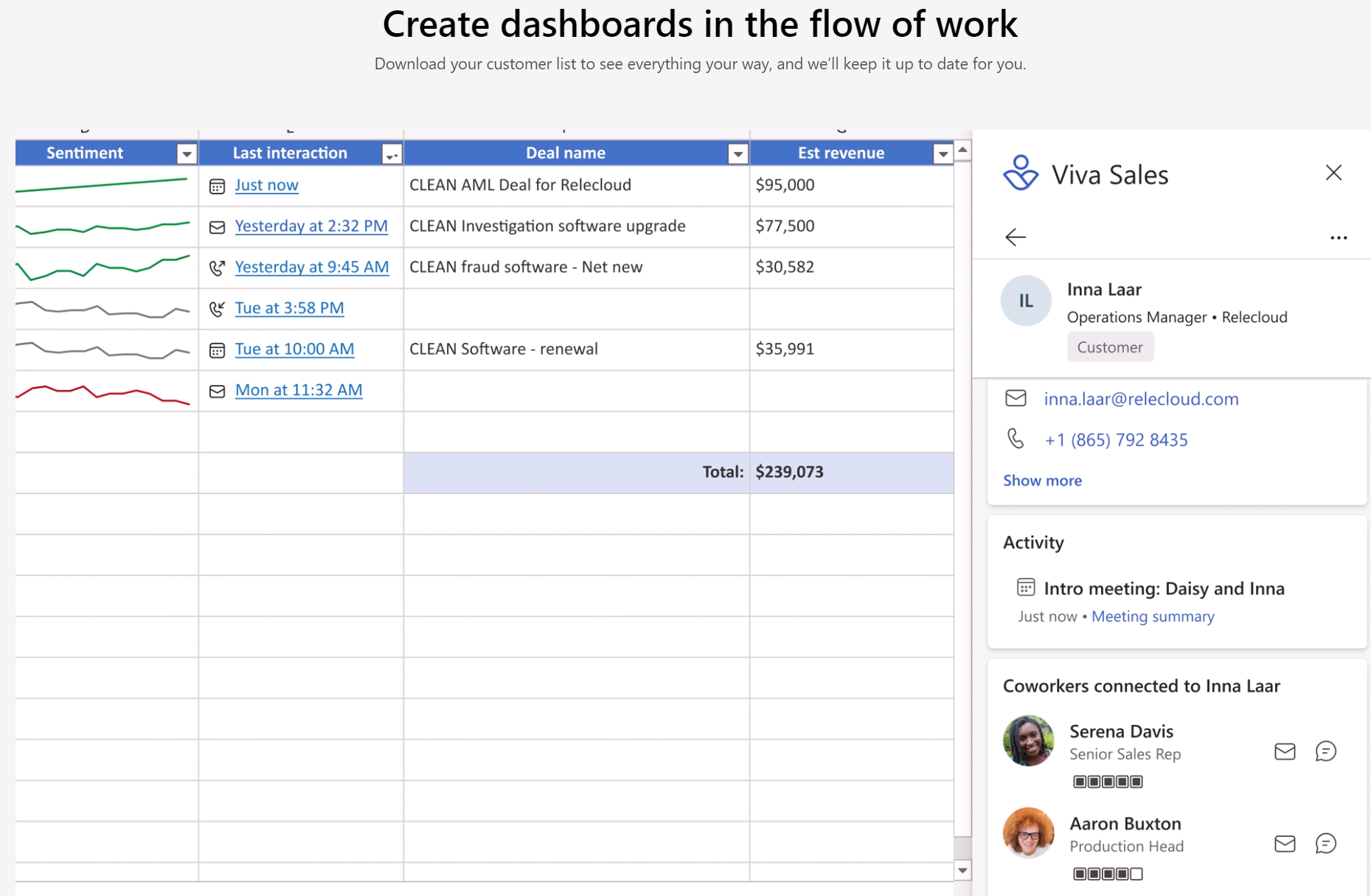
Hot on the heels of Viva Goals, Microsoft have introduced Viva Sales. This latest family member is a “new seller experience” that brings Microsoft 365 & Teams together with “any” CRM system to streamline processes for salespeople…it also adds a hint of AI into the mix.
Areas it helps with include:
AI organised data and tasks
Inbuilt sentiment analysis
Surfacing unstructured data from Office documents
Automated data capture
Reminders
and more, with Microsoft describing it as a sales coach that helps move deals along. It will also surface “business context” data within Outlook and Teams and allow salespeople to update their CRM from those platforms too.
Much of this is, as with many other products, about keeping people within Teams as much as possible – making it the “collaboration hub” for users across organisations.
A feature called Sales Conversation Intelligence (SCI) will help sellers byl:
Generating meeting summaries
Tracking customer sentiment
Suggesting action items
all to keep deals on track and moving along.
Licensing and pricing
Viva Sales is free for users already licensed with Dynamics 365 Enterprise and Premium – for everyone else it will be $40 per user per month. It hits General Availability on October 3rd, 2022 and is NOT part of the Viva Suite.
I like the sound of what Viva Sales can do and am keen to check it out further – as anything that makes sales and customer management easier is a good thing. No matter the CRM you use, it’s never as intuitive and easy to use as users would like…perhaps Viva Sales will go some way to alleviating that. Or perhaps it will just be one more thing to add to the mix?!








 Cloudy with a chance of Licensing