Microsoft Windows 8 Metro Style Start Screen


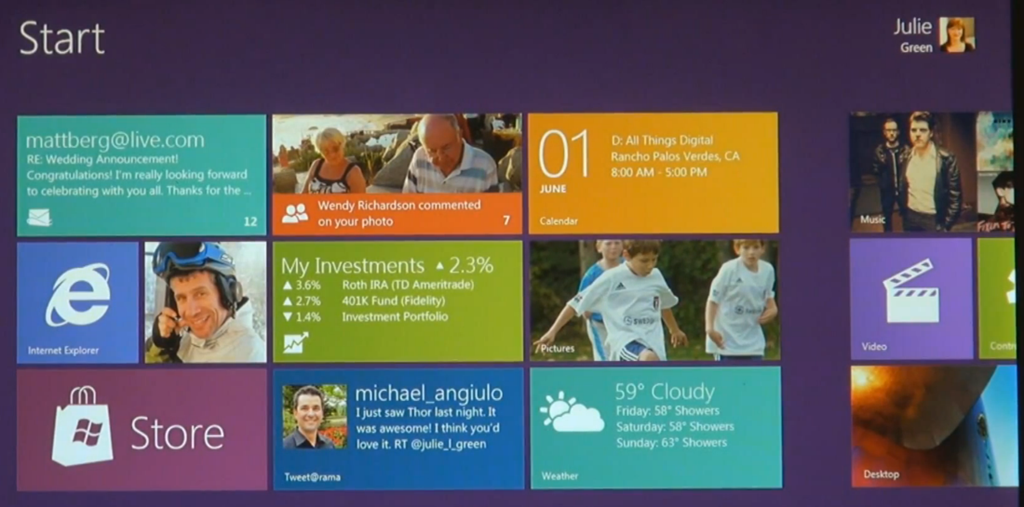
Microsoft’s newest desktop Operating System, Windows 8, is still many months away (9 at least I’d say) but we’re seeing more and more info about what it will contain and how it will look.

Metro is the design style introduced with Windows Phone and is now making it’s way across the Microsoft eco-system…soon to appear in the Xbox dashboard and now in Windows 8. Here you can see:

The Start Menu:

image 

Desktop Notification Balloon:

image

This obviously fits very well with the tiled start screen we’ve already seen from Windows 8:

image

I am certainly looking forward to getting my hands on the beta of this ASAP…just need a tablet so I can test it properly…hint hint Winking smile

Windows Phone 7 can’t access Marketplace


I came across an odd issue with Windows Phone 7 yesterday. The device, an HTC HD7, just could NOT access the Marketplace in any way…updates failed, new apps couldn’t be downloaded etc. The error it gave was:

“The Windows Live ID service is unavailable”

I checked various settings but everything seemed in order. Wifi & 3G were working, the marketplace worked on other WP7 devices, Hotmail still worked on the phone etc so I was at a loss.

After some head scratching, a solution was reached – which I’d like to share with you all just in case it crops up.

Go into Office and OneNote.

Select “All”.

Hit the “Sync” button on the bottom bar.

That will bring up a username/password prompt for the Live ID used with the device.

Even though the fields will be pre-populated (probably), re-type the password just to be sure.

Hit “ok” and BOOM – you’ll have access to the Marketplace Smile

I don’t really understand what the issue is to be honest. I could understand if ALL things that used your Live ID failed but the fact that Hotmail still worked seems odd.

If you’ve got any ideas as to the potential cause – let me know!

Cheers

Rich

Windows Phone at WPC 11


Microsoft’s Worldwide Partner Conference 2011 had some good sessions on Windows Phone 7, a couple of which I was able to attend amidst my hectic schedule of sessions & meetings Smile and this is a rundown of what I saw.

First up, in one of the morning keynotes we saw the Lync client running on Windows Phone 7:

image

I realise that’s not the greatest picture you’ll ever see but you get the idea Smile

I attended the Windows Phone 7 session, led by President of Windows Phone Division, Andy Lees.

image

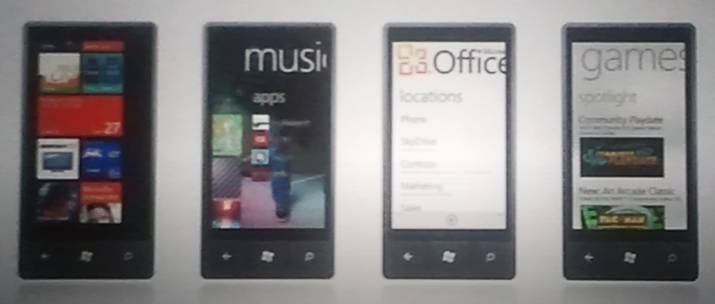
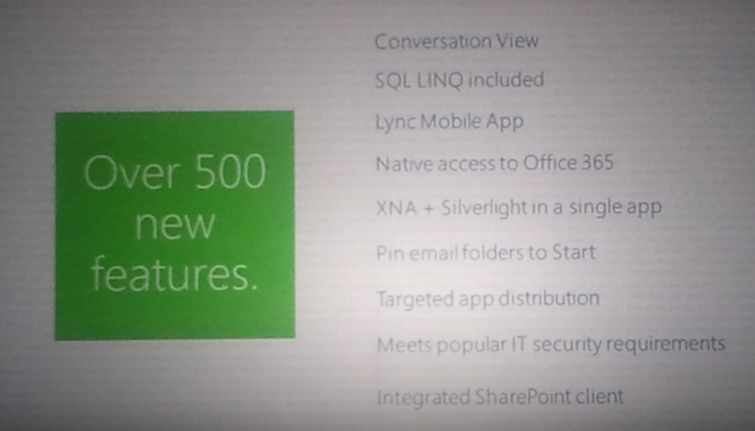
There wasn’t a huge amount of new content but it did contain some great demos of Mango features such as Local Scout and Bing Audio music tagging, as well as the amazingly slick way that WP7 handles people and messaging. Here are some pictures of my favourite slides:

imageimageimageimageimage

image

There was a pretty rapturous response to the majority of the demos from the 100’s of people in attendance, and there was a great energy in the room, both from the presenters and the Microsoft partners.

Microsoft have made some great changes to the Mobility competency to make it more worthwhile and effective for partners to develop apps for the Windows Phone platform. I had a chance to speak with Andy Lees after the session and it seems there are some good things coming further down the line for Microsoft partners. Not just for those that develop apps but also partners that work with licensing and products such as Sharepoint & Office 365.

Windows 8 New Features


Microsoft Windows 8 has been officially demoed and it looks pretty great, with it’s Windows Phone 7 inspired tile interface.

There are other new features being discovered by people who have the leaked pre beta builds and one of them is pretty great:

Built in ISO mounting

Windows 8 Center have got a screen shot which shows this:

image

image

This would be a brilliant addition. All my main machines have got Magic Disc & Magic ISO on them simply so I can mount ISO’s as and when needed. However it’s really annoying when you get a new machine and/or you’re working on someone else’s machine…you go to mount an ISO..BOOM – no can do, so you’ve got to go and download/install them. This new addition will save quite a lot of time across the IT Industry I would imagine Smile


Built in PDF Reader

This will also be cool, again saving users from one extra download and extra bit of 3rd party software on their machine.

SkyDrive

On paper, SkyDrive is awesome. 25GB of storage that you can access pretty much wherever and use either for personal storage alone or also to share things such as datasheets, documents etc with friends, clients, partners and more.

In practice, it’s quite difficult to use…fiddly, hard to find, not quite as easy to get things into/out of as you thought.

Integrating it straight into Windows 8 will see a massive rise in the use of Microsoft’s online storage, and will make the tablet piece even more compelling as users will have a built in, free, easy to use way of sharing/syncing quite a lot of “stuff” available immediately.

Microsoft Windows Phone 7 at Mix 11


Microsoft’s MIX development conference has just finished and there have been a lot of great announcements for the future of Windows Phone 7.

Microsoft’s next update “Mango” will most probably bring about Windows Phone 7.5 as well as a number of huge updates.

Internet Explorer 9

Windows Phone Mango will bring with it a new browser which will have the same rendering engine as their new, much lauded desktop browser. That will mean:

  • Hardware Acceleration
  • HTML5
  • CSS Standards Support

all on a mobile device. Demos comparing an updated WP7 device to an iPhone and an Android handset showed it to be much faster.

Third Party Multitasking

Currently, only the built-in Microsoft apps can multi-task but that will all change, allowing:

  • Fast Application Switching
  • File Transfers
  • Background Audio

and more.

Developer access to hardware/software & Better tools!

Devs will be able to target and use more of the hardware already there, including camera data and motion sensors…bringing Augmented Reality (think Layar) to Windows Phone 7 Smile They will also be able to access contacts and calendars, which I think will bring some great possibilities to the world of WP7 apps.

Not only this but Microsoft are improving the tools that developers can use which will allow them to mix Silverlight with XNA in a single app and emulate location and accelerometer features during the development phase.

Random Extras:

Don’t forget that Microsoft have already told us that Twitter will be getting much deeper integration with the Mango update – that will be pretty great!

TCP/IP support will allow a Skype app.

ANGRY BIRDS IS COMING ON MAY 25TH <—Yes that’s all in caps!

Nokia Windows Phone Devices


Microsoft & Nokia have joined forces to improve, build and push Windows Phone 7 going forwards, this we know. Now the rumours and conjecture have moved, logically, to the next thing – what will Nokia’s first device be, and when will we get them?!

I’ve never had a Nokia.

I’ve had numerous other phones (Motorola, HTC etc) over the years but never Finland’s biggest (?) export, and that’s mainly been down to the OS. I’ve long admired their hardware but couldn’t make friends with the Symbian Operating System…so this could be a first for me now they’ll be running Windows Phone 7. Actually, my Samsung Omnia 7 is the first Samsung device I’ve ever had come to think of it…anyway, back to the Nokia devices!

According to various sources on the internet, the first Windows Phone 7 from Nokia will be the “W7”…based on the Nokia X7 innards but looking like the HTC Mozart. However continuing Nokia’s theme for great cameras, it will have 8 Mega Pixels and a flash.

The next device will be the W8, based on the current N8, although there are apparently a dozen Nokia WP7 devices coming in 2012…should be good times!

image

Zune on Windows Phone 7


Having Zune on my Windows Phone 7 device is great and something I use at least once a day. However this constant use means I’ve found a few niggly things that I’d like to see changed.

1) You can’t create playlists on the device. This is something I’d do on my Android device quite a lot…a great way to quickly create lists on the fly. Only being able to create them on the pc feels quite restrictive.

2) You can’t put playlists on random. Now if one created a playlist with proper care & attention, I can see that this probably wouldn’t be necessary. However I don’t put that much effort into my playlist creation! I usually go through my catalogue by artist and add songs in that I’d forgotten about…this means I get runs of one artist for maybe a dozen songs, and I like my playlists to be much more varied than that…

3) You can’t spend Microsoft points. This one I really don’t get. I can spend Microsoft points in Zune on Xbox, Zune on PC but not Zune on Windows Phone 7…why? If you want to purchase something from the Zune marketplace, you have to use real money and that just seems odd. This means I tend to wait until I’m at a pc to purchase anything from the Marketplace…which certainly defeats the mobile aspect!

Windows Phone 7: My thoughts


Windows Phone 7 has been with the world for 5 or so months, and I’ve had the Samsung Omnia 7 for 3 of those:

This is, I believe, enough time to have formed some proper, coherent thoughts on what I do and don’t like about Microsoft’s new Mobile OS. First of all though, the device itself…

The Samsung Omnia 7 is by far the nicest mobile device I have ever held.

It’s light, it’s slim, it’s smooth, it’s sleek and yes…it’s sexy. It’s brushed metal body feels cool to the touch and looks great, as does the huge 4.3” screen. Not only is it a great size, it’s AMOLED…giving a clarity and brightness that puts most, if not all, other mobile devices to shame.

I haven’t seen another device that comes close to it’s overall aesthetic appeal.

Now on to the big one though, The OS!

I’m not going to go into hugely detailed comparisons with other mobile OS’s, just my opinions and what I think are it’s strong points. As a bit of background, I had an Android 2.1 device for over 12 months before getting WP7.

The first thing is how striking it is, especially on the Samsung screen. You can see in the pictures above, the “Live Tiles” in WP7…as you get an email/text message etc, the totals in the tile increase.

  • The Xbox tile is truly live…your Xbox avatar pops in from the side of the tile.
  • The Zune tile shows a scrolling image of the last artist you listened to.
  • If you pin a contact to the home screen it scrolls through their name and their picture.

Having these ever changing sections, right on the home screen, make Windows Phone 7 feel fluid, dynamic and interactive right from the word go.

Two huge, brilliant, unique features of Microsoft’s Windows Phone 7 are:

Xbox & Zune

Xbox:

The Xbox integration is still in its infancy but already is cool, useful and fun. There are 2 sides to it: interaction with your account & games.

Having it on my phone makes it much easier to do things such as editing my avatar, comparing my game progress against friends & inviting new friends. All things that can be done on the console but all much easier to do via the mobile OS.

Even better than that is the ability to earn actual Xbox achievements and gamer points on your mobile Smile I’ve currently got 5 games that contribute to my gamer score and they make gaming on my mobile more worthwhile, at least in my opinion!

Zune:

I’ve wanted a Zune device for years but, being in the UK, they’ve never been officially available to us. I’ve looked at Ebay many a time and got close to buying one, but when I heard the rumours that Microsoft’s next mobile OS would include Zune, I decided to wait. Lo and behold, WP7 arrives with full Zune integration Smile

I’ve been using the Zune desktop client for quite a while now and it is brilliant – check out my post here:

Read Zune 4.0 Desktop Software

The Zune client on WP7 is, like the rest of the OS, very slick, great to look at and great to use. No music player that I saw on Android came anywhere close to the polished look and feel of Zune…it really is a joy! It has so many great features such as:

History – This section shows the last 6 media items you played. Note I said “media items” not just “songs”…it includes videos too and not just local videos but also videos from YouTube too.

New – This section shows the last 8 items added to Zune…songs, videos and playlists.

Both of these sections are very visual, they both use album cover art and, if it’s a video, a screen grab.

Marquee

This section is pretty special and not something I was expecting. If you have other apps that tie in or relate to Zune in some way, then they appear here. For me this section includes:

  • YouTube
  • Last.fm
  • Lyrics

Office:

This is something I missed when I moved from Windows Mobile 6 to Android. Not having Microsoft Office on my mobile made things just that bit more difficult. Microsoft makes up a big part of my job so Word documents, Excel sheets and PowerPoint slides feature pretty heavily day to day so being unable to read them on my mobile device was pretty annoying!

Now with Windows Phone 7, I’ve got:

  • Word
  • Excel
  • PowerPoint
  • OneNote

at my fingertips and boy is it useful.

The other day I was at home when I came across a MAP 5.5 document that I thought might be useful, so I downloaded it and it showed up in the Office hub on my phone. Today when talking to someone at work about MAP 5.5, I pulled out my phone and quickly showed them the section they needed.

One random thing is how much quicker it is to connect to wireless networks that my Android device. It’s usually a matter of seconds between me arriving at home/work and my phone being connected automatically…that never happened with Android 2.1…

I’m sure there are other parts of Windows Phone that I’ve missed here and when I remember, I’ll put another post together Smile

Microsoft Windows Phone 7: RTM


Microsoft’s new Mobile Operating System – Windows Phone 7 – has been “Released to Manufacturing”. That means it’s done and the work of the “internal engineering team is largely complete” according to Terry Myerson, Corporate Vice President of Windows Phone Engineering.

Terry’s blog post on the Windows Team Blog gives some fascinating examples of how Microsoft have been testing this new release:

“We had nearly ten thousand devices running automated tests daily, over a half million hours of active self-hosting use, over three and a half million hours of stress test passes, and eight and a half million hours of fully automated test passes”

That is a LOT of testing hours!

The full blog post can be read over at:

http://windowsteamblog.com/windows_phone/b/windowsphone/archive/2010/09/01/windows-phone-7-released-to-manufacturing.aspx

Microsoft Zune Pass available internationally


Microsoft are making the Zune Pass available in countries other than the US. That gets a big:

from me and I’m sure, 1000’s of others across the world too!

The imminent arrival of Windows Phone 7, which has the Zune player built in, means making this available worldwide is high on the list of things Microsoft need to do Smile

The Zune Pass is something I’ve been looking at for a long time as it represents great value for money. In the UK, it will be £8.99 a month which will give you full access to stream the huge library of music available in the Zune Marketplace. That in itself wouldn’t be enough to sway me as I have enough music already (!) but here’s the kicker:

Each month, you can permanently download and keep 10 tracks.

Which works out as 89.9p per track. So the streaming AND the keeping – that’s a winner right there!

Also, it will probably mean I will use Spotify very infrequently…