Windows Phone 7 can’t access Marketplace


I came across an odd issue with Windows Phone 7 yesterday. The device, an HTC HD7, just could NOT access the Marketplace in any way…updates failed, new apps couldn’t be downloaded etc. The error it gave was:

“The Windows Live ID service is unavailable”

I checked various settings but everything seemed in order. Wifi & 3G were working, the marketplace worked on other WP7 devices, Hotmail still worked on the phone etc so I was at a loss.

After some head scratching, a solution was reached – which I’d like to share with you all just in case it crops up.

Go into Office and OneNote.

Select “All”.

Hit the “Sync” button on the bottom bar.

That will bring up a username/password prompt for the Live ID used with the device.

Even though the fields will be pre-populated (probably), re-type the password just to be sure.

Hit “ok” and BOOM – you’ll have access to the Marketplace Smile

I don’t really understand what the issue is to be honest. I could understand if ALL things that used your Live ID failed but the fact that Hotmail still worked seems odd.

If you’ve got any ideas as to the potential cause – let me know!

Cheers

Rich

Windows Phone at WPC 11


Microsoft’s Worldwide Partner Conference 2011 had some good sessions on Windows Phone 7, a couple of which I was able to attend amidst my hectic schedule of sessions & meetings Smile and this is a rundown of what I saw.

First up, in one of the morning keynotes we saw the Lync client running on Windows Phone 7:

image

I realise that’s not the greatest picture you’ll ever see but you get the idea Smile

I attended the Windows Phone 7 session, led by President of Windows Phone Division, Andy Lees.

image

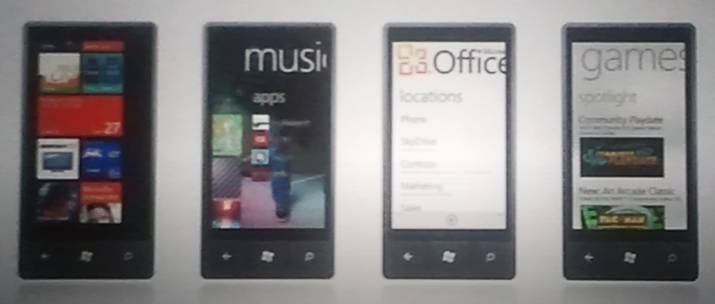
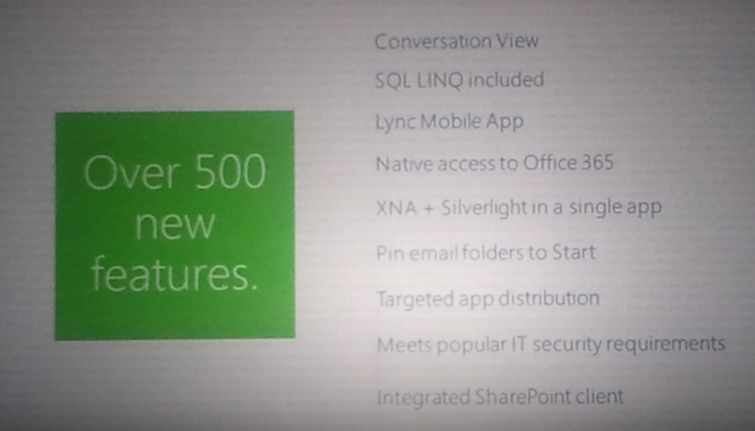
There wasn’t a huge amount of new content but it did contain some great demos of Mango features such as Local Scout and Bing Audio music tagging, as well as the amazingly slick way that WP7 handles people and messaging. Here are some pictures of my favourite slides:

imageimageimageimageimage

image

There was a pretty rapturous response to the majority of the demos from the 100’s of people in attendance, and there was a great energy in the room, both from the presenters and the Microsoft partners.

Microsoft have made some great changes to the Mobility competency to make it more worthwhile and effective for partners to develop apps for the Windows Phone platform. I had a chance to speak with Andy Lees after the session and it seems there are some good things coming further down the line for Microsoft partners. Not just for those that develop apps but also partners that work with licensing and products such as Sharepoint & Office 365.

Microsoft Windows Phone 7 at Mix 11


Microsoft’s MIX development conference has just finished and there have been a lot of great announcements for the future of Windows Phone 7.

Microsoft’s next update “Mango” will most probably bring about Windows Phone 7.5 as well as a number of huge updates.

Internet Explorer 9

Windows Phone Mango will bring with it a new browser which will have the same rendering engine as their new, much lauded desktop browser. That will mean:

  • Hardware Acceleration
  • HTML5
  • CSS Standards Support

all on a mobile device. Demos comparing an updated WP7 device to an iPhone and an Android handset showed it to be much faster.

Third Party Multitasking

Currently, only the built-in Microsoft apps can multi-task but that will all change, allowing:

  • Fast Application Switching
  • File Transfers
  • Background Audio

and more.

Developer access to hardware/software & Better tools!

Devs will be able to target and use more of the hardware already there, including camera data and motion sensors…bringing Augmented Reality (think Layar) to Windows Phone 7 Smile They will also be able to access contacts and calendars, which I think will bring some great possibilities to the world of WP7 apps.

Not only this but Microsoft are improving the tools that developers can use which will allow them to mix Silverlight with XNA in a single app and emulate location and accelerometer features during the development phase.

Random Extras:

Don’t forget that Microsoft have already told us that Twitter will be getting much deeper integration with the Mango update – that will be pretty great!

TCP/IP support will allow a Skype app.

ANGRY BIRDS IS COMING ON MAY 25TH <—Yes that’s all in caps!

Zune on Windows Phone 7


Having Zune on my Windows Phone 7 device is great and something I use at least once a day. However this constant use means I’ve found a few niggly things that I’d like to see changed.

1) You can’t create playlists on the device. This is something I’d do on my Android device quite a lot…a great way to quickly create lists on the fly. Only being able to create them on the pc feels quite restrictive.

2) You can’t put playlists on random. Now if one created a playlist with proper care & attention, I can see that this probably wouldn’t be necessary. However I don’t put that much effort into my playlist creation! I usually go through my catalogue by artist and add songs in that I’d forgotten about…this means I get runs of one artist for maybe a dozen songs, and I like my playlists to be much more varied than that…

3) You can’t spend Microsoft points. This one I really don’t get. I can spend Microsoft points in Zune on Xbox, Zune on PC but not Zune on Windows Phone 7…why? If you want to purchase something from the Zune marketplace, you have to use real money and that just seems odd. This means I tend to wait until I’m at a pc to purchase anything from the Marketplace…which certainly defeats the mobile aspect!

Windows Phone 7: My thoughts


Windows Phone 7 has been with the world for 5 or so months, and I’ve had the Samsung Omnia 7 for 3 of those:

This is, I believe, enough time to have formed some proper, coherent thoughts on what I do and don’t like about Microsoft’s new Mobile OS. First of all though, the device itself…

The Samsung Omnia 7 is by far the nicest mobile device I have ever held.

It’s light, it’s slim, it’s smooth, it’s sleek and yes…it’s sexy. It’s brushed metal body feels cool to the touch and looks great, as does the huge 4.3” screen. Not only is it a great size, it’s AMOLED…giving a clarity and brightness that puts most, if not all, other mobile devices to shame.

I haven’t seen another device that comes close to it’s overall aesthetic appeal.

Now on to the big one though, The OS!

I’m not going to go into hugely detailed comparisons with other mobile OS’s, just my opinions and what I think are it’s strong points. As a bit of background, I had an Android 2.1 device for over 12 months before getting WP7.

The first thing is how striking it is, especially on the Samsung screen. You can see in the pictures above, the “Live Tiles” in WP7…as you get an email/text message etc, the totals in the tile increase.

  • The Xbox tile is truly live…your Xbox avatar pops in from the side of the tile.
  • The Zune tile shows a scrolling image of the last artist you listened to.
  • If you pin a contact to the home screen it scrolls through their name and their picture.

Having these ever changing sections, right on the home screen, make Windows Phone 7 feel fluid, dynamic and interactive right from the word go.

Two huge, brilliant, unique features of Microsoft’s Windows Phone 7 are:

Xbox & Zune

Xbox:

The Xbox integration is still in its infancy but already is cool, useful and fun. There are 2 sides to it: interaction with your account & games.

Having it on my phone makes it much easier to do things such as editing my avatar, comparing my game progress against friends & inviting new friends. All things that can be done on the console but all much easier to do via the mobile OS.

Even better than that is the ability to earn actual Xbox achievements and gamer points on your mobile Smile I’ve currently got 5 games that contribute to my gamer score and they make gaming on my mobile more worthwhile, at least in my opinion!

Zune:

I’ve wanted a Zune device for years but, being in the UK, they’ve never been officially available to us. I’ve looked at Ebay many a time and got close to buying one, but when I heard the rumours that Microsoft’s next mobile OS would include Zune, I decided to wait. Lo and behold, WP7 arrives with full Zune integration Smile

I’ve been using the Zune desktop client for quite a while now and it is brilliant – check out my post here:

Read Zune 4.0 Desktop Software

The Zune client on WP7 is, like the rest of the OS, very slick, great to look at and great to use. No music player that I saw on Android came anywhere close to the polished look and feel of Zune…it really is a joy! It has so many great features such as:

History – This section shows the last 6 media items you played. Note I said “media items” not just “songs”…it includes videos too and not just local videos but also videos from YouTube too.

New – This section shows the last 8 items added to Zune…songs, videos and playlists.

Both of these sections are very visual, they both use album cover art and, if it’s a video, a screen grab.

Marquee

This section is pretty special and not something I was expecting. If you have other apps that tie in or relate to Zune in some way, then they appear here. For me this section includes:

  • YouTube
  • Last.fm
  • Lyrics

Office:

This is something I missed when I moved from Windows Mobile 6 to Android. Not having Microsoft Office on my mobile made things just that bit more difficult. Microsoft makes up a big part of my job so Word documents, Excel sheets and PowerPoint slides feature pretty heavily day to day so being unable to read them on my mobile device was pretty annoying!

Now with Windows Phone 7, I’ve got:

  • Word
  • Excel
  • PowerPoint
  • OneNote

at my fingertips and boy is it useful.

The other day I was at home when I came across a MAP 5.5 document that I thought might be useful, so I downloaded it and it showed up in the Office hub on my phone. Today when talking to someone at work about MAP 5.5, I pulled out my phone and quickly showed them the section they needed.

One random thing is how much quicker it is to connect to wireless networks that my Android device. It’s usually a matter of seconds between me arriving at home/work and my phone being connected automatically…that never happened with Android 2.1…

I’m sure there are other parts of Windows Phone that I’ve missed here and when I remember, I’ll put another post together Smile

Windows Phone Developer Training Kits


Windows Phone 7 Series is a little bit closer after today’s MIX 10 keynote and Microsoft are doing a great job of making sure that WP7 developers have got everything they need to get started putting the iPhone to shame making great apps 🙂

They have put together a training kit for developers which includes 4 Hands On Labs:

Hello Phone:

As with the classic “Hello World” app, this is a way to introduce you to the tools needed to build Silverlight apps for Windows Phones.

Building Your First Windows Phone Application:

This teaches you to create a simple puzzle game using the basic building blocks, and includes some phone-specific features.

new4

Windows Phone Navigation & Controls:

This focuses on on Windows Phone’s layout and switching between different screens.

Game Development with XNA Framework:

This lab helps you build a simple XMA game using Visual Studio Express for Windows Phone.

You can see the online kit here or download a local copy here.

To download the Windows Phone Developer Tools, hit this link:

http://www.microsoft.com/downloads/details.aspx?FamilyID=2338b5d1-79d8-46af-b828-380b0f854203&displaylang=en

Windows Phone 7 Series Development Tools


Today saw the start of MIX 10, Microsoft’s 3 day conference for web designers and developers, and it was all about Windows Phone 7 Series aka WP7 (or Windows Mobile 7 as you might call it).

They announced the availability of a comprehensive set of free tools to support developing Silverlight apps on WP7. This can be download from:

WP7 Developer Kit

and includes previews of:

· Microsoft Visual Studio 2010 Express for Windows Phone

· Windows Phone 7 Series add-in to use with Visual Studio 2010 RC1

· XNA Game Studio 4.0

· Windows Phone 7 Series Emulator for application testing

· Expression Blend for Windows Phone CTP (available as a separate download).

I’m not a developer, although I often wish I was, and this is one of those times! Go get it and make some brilliant apps that will bring me, and countless others, back to the WinMo fold 🙂

An alternative download link is:

http://www.microsoft.com/downloads/details.aspx?FamilyID=2338b5d1-79d8-46af-b828-380b0f854203&displaylang=en

Windows Phone 7 Series


Forget what you though you knew, Microsoft are back in the mobile game…and in a pretty big way!

Above is an image of the new Windows Mobile or “Windows Phone 7 Series” as it’s now known.

Each “tile” is a “hub” which connects the user to various elements…you can see the Xbox Live tile which is pretty exciting! The tiles are all live so will display updated info from the web as appropriate. Even from that 1 picture you can see that the UI (User Interface) is VASTLY improved over all previous versions of Windows Mobile with Phone, Test messages, email, pictures, people and more all available from one screen. One of my biggest gripes with WinMo 6.1 was the number of menus I had to navigate through just to do something simple like look at a picture.

It’s integrated into Social Media like never before with the ability to update Windows Live, Facebook, Twitter etc all from one location and making it easy for users to easily share & upload media such as pictures to Flickr, Twitter and more. This video shows off some of the great new features:


Buzz

The buzz around this new Redmond release is one of the most surprising, and nice to see, things about this whole launch. Both end users and gadget sites such as Gizmodo and Engadget are really behind this:

image image

image

First Windows 7 had huge support from almost everyone and now less than 6 months later, Windows Phone 7 does the same thing…MS have really turned things around! I think a lot of those calls for Steve B to step down will be taken back now 🙂

Zune

This is the one thing I really wanted to see in WP7S and it’s been delivered…Zune is now the media player inside Microsoft’s Mobile platform. I’ve been using the Zune desktop software for quite some time now and it is truly brilliant (see my post here) and the experience on the Zune HD seems comparable. It’s so much smoother and sexier that Windows Media Player and I really love that it synchronizes your track play count between desktop and device 🙂

Me & Windows Phone 7

I’m really excited about Windows Phone 7 Series. I’ve been waiting for it for years…ever since I got a Windows Mobile 5 device in a way…and now it’s here. Well not quite…it’s been announced but devices aren’t going to start shipping until October and that makes me feel better about my situation…which is…I’ve got an Android phone!

Yep that’s right…I’m a huge user of Microsoft products, both software and hardware, and have been using Windows Mobile for over 3 years. However, when my contract cam up for renewal a few months ago I had a choice to make:

a) Keep trudging along with Windows Mobile 6.1 for another year? (My HTC not being eligible for an upgrade to 6.5).

b) Look at another platform such as iPhone or Android?

I was, at first, planning on sticking with WinMo out of loyalty to Microsoft but decided that, as a consumer, I deserved a phone that was fun, easy to use, cool and adaptable to me and my lifestyle. For that I looked at Android and picked up the HTC Hero…I am happier with this phone than any of my previous devices (see post here).

If Windows Mobile 7 (as I may well continue to call it) had been released to buy this week then I would have waited. As it is, I’ll have fun with my Android device, especially once I get the 2.1 update (pleeaaase HTC!) but will definitely be checking out a Windows device in the summer of 2011. Saying that makes it seem SO far away 🙂

If you’re looking for a new phone around October time, definitely go and check out Windows Phone 7 Series.