Microsoft announces Windows 365


Photo by Konevi on Pexels.com

A new member of the 365 family has joined us – alongside Office 365, Microsoft 365, and Dynamics 365 – we now have Windows 365.

Formerly known as Cloud PC, this latest offering enables you to stream an entire PC – including the OS, apps, and settings – from the cloud to any device. This means Windows 10 and 11 will be easily available on any device – including MacOS and Linux.

Although clearly driven by the COVID-19 pandemic and the rapid, global shift to hybrid working, something like this has been a long time coming in many regards. It’s also driven by the changing security landscape…Microsoft also see this as a way to help organisations combat the rise of security threats – let Microsoft take care of securing your desktops so you don’t have to.

Although specific pricing information hasn’t been released yet, it’s expected there will be a range of pre-set options, making it more of an “off the shelf” SaaS offering than the current Azure Virtual Desktop (AVD). Different SKUs and plans will offer different amounts of storage, processing power, memory etc. for organisations to choose from, with Satya Nadella stating this offering would be applicable to businesses of any size.

Options available

Get started with Windows 365 – Microsoft Tech Community

Licensing requirements

Users with Windows Pro endpoints require:

  • Windows 10 Enterprise E3 + EMS E3

while users with non-Windows Pro endpoints require:

  • Windows VDA E3 + EMS E3

Alternatively, both scenarios can be covered by licenses for:

  • Microsoft 365 F3/E3/E5/Business Premium

Technical requirements

It’s not quite as straightforward as just having those licenses, you will also need:

  • Azure subscription
  • Azure Virtual Network
  • Azure Active Directory sync
  • Certain ports open

to ensure that everything works optimally.

More information on the requirements and how to provision can be found here.

Finally…

Not surprisingly, there will be 2 flavours available:

  • Windows 365 Business
  • Windows 365 Enterprise

and it is set to launch on August 2, 2021. I look forward to seeing more information as it becomes available…and hopefully trying it out myself!

Update

While Microsoft are yet to announce official pricing, pricing for 1 SKU has been revealed. For a desktop with 2vCPU/4GB RAM/128GB storage it will $31 per user per month ($372 per year) – which strikes me as quite expensive…

Further Reading

Microsoft announcement

Windows 365 page

Technical requirements

Azure Virtual Desktop


Windows Virtual Desktop (WVD) has been renamed to Azure Virtual Desktop (AVD) – a name change that suggests a broadening of its capabilities and market positioning. More than just a rebrand though, Microsoft have added a range of new capabilities as well as new licensing options.

Typically, AVD is licensed via users’ existing Microsoft 365 licenses but Microsoft have added a new “per-user” app streaming option, aimed at enabling organisations to offer AVD SaaS solutions to external users and customers.

Pricing

Currently AVD per-user is on promotional pricing meaning that “streaming first-party or third-party applications to external users” can be done free of charge from July 14, 2021 to December 31, 2021. From January 1, 2022 pricing will be:

  • $5.50 per user per month (Apps only)
  • $10 per user per month (Apps + Desktops)

You can see Microsoft’s announcement here.

Microsoft VDI Licensing changes


Microsoft have made some changes to their licensing, specifically aimed at making VDI adoption easier and more cost effective.

VDI with Microsoft is done via VECD (Virtual Enterprise Centralised Desktop) and there are 2 types of VECD licence available, one for machines without Software Assurance and one for machines with SA, priced at:

  • VECD (for users without SA) = $110 per device per year
  • VECD for SA (for users with SA) = $23 per device per year
  • So, although greatly reduced, there is still an extra cost on top of a customer’s investment in Software Assurance.

    However, from July 1st 2010, Software Assurance for Windows Client will include the VECD licence at no extra charge; simultaneously reducing the barriers to VDI adoption and increasing the amazing benefits and ROI that Software Assurance offers…good work Redmond!

    Also from that date, machines without SA will be covered by a Virtual Desktop Access (VDA) licence, priced at $100.

    July 1st also gives customers licensed with the above the rights to access their virtual desktop from secondary, non-corporate machines such as home PC’s, hotel machines etc.

    Microsoft & Citrix “Rescue for VMWare VDI” Promotion


    Alongside the new RDP/VDI enhancement, there is a new promo being kicked off called:

    Rescue for VMWare VDI

    For customers currently using VMWare view:

    “eligible customers can trade-in their VMware View licenses with same number of Microsoft VDI Standard Suite subscription and Citrix XenDesktop VDI Edition annual licenses, up to a maximum of 500, at no cost

    At no cost!!! There are of course caveats and restrictions:

    “Customers with existing VMware View licenses for desktops covered by Microsoft Core CAL or Enterprise CAL suites with Software Assurance through Select, Enterprise & CASA (Campus & Schools Agreements)   family of agreements can take advantage of this offer. Determination of eligibility will be done by Citrix and Microsoft sales representatives”

    *(bold mine)

    So:

    Customers on:

    • Open
    • Open Value Perpetual
    • Open Value Subscription

    cannot take part in this promotion…which seems a little odd to me. I’d be interested to hear the reasoning behind this…

    Also, even if you are on one of the chosen licensing schemes but have chosen to purchase CALs individually, you are unable to take part.

    For those who are eligible, this promo is available until December 31 2010.

    You can see more on this, and other joint efforts, over at:

    http://www.citrixandmicrosoft.com/

    Microsoft VECD: Diagrams


    Microsoft VECD (Virtual Enterprise Centralised Desktops) is their required licensing offering for companies looking to run Virtual Desktop Infrastructure (VDI) setups. For more general info on VDI, see my posts here and here and my VECD post is here.

    VECD licensing can be quite confusing to get right for the various different scenarios that might pop up, so Microsoft have made a handy pdf to show how it works for a variety of different possible situations.

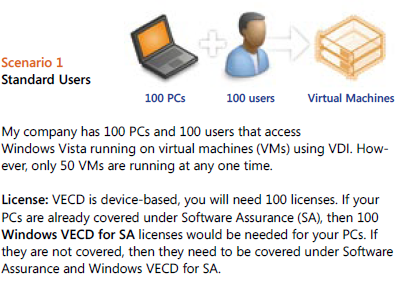
    Scenario 1:

    image

    Scenario 2:

    image

    You’ll notice in scenario 2 that although there are 150 VM’s (Virtual Machines) being accessed, you only need to licence the number of machines, in this case 100. You can have an unlimited number of instances (of the OS) stored on the server and each machine can access up to 4 running instances at a time.

    Scenario 3:

    image

    This is an interesting scenario and I in fact answered a question about this on Twitter just today 🙂 VECD is a device based licence BUT it gives Work at Home (WAH) rights to a specific named user of that machine; this mixing of device/user, while perfectly sensible, does lead to some confusion. These WAH rights help make VECD and VDI nice and flexible.

    There are more scenarios on the pdf (which is why my scenario 3 is their 4!) as well as a lot more great info, and you can download it from:

    http://www.microsoft.com/windows/enterprise/solutions/virtualization/licensing.aspx

    For me at least, I had to save the pdf and then open it; if I tried to open it from the site it gave me an error. It’s down near the bottom, the “VDI Licensing Brochure” mentioned 5 lines from the end 🙂