Microsoft released SQL Server 2025 on November 18th 2025 and updated the Product Terms. However, the update has caused confusion and consternation amongst the Microsoft community – as it seems to suggest that failover rights as a Software Assurance benefit have been removed!!! 😱 (Spoiler alert – it’s almost certain they haven’t).
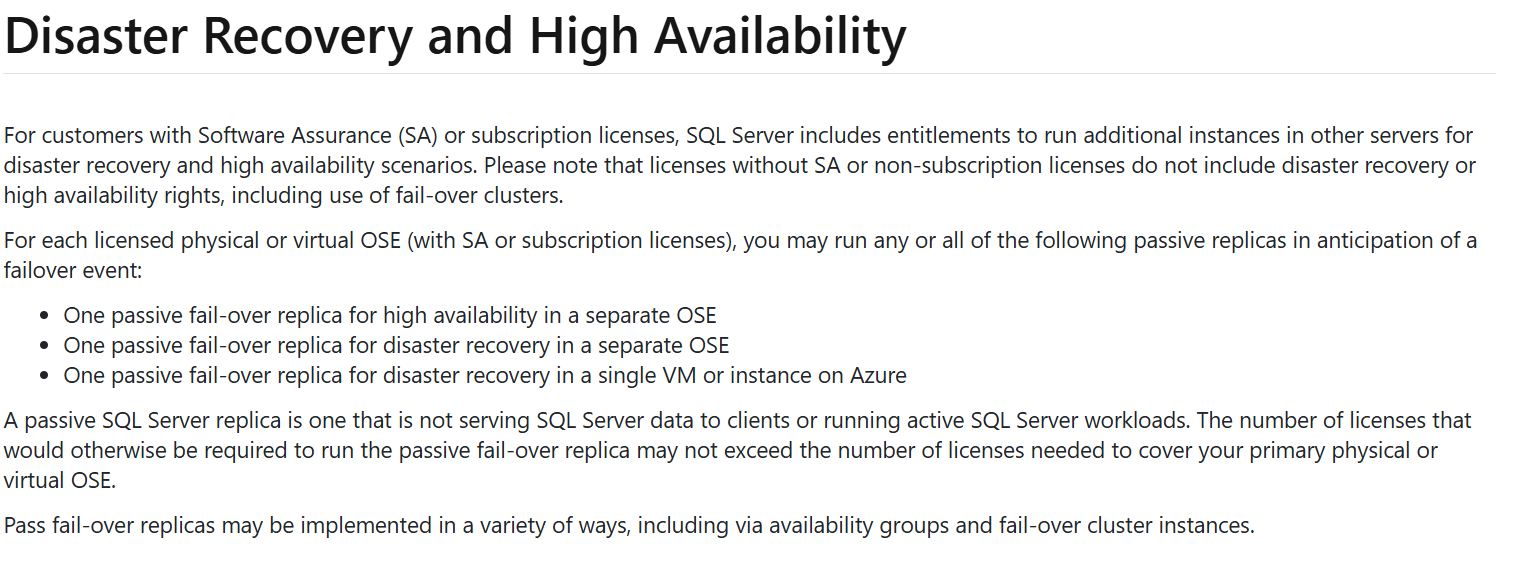
If you’re not familiar with this right it means, in a nutshell, that organisations who purchase SQL Server licenses with Software Assurance (SA) may license additional servers at no extra cost, as long as those servers are used only for disaster recovery/failover purposes. This is a long standing and widely used benefit – removing this right will mean one of 2 things:
Organisations’ SQL Server licensing will double/triple by millions of £/$/€ more per year
Organisations will be forced to have less resilient SQL Server systems, potentially leading to more downtime and lost revenue
Ultimately, if either of those were the case, I believe it would lead to a mass exodus of SQL Server customers. Microsoft may hope they would move to SQL Azure/SQL Server enabled by Azure Arc but I’d expect many to explore other options – Oracle, Postgres, Amazon RDS etc.
Largely because of that, and the fact that we have seen an increase in Product Terms errors over the last couple of years, I’m of the opinion that it is an error and will – eventually – be corrected…but it is worth looking at anyway.
As I was about to press publish, Peter Van Uden has commented on LinkedIn that he’s had confirmation that it is an error and will be corrected in the coming days.
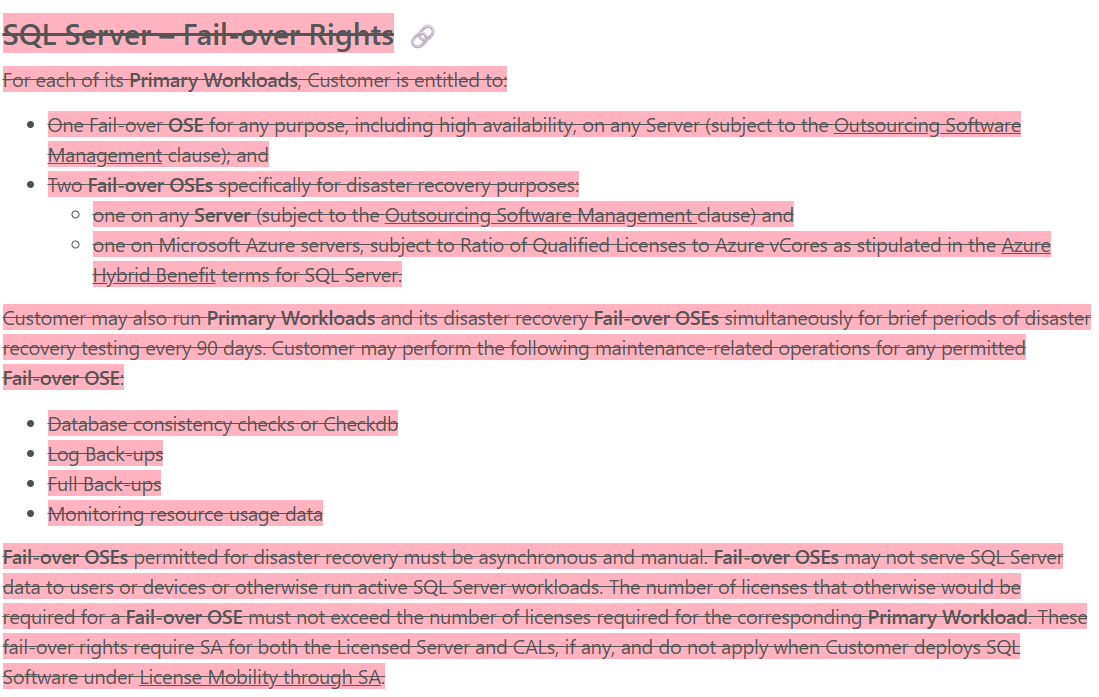
Fellow Microsoft watcher Alex Golev noticed that the whole section had been deleted without replacement:
Other parts of the Product Terms still refer to this section which suggests this is an erroneous deletion…but it could also mean that they just didn’t edit those sections correctly.
I genuinely believe this is an error. It is a huge change that would have significant consequences for most Microsoft customers, including their largest and most significant customers. Making this change would be an enormous risk and to do so without any official announcement or warning is unbelievable. I’m sure we’ll see a reversal in the coming days and that’s why I haven’t posted about this already.
However, I feel it does highlight the increasingly slapdash approach that has been taken to the Microsoft Product Terms since it became an online site, rather than document downloads. It seems likely to me that updates are being made by people with little understanding of software licensing and so they don’t see the consequence of their actions.
The fact that it’s 4 days since this change was made and there has been no word from Microsoft is disappointing – but hopefully that correction will appear soon.
So, don’t panic but do remember that these things happen and that Microsoft experts like me, Alex, Peter and more can be very useful in these scenarios. 😁
Update: The missing text has been reinstated so the panic is over. It does highlight the need for us all to be vigilant in the future though.
It’s been rumoured for a while that Microsoft would release a new product/license for AI Agents called Agent 365 and we have the first public acknowledgement of this from Redmond.
Microsoft 365 Message MC1183300 is titled “Microsoft Teams and Microsoft 365 Copilot: Discover and create agentic users from Teams and M365 Agent Store” and gives us some initial information.
Starting in mid-November 2025, we will get “AI-powered Agentic Users” that will have “full organisation identities”. Users will be able to request agent templates but, at least for now, admins will control the creation and licensing.
What are AI Agents?
Microsoft differentiate them from bots and say:
Agentic Users are provisioned as full-fledged user objects with their own:
· identity in the organization’s directory (via Entra ID or Azure AD)
· email addresses
· Teams accounts
· presence in the org chart
They can participate in meetings, send and receive emails and chats, access and act upon enterprise data, and learn from interactions to improve over time. They have the ability to “proactively reason and act without explicit instructions”.
Exchange Server 2016 & 2019 and Skype for Business Server 2016 & 2019 go out of support in October 2025 (4 months at the time of writing).
The new Subscription editions have been announced as Generally Available by Microsoft (although not yet added to the Product Terms) but not all organisations are ready to make the move. To help with that, from August 1st, 2025, customers can contact their Microsoft account teams to purchase a 6-month Extended Security Update (ESU).
What to know
Any Critical/Important Security Updates released after the end of support will be privately provided to ESU customers.
Microsoft are not committing to release any updates during the ESU period.
The ESU will run for 6 months until April 14th, 2026 and – in Microsoft’s somewhat snarky words – “This period will not be extended past April 2026 (you do not need to ask).”
Microsoft announce new cloud options for Europe. There is an increasing push back from European organisations, particularly Government, against so many critical services and so much data all being run out of the US…this has been accelerated by the current geo-political situation too.
These announcements are Microsoft’s attempt to pre-emptively stem the flow of European customers away from their cloud services.
Altogether we’ve got:
Sovereign Public Cloud
Sovereign Private Cloud
National Partner Clouds
Microsoft 365 Local
Data Guardian
External Key Management
Regulated Environment Management
Microsoft 365 Local is interesting but the MS announcement only talks about productivity workloads like Exchange Server & SharePoint Server. Does M365 Local include Teams, Stream, ClipChamp, Planner etc.? 🤷♂️
Sovereign Public Cloud
Will be offered across all existing European datacentre regions, for all European customers, across enterprise services such as Microsoft Azure, Microsoft 365, Microsoft Security and Power Platform.
Customer data stays in Europe, under European Law, with operations and access controlled by European personnel, and encryption is under full control of customers.
Sovereign Private Cloud
Will support critical collaboration, communication and virtualization services workloads on Azure Local. This solution now integrates Microsoft 365 Local and the security platform with Azure Local, providing consistent capabilities for hybrid or air-gapped environments to meet resiliency and business continuity requirements
National Partner Clouds
Available in France (Bleu) & Germany (Delos Cloud), these will offer comprehensive capabilities of Microsoft 365 and Microsoft Azure in an independently owned and operated environment.
Microsoft 365 Local
Microsoft 365 Local provides customers with additional choice by bringing together Microsoft’s productivity server software into an Azure Local environment that can run entirely in a customer’s own datacentre.
This provides a simplified deployment and management framework for organizations to run Microsoft’s trusted productivity servers in environments they fully control. It remains to be seen exactly what is included and how the licensing works…
Data Guardian
Data Guardian will add an additional level of assurance by ensuring that only Microsoft personnel residing in Europe control remote access to these systems and adds additional human and technical oversight whenever engineers outside of Europe need access.
All remote access by Microsoft engineers to the systems that store and process your data in Europe is approved and monitored by European resident personnel in real time and will be logged in a tamper-evident ledger.
External Key Management
With external key management, customers can connect Azure to keys stored on their own Hardware Security Module (HSM) on-premises or hosted by a trusted third party.
Regulated Environment Management
The Regulated Environment Management service will allow customers to easily manage all these features in one place (for instance, configuring Data Guardian policies or reviewing access log entries).
Microsoft have launched a new addition to the Copilot family, confusingly called Microsoft 365 Copilot Chat.
Copilot Chat was already a thing (that is different to Copilot Biz Chat) and this seems to be a re-positioning as they add some new capabilities too. It is a basic, entry point tool that sits below Microsoft 365 Copilot.
Microsoft 365 Copilot Chat is free and has access to internet info to give “web-grounded” responses. Additionally it can interact with Agents (more on that later) and also has elements of the “Copilot Control System” to help with corporate data privacy.
The table below shows how it stacks up against the “full” Microsoft 365 Copilot product:
One of the new additions is that users of this free product can use 2 types of agents on a Pay As You Go (PAYG) basis, they are:
“Tenant Graph” grounded agents
Autonomous action agents
“Tenant Graph” grounded means agents that can access internal company data as well as internet information, giving answers with additional, organisation specific info and context. This is an additional PAYG per-message cost for M365 Copilot Chat users but is included within the M365 Copilot license – adding a new variable to consider when pricing up licensing options.
Autonomous actions are where the agent uses “generatively orchestrated triggers, topics, data connectors, and workflows” to act on behalf of a user. This is an additional PAYG per-message cost for all users – it is an additional cost even for users licensed with M365 Copilot.
For more info and details on the PAYG per-message pricing model – see my post here.
Copilot for M365 prerequisites updated to include new SKUs as eligible base licenses. The line-up is now: Microsoft 365 Business Basic/Standard/Premium/F1/F3/E3/A3/E5/A5
Office 365 F3/E1/E3/A3/E5/A5
Entra ID Governance F SKU added
Entra ID Governance can be added to M365 Business Premium
Microsoft Viva Pulse added
Azure AI Studio added, although it’s still in public preview
No changes to Dynamics 365 for the first time in about 9 decades!
Azure Support can be reduced at anniversary (clarification)
“Microsoft Defender Vulnerability Management Add-On to Microsoft Defender for Endpoint for servers”, “Entra ID Governance”, and “Microsoft Defender Threat Intelligence API” added
“Microsoft Defender for Endpoint for servers” and “Microsoft Defender Experts for Hunting” added to MCA
Windows Server 2012/R2 goes out of support on October 10th, 2023 – that’s less than 3 months from the time of writing. Additionally, SQL Server 2012 went out of support on July 12th, 2023 – that’s 11 days ago at the time of writing!
Microsoft’s preference is, as always, that you upgrade to a newer version of the software…ideally in Azure. However, for Enterprise Agreement organisations that don’t want to/can’t AND have money to spare (as well as existing Software Assurance), there is another option – Extended Security Updates (ESU). Introduced with the 2008 wave of support ending, they are again available for 2012…but now, announced at Inspire 2023, there is a new twist.
ESU via Azure Arc
Azure Arc is Microsoft’s ever-growing platform for connecting resources across Azure, on-premises, and 3rd-party cloud environments too. Connecting your 2012/R2 servers to Azure Arc enables you to acquire ESUs via a Pay As You Go (PAYG model – one of Microsoft’s new favourite things.
This means you can pay on a monthly, rather than annual, basis. While this will help customer budgets, I suspect it is also Microsoft’s hope that it will make organisations more likely to continually work to upgrade and migrate old servers. Previously, if you’ve paid for a year you might as well take a year to do that process but now – the sooner you upgrade/migrate, the faster you can remove that ongoing cost.
You can use your Microsoft Azure Consumption Commitment (MACC) funds to cover ESUs on PAYG via Azure Arc and manage costs using Azure Cost Management. There are also technical benefits such as not needing to acquire additional license keys.
Availability
Currently the PAYG ESUs are available via:
EA
EAS
SCE
EES
agreements…no CSP you’ll notice.
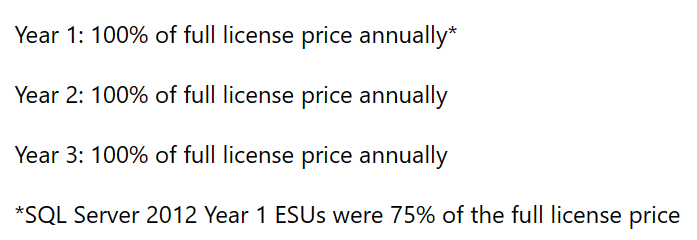
Finally, it is to be noted that, according to Microsoft here, the ESU pricing is now the same each year:
For more information, check out the Microsoft posts below:
Microsoft 365 Copilot pricing has been announced and it is more than most were expecting – $30 per user per month.
Given the aim of Microsoft Copilot – to increase user efficiency and productivity when working with Microsoft 365 Apps such as Excel, PowerPoint, and Word – it’s very unlikely that EVERY user in an organisation would be given a license. It will instead be what Microsoft call “Knowledge Workers” i.e. those who spend most of their time creating content in Office…presentations, documents, spreadsheets etc. However, for many organisations that is a considerable proportion of their business and still equals a large outlay.
There are 2 scenarios I can see happening:
Microsoft take note of the “it’s too expensive” feedback and, when M365 Copilot actually becomes available to buy, they announce a lower price based on “listening to customers and partners“. This “put it out there and see what people say” approach has become a somewhat common strategy for Microsoft over the last few years.
They keep the price high for the first 12-18 months for early adopters who are willing to pay to get access to the potential business gains asap. Once adoption and new purchases hit a plateau, they then announce a price decrease to make it more attractive to a new, wider set of customers <– they did this with Power Platform back in October 2021 and it certainly seems to have worked.
What about Office 365 users?
A slight tangent perhaps but it must be noted that Copilot is only an add-on for Microsoft 365, not Office 365. Thus, if you have the latter, you will need to first upgrade from O365 to M365 and then add Copilot on top…making any concept of value and ROI even more complex.
Difficulty for customers
There are a few points that will be tricky for customer organisations:
Defining who needs a Copilot license
Defining what success looks like
Measuring and reporting on success
Tracking & quantifying ROI
Defining who needs a Copilot license
It won’t be every user in the organisation…but which users will it be?
1) Do you base it on existing license allocation i.e. “everyone with M365 E3/E5 gets Copilot as standard”? This is the easiest way but may well lead to over-licensing of Copilot, just as there is probably already over-licensing of M365 E3/E5.
2) Do you base it on job role i.e. “all team managers, accountants, and sales people get Copilot as standard”. There are a few things to consider here:
How many different job roles are there within your organisation?
Does everyone with the same title do the same thing or does it vary by team/department perhaps?
Will you make exceptions for certain people in other roles?
If so, how do you define the criteria?
How do you manage people who feel left out/under-valued if they don’t get a license?
3) Does each individual user who wants a license need to pass a kind of test to show that they perform relevant tasks and will benefit from Copilot? If so, how do you define the criteria:
Do they need to use multiple parts of Office or just one?
How heavily must they use it?
Are there certain outputs they must produce i.e. customer facing docs, exec reports etc.?
How do you track they are actually using it in the agreed way?
What does success look like?
Whatever process you use to decide how you allocate licenses to users, you will need to have a definition of success to know if your investment is worthwhile. This will vary between organisations and market sectors but some options include:
User satisfaction
Are users happier? Do they feel less stressed when they have Copilot to help them on a daily basis?
Output
Are users generating more output faster than before? This could be customer proposals, setting appointments, internal reports/dashboards, pitch decks, marketing collateral and a whole range of other things that your users create on a regular basis?
Do you use quantitative data i.e. “there are more of X thing in Y time than without Copilot” or do you go more qualitative i.e. “they’re not producing more but what they are producing is better” so quality over quantity? Will it be different for different business units?
Measuring and reporting on success
Once you’ve defined your metrics, you need to measure and report on them.
Each of the above options has pros and cons and will require different approaches to measuring success.
User Satisfaction
If you base it on user satisfaction, you will need to develop a way to accurately measure this for users and to account for changes over time.
For example, satisfaction will likely be sky high at first – they have this new tool that’s doing all sorts of cool stuff, helping them and making each day easier. Over time though – that will all become normal, just a regular part of work…so that satisfaction may well drop off somewhat. How do you account for that?
Output
It’s a similar story for output. What was once better/faster will become normal and so measurements will need to be calibrated for this over the years following a Copilot deployment. While you need to make sure, as an organisation, that you’re not paying for licenses that aren’t delivering (enough) value – you must also avoid the opposite. That once Copilot becomes “normal”, the business forgets what it was like BC (Before Copilot) and decides to save money by dropping those add-on licenses.
If Copilot is being used correctly, that will cause a variety of issues – likely including people being unable to do parts of their job anymore! It will be similar to executives trying to save money by dropping Software Assurance…
Reporting
You also need to think about how this data is collected and analysed and who makes any necessary decisions.
How do you identify if people are no longer making “proper” use of their Copilot licenses?
Is this a constant rolling process or something done once ever 3/6/12 months?
Who decided to remove licenses from a user?
Their manager
HR
Finance
A designated Copilot Tsar?
How are you identifying users who may need a Copilot license part way through the year?
Quantifying Return on Investment (ROI)
$30 per user per month
$360 per user per year
$1,080 per user per 3-year agreement
It’s almost a given that enterprise customers will be paying less but the list price gives us a good base.
How you look at ROI is the first thing to define and that will be related to how you define success. If it is based on hourly rate and time saved then you can calculate it like so:
Tony gets $100,000 p/a so roughly $48 per hour. That’s $0.80 per minute so, if Copilot saves Tony 38 minutes a month then it’s paid for itself.
If it’s user satisfaction then you’ll probably see a wider range of positive results. GitHub Copilot has been available for a while and they released some interesting research last year (2022) that looked at quantifying the ROI.
For many organisations it would be great to see similar results from your “knowledge workers”. That said, adding Copilot for 5,000 users will be, at list price, $1,800,000 per annum and not all organisations will see that dollar value as worth the above results.
The adoption of Copilot may well be a fairly strong indicator of a company’s ethos and approach to employee wellbeing – at least for certain roles!
Conclusion
For some organisation, Microsoft 365 Copilot at this price point will be a no-brainer. For others, it’s a definite no, and for others it will be a definite no at any price point. However, I’d say that most organisations stand to be convinced…particularly if they’re able to get discounts etc.
As with any software product, make sure you understand why you want it, how you’ll use it, and how you’ll know if you aren’t. Work out what makes it good value for you and measure against that.
If you have questions, feedback, and/or would like to talk about you Microsoft strategy in more depth, get in touch here.












 Cloudy with a chance of Licensing