Microsoft BitLocker & Security


BitLocker is Microsoft’s drive encryption software that first appeared in Vista and now Windows 7, along with Bitlocker to Go for USB devices. Having Hard drive and USB drive encryption built into the desktop OS is a great idea, as it reduces the cost & complexity barriers for companies looking to adopt better security practices.

Recently, a story came out that Bitlocker had been “broken” and that a commercially available tool was now able to bypass the security (I saw this on Ars Technica but I’m sure many other places reported it too). When I saw the headline I thought “Oh sh*t…that’s a fly in the old ointment ain’t it?” (don’t ask me why I was thinking in that style of voice!) but then I read the article and saw this gem in the 1st paragraph:

“It scans a physical memory image file of the target computer and extracts all the encryption keys for a given BitLocker disk.”

So this requires the machine to be “hot” i.e. on…as soon as it’s turned off, the memory is dumped and it’s ok…not exactly crack of the century is it?! 🙂 Plus most, if not all encryption offerings from TrueCrypt, PGP etc are vulnerable to this…

The vast majority of comments on Ars Technica saw this for the ineffectual non-story that it was:


image

image

although there were of course a few people who took this as a chance to point out that Linux was better that Microsoft and all proprietary software evil…but that’s nothing new!

Ars Technica have made an update to the article saying:

“this isn’t exactly a "crack" for BitLocker”

but it doesn’t really show, in my opinion at least, how pointless the story was and doesn’t re-assure that BitLocker is jsut as safe as people thought it was.

Paul Cooke of the Windows Blog team has a great post all about BitLocker and these recent claims here:

http://windowsteamblog.com/blogs/windowssecurity/archive/2009/12/07/windows-bitlocker-claims.aspx

What’s New in SQL Server 2008 R2


SQL Server 2008 R2 aka Kilmajaro is due for release on May 6th, 2010 and is a much more Business Intelligence focused release. It has a bunch of new features as well as a number of improvements to existing features.

What’s New?

There are three main new features which we’ll take a look at here:

Master Data Services:

This is a “database, configuration tool, Web application, and Web service” that is used to “manage your organization’s master data and maintain an auditable record of that data as it changes over time”. This can then serve up the data for BI & Reporting tools such as Sharepoint, SSRS, SAP Crystal Reports etc for use around the business.

For information on architecture, deployment, security and more, see here. A great getting started guide can be found here

PowerPivot for Sharepoint

“Microsoft SQL Server PowerPivot for SharePoint extends SharePoint 2010 and Excel Services to add server-side processing, collaboration, and document management support for the PowerPivot workbooks that you publish to SharePoint”.

PowerPivot enables Excel workbooks to easily work with over 1,000,000 rows of data and still perform quick calculations…see my other post here.

3 tier diagram of client, middle, backend add-ins

.A great MSDN look at PowerPivot for Sharepoint can be found here.

Multi-Server Administration and Data-Tier Application:

This “forms a central repository for performance data and management policies that tailor the operation of instances of the Database Engine”. It also includes the ability to connect to a SQL Azure Database.

More info on the manageability side of SQL 2008 R2 is here.

What’s Enhanced?

SQL Server Reporting Services (SRSS) have been given a huge boost in SQL 2008 R2, to help bring them closer to dedicated Business Intelligence platforms such as SAP Business Objects Crystal Reports Servers and Business Object EDGE.

Sharepoint Integration: New features include:

  • Support for multiple Sharepoint Zones
  • New Data extension
  • Query designer for Sharepoint Lists as a data source
  • Right to Left text w/Arabic  & Hebrew

and more. You can now use data held in lists inside Sharepoint and include that in your reports, for more info head over to Getting Data from a SharePoint List Data Source Type (Report Builder 3.0).

Report Parts: This is a great feature which allows you store parts of reports on the server, to be re-used by you (or others) at a later date. This means if you’ve got someone who’s awesome at making charts, they can pre-create them and load them up on the server for the benefit of the rest of the team/business 🙂

Report Part Publishing LifeCycle:

image

You can publish the following report parts:

  • Charts
  • Gauges
  • Images and embedded images
  • Maps
  • Parameters
  • Rectangles
  • Tables
  • Matrices
  • Lists
  • This makes it quite similar to SAP Xcelsius but I don’t think it is as fully featured and also, and perhaps most importantly, it doesn’t seem anywhere near as end user friendly.

    MSDN have got more info on Report Part Publishing here.

    Wrap Up:

    I hope this has gone some way to explaining some of the new features of SQL Server 2008 R2 and that it helped show how these can help you and your business 🙂
    The full MSDN article with almost literally 100’s of how to’s, guides and FAQ’s is here:

    http://msdn.microsoft.com/en-us/library/bb500435(SQL.105).aspx

    A deeper look @ PowerPivot


    PowerPivot for Excel

    PowerPivot for Excel supports self-service business intelligence in the following ways.

    • Current row-and-column limitations in Excel are removed so that you can import much more data. This goes far beyond 1,000,000 rows!
    • A data relationship layer lets you integrate data from different sources and work with all of the data holistically. You can enter data, copy data from other worksheets, or import data from corporate databases. You can build relationships among the data to analyze it as if it all originated from a single source.
    • Create portable, reusable data. Data stays inside the workbook. You do not need manage external data connections. If you publish, move, copy, or share a workbook, all the data goes with it.
    • PowerPivot data is fully and immediately available to the rest of the workbook. You can switch between Excel and PowerPivot windows to work on the data and its presentation in PivotTables or charts in an interactive fashion. Working on data or on its presentation are not separate tasks. You work on both together in the same Excel environment.

    PowerPivot lets users build relationships between completely different data sources and still have all the data held entirely within the workbook.

    Try it out:

    You can download PowerPivot for Excel here. Note: It requires Office 2010 beta.


    3 tier diagram of client, middle, backend add-ins


    PowerPivot for Sharepoint:

    “PowerPivot for SharePoint adds services and infrastructure for loading and unloading PowerPivot data”. The PowerPivot System Service tracks usage of PowerPivot workbooks across the app servers on the farm and deals with “setting up new connections to data that is already loaded in memory, and caching or unloading data if it is no longer used or when there is contention for system resources.” It then presents server health and usage data in reports, enabling admins to see how well the system is performing.

    Excel Services renders the Presentation layer of a Pivot workbook  while the Analysis Services instances detect, extract and process the Pivot data. Here’s a diagram showing how a query request is processed:

    Data processing request diagram

    You can see a full overview over on the MSDN site here.

    Try it out:

    You can download PowerPivot for Sharepoint here. Note: It requires the CTP of SQL 2008 R2  AND Sharepoint 2010 beta.

    Installing PowerPivot for Sharepoint

    There are a number of pre-requisites and steps to installing the product, and they can all be found here:

    http://msdn.microsoft.com/en-us/library/ee210708(SQL.105).aspx

    Microsoft Professional Developers Conference (PDC) 2009 Day 1


    Today was the first day of Microsoft’s PDC with a keynote from Ray Ozzie & Bob Muglia and, as you’d expect from “The Ozmeister” (as I’m now calling him!), the “Cloud” featured pretty heavily in the form of Windows Azure.

    Windows Azure Launch Date: Windows Azure will officially launch 01/01/10 (January 1st 2010) and, as a little sweetener, the 1st month will be free 🙂

    WordPress runs on Windows Azure: This is pretty cool – who knew?!

    Oddly Specific runs on Windows Azure: From the creator of “I Can Haz Cheezburger?” comes a new site “Oddly Specific”. Funny AND runs on Windows Azure.

    Back off, grabby mcgee.

    Microsoft Project Dallas: This is an “information and brokerage service” designed to allow access to commercial and reference data from people such as:

    • Associated Press
    • NASA
    • National Geographic
    • UN

    and more.

    The aim is to create Data As A Service (DAAS) and let data become a commodity…this could be huge!

    Microsoft Project Sydney: This will enable you to connect existing in-house/on-premise services with those running in the cloud on Azure. This is a huge leap forward for Azure becoming an integral part of corporate environments.

    Microsoft AppFabric: Windows Server AppFabric is:

    “set of integrated technologies that make it easier to build, scale and manage web and composite applications that run on IIS”

    It has 3 main parts to it which are:

    • Caching
    • Workflow Management
    • Service Management

    What was once known as “Dublin” is now makes it easier to build/manage services using Windows Workflow Foundation & Windows Communication Foundation.

    Another codename that’s been wrapped into AppFabric is “Velocity”. I haven’t heard of this before but it provide caching capabilities to

    “provide high-speed access, scale, and high availability to application data”

    You can see more info and some AppFabric samples here:

    http://msdn.microsoft.com/en-gb/windowsserver/ee695849.aspx

    These are the main points I’ve picked up today from Twitter using the hashtag #PDC09 as I’m not in L.A myself 😦 As more details become available, I’ll update this/do some new posts.

    Also, tomorrow’s keynote is going to include talk of Internet Explorer 9 (that’s right NINE!) so I’ll be covering that ASAP… 🙂

    Microsoft Office 2010 beta: A Look


    The beta of Office 2010 is available now from MSDN and Technet and this is a look at what’s new, what’s fixed and what caused me problems…hopefully it will be interesting and useful for you 🙂

    Installation and some issues:

    The first thing to note is that you can’t upgrade from the 2010 Technical Preview; this means you’ll need to uninstall and do a reboot. I had a bit of a hairy moment where I logged in after the reboot and was presented with a guest account…I had a little “oh dear” moment thinking I’d managed to screw up my machine! Thankfully it was just a little glitch, I logged out and back in and all was well.

    I double clicked the .exe and…I got the “cannot upgrade from previous versions” message again! I had a little stress and then started looking for the culprit…turns out it was the Office Outlook Connector that was getting in the way. If you’ve got that installed so you can access Hotmail from Outlook, make sure you uninstall it 🙂

    After the install was complete, which took about 20 minutes, I started up OneNote…and got a warning box that I had possibly counterfeit software! It told me it was for “corporate or institutional use” only and that I had to connect it my corporate domain…WHAT?! I was told on Twitter that it had worked fine for other people so I tried again…added the key & clicked “Install Now” again. The next time I opened up OneNote it asked me to activate it online, which thankfully worked!

    So now I’ve got it all installed and activated but it was a bit of a rollercoaster ride! To be fair, this machine has had a few issues with various iterations of Office over the years so I guess there is something not quite right in the registry!

    What’s New?

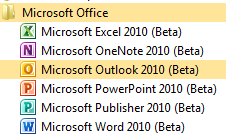
    The first thing I notice is that the Office components have all got new icons:

    image

    Outlook:

    The Outlook Connector doesn’t recognise the beta and installation fails; however as you’re setting up Outlook, it offers to go off and install the Connector for you. I gave it a try and it pulls down a different beta file…clearly made for Office 2010 as it installed without a problem.

    Having said that, the Outlook setup wizard doesn’t recognise that it’s installed, which is pretty annoying, and so goes off to find the settings online. After checking and double checking my account details to no avail, I tried another reboot…lo and behold, this time, it recognised that the connector was installed and went through with the account setup 🙂

    Web test:

    The folder structure on the left looks different than the Technical Preview and I noticed this:

    image

    See Web test at the bottom…what could it be? Let me show you:

    image

    That’s right, Twitter inside Outlook as default…that’s pretty cool 🙂 Once you’ve logged in, you can leave the Web Test folder and still be logged in when you come back.

    Social Media Integration:

    At the bottom of a new email, you now get this:

    image

    If you expand it using the arrow on the right, you get:

    image

    Click to add networks and you get:

    image

    Which hints at the social networking features present in Sharepoint 2010 🙂 It says there are more providers available online, but the link just takes you to a general Office site at the moment 😦 Once this is up & running, it will be pretty awesome…having, and I’m guessing at which will be included, Twitter, FaceBook & LinkedIn info and profiles available inside Outlook will be great. I’m not on Facebook (I know!) but I use the other two, especially Twitter, quite heavily for networking with suppliers, customers and colleagues.

    Blurring the divide between “Social Media” and “Corporate Resources” is a great move, one aimed at this “New World of Work” that will resonate with the graduates coming into the workplace as well as us cool, hip (!) people that get it too. I can imagine some managers/directors being a bit unsure about this but I’m confident they’ll quickly see the benefits…just like corporate IM.

    I’ve linked one of my Live Accounts into Outlook and just sent my first test email. It asked me to complete a “captcha” to verify my account before it would send it…something I don’t remember 2007 doing? You only need to do it once 🙂

    New network pane:

    Once you open up a new mail to someone who has emailed you, you get a message that Outlook wants to run an add-on. Click to run it and then Outlook starts showing you related mails and items.

    image

    I have to say that it takes quite a while for new mails to show up in the networking pane…hopefully this will be improved in the final version.

    Also, I’m finding that I’m needing to close and re-open Outlook for all the changes to take place and, while it’s showing emails, attachments aren’t showing up in the pane. Again, I think this is down to it’s beta status.

    This is very much a work in progress…I posted early so people could see the screenshots 🙂

    The Backstage Icon look a bit different too, a bit more boring:

    image

    Was there the option to swap colour schemes in 2007 and/or the 2010 tech preview? I’m quite liking the black:

    image

    This leads me onto something I realised the other week. I’ve been paying much more attention to the ins & outs of Office 2010 than I ever did 2007 and so finding all kinds of great new features. However, I can’t be 100% sure if they’re new to Office or just new to me 🙂 There are a few in Outlook where I think this may be the case…if so, feel free to let me know in the comments!

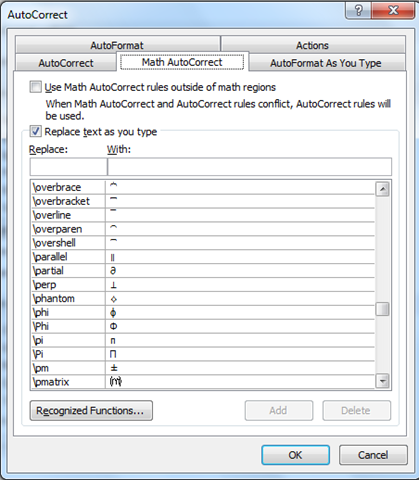
    Options –> Proofing –> AutoCorrect Options

    That takes you to the section that shows you what things are replaced with what. There are things such as “yuor = your” but it also shows you how to make the sign for Pi and much more…pretty interesting:

    image

    image

    Another feature I like the look of is “Keep track of formatting”:
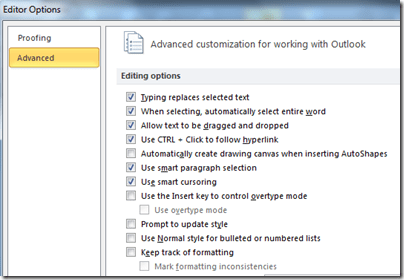
    image


    As for the other components:

    • Word
    • Excel
    • Powerpoint
    • OneNote

    I have to say that they all look pretty much the same to me, at least at this early stage!

    Symantec Backup Exec System Recovery (BESR) 2010


    Symantec’s Backup Exec System Recovery has always been a pretty great product. Allowing admins to snapshot systems to give them a quick restore of OS, Apps and settings as well as dissimilar hardware restores, restore to virtual machines and more has made it a very popular tool 🙂 This month of Novemeber sees the release of BESR 2010 with new versions and new features, so let’s take a look.

    Different Editions

    BESR 2010 comes in the following flavours:

    • Server Edition: RRP = $795
    • Windows Small Business Server Edition: RRP = $495
    • Desktop Edition: RRP = $69
    • Linux Edition (available December 2009): RRP = $495
    • Virtual Edition: RRP = $2495
    • Starter Kit: RRP = $3495

    An optional add-on is “BESR Management Solution” which allows you to centrally manage BESR jobs across your network. Perhaps surprisingly, this is available to all BESR customers free of charge!

    FAQs:

    What is the Starter Kit? The Starter Kit includes 5 Server Licences (with Granular Restore) and 10 Desktop Licences)

    What is the Virtual Edition? A single Symantec BESR Virtual Edition licence allows you to protect all Windows VM’s on a single physical server. Companies should realise some definite savings here.

    What is the Linux Edition? This gives image level backup of Red Hat & SUSE linux systems through a CMD-line interface.

    What does it support?:

    Symantec BESR 2010 fully supports:

    • Windows Server 2008 R2
    • Windows 7
    • Exchange 2010
    • Hyper-V 2.0
    • vSphere 4.0
    • XenServer 5.5

    Full Windows Support:

    • Microsoft Windows Server 2008, including SP1 and
    Server 2008 R2
    • Microsoft Windows Essential Business Server 2008
    • Windows Small Business Server 2003 and 2008
    • Microsoft Windows Server 2003 family including SP1 and R2
    • Microsoft Windows Storage Server 2003 (SP1)
    • Windows Vista Ultimate, Business and Enterprise
    • Windows XP Professional/Home (SP2 or later)
    • Windows XP Media Center
    • Windows 7 Ultimate, Enterprise and Professional

    Full Virtual environment support:

    • VMware vSphere 4.0
    • VMware ESXi 3.5 and 4.0
    • VMware ESX 3.0, 3.5 and 4.0
    • VMware Server 1.0 and 2.0
    • VMware Workstation 4, 5, and 6
    • Microsoft Hyper-V 1.0 and Hyper-V Server 2008 R2
    • Microsoft Virtual Server 2005 R2 and later
    • Citrix XenServer 4.x and 5.x

    Full Linux Environment Support:

    • SUSE Linux Enterprise Server 10, SP1 and SP2 (x86) 32-bit
    • SUSE Linux Enterprise Server 10, SP1 and SP2 (x86_64 not ia64) 64-bit
    • Red Hat Enterprise Linux 5.0, 5.1, 5.2, 5.3 (x86) 32-bit
    • Red Hat Enterprise Linux 5.0, 5.1, 5.2, 5.3 (x86_64 not ia64) 64-bit

    Note: SUSE Desktop & RedHat Desktop are NOT supported and BESR f Linux is a 32bit app..so it you’ve disables 32bit runtime, it won’t work.

    All in all, BESR 2010 is a pretty good bit of kit and will definitely make things easier should there be a disaster with the servers 🙂

    Microsoft Project Madison


    Project Madison is a new Data Warehousing solution from Microsoft, born out of their purchase of DATAllegro in August 2008. It is a:

    “highly scalable data warehouse appliance that delivers performance at low cost through a massively parallel processing (MPP) architecture.”

    It’s official name is “Microsoft SQL Server 2008 R2 Parallel Data Warehouse” (I’d have kept Madison myself) and it’s aim is to make Datacenters easily scalable from “Terabytes to Petabytes”.

    Massively Parallel Processing (MPP)

    Most traditional architectures are Symmetric Multi-Processing. This means that all the queries are processed in one physical instance of the database; so CPU, Memory & storage limitations of the box all limit the speed & scale of the implementation.

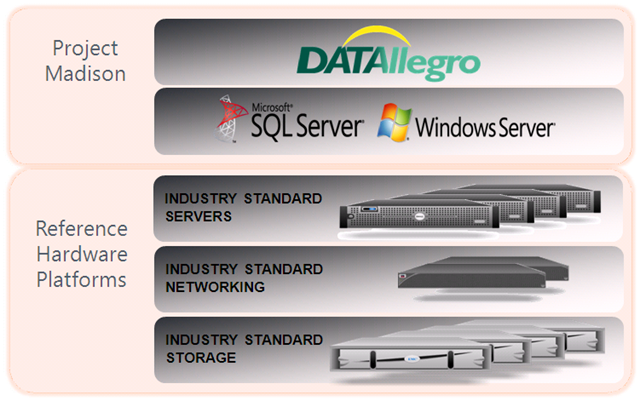
    Madison and it’s MPP approach get around that nicely as large tables are partitioned over multiple physical nodes. Each node has it’s own CPU, Storage and Memory and it’s own running instance of SQL Server…this is a patented approach known as “Ultra Shared Nothing” 🙂 Everything is mirrored as well for HA and redundancy.

    image

    It’s use of Industry Standard hardware helps keep the costs down and gives a much lower TCO (Total Cost of Ownership) that current DW (Data Warehousing) offerings. If you need to scale you can simply buy some more server (HP DL380’s, IBM Xwhatever’s etc) and add them into the environment…no more needing to purchase a whole new appliance and write off the previous one. Definitely a good point for CFO’s and their kind 🙂

    Architecture

    Madison’s approach to data storage makes it quicker, more reliable & more responsive to the needs of a business; or even to the needs of individual dept’s within a business. If you have multiple separate but related companies under a single umbrella (or you’re a big enterprise that has internal departments the same size as a small company!) Madison is definitely something you should take a look at.

    image

    Here, each Business Unit has it’s own Data Mart making it easier, quicker and cheaper for them to store and access their data, but a single “Golden” copy of data in the central reservoir resolves many issues. There is also great high availability here as Spokes or hubs can back each other up.


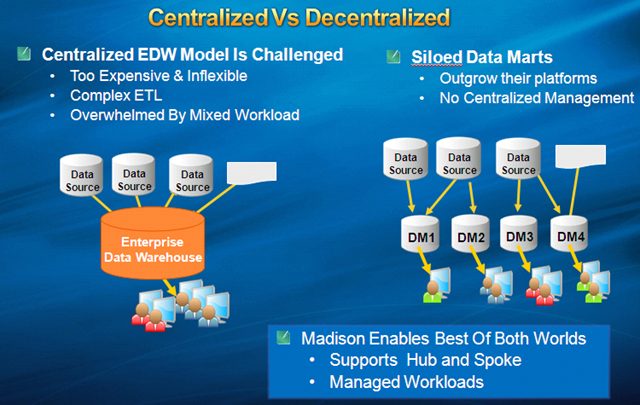
    This next image does a great job of showing the difference between Madison and current DW solutions:

    image

    Much more flexible 🙂 It’s also going to be fast, one example I saw was:

    “625K rows returned in 11 seconds from 1 trillion row table”

    That’s amazing!


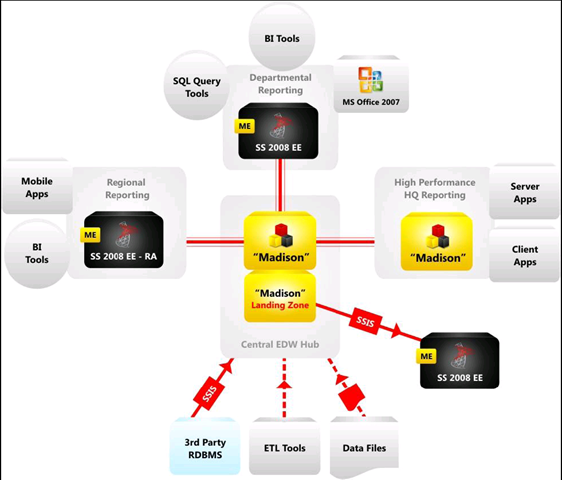
    You can see in the diagram below that it plugs into Office and also “BI Tools”, which surely is Sharepoint. This backs up what I’ve heard that Sharepoint Online will support Madison too!

    image

    Learn more over at:

     http://www.microsoft.com/sqlserver/2008/en/us/parallel-data-warehouse.aspx

    Microsoft BPOS: Sharepoint Online 2010


    Sharepoint 2010 is due for release around April time 2010 and the Online version will become available through BPOS around September time I do believe.

    When the 2010 version of Sharepoint (and Exchange & OCS) hit online, they will be SO much more fully features than the current 2007 versions; they will in fact be almost the same! This will be especially notable with Sharepoint as their is a large disparity at the moment:

    Read Comparison of Sharepoint Server & Sharepoint Online

    Sharepoint Online 2010 will include all the Business Intelligence (BI) aspects such as:

    • Excel Services
    • Forms Server
    • Dashboards
    • Key Performance Indicators (KPI’s)

    and more 🙂 As a BPOS Partner this is great news…the BI features are becoming more interesting to more people and not having these features can be quite a big barrier to Sharepoint Online adoption. That’ll all change next year which is great news 🙂

    Licensing

    Wave 14 will bring some changes to the BPOS licensing too…there will be Standard and Enterprise USLS…just as there are for the on-premise CALs.

    However, the split of features between the 2 will be decidedly different. The Enterprise CAL will include:

    FAST Enterprise Search

    There are also rumblings that it will include some part of, or ways of linking to, Microsoft’s Data Warehousing technology “Project Madison”. This would certainly fit with the BI capabilities inside Sharepoint…

    I’ll be doing a post dedicated to Madison soon so keep your eyes peeled for that 🙂

    This is all great news, for partners, customers and Redmond as, come H2 of 2010, Sharepoint Online will be a formidable challenger in the world of S+S/SAAS BI and should be pretty great. I, for one, am excited 🙂

    Props to W Cornwill for the Britney pic!

    Microsoft Data Protection Manager 2010 & Seagate


    Microsoft’s Data Protection Manager (DPM) is soon to arrive in it’s 2010 incarnation (first half 2010) so this week’s TechEd Conference is revealing a host of new features.

    DPM is currently a Windows focused product which, while not surprising, is quite limiting in many corporate IT environments these days. So with 2010, Microsoft have joined together with Seagate and OEM’d their i365 software to extend protection to heterogeneous environments including:

    • Linux
    • Unix
    • Netware
    • IBM iSeries
    • Oracle
    • VMWare

    A great list…but you’ll notice no Mac support 🙂

    This will instantly remove one of the main barriers to DPM adoption in enterprises,as many places have at least a few Linux/Unix servers running in their datacenters.

    Microsoft will also be offering online backups via Seagate’s EVault service and datacenters. It includes data compression and data de-duplication to reduce bandwidth hit and has:

    “a network of SAS 70 Type II certified, Tier 3 and 4 hosting facilities, WAN optimised backup and recovery, disaster recovery experts and processes, and a 12-year track record protecting data for over 22,000 customers across the globe”

    according to Seagate.

    What I find strange is that this doesn’t utilise any of Microsoft’s online services…in particular Microsoft Azure. With BPOS offering an online hosted archive, it seems strange that this technology can’t be extended to store other, non email, data too.

    Is using eVault just a temporary measure until Azure is fully up and running? I don’t know but I would expect that it’s in the long term plan to fold all this inside Azure…maybe some kind of Seagate purchase will happen?!

    I’m also keen to find out if the data compression and de-duplication are offered to customers who choose to back up on-site to local tape, NAS, SAN etc. De-Dupe is one of the big features Symantec are touting for the next release of Backup Exec (14 I guess to keep with superstition); if MS are including that too then it will really steal some thunder!

    Thanks to The Register for this…

    Microsoft “Geneva”: Single Sign On & Online Services


    Microsoft Geneva:

    “provides companies with simplified user access and single sign-on, for on-premises and cloud-based applications in the enterprise, across organizations, and on the Web to facilitate collaboration, increase security and reduce cost.”


    There are 3 components to Geneva which now have more official names:

    Geneva Framework = Windows Identity Foundation: provides developers pre-built .NET security logic for building claims-aware applications

    Geneva Server = Active Directory Federation Services (ADFS) 2.0: a security token service (STS) for issuing and transforming claims, enabling federations, and managing user access

    Geneva Cardspace = Windows Cardspace: helps users navigate access decisions

    The aim of Geneva is to provide a true “Single Sign On” (SSO) experience to users across the various platforms that they come across, be they corporate and/or personal.

    For example, once a user is logged in with their corporate domain credentials they could then access Microsoft Online Services such as Hotmail, MSDN, LiveSpaces etc; without being prompted to enter their @hotmail/@live credentials. All this requires is 1 Geneva Server and a Windows Live Tool currently called “Microsoft Online Services Federation Utility”.

    Federation Gateway

    The Microsoft Federation Gateway is a cloud based identity service, that extends beyond your corporate domain out into the internet. This is the hub for all the connections users want to make to external MS technologies, be it Azure, Live or BPOS (MS use CRM Online as an example on the MSDN site).

    Cc287610.405c867e-b9fe-4933-8ca1-7387ae678041(en-us,MSDN.10).gif

    The above shows the federation of identities between partners. An example of how the data flows between the different points of the SSO setup can be seen below:

    Cc287610.83e88583-1e36-4e3c-8cfd-51a1a312b9a0(en-us,MSDN.10).gif

    You can find more information about the Microsoft Federation Gateway on MSDN here.

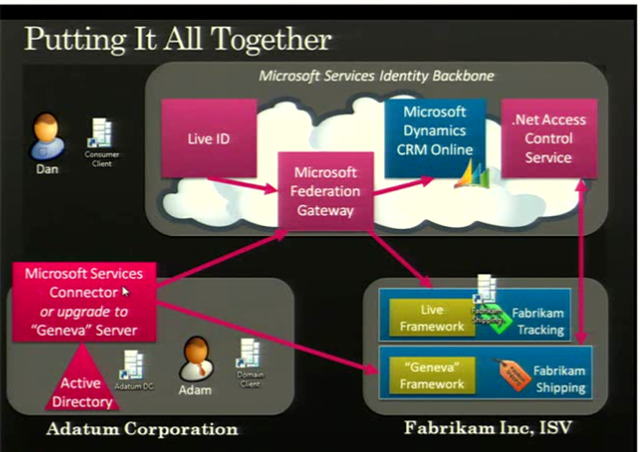
    A slide from PDC 2008 showed an example of Geneva working with a BPOS component for the US:

    image

    The full 1hour+ video of the “Identity Roadmap for Software + Services” presentation video from PDC 2008 can be viewed here on Channel 9.

    I know that BPOS, Microsoft’s hosted offerings of Exchange & Sharepoint (among others) will start using ADFS 2.0 at some stage next year. Most likely when the 2010 versions are deployed to the cloud, which I expect to be around late calendar Q3 so August/September. This is where I’m particularly keen to see what Geneva can do for SSO…it should make it pretty much seamless for corporate users whether they’re accessing on-site applications such as Exchange, their Online brethren, custom developed applications, hotmail, MSDN and more…and that will be excellent!

    I use a variety of different MS Online Services and have at least 3 different logins for them…I’ll be interested to see if Geneva can look after that for me 🙂 BPOS currently comes with a separate SSO client which needs to be installed for each user and comes with it’s own unique set of issues, so having a corporate wide SSO would definitely be better. Also, you currently need to re-enter your details for OWA with BPOS as it’s on an HTTPS connection…I assume Geneva would remove that need?

    Some great technical documents, step-by-step guides and Virtual Machine demos of Geneva can be found on the Technet site here.