Microsoft Security Copilot SCU included with Microsoft 365 E5


Microsoft Security Copilot uses Security Compute Units (SCU) to measure the compute power used to run various workloads. A quantity of these is now available with Microsoft 365 E5 licenses, rollout starting from November 18th 2025..

What SCU capacity is included with Microsoft 365 E5 licenses?

Each Microsoft 365 E5 license includes 0.4 SCU so, for example, an organisation with 1,000 M365 E5 licenses will have 400 SCU per month. The allocation resets monthly and unused SCU cannot be rolled over to the next month.

There is a maximum limit of 10,000 included SCU per month – this is equivalent to 25,000 M365 E5 licenses.

Pricing considerations

Should organisations exceed their M365 E5 included SCU quantity, overage SCU will be available for $6 per SCU on a Pay As You Go (PAYG) basis. That is 50% higher than the “Provisioned” SCU pricing of $4.

However, an interesting point – and something that adds complexity to these decisions – is that the included SCU provide more flexible billing than the traditional provisioned capacity model.

Under provisioned capacity, an organisation commits to a set number of SCU per hour and is charged for that amount even if actual usage is lower. With E5, the included SCU are drawn down only by the amount actually consumed each hour, which provides a more accurate reflection of usage and avoids paying for unused capacity:

  • With Provisioned Capacity, if you provision 5 SCU but only use 3.5 – tough, you pay for all 5.
  • With E5 Included, you would only use 3.5 SCU.

This addition is another move to keep organisations on M365 E5, rather than stepping down to E3 +add-on.

SCU included with Microsoft 365 E5 – https://learn.microsoft.com/en-gb/copilot/security/security-copilot-inclusion

Microsoft Product Terms: September 2025


Photo by Markus Winkler on Pexels.com

Visual Studio Subscriptions have been added to MCA

Windows 10 ESU added to CSP

Microsoft Defender & Microsoft Purview Suites have now been made available to Business Premium users

That last point is very interesting as this brings a world of new security features to smaller organisations – which will have multiple impacts:

1) directly increase the ARPU (Average Revenue Per User) of SMB customers as they buy new add-ons
2) increase the chances of SMB customers adopting Copilot – as these new products address many of the security/data challenges…
2b) which will further increase the ARPU of SMB customers

Microsoft have long been calling out the strength of SMB driving M365 sales so this is a logical next step.

Microsoft Copilot for Security


After a seemingly successful preview period, Microsoft’s Copilot for Security is now generally available.

Capabilities

Copilot for Security has a range of features and capabilities that help organisations across the range of Microsoft’s security products such as Defender, Intune, and Purview. These include:

and many more can be found here – https://techcommunity.microsoft.com/t5/microsoft-security-copilot-blog/microsoft-copilot-for-security-general-availability-details/ba-p/4079970

Licensing & Pricing

Copilot for Security uses a consumption model based on Security Compute Units (SCU), which are charged at $4 per hour. For example:

40 security staff using it for 1 hour every weekday = 40 (hours) x 22 (days) x 4 (dollars)

40 hours x 22 days = 880 hours per month which is = $3,520 per month.

I feel like for many organisations those numbers will end up being higher in reality.

Microsoft Sentinel for Power Platform


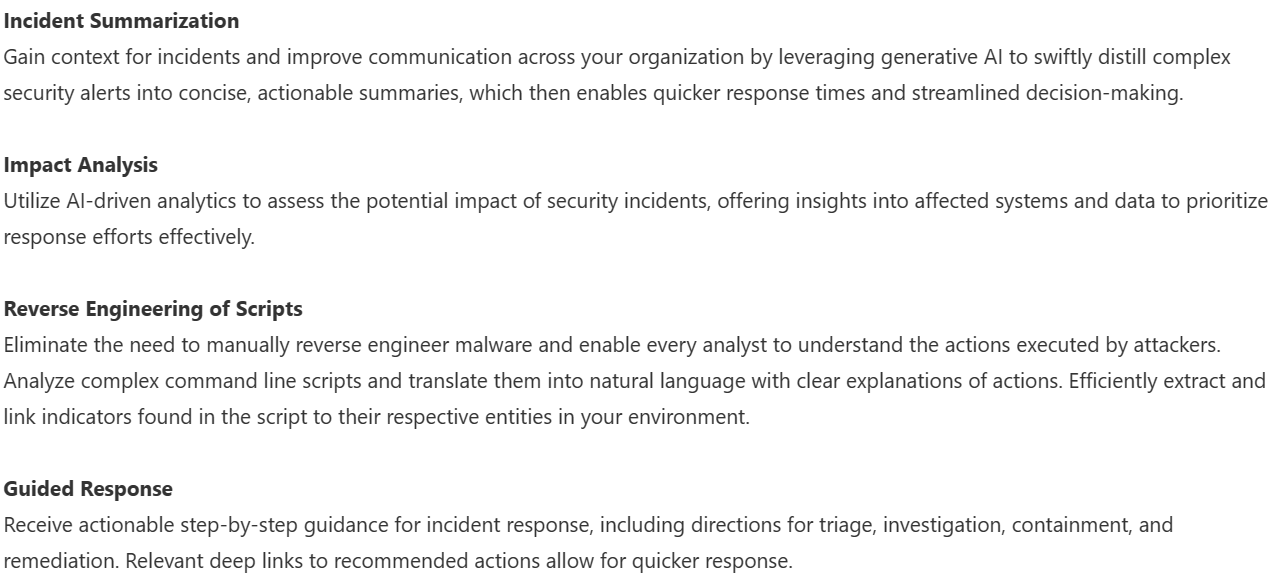
Microsoft have released the preview of “Microsoft Sentinel for Power Platform” without much fanfare (overshadowed by Copilot really) but I think it could be a very interesting offering. Microsoft Sentinel is a SIEM (security information event and management) platform, aimed at enabling organisations to monitor, discover, remediate, and prevent security attacks across their organisation.

Low code risks

As more and more users develop low code applications within organisations, the risks to those businesses increase. The apps will connect to various internal and external systems, containing and moving data – some of which may be sensitive and/or covered by regulations such as the GDPR or HIPAA – and perhaps linking to web servers and SaaS applications too.

Applications created by highly trained developers with years of experience and huge budgets often suffer from security weaknesses; one can only imagine the potential problems with apps created by citizen developers!

Microsoft Sentinel for Power Platform

This will enable organisations to monitor Power Platform environments and detect any suspicious activity such as:

  • Power Apps execution from unauthorized geographies
  • Suspicious data destruction by Power Apps
  • Mass deletion of Power Apps
  • Phishing attacks made possible through Power Apps
  • Power Automate flows activity by departing employees
  • Microsoft Power Platform connectors added to the an environment
  • Update or removal of Microsoft Power Platform data loss prevention (DLP) policies

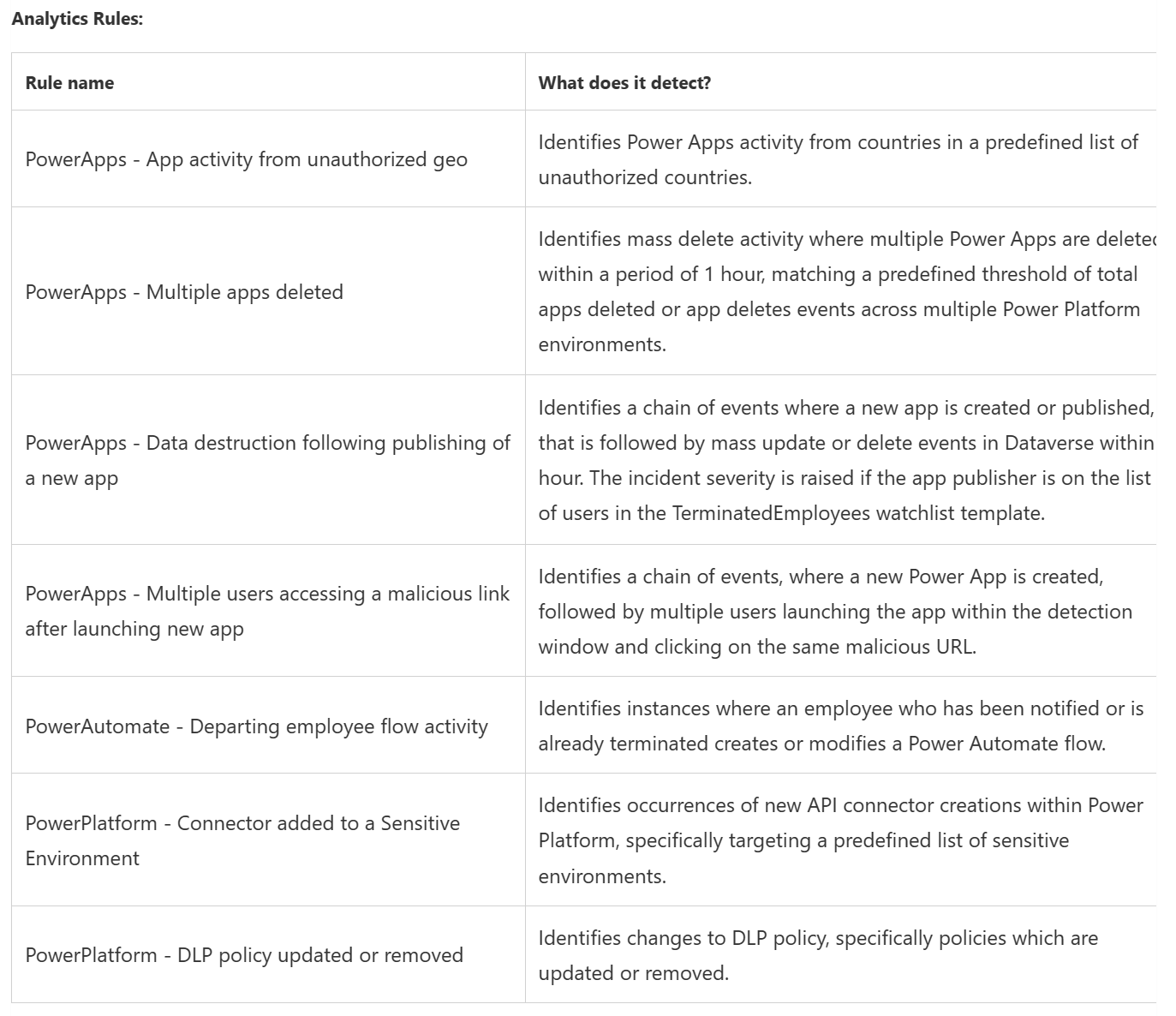
The initial rules included are:

but as we’ve seen with Microsoft Sentinel itself, these will be added to over time.

Almost every organisation will find itself with a large Power App and Power Automate user base so Sentinel for Power Platform could really be worthwhile.

See more info here and here.

Microsoft Purview Premium Audit features added to Standard


Following recent security breaches where important information was only available to those customers paying for Office 365 E5, Microsoft have announced they are moving certain Microsoft Purview Audit features from the Premium tier into the Standard tier. Following urging from the ‘Cybersecurity and Infrastructure Security Agency’ (CISA), updates will start from September 2023.

Purview audit availability

Purview Audit Premium is only available with E5 licenses while Purview Audit Standard is part of:

  • Microsoft Business Basic/Standard subscriptions
  • Microsoft 365 Apps for Business subscription
  • Microsoft 365 Enterprise E3 subscription
  • Microsoft 365 Business Premium
  • Microsoft 365 Education A3 subscription
  • Microsoft 365 Government G1/G3 subscriptions
  • Microsoft 365 Frontline F1 or F3 subscription, or F5 Security add-on
  • Office 365 Enterprise E1/E3 subscription
  • Office 365 Education A1/A3 subscriptions

which covers a significantly wider portion of Microsoft’s customer base.

Customer with these licenses “will receive deeper visibility into security data, including detailed logs of email access and more than 30 other types of log data” and Microsoft are also doubling the default retention length from 90 to 180 days.

You can see the Microsoft announcement here.

Microsoft Entra gains two new products


Photo by George Becker on Pexels.com

Microsoft have added 2 new products to their Entra family:

  • Microsoft Entra Internet Access
  • Microsoft Entra Private Access

Both are focused on security and protecting access to apps over the internet.

Microsoft Entra Internet Access

An identity-centric Secure Web Gateway that protects access to internet, SaaS, and Microsoft 365 apps and resources. It extends Conditional Access policies with network conditions to protect against malicious internet traffic and other threats from the open internet.

Microsoft Entra Private Access

An identity-centric Zero Trust Network Access that secures access to private apps and resources. It reduces operational complexity and cost by replacing legacy VPNs and offers more granular security. You can apply Conditional Access to individual applications, and enforce multifactor authentication, device compliance, and other controls to any legacy application without changing those applications

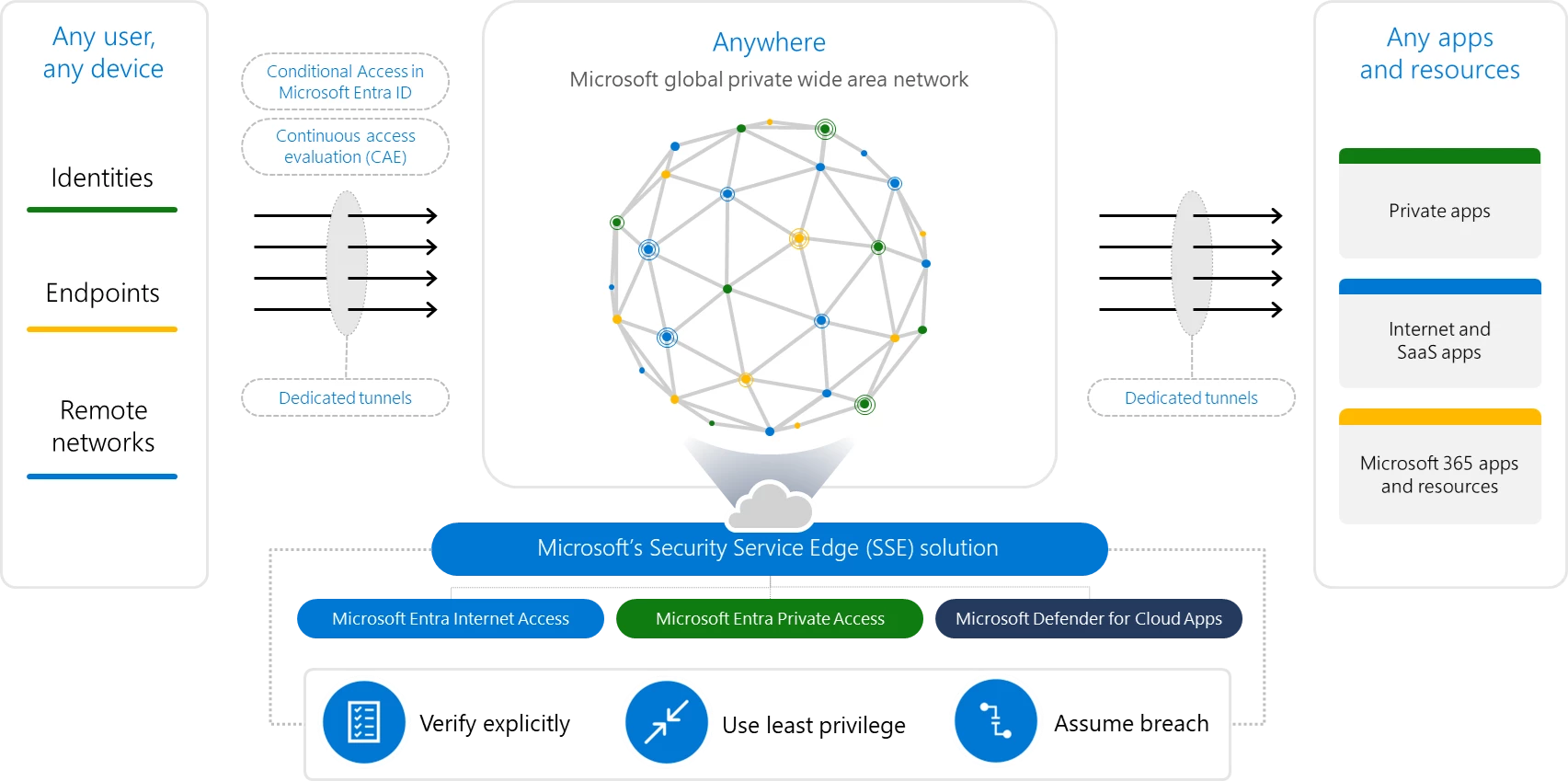
These 2 products, plus Defender for Cloud Apps, form what Microsoft call their Security Service Edge (SSE) solution:

https://www.microsoft.com/en-us/security/blog/2023/07/11/microsoft-entra-expands-into-security-service-edge-and-azure-ad-becomes-microsoft-entra-id/

See more info here.

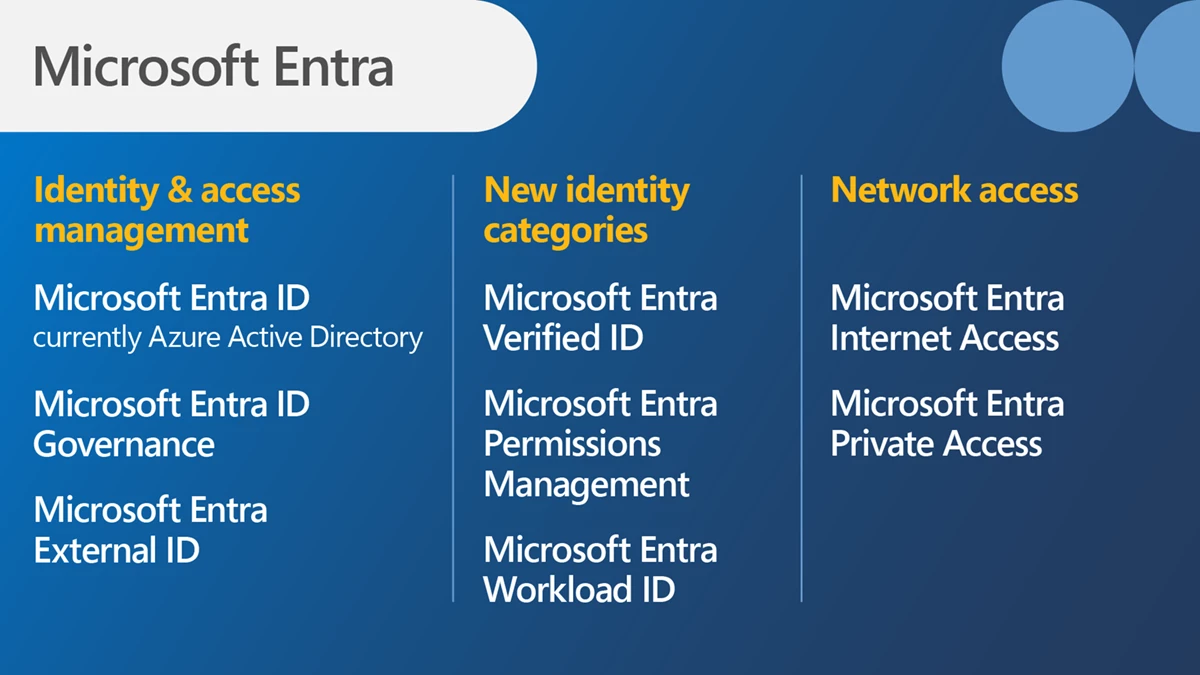
The Entra line-up will soon be:

Azure Active Directory is now Microsoft Entra ID


Microsoft have announced that Azure Active Directory (Azure AD) will, from August 2023, be known as Microsoft Entra ID.

Nothing else changes – no licensing, no capabilities, no portals etc. – it’s just a re-brand:

See the announcement here.

New Microsoft products – Defender Threat Intelligence, External Attack Defender, & Sentinel for SAP


Photo by Susanne Jutzeler, suju-foto on Pexels.com

Microsoft have added more new products to the Defender family – “Microsoft Defender Threat Intelligence” and “Microsoft Defender External Attack Surface Management” – and have brought out an SAP add-on for Microsoft Sentinel.

Microsoft Defender Threat Intelligence

This new offering, incorporating what was RiskIQ, effectively “maps the internet” and gives customers direct access to Microsoft’s real-time data and security signals; this enables organisations to “proactively hunt” for threats within their environment.

https://www.microsoft.com/en-us/security/business/siem-and-xdr/microsoft-defender-threat-intelligence?rtc=1

Microsoft Defender External Attack Surface Management

This helps organisations identify all their internet facing resources – including those you’re not aware of and/or have forgotten about. It’s so easy to lose track of your external facing devices with COVID changes, mergers, good old shadow IT, and the potential for mis-configured assets around the business.

https://www.microsoft.com/en-us/security/business/cloud-security/microsoft-defender-external-attack-surface-management?rtc=1

Being able to see a continuously updated map of potentially vulnerable assets will be key for organisations looking to protect themselves, their assets, and their users.

Microsoft Sentinel for SAP

They have announced an SAP specific add-on for Microsoft Sentinel that will:

  • Monitor all system layers
  • Detect & respond to threats
  • Enable customisation to extend protection

According to Microsoft it will integrate with “virtually any” NetWeaver system. It launched in August 2022 and is free for the first 6 months. After that it will be an add-on charge to the regular Sentinel pricing.

Further Reading

Threat Intelligence

External Attack Surface Management

Sentinel for SAP

Microsoft Defender for Cloud pricing


Photo by Pixabay on Pexels.com

Microsoft Defender for Cloud is a relatively new product name – created through a combination of “Azure Defender” and “Azure Security Center” – and is Microsoft’s solution for “cloud security posture management” (CSPM) and “cloud workload protection” (CWP).

It works not only in Azure but also Amazon AWS and Google GCP and hybrid scenarios via Azure Arc.

Licensing & Pricing

The main thing to understand is that Microsoft Defender for Cloud isn’t one thing, it is an umbrella for several separate products that all have their own costs.

Resource TypePrice
Microsoft Defender for Servers Plan 1£0.006/Server/hour
Microsoft Defender for Servers Plan 2£0.016/Server/hour
Included data – 500 MB/day
Microsoft Defender for Containers£0.0072/vCore/hour
Microsoft Defender for SQL on Azure£0.016/Instance/hour
Microsoft Defender for SQL outside Azure£0.012/vCore/hour
Microsoft Defender for MySQL£11.420/Instance/month
Microsoft Defender for PostgreSQL£11.420/Instance/month
Microsoft Defender for MariaDB£0.016/Instance/hour
Microsoft Defender for Storage£0.016/10K transactions
Microsoft Defender for App Service£0.016/App Service/hour
Microsoft Defender for Key Vault£0.02/10K transactions
Microsoft Defender for ARM£3.046/1M API calls
Microsoft Defender for DNS£0.533/1M Queries
Microsoft Defender for IoT agentless monitoring£107 per month per 100 monitored devices
https://azure.microsoft.com/en-gb/pricing/details/defender-for-cloud/

Microsoft Defender for IoT agentless monitoring covers existing environments and is deployed on-premises. It can be connected to Microsoft Sentinel with no additional Sentinel charges – but it will require an IoT Hub which costs between £7.61 – £1903.17 per month.

For new IoT devices deployed via Azure IoT Hub, Defender pricing is:

SolutionPrice
Defender for IoT for devices managed by IoT Hub – by device£0.0008/month
Defender for IoT for devices managed by IoT Hub – by messages£0.153/25K transactions

Both of these offer free usage for the first 30 days and then the pricing kicks in, so be aware of what things people are turning on within your organisation.

Microsoft Defender for Cloud Free Tier

This is enabled on all Azure subscriptions when you visit the Defender for Cloud section of the Azure portal and includes:

  • Continuous assessment
  • Security recommendations
  • Secure Score for Azure
  • Secure Score for AWS

Further Reading

The Microsoft Defender for Cloud page is here.

Microsoft introduce Defender for Endpoint Plan 1


Photo by Pixabay on Pexels.com

Microsoft have announced the preview of “Microsoft Defender for Endpoint Plan 1”.

Microsoft Defender for Endpoint (MDfE) is the new name for “Microsoft Defender Advanced Threat Protection” (MDATP), which is the differentiator between Windows 10 E3 and E5. The existing version of MDfE will become Plan 2 and the newly introduced Plan 1 will contain a subset of features.

What’s included?

Defender for Endpoint Plan 1 diagram
Microsoft Docs site

The Plan 1 offering will include:

  • Next-generation protection
    • This includes anti-virus and anti-malware cover
  • Attack surface reduction
    • These include:
      • Ransomware mitigation
      • Web protection
      • Network firewall
      • and more
  • Manual response actions
    • These are:
      • Run anti-virus scan
      • Isolate device
      • Stop and quarantine
      • Indicators to block/allow files
  • Centralised management
    • Includes access to the Microsoft 365 Defender portal with RBAC access and reporting.
  • It will also include:
    • Security reports
    • APIs

The MS Docs page states that MDfE P1 will support:

  • Windows 10 1709 and later
  • macOS Big Sur, Catalina, and Mojave
  • iOS
  • Android OS

although the MS Tech Community page states “Windows 7, 8.1, 10, 11, macOS, Android, and iOS“.

Differences between Plan 1 & Plan 2

Features exclusive to Plan 2 include:

  • Device discovery
  • Threat & vulnerability management
  • Automated investigation & response
  • Advanced hunting
  • Endpoint detection & response
  • Microsoft Threat Experts
  • Support for Windows Server
  • Support for Linux

Licensing

MDfE Plan 1 will be included in Microsoft 365 E3/A3 and will also be available as a standalone license.

You can check out the preview of MDfE P1 here – Preview signup.

Further Reading

Techcommunity announcement

MS Docs page