Office for iPad


image 

BOOM – it’s here…Word, Excel & PowerPoint FOR THE IPAD!

image

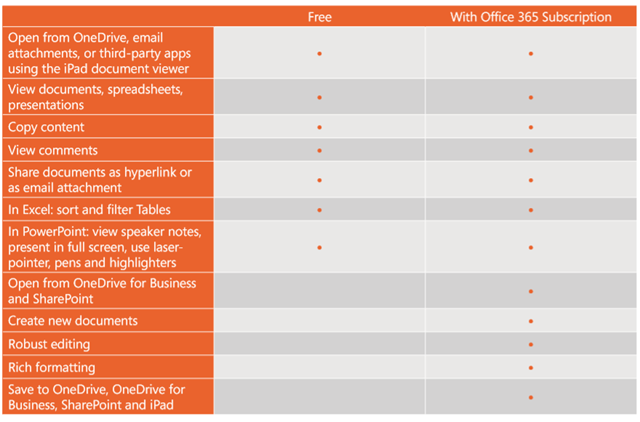
Office for iPad uses a “Freemium” model. It is free to download the app, free to view and present with – to create and/or edit, you will need an Office 365 subscription.

The differences between free & paid are:

image

Q: What Office 365 subscription plans include Office for iPad?

A:

  • Office 365 Home
  • Office 365 Small Business Premium
  • Office 365 Midsize Business
  • Office 365 E3 and E4 (Enterprise and Government)
  • Office 365 Education A3 and A4
  • Office 365 ProPlus
  • Office 365 University

The new Office 365 Personal will also qualify when it becomes available later this spring.

PSTN dialling coming to Lync Online


This is a big one. It’s been announced at this year’s Lync Conference that Lync Online will soon have the ability to make and receive calls to/from the PSTN network.

PSTN is the Public Switched Telephone Network – the “normal” phones rather than VOIP (Voice Over Internet Protocol) phones. This update will enable Lync Online users to make/receive calls directly to the regular phone network – will open things up to a huge number of users and companies.

I can’t see much more info than this at the moment – Twitter lit up with the news that this had been announced but that seems to be the extent of it! As I hear more, I’ll post again!

Office 365 and Multi-Factor Authentication


Cloud Services, rightly, throw up a number of questions around security and Microsoft always seem to be making improvements to the, already substantial, security of Office 365.

A recent one is the availability of Multi-Factor Authentication (MFA) for all Office 365 users. This has been available for admins since June 2013 but has now rolled out across the board.

With Multi-Factor Authentication for Office 365, users are required to acknowledge a phone call, text message, or an app notification on their smartphone after correctly entering their password. Only after this second authentication factor has been satisfied can a user sign in.

This will be very similar to the process already in place for Microsoft Accounts, when you sign into a new device and you receive a confirmation text.

Admins can set MFA for some/all users in the admin console, as you’d expect.

The second authentication factor options are:

  • Call my mobile
  • Text my mobile
  • Call my Office phone
  • Notify me through app
  • Show one-time code in app

Currently this isn’t available with the desktop apps of Office 2013 so MS have introduced App Passwords to help increase the security here.

Once an information worker has logged in with multi-factor authentication, they will be able to create one or more App Passwords for use in Office client applications. An App Password is a 16-character randomly generated password that can be used with an Office client application as a way of increasing security in lieu of the second authentication factor.

Roadmap

It’s interesting to see that Microsoft are continuing to invest in MFA with Office desktop applications, and so App Passwords will be only a temporary method.

We’re planning to add native multi-factor authentication for applications such as Outlook, Lync, Word, Excel, PowerPoint, PowerShell, and OneDrive for Business, with a release date planned for later in 2014. This update includes the current phone-based multi-factor authentication, and it adds capability to integrate other forms of authentication such as: third-party multi-factor authentication solutions and smart cards.

Multi Factor Authentication with desktop apps isn’t something I’ve really though about to be honest, but as ever more data is accessed via Office and desktops, it certainly makes sense.

Read more about Office 365 & MFA here:

http://blogs.office.com/2014/02/10/multi-factor-authentication-for-office-365/

Power BI General Availability


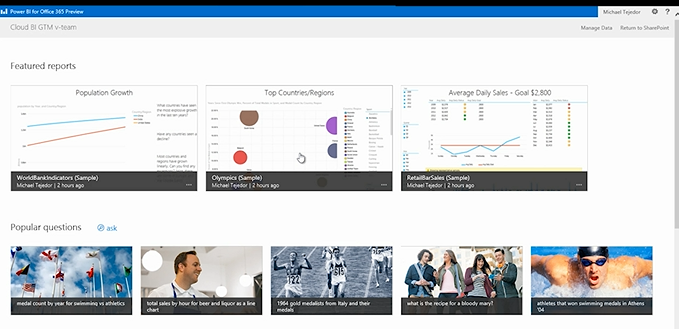
Business Intelligence is an ever growing area and I think it will continue to grow for quite some time. Taking note of the data you have, analysing it and making decisions based on it is becoming more and more prevalent – think what Billy Beane has been doing at the A’s for years, what Bill James does with the Red Sox, look at how Opta stats have become such a huge thing within premier league football…all these are examples of business intelligence.

The new way:

imageimage

I’m amazed at some of the things that are being done with Power Bi, especially combined with Excel 2013! The opportunity for organizations to become so much smarter with how and what they’re doing is huge – the fact that it’s cloud based so allows access from anywhere is a big deal, especially with the Windows 8 & RT apps AND HTML5 support.

It’s available now so pricing is in the pricefiles – to see some of the things you can do with Power BI, head over to:

http://www.microsoft.com/en-us/powerbi/default.aspx#fbid=rZ1xycdtZvO

Windows Intune & Power BI coming to Open Licensing


In a very encouraging move, Microsoft have announced that, from April 1st 2014, customers will be able to purchase both Windows Intune through the Open licensing program.

Currently Intune is available only via the MS portal but will now sit alongside Office 365 (and soon Power BI too) on the regular pricelists.

See more here:

http://www.digitalwpc.com/Community/Perspectives/Pages/Windows-Intune-and-Power-BI-coming-to-Open-Volume-Licensing.aspx?fbid=-jjTmFnB-aO&mtag=mbar-twitter&mtag=mbar-linkedin#fbid=PVSRpLQGbVC

Hat tip to Licensing School for finding this.

Office 365 Admin Access in Exchange Online


Office 365 Wave 15 (the current release) brought with it a new admin console, that consolidates and streamlines access to most requirements. That said, one of the common worries for IT managers is around loss of control when compared to administering their on-site infrastructure.

A great tip from @12knocksinna shows how to gain access to an extra level of features:

image

To access this, simply fire up OWA and then change /OWA to /ECP in the URL an hey presto –  you’re in!

I’m sure I remember these features being available in the beta release of Wave 15 – anyone else?!

See Tony’s full blog about it her:

http://m.windowsitpro.com/blog/wave-15-office-365-admin-interface-unifies-applications-lacks-some-functionality

Office 365 Cross Family Transitions


At the 2013 WorldWide Partner Conference (WPC), Microsoft announced plans to make it easier for customers to switch between Office 365 plans – this was greeted by smiles & cheers from many!

The initial introduction worked only for a few cases but the supported switching scenarios have now been expanded to include:

From To
Small Business MidSize Business
Enterprise E1
Enterprise E3
Enterprise E4
Small Business Premium MidSize Business
Enterprise E3
Enterprise E4
Exchange Online Plan 1 Enterprise E1
Enterprise E3
Enterprise E4
MidSize Business
Exchange Online Plan 2
Enterprise E3
Enterprise E4

Microsoft say:

“We continue to work on transition solutions for both additional scenarios (e.g., Exchange Online to Midsize Business) as well as for Open subscriptions and Government/Academic SKUs”

So there will continue to be additions and improvements around this – making Office 365 even more relevant for businesses everywhere.

Office 365 MidSize Business and Exchange Online Archiving


Exchange Online Archiving (EOA) is now available as an add-on for Office 365 MidSize Business; this gives MidSize users unlimited archiving as well as legal hold capabilities.

It’s great to see Microsoft continuing to improve and add to their Office 365 platforms, and this move really helps SMBs to attain Enterprise levels of service.

The Ordering Process

Currently, EOA can only be added to MidSize Business licenses purchased via the Advisor model, that is via the Microsoft Online Portal. If you purchased via Open Licensing (so from your reseller partner – and you pay them rather than MS), you need to add just 1 license of MidSize Business via the Advisor Model. That way, you’ll then be able to attach EOA to that license but fear not, the subscription can be applied to all mailboxes on that tenant – including those purchased via Open.

The process is nice and simple, which is good:

  1. Login to your Office 365 account as the Administrator.
  2. Go to the “Purchase Services” tab in the Admin Console.
  3. Click “Add” to purchase one additional seat of Office 365 Midsize Business.
  4. You can add Exchange Online Archiving at the same time as you add the direct bill seat of Midsize Business:
  5. Select the “Optional Add-ons” dropdown and enter the number of licenses of EOA you want to purchase.
  6. Add to the cart and proceed to payment by clicking “check out.”
  7. Follow the wizard to complete your payment with a purchase by credit card or other locally available payment method.

Microsoft Student Advantage


Microsoft have announced another great benefit available to education customers:

“Any academic institution that licenses Office for staff & faculty can provide Office 365 Office Pro Plus to students AT NO ADDITIONAL COST”

This, known as Student Advantage, starts from December 1st.

Its aim is to help give students the skills they’ll need to be successful out in the world of work, whilst helping schools manage costs – certainly a worthy aim!

You can read more here:

http://blogs.technet.com/b/microsoft_on_the_issues/archive/2013/10/14/microsoft-announces-new-student-advantage-program-to-prepare-students-for-tomorrow-s-jobs.aspx#!

Switching between Office 365 plans


It was announced at WPC 2013 that Microsoft would be making it easier for Office 365 customers to move between the various plans and now, less that 4 weeks later, the first move has been made.

This first update makes it MUCH easier to move to a higher plan within the same family. Considering that this scenario is the customer saying “I want more features and will give you more money for them” it was an oddly difficult process; it required a call to support, cancelling subscriptions and manually re-assigning licenses! Now it is all done with a simple, automated self-service wizard in the Admin portal – happy days! The current options are:

image

NB: As the moment, only subscriptions of 300 or fewer users can be switched with this method. Also, this is only available to those with the new portal – if you’re still waiting for the upgrade this won’t be there.

Future Updates

Microsoft are also working on expanding the switching options to make it possible to move between families. Later this year the following will be available:

image

Giving people the ability to easily move from Midsize Business to E3 will be a great option.

For more info head over to http://blogs.office.com/b/office365tech/archive/2013/08/01/office-365-customers-can-more-easily-switch-plans.aspx

Cheers

Rich