Windows 7 & Server 2008 R2


Windows 7 is excellent on it’s own, full of great new features, but when combined with Windows Server 2008 R2-it really comes in to it’s own. Things such as Direct Access, Branch Cache and Network Access Protection help make things easier, faster, more secure and better than ever before!

Win7 & R2

Direct Access:

Direct Access is Microsoft’s answer to the pain that is VPN’s. They are often tricky to set up, tricky to use with failed connections etc and can waste a lot of time and money in helpdesk calls and lost productivity; so this is where Direct Access comes in. Once PC’s have connected to the corporate network once, they’ll be able to do it anytime, from anywhere:

Direct AccessDirect Access

This means users will receive the latest updates wherever they log on…home, the airport, a hotel-anywhere! Making mobile working a more secure propostion for users and admins…

For more details, see my dedicated post here and there is a great Solution Design Technet article here.

Branch Cache:

This new feature is designed for remote office and works by caching information on local servers rather than retrieving it from HQ each time. I’ve just seen that the information can be cached on client computers and this is knows as “distributed cache mode”.This decreases network traffic and, at the same time, helps increase users productivity.

Branch Cache

Branch cache retention policies can be set by IT be it based on cache size, length of time cached etc. Technet has a great Early Adopters guide that’s full of information and can be found here.

To benefit from all these features, you need to run both Windows 7 AND Windows Server 2008 R2:

Licensing

Windows 7 not on ARM netbooks


With Windows 7, Microsoft have made a clear effort to include the netbook market with the OS’s smaller footprint, reduced hardware utilization and the recent removal of the 3 application limit. However, one area of the market that doesn’t look to be included is ARM-based netbooks, according to Microsoft’s announcement at this week’s Computex trade show.

What is ARM?

ARM (Acorn/Advanced RISC Machines) is a type of CPU first made in the 1980’s. These small processors are developed for low power consumption and so are found in most portable devices including mobile phones, PDAs & iPods as well as hard drives and routers.

It is believed that Microsoft’s long standing relationships with Intel & AMD are behind their decision not to support ARM with Windows 7, although they have also been working with ARM for 12 years on Windows CE & Windows Mobile-both of which sit on ARM processors.

Microsoft’s official statement was:

At this time, Windows 7 does not support any ARM architecture. Currently, Windows works on both x86 and x64 platforms, which, thanks to the pervasive PC hardware standard, power the vast majority of the world’s laptops and desktops. In the specialized devices space, where ARM is well suited, we offer the Windows Embedded CE platform

The first three words, “at this time”, could be significant; does that mean that an ARM compatible version is in the works? Perhaps it will make a surprise appearance before the General Availability date of October 22nd or possibly the early part of 2010; it would certainly be a mistake for Redmond to dismiss this growing section of the market-particularly with Google Android’s arrival on 6 new ARM netbooks!

Bingtones


To coincide with the release of the awesome Bing decision engine, Microsoft have made 3 bing-themed ringtones, or Bingtones, available.

Go grab them here and see what you think 🙂 I’m a little worried to say that I quite like Bingtone 2!

Thanks to Pocket PC Thoughts.

MS MyPhone open to all


That’s right folks, the beta of Microsoft’s MyPhone is open to everyone-go and sign up here.

I’ve been using it for a couple of months and it’s pretty much excellent It’s a great way to keep a backup of Office files and photo’s- as well as text messages. I also find it useful for getting items from my phone to my pc when I can’t find my USB cable, which seems to be most of the time 🙂 It will really come in to it’s own when you get  a new phone and you have a nice easy way to quickly import your texts etc.

It’s biggest drawback in my eyes is it’s 200MB storage limit, that makes it no real use for music and transferring MP3’s and WMA’s is where I’d love to use it most. This could easily be overcome by using the Hotmail SkyDrive as a storage pool-giving us all 25GB 🙂 As it was originally called “SkyBox”-that link could still be a possibility…

Office Communicator Mobile for Java


Microsoft Office Communicator Mobile for Java is a new enterprise messaging client built on the Java Platform Micro Edition. Thanks to John Westworth for the heads up on this.

 When deployed together with Office Communications Server 2007 R2, Communicator Mobile for Java enables several mobile phones that are otherwise not supported by native clients but have the capability to run Java applications to function as unified communications endpoints, providing instant messaging (IM), presence, and telephony to create a familiar experience for users of Microsoft Office Communicator.

Like Office Communicator users, Communicator Mobile for Java users can:

  • View Contact List and click to call.
  • View contacts’ presence.
  • Search enterprise directory and click to call.
  • Directly dial enterprise-routed calls from a mobile phone.
  • Benefit from Single Number Reach, where a user can be reached on the mobile phone like all other endpoints when contacted through one phone number assigned to the user.
  • Control incoming enterprise-routed cellular voice calls and choose to redirect them to Unified Enterprise Voice Mail.
  • Receive notifications of unread voice mail count and respond by calling voice mail (on selected models).
  • Initiate IM conversations with individuals and also add more participants to escalate conversations to IM Conferences.
  • Retrieve the phone book contacts from the phone into Communicator Mobile for Java and call those numbers from Communicator Mobile for Java

The following are prerequisites for installing the Communicator Mobile for Java client.

  • Nokia S60
  • Nokia S40
  • Motorola RAZR V3xx

Each of the mobile phones must also meet the following prerequisites:

  • Capable of running Java applications greater than 512 KB, and with a heap size of 2 MB.
  • Mobile Information Device Profile 2.0 (MIDP 2.0).
  • Connected Limited Device Configuration 1.1 (CLDC 1.1).
  • Screen resolution:
    240×320 for Nokia S40 and Motorola RAZR V3xx phones.
    240X 320 or 320×240 for Nokia S60 phones.
  • Data-connection-enabled (GPRS, Edge, or 3G connection) mobile device. Subscription to an unlimited data plan on the mobile device is recommended, because the client and server will be exchanging messages even when they are in an idle state.

More info can be found on Technet here.

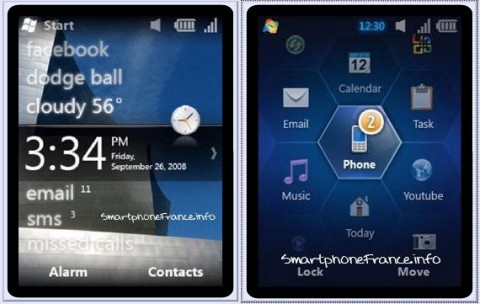
Windows Mobile 6.5 Launch


MS have confirmed that the offical launch date for Windows Mobile 6.5 is May 11th 2009, which is the first day fo this year’s TechEd event.

The Windows Mobile blog says:

“Stephanie Ferguson, GM (General Manager) of Business Experiences at Microsoft’s Mobile Communications Business is going to deliver the kick off launch presentation of Windows Mobile 6.5 on Monday, May 11th at 1:00PM – 2:15PM. This Tech Ed 2009 session focuses on one of the biggest launches in the history of Windows Mobile – Windows Mobile 6.5. It is targeted at both IT Professionals and Developers, with a cool demo and an outline of great stuff to come.”

winmo65_2winmo

It will still be a number of months until we see any WinMo 6.5 devices but TechEd will give us a chance to see even more about the features of the new mobile OS and more things to look forward to!

*Update* Microsoft Windows Mobile 6.5 phones will start being released on October 6th 2009 🙂

Samsung say Windows 7 beats Linux


I just saw over on Endgadget that Samsung’s European Product Manager Patrick Pavel has said he expects Windows 7 to spell the end for Linux on Netbooks 🙂

That’s yet another great compliment for Windows 7-and it’s not even finished yet!

He also said that, depending on licence fees, Samsung would like to include some of the higher end versions of Windows 7 on their netbooks…that would excellent!

MS Windows Mobile Ad


This new advert for Microsoft Windows Mobile phones is pretty good. Bright, fun, young, funky, girls, scooters, music but with benefits to business too-a good all rounder.

Having said all that, I’m not 100% sure it will bring over many new customers-more likely it will just make us existing customers feel a bit cooler 😉

Take screenshots on Windows Mobile


There have been quite a few occasions where I’ve wanted to screenshot something on my Windows Mobile device but I’ve always thought that to be impossible-how foolish I was it seems!

I found a great post from www.aboutonlinetips.com which lists 15 different free applications to do just that. You can find it here.

Microsoft MyPhone-Hands On


After a not too long wait, I’ve gained entry to the Microsoft MyPhone beta and am just getting started now.

The initial setup process was nice and easy. I just visited 1 site on my phone, downloaded a small 58kish .cab file and installed that on my mobile device. A couple of “I agree”s later and it’s installed-ready for the initial sync. Here it gives you a choice of what you would like to sync-such as calendar, contacts, music, photos, texts etc (corporate users with push mail won’t get calendar & contacts) and while your initial reaction might be “all of it”; you have to remember it’s got a 200MB storage limit. While that is pretty limiting, I imagine once the service is out of beta we will see a dramatic increase in available storage a la SkyDrive (25GB). However for now I chose to sync just texts, documents and photos-hopefully that will be less than 200MB 🙂

I have to say that this initial sync is taking it’s time-particularly the photos; I’ve been at it for about 30 minutes and am currently on 48% (Update-completed in 75 minutes). I know that the first big backup is always the slowest but I think I started this too late for it to be taking over 1 hour! Luckily it’s happy to sync over Wi-Fi…

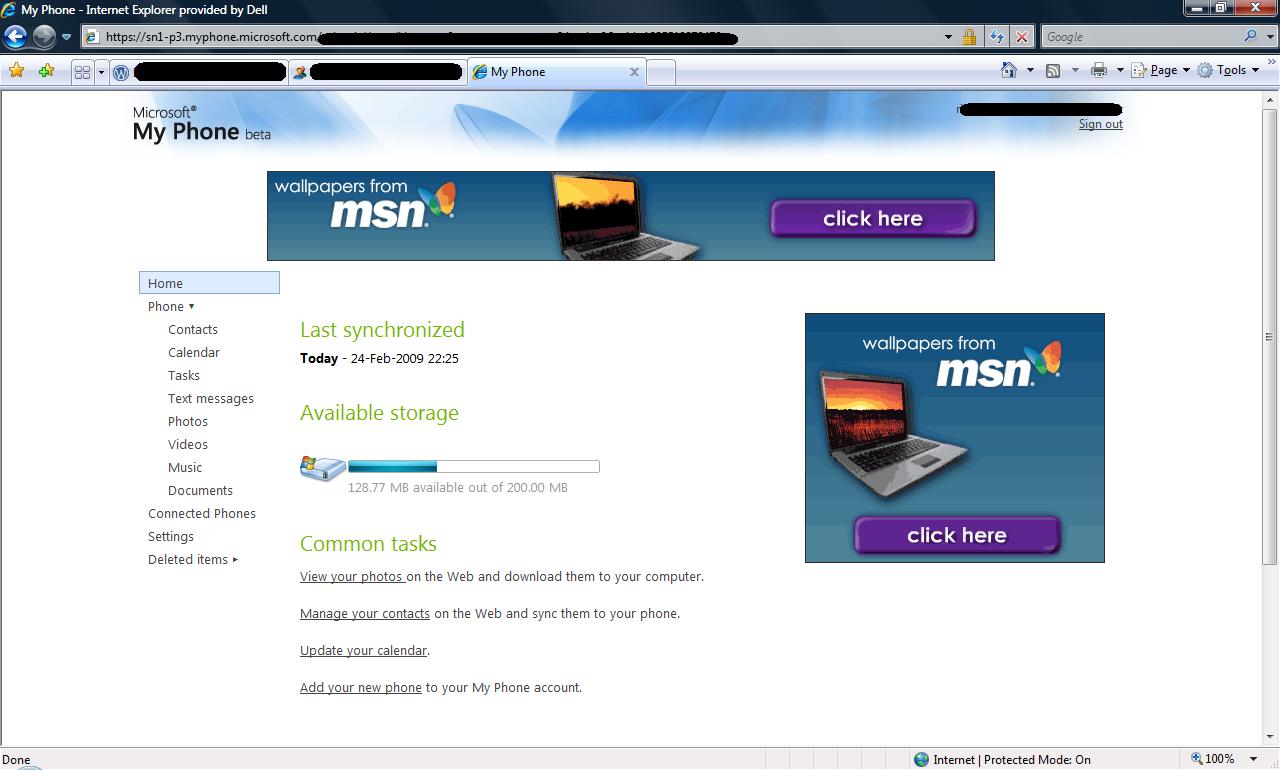
Once the sync has been completed, all the data can be accessed via your MyPhone homepage:

myphone-home1

One cool thing you can do with your contacts is “Archive to Web” so you can delete them from your phone but still retain a record of the numbers just in case. This is really handy for me as I’ve got a lot of random (might need them one day” numbers clogging up my contacts list. Only issue is you can only select one contact to be archived at a time (despite appearances)-would be could to do a mass archive…but hey-it’s still a beta 🙂

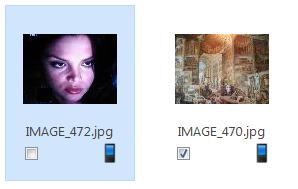
With Contacts, photos, text messages etc you can also delete them from the MyPhone site and this will delete them from your phone too at the next sync. Once thing that has just caught me out and is quite annoying is that just selecting the tick box of an object doesn’t change focus to it, you have to click on the actual image. Because of this, I’ve just deleted the wrong picture! For instance, in the below example:

delete

hitting “delete” will get rid of Vanessa Ferlito, rather than the artwork on the right. Maybe it’s just me who feels this way but I think the tick box should be the deciding factor when it comes to selections. Also, this means you can’t perform the same action to multiple items (as with archiving above).

I was hoping to use MyPhone to improve my management of text messages as, let’s be honest, it isn’t a great experience doing on the device, but the inability to select multiple items makes it even more of a chore!

To sum up, I think MyPhone is a great new service and one that will continue to get better-such as using SkyDrive to store things, giving us 25GB storage and me a place to backup the music and videos on my phone too. It’s only a beta so there’s plenty of time for things like the storage, the basic appearance of the website, it’s integration into other services and the inability to select multiple items (this is a real sticking point for me!) to be fixed 🙂

I’m glad that MS have delivered this service, both form a user/consumer point of view but also looking at it as a partner and a fan of Microsoft, as it signals that they’re starting to take the mobile arena more seriously than perhaps ever before.