Microsoft & The Nexus One


I know the Nexus One is Google’s new phone but I’ve been most interested by the reactions of various ‘Softies.

As an item, I don’t the the Nexus One is anything special, the camera is the same as most other similar level phones such as the Droid and the Hero as are it’s supported formats, SD expansion, GPS etc. The software is great as Android is a brilliant mobile OS…but the software isn’t specific to the Nexus One so you can get that on the Droid and the Hero (once it’s updated to 2.0). This chart over on Gizmodo is a good comparison point:

http://gizmodo.com/5442459/nexus-one-vs-iphone-3gs-vs-droid-vs-pre-the-definitive-comparison

The fact that it’s a phone being released directly by Google is the most noteworthy thing about it but even that isn’t huge news, certainly not to general users.

The release of this device obviously draws comparisons to Microsoft and Windows Mobile 7, especially as a “Microsoft” phone has been rumoured for quite a while. There has been quite a lot of activity on Twitter regarding the Nexus One, much of it from Microsoft people and that’s has made me think a little…

Steve Clayton has a post over on Geek In Disguise with some of his thoughts on Google and Android. Usually I agree with Steve but I think this post, rather than defending Microsoft, actually highlights the biggest problem in the Mobile Device wars that are heating up.

He has a cartoon from Hugh McLeod:

googleis

and he says:

“Though people do still get excited about whether a phone has a 2mp or 5mp camera but the real differentiator these days is software”

and

“this battleground is software based I feel. We have a lot of to do. Software is our bread and butter.”

The main issue in this battle is, in my opinion, that the Windows Mobile software is not as good as Android (or Apple’s iPhone OS) and that is why Microsoft are losing. So, as much as I like Microsoft, pointing out that you’re a “Software Company” when you’re losing in the software stakes, maybe isn’t the best idea. I think a lot of people will look at this as:

“If Google aren’t even a Software Company and they can make something as good as Android, that puts Microsoft and their efforts with Windows Mobile in an even poorer light”

That’s certainly a thought I’ve had and I’m a big MS supporter. This seems like the kind of thing that people already Anti-Microsoft will latch onto big time…in a Google vs Microsoft “Mac vs PC” style.

The Future

Windows phone

Microsoft recently released Windows Mobile 6.5 but it hasn’t really made any difference to the balance of the market; thus most people are looking at Windows Mobile 7 as their last chance to take the mobile market back and make it theirs.

We know that Windows Mobile 7 is due “late this year (2010)” and LG confirmed at CES yesterday that they’re working on Windows Mobile 7 handsets this year. The rumours suggest that something Windows Mobile 7 related is going to be announced at Mobile World Congress next month in February so I’ll definitely be keeping an eye on that"!

The rumour is that Windows Mobile 7 will contain the Zune software and that would be a brilliant move. It’s cool, sleek and graceful and will open up the Zune Marketplace to people all over the world…or at least it should! If it does, it will make WinMo 7 equipped devices the best iPod alternative going…something that MS, and I, would love to have 🙂

The other big thing that Microsoft’s next mobile OS simply MUST have is a huge Marketplace full of cool, smart, web 2.0, neat apps…easily available. This is one of my favourite things about Android and it’s clearly proved very popular for Apple and the iPhone.

Another change needs to be the “Consumerification” of Windows Mobile. Version 7 needs to be smoother, sleeker, cooler, faster and more fun than ever before. HTC have done a great job with their TouchFlo on WinMo 6.1 but it’s needs to be done from the ground up, all the way through the OS. If they can make Windows 7-the greatest desktop OS of all time- they should be able to make Windows Mobile 7 what it needs to be!

I really want Windows Mobile 7 to be awesome and hugely successful and for me to rejoin the Microsoft Mobile fold with my next phone…but it has to be right.

As Steve Clayton says:

“The game is moving fast though so it’s time to write some of the smartest 1’s and 0’s of our lives. “

Go get ‘em Microsoft!

My move to Android AKA Android vs Windows Mobile


Android is faster, more responsive, more intuitive, looks great and the app marketplace is amazing! I really wanted to get apps for my Windows Mobile 6.1 device but it was SO difficult! Within 14 hours of having my Android phone I’d downloaded multiple awesome applications which we’ll cover later 🙂

One of the biggest problems I found with Windows Mobile is that I felt constrained, there were so many things that I wanted to do but couldn’t…the big one (for me) was an e-book reader. There are so many times that having a book to hand would be great:

  • On the train
  • Waiting in receptions
  • Visiting the in-laws 😉

are just a few of them.

When I got Windows Mobile 6.1, I had a look online and saw there was indeed a Microsoft E-Book reader available. I downloaded it but couldn’t use it as it wasn’t designed for 6.1…bit of a fail! There is a support forum thread dedicated to this where a fix was mentioned about 2 years ago, but as far as I know, it never materialised. So for the 18 months I had that phone, I either had to carry an actual book around or lay off the reading!

The first day I got my Android phone, I downloaded a brilliant app called Aldiko which sorted all that out 🙂 See more below…

Marketplaces

For me, this is a huge revelation…the Android marketplace is amazing 🙂

I know Microsoft brought out the Windows Mobile Marketplace but, let’s be honest, it isn’t very good is it? I often had trouble signing in…sometimes I couldn’t connect from my device and other times it’d be the desktop version that wasn’t working. Once I was in it wasn’t plain sailing either…I found the entire thing clunky and difficult to navigate. Also I was never 100% sure if I was downloading a free app or a trial and I just didn’t feel comfortable as a user.

It’s possible that it’s just a personal thing that I don’t get on with the Windows Marketplace and that it’s a pleasure for everyone else…but I doubt it 😉

On the other side of this fence is the Android Marketplace…

It’s easy to navigate, it’s quick, it’s clear, it’s full of brilliant apps, it’s fantastic:

This brings me nicely onto:

Apps

This was probably the hardest part of being a Windows Mobile user; seeing all the iPhone users with their fancy apps…compasses, games, programs for work etc…and then Android came along and allowed people to do the same thing…not on at all! Finally Microsoft brought out the Windows Marketplace but, as I say above, it just didn’t seem very good.

I’ve had my new HTC Hero:

for about 3 weeks and am finding new apps almost daily. So far, these include:

Advanced Task Killer:

This is a great and very handy app for quickly and easily shutting down all the processes still running in the background. Great for making sure you don’t run low on memory!


Aldiko:

Aldiko Book Reader: Download and read thousands of books right on your Android smartphone.


and it’s already loaded with:

  • Art of War
  • The Prince
  • Hamlet
  • Othello
  • Macbeth
  • The Iliad

and more…giving me great reading material whenever & wherever I want it; something Windows Mobile could never give me.

To me, this really is brilliant 🙂 When the Christmas gatherings got too much, I was able to easily chill out and read Othello…nice!

I love how it’s home screen is laid out like an actual bookshelf…it might be gimmicky but I like it!

It looks great, works quickly and smoothly and has a brilliant selection of books. I’ve only downloaded the free books, ‘cos I love the classics, but you can also purchase O’ Reilly and MS Press books on there too; making them a truly portable aid.

Bonsai Blast:

A brilliant, fun and very addictive game where you simply need to get 3 coloured balls in a row:

I repeat, this is very addictive and will quickly take up a whole bunch of your time! Great for passing a few minutes or longer in queues, on public transport, waiting for the kettle to boil etc…but those few minutes will almost certainly stretch into 15-20 with a few cries of “just one more go” 🙂

CaveDroid:

A cool retro style 1st person game where you fly through a tunnel avoiding obstacles and collecting points. I can’t find any pics but I’ll keep trying.

Evernote:

Evernote is a pretty well known note-taking app and is very handy to have…I haven’t had cause to use the audio note yet but I can imagine that being pretty useful.

It’s very easy to use and will get a fair bit of use at partner events, seminars, that kind of thing.

OI Shopping List:

This app is brilliant. I’m a little upset that I’m this happy and excited about an app that lets you make lists but it really is very good.

It let’s you put in an expected/known cost for each item and then gives you a total for the list…the best bit is that, if you add in the costs as you go, it gives you a running total of what’s in your trolley/basket/arms. Very useful 🙂

Another great feature is that once you’ve list an item and cost once, future lists will pull that info out automatically…again, very useful! A recent update has given it a “Quantity” column too, which makes it even easier to use.

I’d definitely recommend this app for anyone that buys more than 1 thing from shop 🙂

There are plenty more apps that I’ll detail in future posts. If you’ve got any of your own you’d like to add in, let me know in the comments.

Summary:

I’ve only had my Android phone for a few weeks but I really am truly impressed with it…much more than I was when i got my WinMo 6.1 phone. I am a BIG Microsoft supporter and not particularly a fan of Google at all…however, with Android, they offer the far superior product so that’s what I, as  consumer, chose.

If you’re looking for looking for a cool, stylish, fun, helpful, useful, “check it out mate” phone…DEFINITELY go with an Android device. I’d still recommend Windows Mobile before anything else for a work device, but for a personal mobile device, Android is the top dog in my opinion.

I’d love to hear your thoughts on this so please, leave a comment and let’s get a discussion going 😉

Google Goggles


Google Goggles is here. No, not the Google Labs project from 2008 that Gmail would check your sobriety levels using maths puzzles before letting you send an email (see Telegraph here)…but true Visual Search. That’s searching with pictures as in:

“What’s that a statue of?”

“Dunno mate”

“Tell you what, I’ll take a picture of it on my phone and Goggle it”

“*snap*…*upload*…*search"*…”

“Oh…it’s Winston Churchill”

“What, the dog off of the adverts bruv?”

”Dunno…seems a bit big innit?”

That conversation went a bit “chavvy” there…funny but probably not representative of the demographic that will mainly be using this 🙂

What is it?

If my awesome transcript above isn’t enough, Google have some examples over at:

http://www.google.com/mobile/goggles/#landmark

image

Does it work for everything?

Google are quite upfront that it “works better with certain types of queries”. They say that

“books & DVDs, landmarks, logos, contact info, artwork, businesses, products, barcodes, or text”

all work well while it’s not currently hot on “animals, plants, cars, furniture, or apparel”.

Can I haz Goggles?

Only if you’ve got an Android 1.6+ device 😦

C3PO from the film Star Wars

This might be the first time that users of Windows Mobile devices, Blackberries & iPhones have all come together in a show of solidarity usually reserved for invading aliens in hollywood movies 😉

Anymore Cool features?

Actually yes, yes there are!

Nearby Places Overlay:

This shows you local businesses such as restaurants, cinemas etc WITHOUT EVEN CONDUCTING A SEARCH! Point your camera forwards in Goggles mode, pan around and, once the GPS locks on and:

“you’ll see labels tagged to the nearby businesses, and a pin icon with a number in it at the bottom right corner of the screen. The number in the icon indicates the number of businesses nearby. You can either click the pin to see all places near you listed by proximity, or select a specific label to see more information about that particular business.”

Some nice augmented reality!

My thoughts:

I’ve never really been a fan of Google. I always used Google Search because, until Bing came along, it was the best but I was never interested in Google Mail or Google Apps. While things such as Google Earth and Streetview have come in very handy, I’ve never felt any connection with Google as a company; I don’t know them, they don’t know me and neither of us case about the other.

When they brought out Android, I was took a look but wasn’t bothered and the same goes for Chrome and Chrome OS. I’m a staunch Microsoft supporter, have been for many years and will continue to be so…BUT…

Google Goggles really could be awesome. For years I’ve said this should be the next evolution in search (ask anyone that sits near me at work!) and here it is…I feel a bit like the people in the Windows 7 adverts 😉

The number of times each day that people can see something but don’t know what it’s called:

“What kind of car is that?”

“Who’s that a statue of?”

“Which company has this logo?”

“What’s this building called?”

and there’s just no way to describe it to a text search engine, must be in the 100’s if not 1000’s.

It’s like Shazam for everything that isn’t music!

I’m a big fan of Windows Mobile (for all it’s faults) and I really believe that Windows Mobile 7 will be a HUGE leap forward. I’m due an upgrade to my phone very soon and have got my eye on the HTC HD2 with Windows Mobile 6.5…but this announcement has really made me consider jumping ship to Android…at least until WinMo 7 is released!

shocked.jpg

Having said all that though…my main thought is this:

”Will I ACTUALLY use it that much?”

As in, will I use it enough to make up for not having Office Mobile, for learning a new OS etc…and I’m not sure I will.

What I really want is for this to become available on normal, everyday desktop…no actually, what I REALLY is for this feature to come to Bing’s normal, everyday desktop search…that would be the best case scenario 🙂

I’m never sure how copyright/patents come into play with things like this…can Google patent this and stop Microsoft from developing essentially the same thing for Windows Mobile and Bing?

All in all, this is a great advance in the world of search and a good show from Google that they’re still in the game…but not enough to turn this user.

Zune 4.0 Desktop Software


I’ve always been a big Windows Media Player (WMP) fan. I never bothered with any of the alternatives as WMP has always had most/all the features I’ve needed, and I despise iTunes (for way too many reasons to go into here!).

When I first got the beta of Windows 7 back in Feb/March (?), one of the first things I did was check out WMP 12. I was very pleased with what I found…it’s quicker and smoother and has got numerous great new features such as “Play To” for streaming to other devices, the ability to be played remotely to another Windows 7 machine, the ability to preview songs and more. It works really well and is much improved over V11 but recently I’ve been thinking about checking out something different.

I’ve been wanting a Zune for years but as they aren’t properly available here in the UK, I’ve not got one. While thinking on possible replacements for WMP 12, I remembered hearing the Zune desktop software getting good reviews; so I thought – will it work without a Zune? Perhaps obviously, yes it will…and it is truly great!!! 🙂

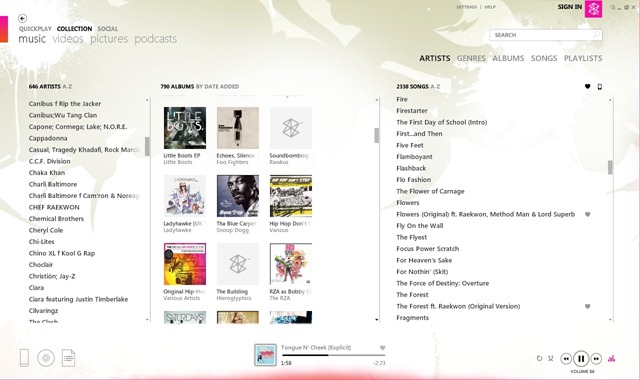
I’ve only been using it for a little under 24 hours but so far, I’m a huge fan of it. I’ve taken a bunch of screenshots so you can see the elegant, modern, media centre style vibe it’s got going on.

This is the Welcome Screen I get when I load it up:

Zune Quickplay View

It’s divided into four sections:

New: This section contains any news tracks added into the library

History: This contains the tracks/albums that have previously been listened to.

Pins: You can “pin” albums/singles to the front page with a simple right click

Smart DJ: Automatically generates playlists based on your library.

Smart DJ

This I’ve heard a lot about. It creates playlists all on its own, based on artists that you give it as a reference after analysing your music. It’s just finished analysing my music and has given me a Smart DJ playlist based on Wu-Tang Clan and it’s excellent:

image

As you can, it’s not just other Wu-Tang songs – it’s got Nas and Canibus in there too, artists who are indeed related.

This Smart DJ based on “Onyx” is even more impressive:

image

Every artist is different there-great stuff 🙂

Collection

This is where you can see all the songs/albums/artists/genres etc in your library, much like Windows Media but just better.

Zune Artists View

Rather than them being separate section as in WMP, you can see Artists, Albums and individual songs all at once. This section has got a very current, web 2.0 app style feel and I’m a big fan.

The “Songs” section also includes a “Play Count” column which is what I was originally looking for. I know it’s pretty gimmicky and all the rest of it, but I like the idea of being able to see what songs get played the most. This features aligns quite nicely with today’s IT drive towards ever deeper data mining too 😉

Album View:

This is clearly taken from Media Centre but that’s no bad thing:

Zune Album View

I love the tiled album art background and the changing colour schemes that it moves through…also, the tiles in the background flip round – small things eh?! 🙂

Another nice touch is the ever-present yet subtle graphic equalizer down at the bottom of the screen:

image

There are a few things that aren’t in there when compared to WMP 12-inc most/all the new Windows 7 features (play to, stream, preview etc) but I don’t really mind that. The biggest downside for me is that I can’t sync my Windows Mobile device with it. I know that seems logical as it’s designed for the Zune but as it can work without one – it’d be nice to have that option. The mobile syncing is the only thing keeping WMP12 in the picture…and I never thought I’d say that…

All in all, I’m a HUGE fan of Zune 4.0 Desktop software and I highly recommend you go and download it here right now!

Windows 7 & AutoDesk: Project Cooper


Windows 7 has officially been launched. Today is general availability (GA) day (which means you can pop down to Comet/PC World etc and get it off the shelf) and we’ve seen a number of launch events all around the world. Numerous other manufacturers have been presenting alongside Microsoft to show how their technologies inter-operate but one that caught my eye was AutoDesk.

AutoDesk are makers of CAD (Computer Aided Design) software, most notably AutoCAD & AutoCAD LT. I have to say I’ve never really considered that they would have any kind of relationship with Microsoft, so I was a little surprised to see that they were taking part in today’s launch event in New York, presenting Project Cooper. This new product:

“will allow users to easily and quickly create professional-looking drawings and sketches, or precise drawings with real-world dimensions, and share this information with others”

according to AutoDesk Senior Director, Emerging Products Amjad Hanif.

It has been

“engineered to take full advantage of Windows 7 support for multi-touch, including panning, zooming, rotation and flick functionality”

and is designed for those times that a mouse/keyboard just isn’t going to work. With it being CAD software this will be architects, interior designers, building planners etc when they’re on site. They’ll be able to sketch out ideas there and then, increasing productivity and collaboration – 2 key messages from Microsoft.

From a software reseller’s point of view, this represents yet another opportunity for Wondows 7 to open up new revenue streams and help us create better, stronger relationships with our customers.

You can see the original post on the Windows Blog here.

... When You've Got Alice Cooper

Windows 7 BitLocker to Go Reader


One of Windows 7’s many great new features is BitLocker To Go-a built in encryption tool for removable USB devices. Enabling users to store important/sensitive data on USB sticks and protecting that data should the device be lost. As it’s a new feature in Windows 7, people have been wondering about inter-operability with previous OS versions such as Vista & XP. The answer is here:

Windows 7 BitLocker To Go Reader

This enables users with BitLocker encrypted USB devices to share data with users on Vista and XP. It will allow you to copy encrypted files from the drive onto the Vista/XP machines but:

“Once you copy the files from the encrypted drive, they will no longer be protected by BitLocker in the new location, even though they’ll still be protected on the encrypted drive”

It’s worth noting that you can only unlock the drive using Reader if you’ve got the password information etc…it doesn’t just allows random unlockings 🙂

For more information and step by step instructions on using BitLocker to Go Reader on XP/Vista, see:

http://windows.microsoft.com/en-US/windows7/what-is-the-bitlocker-to-go-reader

To go and download the program and get started, go to Microsoft Downloads here.

Adobe Flash 10.1 for Windows Mobile


Adobe Flash 10.1on Windows Mobile aims to bring and end to the myriad issues experienced when trying to use the two products together! It has always been a bit of a joke and has never really worked properly, despite Flash becoming ever more ubiquitous on sites across the globe; a real fix to this would be great.

From Adobe’s statement (bold mine):

“A public developer beta of the browser-based runtime is expected to be available for Windows® Mobile, Palm® webOS and desktop operating systems including Windows, Macintosh and Linux later this year… Flash Player 10.1 is the first consistent runtime release of the Open Screen Project that enables uncompromised Web browsing of expressive applications, content and high definition (HD) videos across devices.”

I’m a big Windows Mobile fan but it does annoy me not being able to view flash content on my device, so this is really something. Adobe made no mention of supported WinMo versions but PCMag say it will be 6.5 and above…which sucks a bit. I’m sure there will be a lot of 6.1 devices around for quite some time, I’m stuck on it until my contract ends) so it’d be nice to back it backdated at least that far 🙂

WHat MS really ought to do is get full Silverlight up and running on WinMo devices-that’s be awesome!

Still, we’ll see how it goes when the Flash beta arrives. The full Adobe release can be seen here.

Thanks to Mary Jo for the pcmag link.

Microsoft: The New Efficiency


At today’s “New Efficiency” launch event, Microsoft CEO Steve Ballmer spoke about Windows 7 deployments and how customers can save money with the latest OS. He particularly mentioned that Windows 7 “will bring $90-$160 saving per pc per year”.

He also discussed the “Consumerisation of IT”, where users bring/force change in Corporate IT via their expectations from using software at home. He said that it isn’t a new phenomenon (it just has a new name) and that it will continue to be a huge driving force in the way that software is designed and used-such as the extra social networking features being added into Office, Exchange & Sharepoint.

This all led to the launch of a new website:

http://vepexp.microsoft.com/thenewefficiency

which contains dozens of videos from MS execs covering topics such as:

  • Discover Windows Optimized Desktop
  • Learn about Optimized Server
  • Experience Unified Communications
  • Explore Business Ready Security

There are a bunch of videos on Exchange 2010 such as:

  • Upgrade & Deployment
  • High Availability
  • Mobility & Active Sync
  • Email Archiving

and more. These are a great source of information on Exchange 2010, some of which I’ve collected here.

The banner below is a great representation of the products & ideas behind the New Efficiency.

image

There are way too many sessions to list here but MS have put together some suggested sessions listings for:

  • Enterprises
  • Mid-Size
  • SMB’s

They contain links to the videos on the New Efficiency site and can be downloaded from my SkyDrive here.

ZuneHD in Europe?!


I’ve just been told on Twitter that there is a rumour, and it’s to be stressed that this is a rumour, that Microsoft may still be planning on using the Zune HD to launch the product into EMEA (Europe, Middle East and Africa)!!!

That means that this sweet ass gadget:

could be in our shores, in our stores and, more importantly, in our hands 🙂 In my opinion, the new Zune is much sexier than anything I’ve seen from Apple…

The specs for this are:

  • 3.3 inch OLED display capacitive touch screen (480×272 16:9 aspect ratio).
  • Size: 2.07″x4.08″x.35″ (52.7 mm x 102.1 mm x 8.9 mm)
  • Weight: 2.6 ounces (74 grams)
  • Runs on Nvidia Tegra APX with 8 independent processors.
  • Multi-touch technology.
  • 16/32 GB
  • Built-in accelerometer.
  • HD radio tuner.
  • 720p high definition video support and output (additional dock required).
  • Wi-Fi connectivity 802.11b/g with Open, WEP, WPA, and WPA2 authentication modes and WEP 64- and 128-bit, TKIP, and AES encryption modes.
  • A Wi-Fi version of the Zune Marketplace.
  • Web browser (based on Internet Explorer Mobile 6 for Windows CE).
  • Games
  • Unicode Support
  • Equalizer
  • Music, up to 33 hours (wireless off); video, up to 8.5 hours
  • Battery : 3.7 Volt, 730 mAh Lithium-Ion Polymer battery
  • I’ve wanted a Zune for ages so if this is true-it’d be AWESOME 😉

    *Update* Looks like it truly was a rumour, as the Zune HD isn’t available in Europe (or anywhere else for that matter) 😦

    MS Myphone: Windows IT Pro article


    Jeff James over at Windows IT Pro has recently posted a review of MS Myphone with input from your’s truly 🙂

    The article covers the good and the bad points of Microsoft’s mobile phone backup service and it seems we both agree on the one addition that should be made…

    Go check the article here:

    Windows IT Pro MyPhone Article