Microsoft Zune Pass available internationally


Microsoft are making the Zune Pass available in countries other than the US. That gets a big:

from me and I’m sure, 1000’s of others across the world too!

The imminent arrival of Windows Phone 7, which has the Zune player built in, means making this available worldwide is high on the list of things Microsoft need to do Smile

The Zune Pass is something I’ve been looking at for a long time as it represents great value for money. In the UK, it will be £8.99 a month which will give you full access to stream the huge library of music available in the Zune Marketplace. That in itself wouldn’t be enough to sway me as I have enough music already (!) but here’s the kicker:

Each month, you can permanently download and keep 10 tracks.

Which works out as 89.9p per track. So the streaming AND the keeping – that’s a winner right there!

Also, it will probably mean I will use Spotify very infrequently…

Microsoft Windows Phone 7 Funeral Parade


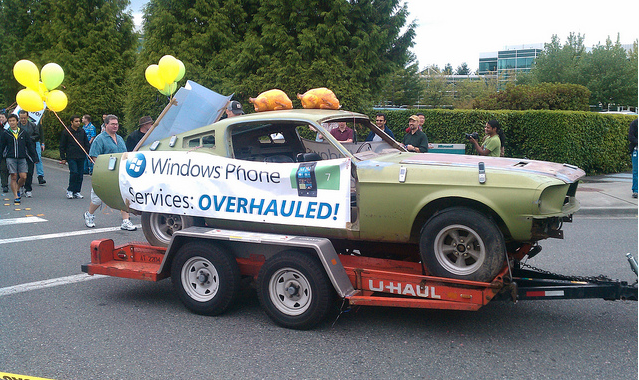
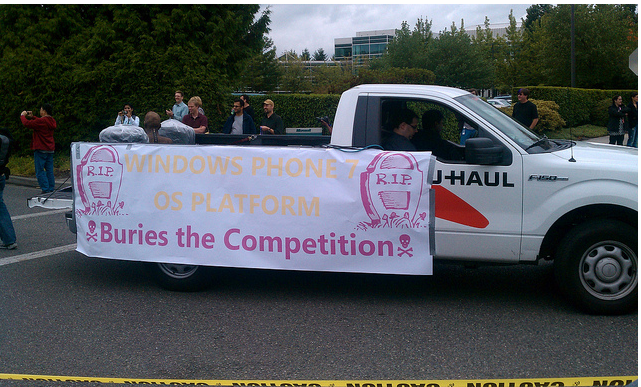
Microsoft have announced that Windows Phone 7 has been RTM’d (Released to Manufacturing) and to mark the occasion they held a great parade through their Redmond campus.

There were jugglers, unicyclists, fancy dressers and a funeral parade for Microsoft’s competitors such as the iPhone! Flickr member, and I assume MS employee, “Trioculus” has a great set of pictures on his Flickr account:

imageimageimageimage

Lots of fun with a great turn out of people but the funeral parade has received quite a few negative comments on Twitter from people such as EdBott & MaryJoFoley. I can see both side of the argument to be honest…yes it’s just a bit of fun and done very much tongue in cheek but perhaps it wasn’t the most appropriate thing for Microsoft to do. People are quick to criticise Microsoft for almost anything so this just seems like they’re asking for it! Also, Apple and their other competitors will use this as “proof” that Microsoft are focused simply on beating them, are scared of them etc. That said, let’s have a look at some pictures Smile

imageimage

Head over to http://www.flickr.com/photos/trioculus/ to see more pics of the event,

Your thoughts on this – fun or foul ?!

Bringing together the Android-o-Sphere


I’ve recently moved over to the Android mobile platform and I’m pretty happy with it…it’s full of cool apps, e-book readers and fancy widgets. However, the biggest problem is fragmentation of the Operating System…there are currently 4 different Android OS releases in the market:

1.5

1.6

2.0

2.1

The big thing is that certain apps only work on certain versions, and that, my friends, is disappointing! One of the major apps that attracted me to Android was “Google Goggles” but, 4 months later I still haven’t used it 😦 Goggles is an Android 2.0+ app and my phone, the HTC Hero, is an Android 1.5 device. I knew that when I bought it but I had also been led to believe that an upgrade was imminent…like before end of 2009 imminent. It was then “sometime it January” and, after a period of silence, it was “by the end of March”. It’s now being reported by MSN & Engadget that HTC will roll out the update to 2.1 on April 26th in Taiwan, with the rest of the world following shortly after. I hope that happens as I think then, Android will truly realise it’s potential…and I’ll get to have all kinds of fun 🙂

It’s not just Goggles…other apps I’m missing out on include:

Flyscreen (1.6+) (adds apps to lock screen)

Gesture Search (2.1…now backported to 1.6)

Google Earth (2.1 only) <—This is a proper WTF decision…why isn’t Google Earth available to ALL owners of Google phones?!?!

and I’m sure countless more.

However, according to Engadget, Google are on the case…by splitting the OS up even more. At first I was like “What the WHAT?!” but having RTFA it does make sense:

Google “will start by decoupling many of Android’s standard applications and components from the platform’s core and making them downloadable and updatable through the Market”

This means that one wouldn’t be at the mercy of the manufacturer (HTC etc) or the carrier (AT&T etc) when new shiny bits were released for Android…you could just go and get it. That would be brilliant 🙂 This seems to be codenamed “Froyo” and then a later version will “Gingerbread”.

I’m not a great fan of Google but I do think that Android is the best Mobile OS currently available, and this appears to be a good solution to a very annoying problem. So 1) Hurry up HTC and get me onto 2.1 and 2) hurry up Google and implement this to prevent such disparate lag between users & devices.

Read the full scoop over at Engadget here.

Windows Phone Developer Training Kits


Windows Phone 7 Series is a little bit closer after today’s MIX 10 keynote and Microsoft are doing a great job of making sure that WP7 developers have got everything they need to get started putting the iPhone to shame making great apps 🙂

They have put together a training kit for developers which includes 4 Hands On Labs:

Hello Phone:

As with the classic “Hello World” app, this is a way to introduce you to the tools needed to build Silverlight apps for Windows Phones.

Building Your First Windows Phone Application:

This teaches you to create a simple puzzle game using the basic building blocks, and includes some phone-specific features.

new4

Windows Phone Navigation & Controls:

This focuses on on Windows Phone’s layout and switching between different screens.

Game Development with XNA Framework:

This lab helps you build a simple XMA game using Visual Studio Express for Windows Phone.

You can see the online kit here or download a local copy here.

To download the Windows Phone Developer Tools, hit this link:

http://www.microsoft.com/downloads/details.aspx?FamilyID=2338b5d1-79d8-46af-b828-380b0f854203&displaylang=en

Windows Phone 7 Series Development Tools


Today saw the start of MIX 10, Microsoft’s 3 day conference for web designers and developers, and it was all about Windows Phone 7 Series aka WP7 (or Windows Mobile 7 as you might call it).

They announced the availability of a comprehensive set of free tools to support developing Silverlight apps on WP7. This can be download from:

WP7 Developer Kit

and includes previews of:

· Microsoft Visual Studio 2010 Express for Windows Phone

· Windows Phone 7 Series add-in to use with Visual Studio 2010 RC1

· XNA Game Studio 4.0

· Windows Phone 7 Series Emulator for application testing

· Expression Blend for Windows Phone CTP (available as a separate download).

I’m not a developer, although I often wish I was, and this is one of those times! Go get it and make some brilliant apps that will bring me, and countless others, back to the WinMo fold 🙂

An alternative download link is:

http://www.microsoft.com/downloads/details.aspx?FamilyID=2338b5d1-79d8-46af-b828-380b0f854203&displaylang=en

Microsoft’s Mobile Surface


Microsoft’s interactive, multi touch, 23rd century Surface is brilliant. However it is also, literally, the size of a table and so not particularly portable.

However, Mary Jo Foley has uncovered information of a planned “Mobile Surface”. Microsoft Research’s site states:

“Our goal is to bring Microsoft Surface experience to mobile scenarios, and more importantly, to enable 3D interaction with mobile devices. We do research on how to transform any surface (e.g., a coffee table or a piece of paper) to Mobile Surface with a mobile device and a camera-projector system. Besides this, our work also includes how to get 3D object model in real-time, augmented reality and multiple-layer 3D information presentation.”

I’d carry one of those about if it meant I could turn any surface into a multi-touch surface that I could use, demo, play and work on 🙂

Setting up Hotmail via POP3


Connecting to Hotmail via POP3 might be old news to everyone but I thought I’d cover it here just in case, as it doesn’t seem to be that well publicized online. I set it up on my old phone ages ago but have only just got round to it on my new device; typically I couldn’t remember the details so I did a quick Bing. What surprised me was how difficult it was to find the information…most blogs, forums, sites I encountered either said “It can’t be done” or “It can be done, but you need to pay for it”!

It can be done and it doesn’t cost anything, here are the details you need:

POP server = pop3.live.com (Port 995)

POP SSL Required = Yes

Username = Live ID

Password = Your hotmail password

SMTP Server = smtp.live.com (Port 25 or 587)

Authentication Required = Yes

TLS/SSL Required = Yes

Using these details I got it all set up and working on my device in just a few minutes.

Thanks to www.WindowsPhoneExpert.com for the info (again).

Exchange Online & Android


The other day at work I was asked if you can connect Android phones to Exchange Online…so I went off to investigate.

Microsoft’s page gives a list of devices and supported OS’s:

image

http://www.microsoft.com/online/mobility/exchange-activesync.mspx

I’ve got the HTC Hero and so does the person who asked, so that’s the route my investigation took, I opened up the “Mail” section on my phone and went to work.

The auto-detect feature doesn’t work with Exchange Online (or so it seems) so it’s on to manual setup, which asks for:

  • Email Address
  • Server Name
  • Domain
  • Username (Same as the email address)
  • Password

Apart from a couple, they’re all pretty self explanatory but there’s one that could trip you up:

Server Name:

There are 3 different server URLs depending on location:

image

but it just wasn’t working for  me, so I called Microsoft BPOS support. After a bit of a false start, they were very helpful and gave me a call to work through the issues.

I navigated to OWA through my browser (mail.microsoftonline.com)but couldn’t log in. I then found it was resolving itself to the “red001…” address, which clearly wasn’t right as I’m in the UK, so I cleared all my bookies, cache etc and went back to the setup screen.

I tried again and still no luck, but then I tried one last thing…entering the server URL without the “https://” and the start. To be honest, I’m not sure why I tried that (although I’m equally sure that someone more techie than me would have tried that first!) but it worked! Entering simply “red002.mail.emea.microsoftonline.com” worked a charm and BOOM, I could see my emails on my Android device. A quick check revealed that the calendar and contacts were syncing too…brilliant 🙂

I hope that helps anyone wondering if this can be done and/or having trouble getting it working 🙂

Windows Phone 7 Series


Forget what you though you knew, Microsoft are back in the mobile game…and in a pretty big way!

Above is an image of the new Windows Mobile or “Windows Phone 7 Series” as it’s now known.

Each “tile” is a “hub” which connects the user to various elements…you can see the Xbox Live tile which is pretty exciting! The tiles are all live so will display updated info from the web as appropriate. Even from that 1 picture you can see that the UI (User Interface) is VASTLY improved over all previous versions of Windows Mobile with Phone, Test messages, email, pictures, people and more all available from one screen. One of my biggest gripes with WinMo 6.1 was the number of menus I had to navigate through just to do something simple like look at a picture.

It’s integrated into Social Media like never before with the ability to update Windows Live, Facebook, Twitter etc all from one location and making it easy for users to easily share & upload media such as pictures to Flickr, Twitter and more. This video shows off some of the great new features:


Buzz

The buzz around this new Redmond release is one of the most surprising, and nice to see, things about this whole launch. Both end users and gadget sites such as Gizmodo and Engadget are really behind this:
image image

image

First Windows 7 had huge support from almost everyone and now less than 6 months later, Windows Phone 7 does the same thing…MS have really turned things around! I think a lot of those calls for Steve B to step down will be taken back now 🙂

Zune

This is the one thing I really wanted to see in WP7S and it’s been delivered…Zune is now the media player inside Microsoft’s Mobile platform. I’ve been using the Zune desktop software for quite some time now and it is truly brilliant (see my post here) and the experience on the Zune HD seems comparable. It’s so much smoother and sexier that Windows Media Player and I really love that it synchronizes your track play count between desktop and device 🙂

Me & Windows Phone 7

I’m really excited about Windows Phone 7 Series. I’ve been waiting for it for years…ever since I got a Windows Mobile 5 device in a way…and now it’s here. Well not quite…it’s been announced but devices aren’t going to start shipping until October and that makes me feel better about my situation…which is…I’ve got an Android phone!

Yep that’s right…I’m a huge user of Microsoft products, both software and hardware, and have been using Windows Mobile for over 3 years. However, when my contract cam up for renewal a few months ago I had a choice to make:

a) Keep trudging along with Windows Mobile 6.1 for another year? (My HTC not being eligible for an upgrade to 6.5).

b) Look at another platform such as iPhone or Android?

I was, at first, planning on sticking with WinMo out of loyalty to Microsoft but decided that, as a consumer, I deserved a phone that was fun, easy to use, cool and adaptable to me and my lifestyle. For that I looked at Android and picked up the HTC Hero…I am happier with this phone than any of my previous devices (see post here).

If Windows Mobile 7 (as I may well continue to call it) had been released to buy this week then I would have waited. As it is, I’ll have fun with my Android device, especially once I get the 2.1 update (pleeaaase HTC!) but will definitely be checking out a Windows device in the summer of 2011. Saying that makes it seem SO far away 🙂

If you’re looking for a new phone around October time, definitely go and check out Windows Phone 7 Series.

BPOS & Blackberry


Microsoft BPOS has support Blackberry linking for a while, but for the full BES (Blackberry Enterprise Server) experience, users were required to purchase the Blackberry licences separately. Not any more as

“Microsoft Online Services is now a BlackBerry® certified partner and BlackBerry Alliance Elite Member”

which gives us “Microsoft Online Services Hosted BlackBerry service”.

Microsoft will:

· Host and operate BlackBerry Enterprise Server

· Provide all BlackBerry Enterprise Server server, client licenses and support services Included in the service (There is no need for customers to provide licenses or service agreements.)

· Provide technical support to the customer’s IT administrators, including interfacing with RIM on troubleshooting as needed

The 3rd point there is a pretty attractive reason to go with this solution…as it gives you one port of call to troubleshoot your online services and your RIM infrastructure.

The features include:

image

Pricing

“The Hosted BlackBerry Service is purchased and billed separately from Exchange Online Standard or the Business Productivity Online Suite Standard from Microsoft Online Services. It is a separate month-to-month auto-renewing agreement. Pricing is U.S.$10.00 per user per month with no minimum number of users required.”

There is a 30 day trial available so you can give it a whirl.

This is a good move on Microsoft’s part, positioning themselves as a more central pillar of a customer’s infrastructure and recognizing that Blackberries are here to stay. It’s good to see them embracing that rather than attempting to fight/ignore the competition as they might have done a few years ago.

You can see the full post here.