Microsoft “Instant On” OS?


Could Microsoft be readying an “Instant On” OS? A survey sent to select MS customers and picked up by Engadget seems to indicate that Microsoft are at least thinking about it.

Microsoft are asking if users would like an OS that, within 8 seconds, allowed us access to a “select sub-set of services”, including Web browsing, IM & Media playback but not “Full Windows”. I’d love this, it would make things quicker and easier and I assume, reduce our power bills a little too 🙂

Virtualization-what is it and why bother?


Microsoft & VMWare are the two big names in Virtualization at the moment, and it’s a topic everyone is talking about. Manufacturers, resellers, consultants, analysts, end users, Jeff down the pub..they’ve all got something to say about Virtualisation. There are all kinds of facts and figures going around, some of which seem contradictory but as with most things it all depends on viewpoint..

You might be wondering why I think it’s time to add my voice to the crowd so let me tell you. At work I see a number of people, our sales guys and our customers, who know the should be thinking about virtualization and talking about virtualization, but they don’t know what they’re supposed to think and say..they know that people can virtualize..but they don’t know why, or how. They know it reduces costs but if someone asked them, the would have to hope that “Err, erm, well..” translates into something better in one of this world’s many languages!! 😉

So in a nutshell, I hope this post/blog will become a safer, calmer haven for people to take a look at virtualization without the often deafening clamour of their colleagues, bosses and suppliers. I’ll say straight away that I’m a Microsoft Partner and supporter so I will lean towards Hyper-V but I will aim to keep everything well balanced and as neutral as possible 🙂

What is Virtualization?

Virtualization has been around since the Mainframes of the 70’s but has only become a general topic relatively recently (around 2005 it really took off).

A very common, entry level example of Virtualization is hard drive partitioning. You have one physical drive, but you can divide it up into 2 or more virtual drives and that’s what the computer sees.

The big buzz around Virtualization is…

Server Consolidation.

These days, many companies suffer from “Server Sprawl”, where they have large numbers of servers, often performing just a single task (Exchange Server, File Server etc) and wasting a lot of internal resources such as RAM, storage space and processing power as well as external resources like floor space, cooling and power.

This is where Server Virtualization comes in. Tools such as Microsoft Hyper-V, VMWare ESX, Citrix XEN and more all allow you to consolidate these various servers onto one physical server running multiple virtual instances or Virtual Machines (VM’s).

Each VM has it’s own Operating System (OS) and applications installed on it and is completely separate to the other VM’s, just like physical servers. (The “One Point of Failure” discussion is later..). It’s widely accepted that most physical servers are running at about 10% utilization, so each server is wasting 90% of it’s storage, RAM, processing power etc..all things that you’ve paid (and are still paying) for. This means you could put say 7 of those servers onto one box, and that machine would then run at around 80% utilization…immediately increasing your Return on Investment (ROI). If you can go from 7 to 1, you can go from 70 to 10 which all of a sudden is a huge difference…

Getting rid of all those servers will reduce the amount of cooling and power you use in your server room/data centre too. This leads us to..

Green IT:

Gartner say that the average company spends 4%-7% of their total IT budget on energy costs such as power and cooling. If your budget is £500,000 that’s £20,000-£35,000 a year, so if you can reclaim say 40% of that and add £8000-£14000 back into your budget straight away, that’s got to be a good thing. With the continued increase of energy prices at the moment, just this aspect on it’s own can be a compelling reason to move to a virtual environment.

A virtual infrastructure can be a lot easier to manage as well. It reduces the amount of time administrators spend on repetitive tasks such as provisioning & configuring servers. If you need a new server quickly, you can simply boot up a pre-configured Virtual template and you have a new machine up and running in minutes.

There are a number of management tools such as VMWare Virtual Center and Microsoft Virtual Machine Manager which make administration even easier.

Windows 7: Vista but Better


Windows 7: “Vista but Better” is the description given by Steve Ballmer at the Gartner Symposium.

While he still stands by Vista-pointing out that it’s adoption rate at the 2 year mark is twice that of XP-he also said Microsoft are prepared for people to skip it and go straight to Windows 7.

Choice quotes from Ballmer include:

“Our next release of Windows will be compatible with Vista. The key is let’s get on with it. We’ll be ready when you want to deploy Windows 7.”

“It’s not (a) minor (release) because it’s a lot more work than a minor release. It’s a major release.”

“It’s clear Yahoo didn’t want to sell. They probably still think it’s worth more than $33 a share. I still think it makes sense for their shareholders and ours.”

More can be found over at ZDNet.

Microsoft are in a tricky position with Vista & Windows 7 really…no matter what they do, they’ll be accused of eithe rgiving up on Vista and “admitting” it’s not brilliant OR flogging a dead horse. Very close to the original Catch 22..

Personally I think Vista is a great OS. I use Vista @ home and XP @ work (I know!) and Vista wins hands down each time..it’s easier, faster, slicker, more user friendly but some people just don’t go for it. Certainly not friends but I’d guess that one day Vista & Betamax will be casual acquaintances in the “Why didn’t they like me” bar in Techsville, TW..

Microsoft Windows Server 2008 X64 on VMware ESX


Microsoft Windows Server 2008 X64 on VMware ESX is now possible as ESX 3.5 Update 2 has been certified as seen here. This also means that you can install Exchange 2007 SP1 x64 in there too.

I saw this on BrettJo’s Exchange Blog..

Microsoft Roundtable Documents and Downloads


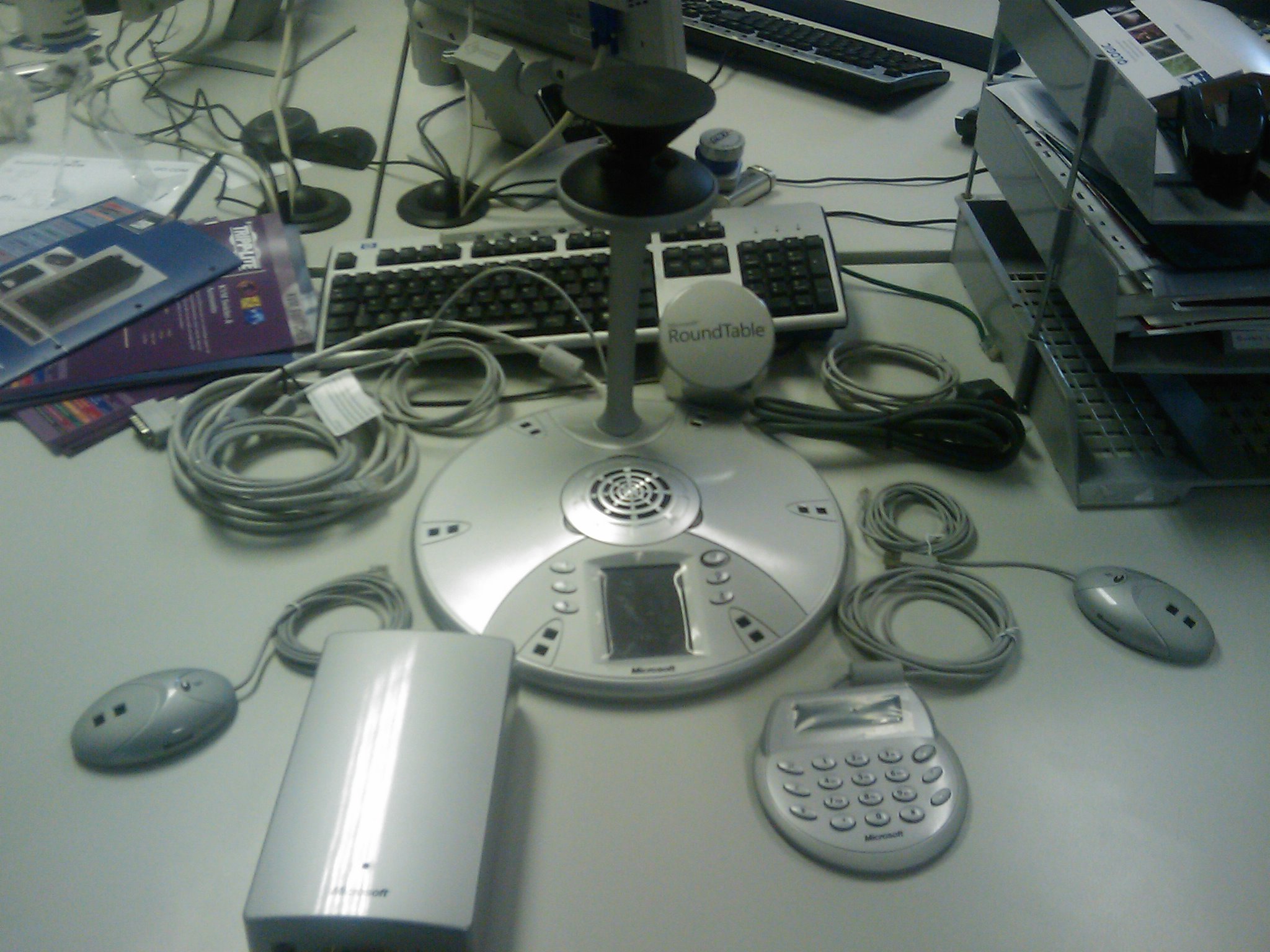
The Microsoft Roundtable is a truly innovative, modern take on video conferencing and as I think my blog shows, one of my favourite gadgets!

To make it even easier, I’ve collected a number of documents and downloads to help you out with the setup, installation and use of the Microsoft Roundtable.

Roundtable User Guide

Roundtable Manuals

Roundtable Deployment Guide

Roundtable Management Tool

Roundtable Firmware

(It’s a good idea to have the firmware around, as you’ll need it in the event of a factory reset.)

Microsoft Roundtable Unboxing-Pics!


My Microsoft Roundtable arrived today-yey! It made what was turning out to be a pretty boring, not so brilliant morning into a pretty awesome morning!

I took a load of pics of the Unboxing (on my HTC Diamond) a few of which are below, and the rest can be found here..

Typically, we’re just about to embark on installing a new PBX at work so I’m not going to be able to hook this bad boy up for probably a couple of weeks! It’s just going to be sitting next to me mocking me 🙂

Microsoft OCS 2007 R2-Features Released


Microsoft OCS 2007 R2 has been officially announced today at VoiceCon over in Amsterdam.

R2 is classed as a “minor” release and will not go to public beta, but should be with us in December 2008 (so only a couple of months to wait).

Stephen Elop, president of the Microsoft Business Division at Microsoft said “This new release puts Microsoft on a rapid path to deliver voice software that does much more than a network private branch exchange (PBX) and with much less cost.”

Key new features of Office Communications Server 2007 R2 include the following:

Next-Generation Collaboration

Dial-in audioconferencing. Office Communications Server 2007 R2 enables businesses to eliminate costly audioconferencing services with an on-premise audioconferencing bridge that is managed by IT as part of the overall communications infrastructure.
 
Desktop sharing. This feature enables users to seamlessly share their desktop, initiate audio communications and collaborate with others outside the organization on PC, Macintosh or Linux platforms through a Web-based interface.
 
Persistent group chat. This enables geographically dispersed teams to collaborate with each other by participating in topic-based discussions that persist over time. This application provides users with a list of all available chat rooms and topics, periodically archives discussions in an XML file format that meets compliance regulations, provides tools to search the entire history of discussion on a given topic, and offers filters and alerts to notify someone of new posts or topics on a particular topic.
 

Enhanced Voice and Mobility

Attendant console and delegation. This allows receptionists, team secretaries and others to manage calls and conferences on behalf of other users, set up workflows to route calls, and manage higher volumes of incoming communications through a software-based interface.
 
Session Initiation Protocol trunking. This feature enables businesses to reduce costs by setting up a direct VoIP connection between an Internet telephony service provider and Office Communicator 2007 without requiring on-premise gateways.
 
Response group.A workflow design application manages incoming calls based on user-configured rules (e.g., round-robin, longest idle, simultaneous), providing a simple-to-use basic engine for call treatment, routing and queuing.
 
Mobility and single-number reach. This extends Microsoft Office Communicator Mobile functionality to Nokia S40, Motorola RAZR, Blackberry and Windows Mobile platforms, allowing users to communicate using presence, IM and voice as an extension of their PBX from a unified client.*
 

New Developer Tools for Business Applications

APIs and Visual Studio integration. This improves the efficiency of everyday business processes by enabling businesses to build communications-enabled applications and embed communications into business applications.

* Blackberry client does not include Single Number Reach.

 OCS 2007 R2 has it’s official virtual launch on Feb. 3rd 2009 (03/02/09) and you can register to participate here.

 The word is that the OCS team will be sticking to a rough 2 year release cycle, which adds more weight to the Office 2010 release date.

I think that these new features make OCS an even more viable option in the workplace, especially for enterprises..I think the number of companies forgoing traditional PBX’s completely will increase as a result of this.

Mary Jo Foley over at ZDNet has got the full scoop here.

Microsoft WinHec 2008 sessions


Microsoft WinHEC (Windows Hardware Engineering Conference) 2008 starts November 5th (05/11/08) and as with the PDC, Windows 7is a big focus. WinHEC attendees will also get an alpha copy of Microsoft’s next desktop OS, but WinHEc is fast becoming the forgotten sibling!

The Session list for PDC gave us some interesting tidbits to speculate over such as Windows Strata, so I’m hoping the WinHEC listing will too. Here’s what I’ve spotted so far:

Windows 7 Device Experience Overview – CON-T531:

It summarizes the new Windows features for portable devices such as mobile phones and cameras, printing and imaging devices, and networked consumer electronic devices like media servers and digital picture frames.

Windows 7 Device Services for Media Transfer Protocol – CON-T568:

“Device services are the building blocks that enable new extensibility opportunities for Windows-compatible portable devices and align new experiences for portable devices in Windows 7″

The two sessions above give a good indication of some of the new features, and the general direction, of Windows 7.

The Manycore Shift: Microsoft Makes Parallel Computing Personal – COR-T522:

“We’ll highlight efforts in Visual Studio and Windows as examples of how Microsoft is addressing the problems that concurrency introduces through rich support in future tools and operating systems for threading, synchronization, scheduling, and resource management.”

This links in with other info we’ve seen that MS are doing what they can do increase parallel computing in Windows 7 without changing the kernel. Interesting to see Visual Studio mentioned too..

Directions for Virtualized I/O in Windows – ENT-T590:

This session discusses areas of technologies that are being investigated for future Microsoft virtualization offerings. These include PCI Single-Root I/O Virtualization, those technologies that enable it, and their implications to the Windows Driver Model. Improving storage area network (SAN) support and other I/O-related virtualization capabilities are also discussed.

Improving Networking Performance for Hyper-V Virtual Machines – ENT-T589:

Windows Server 2008 R2 will deliver new networking features and enhanced support of stateless and state-full offload technologies to Hyper-V virtual machines.

Microsoft Hyper-V – ENT-T587:

This session includes highlights of “selected features in the next release of Hyper-V.”

The three sessions above all point towards there being a clear(ish) definition of the features for Hyper-V R2..I’ll be interested to see what these are and how much closer Hyper-V gets to VMWare in terms of enterprise features…Live migration ala VMotion anyone?!

**Update** Seems everyone’s wish is coming true..it looks that Hyper-V 2.0 will have Live Migration…see more here

Windows Server Support for More than 64 Logical Processors – ENT-T554:

This session discusses the architecture and support of more than 64 logical processors in Windows Server 2008 R2.

This is a big advance for the Enterprise level/HPC end customers.

Windows Boot from One Image Format – ENT-T606:

“This session discusses native support of VHD in Windows Server 2008 R2” which “creates opportunities for lowering operational costs by enabling customers to use a single image creation, deployment, and maintenance process and toolset across virtual and physical environments.”

Windows 7 Network Optimization for Branch Offices – ENT-C659:

“..new capabilities in Windows 7 that reduce wide area networking link usage and provide the potential reduction in total cost of ownership (TCO) by reducing WAN link usage, providing faster downloads in the branch office, and requiring no networking infrastructure changes”.

This is an interesting sounding sessions and I’d bet that these features will speed up the adoption of WIndows 7 into corporate environments upon it’s release.

There are also a number of sessions about Multi-Touch.

Microsoft Windows 7-The Official Name!


Windows 7 is the official name for Microsoft’s next desktop OS!

Steve Clayton over at his Geek in Disguise blog has confirmed this. I think it’s a great name: simple, clean, easy, popular AND it’s what I’ve had my money on in the office 🙂

More info can be seen over @ the Windows Vista blog here.

Downgrade MS Vista to XP


“How do I downgrade MS Vista to XP” is a question I hear quite often at work (although less recently so it looks like Vista is gaining ground!), so I thought I’d make a quick post on how it’s done.

Can I downgrade?

In most cases yes. All Microsoft volume licenses include “Downgrade Rights” as do the OEM licences for Vista Business & Vista Ultimate. The Downgrade Chart can be found here. Vista Business & Ultimate can only be downgraded to XP Pro, XP Pro 64-bit or XP Pro Tablet…NOT Windows 2000.

How do I downgrade?

You can use any XP Media and also any previous XP Pro licence key (VLK), even one that has been used before. This prevents you from activating online so you’ll need to call the Product Activation Centre, you can get the number by selecting the “Activate by Phone” option in the installation wizard or call 0800 018 8354 and 0870 2411963 if you’re in the UK. Once they confirm you have a valid XP key, you will get a new Vista key.

Can I re-install Vista later?

Yes you can. You will need to remove the XP installation and use the original OEM Vista media.