Microsoft Data Protection Manager 2010 & Seagate


Microsoft’s Data Protection Manager (DPM) is soon to arrive in it’s 2010 incarnation (first half 2010) so this week’s TechEd Conference is revealing a host of new features.

DPM is currently a Windows focused product which, while not surprising, is quite limiting in many corporate IT environments these days. So with 2010, Microsoft have joined together with Seagate and OEM’d their i365 software to extend protection to heterogeneous environments including:

  • Linux
  • Unix
  • Netware
  • IBM iSeries
  • Oracle
  • VMWare

A great list…but you’ll notice no Mac support 🙂

This will instantly remove one of the main barriers to DPM adoption in enterprises,as many places have at least a few Linux/Unix servers running in their datacenters.

Microsoft will also be offering online backups via Seagate’s EVault service and datacenters. It includes data compression and data de-duplication to reduce bandwidth hit and has:

“a network of SAS 70 Type II certified, Tier 3 and 4 hosting facilities, WAN optimised backup and recovery, disaster recovery experts and processes, and a 12-year track record protecting data for over 22,000 customers across the globe”

according to Seagate.

What I find strange is that this doesn’t utilise any of Microsoft’s online services…in particular Microsoft Azure. With BPOS offering an online hosted archive, it seems strange that this technology can’t be extended to store other, non email, data too.

Is using eVault just a temporary measure until Azure is fully up and running? I don’t know but I would expect that it’s in the long term plan to fold all this inside Azure…maybe some kind of Seagate purchase will happen?!

I’m also keen to find out if the data compression and de-duplication are offered to customers who choose to back up on-site to local tape, NAS, SAN etc. De-Dupe is one of the big features Symantec are touting for the next release of Backup Exec (14 I guess to keep with superstition); if MS are including that too then it will really steal some thunder!

Thanks to The Register for this…

Exchange 2007 & Server 2008 R2


Windows Server 2008 R2 doesn’t support Exchange 2007. That is a fact and it has caused confusion, consternation & anger among many of Microsoft’s customers and indeed partners (I can confirm that!).

The big question was “Why"?”…as when Server 2008 R2 was released in September, Exchange 2007 was the current version. While Exchange 2010 is almost upon us it is still unlikely that companies will instantly move to the new version…particularly on something as important as their email infrastructure. So that meant either:

a) Customers stayed on Exchange 2007 and Server 2008

b) Customers had a mixed Server 2008/2008 R2 environment

and, aside from the technical aspect, many people viewed it as a cynical ploy by Redmond to force them to upgrade. The message alongside Windows 7 is “Deploy with Server 2008 R2, they’re better together” (which is true!) but then it seemed a little like “Gotcha! Now you’re got R2…you’ve got to buy Exchange 2010”. While that wasn’t the case, that’s how it seemed to customers and really-that’s what matters. Vista wasn’t anywhere near a terrible as a lot of people say it is…but it didn’t do very well did it…and that was because of user perception.

Now however, that’s all changed! This post on the Exchange Team Blog (You had me at EHLO) reveals that:

“In the coming calendar year we will issue an update for Exchange 2007 enabling full support of Windows Server 2008 R2”

They say that customers spoke, Microsoft listened and the change is happening…brilliant 🙂

Good work Microsoft!

Thanks to @JohnFontana for the tweet that flagged this up…

Exchange 2010 Licensing Considerations


Exchange 2010 is now in the price files so you can all go out and buy it 🙂 There is a lot of information about the technical differences, but not so much about the licensing changes…so let me change that 😉

Replication Licensing

The current “Local Continuous Replication” is being replaced by “Mailbox Resiliency” in 2010; Mailbox resiliency requires 2 active instances of Exchange 2010…and thus 2 licences.

As a one-time exception, customers with Exchange 2007 and Software Assurance (SA) on Select, Enterprise Agreement, Open, Open Value, Campus & School get:

“One complimentary Exchange Server 2010 Standard license for each datacenter where the customer has at least one server licensed for Exchange Server 2007 Standard with active Software Assurance as of November 1, 2009.”

The additional licences that you receive under this offer all included SA that expires at the same time as your originally purchased licence.

As an additional offer, if your Exchange SA expires between November 1st 2009 – November 1st 2010 you can renew just the SA for the original licence, and that will also renew the SA for the 2nd additional licence 🙂 However, after that the licences will need to be renewed separately.

The original MS post is here.

Microsoft Licensing Changes


Microsoft licensing is an ever changing world and there have been a few changes recently that I think you could do with knowing.

Removal of Grace Periods:

Previously, all Microsoft licence programs gave customers a 30 day grace period on Software Assurance (SA) renewals…but not any more.

There is no longer a grace period for the following programs:

  • Enterprise Agreement (EA)
  • Enterprise Agreement Subscription (EAS)
  • Select
  • Select Plus
  • Open Value Perpetual
  • Open Value Subscription
  • The exceptions are:

    Open Licensing (OLP)

  • Schools Agreement
  • Campus Agreement

This doesn’t impact current agreements so current customers will still receive a grace period until the end of the contract they have at the moment.

Change of Channel Partner:

The Change of Channel Partner (CoCP) forms are used when a customer wants to move their agreement from one reseller to another and applies to all agreements except OLP. They currently take 30 days to process which, in my opinion is too long so when I heard there was a change coming-I was cautiously optimistic…however I was also wrong!

The CoCP forms now take 90 days to be processed, which is frankly ridiculous. That is 1/4 of a year just to change resellers and I don’t think it is in the interests of resellers or customers. It is due to an “increasing volume of CoCP forms” but I can’t believe there are so many forms flying around that a company the size of Microsoft can’t process them in less that 3 months.

The form is about 1 side of A4 and contains very few details so I struggle to see why it takes so long. I can only assume it’s done as a manual process and that makes it slower…so I suggest making it do-able online. Either:

1) A customer does it via MCLS/VLSC

2) The reseller does it via those or another tool. It is then emailed to the customer for verification.

Bada-Boom, Bada-Bing, job done 🙂

If anyone from MS can explain why it takes so long, please do.I think this is possibly the part of dealing with Microsoft that infuriates me the most!

Bing Twitter Search


Bing Twitter search is live!

Over the last few weeks, we’ve seen rumours that Twitter would be licensing data to Bing and Google, earlier today it was announced that Bing had definitely signed it up…and now it’s all up and working…for the US at least.

Head over to www.bing,com/twitter and change your location to United States (top right hand corner)…this will allow you to search live Twitter data…and it’s pretty cool. I did a search for myself (of course!) and got:

image

There you can see how I found out to change the location (cheers JNathan!) and some other tweets sent to me…you can also see at the bottom a tweet from me with a “top link” in it.

You’ll also notice that each tweet has a small “RT” icon, allowing you to Re-tweet it on Twitter…that’s a pretty nice feature!

Microsoft Office 2010: New offerings


Microsoft Office 2010 will be with us next year and there are lots of great new things happening with it. I’ve been running the technical preview for a couple of months now and there are countless new features that I love – you can see more on that here and here.

There are 3 new announcements regarding ways that Office 2010 will be available:

Microsoft Office 2010 Starter:

This is my favourite of the 3, an ad-supported, cut down version of Office 2010 containing Word & Excel…for FREE. It will include the ability to view files as well as creation and basic editing functions and will be easily upgradeable to a full version of Office 2010.

This is of course aimed at increasing Office’s exposure in emerging markets as well as taking market share from Sun’s OpenOffice package; in my opinion that’s a good thing. OpenOffice, while a commendable Open Source effort, just isn’t as good as Microsoft Office. It’s not just me as a Microsoft fan saying that-friends and colleagues who are Mac and/or Linux fans agree too 🙂

The situation I can see Office Started being of most use to me is when I’m setting up new PC’s for friends/family and I get the almost obligatory “Where’s MS Word?”…”What? What do you mean it’ doesn’t come with the computer?!” tirade. It always seems that people buy new machines sans Office and then immediately need to start creating/editing documents…why, I’m not sure! Currently in these case, I recommend they download OpenOffice for the time being and then they can get Office at a later date…but I’d much rather download Office 2010 Starter edition for them! In fact, in the vast majority of cases this will be pre-installed on PC’s by the OEM manufacturer allowing users to get working straight away.

I guess a lot of people just stick with OpenOffice once it’s on their machine-something that Microsoft would clearly like to change. I can imagine that once someone has seen what is possible with Office Starter, quite a high percentage of people will upgrade to Office Home & Student which:

“has been the top selling PC software title at US retail for the last two years”

and is a great value way of getting Office at home. It’s worth noting that MS Works will be discontinued when Office 2010 is released.

Also, to combat what seems to be a common misconception, although Starter will be pre-installed by OEM’s, it WILL also be available for users to download themselves.

Product Key Card:

This is a new way to purchase Office from retail outlets (PC World, Comet,  Currys.digital etc) which is simply a card with an Office licence key on it (no dvd media); allowing you to easily convert trials that are pre-installed on machines. It hits the green mark too by using less packaging 🙂

Click to Run:

This is a new way to download, try and buy Office on existing machines. It uses virtualization technologies (which seem to be based on their corporate App-V technology) to allow multiple version of Office to co-exist. This means consumers can try Office 2010 while still keeping their current 2007 installation with no risk of conflicts.

All in all-these are yet more reasons for Office 2010 to be the best release to date 🙂

The Official Office 2010 Technet post (with videos) is here:

http://blogs.technet.com/office2010/archive/2009/10/07/new-ways-to-try-and-buy-microsoft-office-2010.aspx

VStudio 2008 Edition Comparison


Visual Studio 2008 has got a few different versions and working out which one is right for you can sometimes be a bit tricky. Microsoft have made some very useful comparison charts but, as is often the case, they haven’t made them that easy to find!

The different editions are:

  • Architecture
  • Development
  • Database
  • Test
  • Team Suite (This includes all 4 version above)

A nice “at a glance” comparison can be found on the Microsoft site here.

A more in-depth version can be downloaded here.

Hat tip to Softie Rob Caron

Microsoft VECD: Diagrams


Microsoft VECD (Virtual Enterprise Centralised Desktops) is their required licensing offering for companies looking to run Virtual Desktop Infrastructure (VDI) setups. For more general info on VDI, see my posts here and here and my VECD post is here.

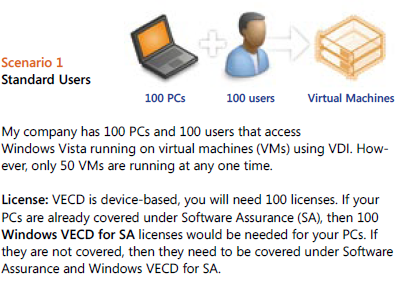
VECD licensing can be quite confusing to get right for the various different scenarios that might pop up, so Microsoft have made a handy pdf to show how it works for a variety of different possible situations.

Scenario 1:

image

Scenario 2:

image

You’ll notice in scenario 2 that although there are 150 VM’s (Virtual Machines) being accessed, you only need to licence the number of machines, in this case 100. You can have an unlimited number of instances (of the OS) stored on the server and each machine can access up to 4 running instances at a time.

Scenario 3:

image

This is an interesting scenario and I in fact answered a question about this on Twitter just today 🙂 VECD is a device based licence BUT it gives Work at Home (WAH) rights to a specific named user of that machine; this mixing of device/user, while perfectly sensible, does lead to some confusion. These WAH rights help make VECD and VDI nice and flexible.

There are more scenarios on the pdf (which is why my scenario 3 is their 4!) as well as a lot more great info, and you can download it from:

http://www.microsoft.com/windows/enterprise/solutions/virtualization/licensing.aspx

For me at least, I had to save the pdf and then open it; if I tried to open it from the site it gave me an error. It’s down near the bottom, the “VDI Licensing Brochure” mentioned 5 lines from the end 🙂

Microsoft Licensing: Too difficult?


Steve Ballmer was hosting a Q&A today (05/10/09) and was asked about plans to simplify Microsoft’s licensing. Brilliantly, he said they have no plans to do such a thing; somewhat expectedly, Twitter has lit up with person after person commenting that it’s all too hard and Ballmer should sort it out. However…

I don’t understand why people expect Microsoft licensing to be super simple and laid out so that everyone, no matter their field of expertise, can easily understand every part of it.

I don’t know how an engine is all put together, so I rely on mechanics. I don’t know how to re-program a washing machine,so I rely on engineers. I’m not 100% au fait with all the accounting procedures, so I rely on our Finance dept. At no stage do I expect that I should be able to work out & know all these things; much less do I demand that someone does something about it!

Yes-it is important and integral to an end users business that they get the correct licences, in the correct way, as cost-effectively as possible. However the same is true of servers…and VOIP…and storage…and the list goes on but I have never seen anyone moan about how confusing speccing up a SAN solution is…and that can be pretty complicated. People are perfectly happy to accept that these things are handled by experts, people with years of experience and the time to work out all the different ways of doing something…so why not software licensing?

In fact, it’s not software licensing as a whole…in reality, it’s just Microsoft licensing that people seem to have a problem with. If someone needs help working out whether Adobe TLP or CLP suits them best – fine. Help on whether they need a Backup Exec agent for each File server or should they get a virtual agent for the server – fine. Help on whether they need CALs or NULs for Crystal Reports server – fine. However, if they need help on whether OLP or OVP is best, or if they need Windows Server Std or Enterprise or if they should get CALs or a processor licence – then it’s a whole different story. Then it’s too complicated, it’s made to confuse and rip off end users and all it does is generate more money for Bill & Steve.

Yes, I’m a Microsoft fan and yes, my job is to provide licensing solutions to customers but I really think people are being over the top now. It’s similar to what happened with Vista, it’s become cool to slate MS licensing. Just like with the ill-fated OS, I suspect many people who are complaining haven’t had any bad experiences with it, or perhaps haven’t experienced it at all, but it’s cool to moan so everyone’s joining in!

If you’ve read this and there’s some part of MS licensing that’s confusing you-please leave a comment/drop me a tweet/send me an email and I’ll be happy to help 🙂

Microsoft & Virtual Licensing


Microsoft and virtual licensing is definitely a hot topic at the minute. In particular an article written by Paul DeGroot from Direction on Microsoft keeps being re-tweeted on Twitter by all manner of people. Personally, I think people are being a little short-sighted and thus not being quite fair to Microsoft-or the people they’re advising.

Reading this article by Bridget Botelho over at www.searchservervirtualization.com, the crux of it seems to be that Microsoft licensing

 “defeats the purpose of building a dynamic data center”

due to the rules around re-assigning Windows server licences. True, if you’re using Windows Server Std or even Enterprise licences, licence re-assignment has the potential to cause a few issues. However, the example used is of a datacenter…and MS have a product called “Windows Server DataCenter”-which is aimed at customer running a “proper” datacenter. The example DeGroot uses is:

"You might want to run an automated data center with rules like ‘Move a VM when the CPU hits 90%,’ but that move may violate the 90-day rule…”

What’s the problem?

Example A:

Say you are licensed for 3 VM’s on server A and 2 VM’s on server B. The above rule could potentially leave you with 2 VM’s on server A and 4 VM’s on server B. If you’re licensed with Windows Server Std-that would leave you incorrectly licensed.

Example B:

Say you are licensed for 3 VM’s on server A and 4 VM’s on server B. The above rule could potentially leave you with 2 VM’s on server A and 5 VM’s on server B. If you’re licensed with Windows Server Enterprise-that would leave you incorrectly licensed.

However, Windows Server Datacenter gives you unlimited virtual licensing rights-rendering the above examples moot.

Check out this great video explanation:

Other analysts join in:

Chris Wolf from Burton Group said at this year’s VMWorld that “one of the most important changes Microsoft needs to make is to remove the mobility restrictions associated with Standard Edition Windows Server OS licenses”. He goes on to say

“Most enterprises wind up purchasing Datacenter edition licenses as part of a virtualization project…”

and he says this as though it is a bad thing! He only seems to be looking at the upfront costs and basing it on the assumption that there are no benefits associated with Datacenter licensing other than being able to move VM’s around; in my experience that isn’t true.

If a customer were to use Standard licences to cover every VM in their datacenter, It would also slow down expansion as each time you need to deploy a new VM-what do you need to do…that’s right, go and order a new licence.

You urgently need to provision a new server to cope with extra load etc but you haven’t got a spare licence-the proper thing to do is wait until a licence has been ordered from your reseller and then deploy the VM. What will actually happen is that the VM will get deployed anyway and the licence will get ordered after the fact…leaving the company non-compliant but “hey-it’s only for 24 hours” will be the mentality.

Then, once people become familiar with that “process” they may well not bother reporting the new deployment as, let’s be fair, most techies aren’t up on the licensing rules and so might not even realise there’s anything to report. On top of that maybe people will simply forget to mention it or the Asset management guy is on holiday so they’ll tell him when he’s back…but a fortnight’s a long time and it never gets done.

Even with Software Asset Management monitoring is place, it will be a job to keep track of it and may well still lead to non-compliance.

Alternatively, you can purchase Datacenter edition and use as many VM’s as your servers can handle. These days ease of management, and thus a reduction in management costs, is a huge focus for most companies so while Datacenter is more expensive that Std (or Enterprise) it gives cost savings in many other areas.

Wolf also said:

“The leap to licensing per VM instead of per physical machines is going to take a lot of pressure on the company," Wolf said. "But keep holding them to the fire, because it is working."

To me it would seem that licensing per VM would be more expensive, more complicated and more fraught with potential pitfalls. I’d be interested to see what you think on this subject…

Technical Differences:

Also, on a slight side note, Windows Server Datacenter is much more technically suited to that environment with features such as:

  • Hot Add Processors
  • Hot Replace Memory
  • 64 X64 sockets (against 8 for Ent)

when compared to Enterprise and:

Failover cluster nodes

  • Cross File Replication
  • 2TB X64 RAM (against 32GB)
  • 64 X64 sockets (against 4)

when compared to Std.

See more comparisons here.