Sideloading Apps in Windows 8


Many organizations have there own Line Of Business (LOB) systems that they use internally, and in Windows 8 there are 2 ways of installing these on machines:

  • Via the Windows Store
  • Sideloading (I.e. bypassing the Windows Store)

How to Sideload:

Sideloading is a Software Assurance (SA) benefit & the document I have from MS says:

“Windows EA, Select SA, and EES customers will be granted sideloading license rights”

It doesn’t mention Open SA customers there but I see no reason they would be excluded, so I will ask for clarification on that.

The requisite license keys for this will automatically be provided via the VLSC.

If you do not have SA, Sideloading is still possible…for a charge:

WinSideLoad-H 8 Sngl OPEN 100 License = £2,435

Purchase this license and you will then receive the license keys via the VLSC.

Of course, it is still free for companies to publish their apps via the Store, but this method affords them more privacy.

I have to say I’m not 100% sure why the ability to sideload outside of SA has a fee attached too it. Is it in an attempt to ensure companies are serious about the apps they deploy, and stopping them pushing out willy nilly, poorly created apps that will detract from the Windows 8 experience?

Windows Server 2012 Licensing Changes


Windows Server 2012 is getting ever closer and today we had some exciting news – changes to the licensing – Yay! This has genuinely got me quite excited Smile

Currently Windows Server has 3 main flavours:

  • Standard / Licensed Per Server
  • Enterprise / Licensed Per Server / Rights to 4 Virtual Servers
  • DataCenter / Licensed Per CPU / Rights to Unlimited Virtual Servers

There are also Web Server, HPC & Small Business Server (SBS) editions.

There are also feature differences between the versions.

Going forward with Windows Server 2012 we will have:

  • Std / Licensed Per CPU / Rights to 2 Virtual Servers
  • DataCenter / Licensed Per CPU / Rights to Unlimited Virtual Servers
  • Each license covers 2 CPUs

Std & DataCenter will have feature parity and the only difference will be the virtual server rights. This is a question I’ve already seen on Twitter:

image

So it’s good to get an answer straight away.

Features previously not in Windows Server Std that will be with 2012 include:

  • Windows Server Failover Clustering
  • BranchCache Hosted Cache Server
  • Active Directory Federated Services
  • Additional Active Directory Certificate Services capabilities
  • Distributed File Services (support for more than 1 DFS root)
  • DFS-R Cross-File Replication

This follows the same path as the changes recently made to System Center and, while it may make small installations more expensive, overall it reduces costs and simplifies the licensing for end users.

There are 2 other editions of Windows Server 2012 – Essential & Foundation:

image

As you can see, Essentials & Foundation are aimed at the very small networks and both are limited to 1 CPU. Things which are missing from the lower editions include:

  • Direct Access
  • Hyper-V
  • ADFS

To see the full list of feature differences between the various editions, download the Windows Server 2012 datasheet here:

View Datasheet

Web Server

Windows Web Server can only run web facing workloads but does not require any CALs (Client Access Licenses) which makes it perfect for hosting external sites. However Web Server is being discontinued in the next release but before tales of astronomical rises in costs as companies are forced to buy CALs for every single user of their service:

“Despite the removal of Web Server edition, web workloads running on a Windows Server 2012 edition will continue to receive the “CAL waiver” that is in effect for these workloads today. Windows Server CALs will not be required to access the licensed server if it is only being used to run web workloads”

Software Assurance Transition

If you have active Software Assurance (SA) on Windows Server licenses at the time of release for 2012, you will receive rights to the new versions as per the below:

image

What about SBS?

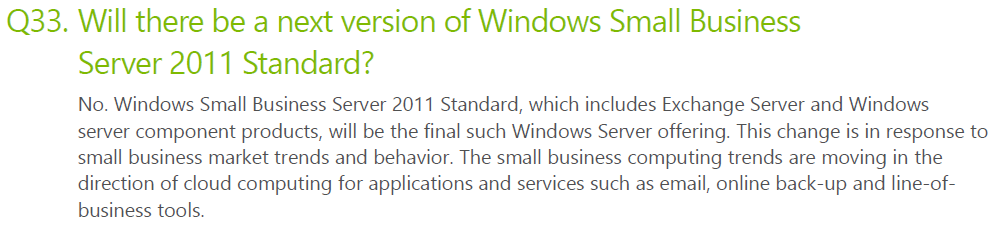
Small Business Server has been around for years, combines Windows Server & Exchange Server and is aimed at networks with less than 75 users. Now however it’s time has come to an end…

image


image

SBS has quite a thriving community built around it with many passionate advocates, most of whom are sad/angered to see it go. I on the other hand am really rather happy about it! I’ve always found it to be an extra, unnecessary complication when new sales staff/customers get involved with licensing. I realise I’m not going to be popular with that opinion and I’m equally sure that if I worked more in that area I’d have a different opinion but as it is, from the Mid-market & Enterprise space, this is a welcome move.

You can find the full FAQ here:

Find Answers

Microsoft finalizes Price Increases


Microsoft’s impending price increases have been the subject of much discussion recently, with customers and partners working together to negate the impact this will have on budgets going forward. However we’ve only had rough figures as to what the price increases will actually be so it’ s been a little odd! However, we now have final numbers for the percentage increases:

image

As you can see, the increases aren’t as hefty as first expected, due to the volatile Euro.

You’ll also notice that Government Open License is being re-instated from next month.

MS to change Office 365 support?


CRN, Channel Reseller News, has just reported that MS are set to revamp the structure for Office 365, by giving sales and support responsibilities to distributors.

This will mean rather than customers purchasing directly from Microsoft and them giving resellers a rebate, resellers will purchase from distribution partners as they currently do for other items such as Office & Windows via the Open license models. They go on to say that distributors will also provide end user support but MS will retain ownership of the billing functionality; which raises two points for me:

1) End User Support: MS have invested quite heavily in their support teams and, in my experience, they are really good. Quick, knowledgeable, keen to help etc…it strikes me as odd that Redmond would look to move away from that and put it on the channel. Perhaps distributors will have the option to offer end-user support but I would imagine that MS will keep that support element.

2) Billing: Selling it through the channel but Microsoft keeping the billing seems overly complicated. A sales cycle would be:

  • Distributor buys from MS
  • Reseller buys from Distributor
  • Customer buys from Reseller

and payment would follow that back through the channel so I’m not sure where MS would fit in?

Feel free to offer your thoughts on all the above too!

I think it will, overall, be a good move to include the channel more in this but hey, I’ll see what new info we get at WPC and let you know Smile

Windows 8 Editions


Microsoft have announced the editions of Windows 8 that will be available:

  • Windows 8
  • Windows 8 Pro
  • Windows 8 Enterprise
  • Windows RT

Let’s take a look at each edition and what you get.

Windows 8

This is the new incarnation of “Home Premium” as it cannot join a domain or be managed via group policy. New/updated features include:

  • Updated Windows Explorer
  • Updated Task Manager
  • Better multi-monitor support
  • Ability to switch languages on the fly (previously ENt/Ultimate edt only!)


Windows 8 Pro

This is, as the name suggests, the new “Professional” offering of Windows and it brings with it a few new things:

  • Boot from VHD
  • Client Hyper – V
  • Bit Locker & Bitlocker to Go

Now the first 2 are pretty cool and will come in very handy but in my opinion, that 3rd one is the biggie:

Hard Drive and USB encryption built in as part of the OS!

Previously Bitlocker was available only as an Enterprise feature which required SA to be purchased on top of the Windows 7 Pro SKU, and for the last almost 3 years we’ve had customers asking:

“Why isn’t this in the Pro version?”

so it’s great that it now is Smile

Windows RT

This has previously been known as “Windows on ARM” or “WOA” and is exclusively for devices powered by ARM processors. These devices will typically be thinner, lighter and have better battery life than regular devices so it’s aimed very much at the tablet market.

One of the interesting features is that Windows RT is listed as including Microsoft Office (Word, Excel, PowerPoint, OneNote). No more solid information has been given on this, leading to some speculation. Over on LinkedIn, Paul DeGroot has said:

image

I imagine it will be something akin to what is built into Windows Phone, certainly not equivalent to the full desktop version but more than capable of handling what users need to do when they’re out and about – perfect for tablets once again and a great USP against Apple & Android devices.

One of the big differences with Windows RT is that X86/X64 software and desktop software cannot be installed on it, again keeping it focused on the tablet market…just like the iPad iOS and responding to people’s claims of Windows being too “bloated” to run on a tablet.

There is also a lot of noise being made about the name “Windows RT” and how it’s rubbish and no-one will know what it means etc. but I genuinely feel that’s people just complaining for the sake of it.

  • What does iOS mean?
  • What does Ice Cream Sandwich mean?

Nothing yet devices with those OS’s are still selling pretty well so I really don’t see it being a problem Winking smile

The Windows Team Blog post has got a great, although not exhaustive, comparison chart between the 3 above versions here:

http://windowsteamblog.com/windows/b/bloggingwindows/archive/2012/04/16/announcing-the-windows-8-editions.aspx


Windows 8 Enterprise & enhanced Software Assurance

Microsoft have kept the Enterprise edition of Windows going, reserved as always for customers purchasing Windows 8 Pro with Software Assurance.

As you’ve seen above, 2 features previously restricted to Enterprise have been moved into the Pro SKU (BitLocker and Multi-User Interface) but the other key differentiators from Windows 7 are there including:

  • Direct Access
  • Branch Cache
  • AppLocker
  • VDI Enhancement

as well as a couple of new ones:

  • Windows 8 App Deployment – “Domain joined PCs and tablets running Windows 8 Enterprise will automatically be enabled to side-load internal, Windows 8 Metro style apps”
  • Windows To Go – “a fully manageable corporate Windows 8 desktop on a bootable external USB stick.”

That second addition aims to ease the pain around BYOD (Bring Your Own Device), which going to be a huge thing over these coming months and years.

Microsoft are also adding new benefits to Software Assurance on Windows 8 Pro, which will include:

  • Windows To Go Use Rights: Windows To Go will allow companies to support Bring Your Own PC scenarios and will give employees who need to work from home more secure access to their full corporate environment. With Windows To Go use rights under Software Assurance, an employee will be able to use Windows To Go on any company PC licensed with Windows SA as well as from their home PC. Additionally, through a new companion device license for SA, employees will be able to use WTG on their personal devices at work.
  • Windows RT Virtual Desktop Access (VDA) Rights: When used as a companion of a Windows Software Assurance licensed PC, Windows RT will automatically receive extended VDA rights. These rights will provide access to a full VDI image running in the datacenter which will make Windows RT a great complementary tablet option for business customers.
  • Companion Device License: For customers who want to provide full flexibility for how employees access their corporate desktop across devices, we are introducing a new Companion Device License for Windows SA customers. For users of Windows Software Assurance licensed PCs this optional add-on will provide rights to access a corporate desktop either through VDI or Windows To Go on up to four personally owned devices.

These again make strides towards addressing the changes being brought about through BYOD and remote working.

You can see more info on the Windows Team Blog here:

http://windowsteamblog.com/windows/b/business/archive/2012/04/18/introducing-windows-8-enterprise-and-enhanced-software-assurance-for-today-s-modern-workforce.aspx

That said, it will be interesting to see what changes (if any) are made to Office licensing (most probably through SA again) to bring it into line with BYOD needs…but that’s a separate topic Winking smile

SQL 2012 Core Factor Table


You may well have seen by now that SQL 2012 bring with it a big change, moving from “Per CPU” to “Per Core” licensing. (Read more here.)

Well there’s one more bit that hasn’t been widely announced but can make a fair difference in certain scenarios, and that is the “Microsoft SQL 2012 Core Factor Table”:

image

What?

There is a minimum of 4 core licenses per physical processor so the above table shows that:

1 x Single Core = 4 Cores

2 x Dual Core = 4 Cores

which fits the model. However you can see that there is special dispensation for certain AMD processors where each physical core is worth just 0.75 cores when it comes to SQL. S0 that means:

6 physical cores on an AMD 32XX CPU = 4.5 SQL Cores*

*I believe this would be rounded up to 5…and you have to buy in multiples of 2 so doesn’t alter anything…but if you have an 8 core CPU of the above kinds, you’d then only need to buy 6 SQL cores (8*.75=6).

This does add an extra bit of complexity to correctly designing an SQL solution but hey, that’s what us licensing gurus are for right? Smile

I do wonder how this will affect decisions when companies are speccing up hardware for SQL deployments. Will previously 100% Intel houses start looking at AMD chips for the SQL cost savings they can bring?

System Center 2012 Licensing Changes


System Center 2012 is getting closer and today saw Microsoft release details of the new licensing models.

Currently the various System Center products (SCCM, SCOM, SCSM, DPM etc) can be purchased individually or as bundles, from 2012 however it’s bundles only. There will be 2 flavours:

  • Standard
  • DataCenter

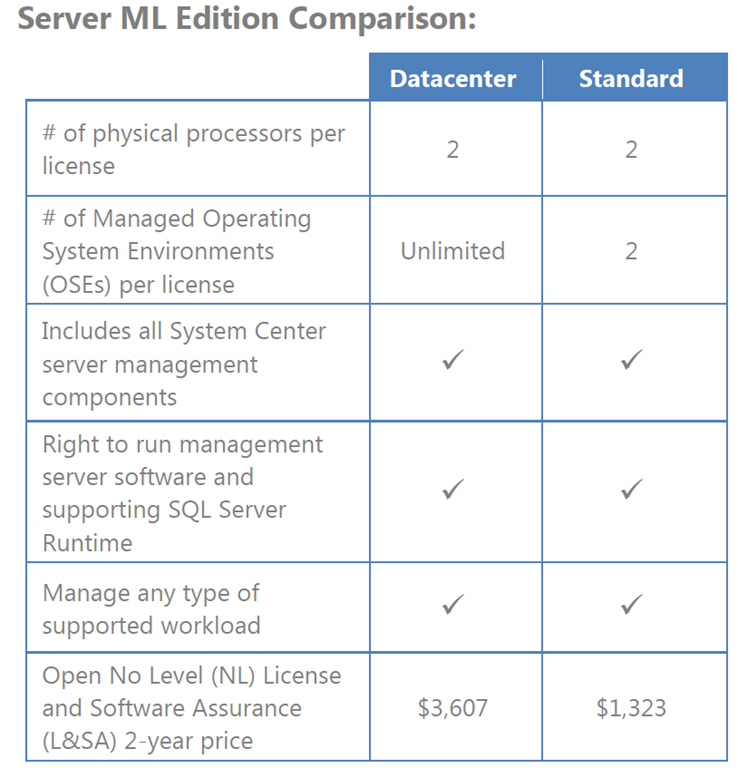
with the difference being the number of OSEs (Operating System Environments) that can be managed:

image

Following DPM 2010’s lead there will now be no more console server licences or SQL needed, simply Management Licences for the endpoints being managed.

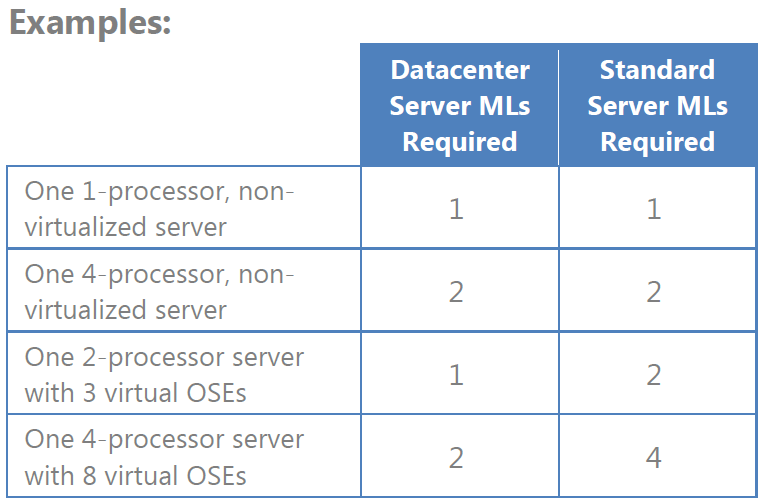
Determining the number of licences needed will involve knowledge of the virtual environment & physical processors, similar to SQL:

image


System Center 2012 has a much greater focus on “The Cloud” and as such:

image

This enables organizations to move to a hybrid infrastructure much more easily.

What if I already have System Center?

If you have System Center with Software Assurance that is current at the time of 2012 General Availability you will receive the following grants:

image

What about Client devices?

More changes abound here too, there are now 3 Client ML offerings:

image

It’s important to note that, as with the Server MLs:

“Components included in the Client MLs are not available separately”

Opinion

Overall I think this is a good move. Again, Microsoft are modifying their licensing to make it more dynamic, more future proof and more accessible to companies going forwards.

Yes, there will be situations where it works out more expensive for some companies but for the vast majority this is a great move…they’ll have the ability to deploy a wider range of System Center products with streamlined licensing, which is good for everyone Smile

That said, I’m off to review a number of proposals to see how they map to the new models and what changes need to be made – good times! (Thing is, I actually mean that Winking smile)

Any questions, let me know.

Microsoft SQL 2012 Licensing Changes


Microsoft have this week announced some relatively major changes to the SQL 2012 product line up and it’s licensing.

Editions

There are now 3 editions of SQL Server:

  • Standard
  • Enterprise
  • Business Intelligence

Licensing

Here’s the big change – there’s no more Per CPU licensing…now it’s by Core.

This is a major, although not wholly unexpected, move by Microsoft. Other vendors such as Oracle have long charged by the core but Microsoft have always stayed with physical sockets as their measure…until now.

I’ve been expecting this for a while, especially as 6-core processors become more commonplace and Intel keep making them more powerful. What once took 2 processors can now be done with 1 and what once took 4 now needs just 2, so Microsoft must have been seeing a decline in their SQL revenue over the last 18 months or so.

To break down the licensing:

Standard = Per Core or Server + CAL

Enterprise = Per Core only

Business Intelligence = Server + CAL only

You’ll notice that the new Business Intelligence (BI) edition is Server+CAL only so what should you do if you have external/anonymous users and/or a huge number of people accessing the BI server/s? SQL Enterprise Edition 2012 contains ALL features of the BI edition so use that to license by core.

Let’s go a little deeper into the licensing and see what else there is for us Smile

It’s worth noting that “Core based licences will be sold in 2 core packs.” but a big clause is:

“To license a physical server properly, you must license all cores in the server with a minimum of 4 cores required for each physical processor in the server.”

This means if you’re running with dual core CPU’s you’re going to have to buy more cores than you have. <—This will be a big cause of outrage I’m sure however it does mean that as you upgrade your server hardware and get CPUs with higher core counts, there won’t be a big extra licensing cost.

Transition to new Licensing Models

Whenever Microsoft bring out new versions of software and change the licensing rules, the big question is always “What if I need to buy new licenses in the meantime?” and we, as partners, have to work to make sure that we help customers future proof any investments they make in the run up to the new product release.

What’s the deal with the run up to SQL 2012?

  • After 30/06/12, no Enterprise Edition Server licenses will be sold. (EA/EAP customers will have until their next renewal after 30/06/12 to purchase additional server licences for current projects.)
  • All existing SQL Enterprise Editions licensed via Server + CAL with SA (Software Assurance) can be upgraded to SQL 2012 and the SA can be maintained to provide access to future updates.
  • Here’s a point to take note of:
  • Newly purchased Enterprise Edition (EE) 2012 server licenses and/or those server licenses upgraded via SA will be limited to server deployments with 20 cores or less.
  • Customers with processor licenses under SA can upgrade to SQL 2012 at no additional cost.
  • At the end of the SA term, processor licences can be exchanged for core licenses and the SA can then be renewed.
  • SQL Std & Enterprise Processor licensed covered with SA will be exchanged for a minimum of 4 core licenses or the actual number of cores in use.
  • SQL DataCenter (a version of 2008 that’s disappearing in 2012) will swap out for a minimum of 8 cores or the actual number of processors in use.

There are some other rules and guides around the ability to add core licenses mid term to an EA/EAP etc but I don’t want to make this section TOO big!

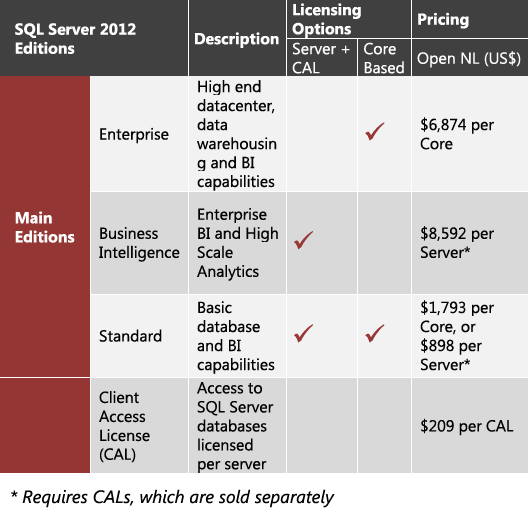
Pricing

Microsoft have released estimated pricing in dollars so let’s take a look at that and see how it stacks up to current 2008 R2 costs.

image

So you’re looking at $7172 at a minimum for a SQL Std server which stacks up pretty well against the current processor licensing costs. I’m sure people will find scenarios where this is more expensive but they’ll surely forget to take into account all the new features like Project Crescent & Juneau that have been integrated into the new editions, and so I don’t think that price should really be the big thing here.

Any other editions available?

SQL Datacenter, Workgroup & Standard for Small Business editions are all being retired with the 2012 release.

Web Edition will only be available to hosters via SPLA (Service Provider License Agreement).

Developer, Express & Compact editions will continue to be available in the same ways as right now.

Microsoft License Terms


Microsoft have a range of products with a variety of different rules & rights around what you can/can’t do with them such as downgrading to a previous version.

Even for partners, it can be difficult to know each & every license right for the different products and that’s where this site can come in very handy:

Microsoft License Terms

For any OEM or FPP product this site should tell you what you need to know.

image

image

image

image

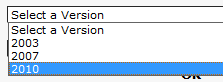
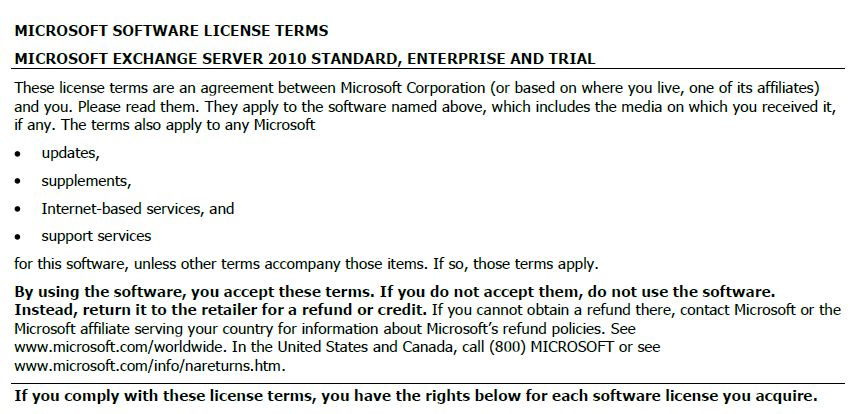
Making the selections as above gets you a pdf of the full license terms:

image

This can be a great way to double check if you’re allowed to do something!

Microsoft Enterprise Agreement: Updated for the Cloud


Microsoft’s top level licensing model, the Enterprise Agreement, has recently been overhauled to make it more cloud friendly…which is a good thing for organisations looking to adopt this new model now, or in the future.

What is an Enterprise Agreement?

The Enterprise Agreement (EA) is Microsoft’s highest level model, for companies of 250 seats and above. It requires an Enterprise Wide (EW) licensing commitment, includes Software Assurance (SA) on all licences and offers the best discounts.

The common way for an organization to licence under the EA is with the “Professional Desktop”, comprised of:

  • Windows OS
  • Office Pro Plus
  • Core CAL

The Core CAL itself is a bundle, comprised of:

  • Windows Server CAL
  • Exchange Server CAL
  • Sharepoint Server CAL
  • SCCM Client ML

With the exception of Windows Server & SCCM, all these products are now available online via Office 365 and Intune.

If a company with an existing EA wanted to take advantage of these products, they would be on top of their existing Professional Desktop licences, as they are required to maintain the Enterprise Wide commitment. This would mean double licensing, not an effective use of budget and of course, not the way customers want to do things.

So in a very quick move, Microsoft have produced an amendment to their Enterprise Agreement terms making it possible for organizations to “mix & match” between online & onsite licensing.

Product LineUp

Windows OS –> Windows Intune

Office –> Office 365 E3 or E4

Core CAL –> Core Bridge

Enterprise CAL –> ECAL Bridge

What’s a Bridge CAL?

Bridge CALs are a new licensing item that bridge the gap between the CAL suites and their closest online relatives.

For the Core CAL offering, the bridge CAL covers the organization for:

  • Windows Server CALs
  • SCCM Client MLs

thus completing the Enterprise Wide commitment, without duplicating any functionality and keeping them compliant with the contract terms.

Example

The following diagram gives a good example of how the online and onsite licensing models can co-exist within an organization.

image

There are certain differences when it comes to the Software Assurance benefits available with Online products too, for example:

Windows Intune does NOT give

  • Training Vouchers
  • TechNet Subscriptions

There are a variety of different combinations possible when it comes to these licensing scenarios, some more complex than others! I have left out a fair amount of information from this post as I don’t want to cause confusion, however if you have a specific scenario I would be more than happy to help Smile

It’s great to see Microsoft making such changes as this and at such a good speed. Many people criticised Microsoft for taking too long to update their licensing models to accommodate the changes brought about by Virtualisation and, while that may be true, Redmond are definitely ahead of the curve this time!