Microsoft Enterprise Mobility Suite Rumour


Rumours abound that Microsoft are set to make 2 announcements at tomorrow’s (27/03/14) web conference:

1) Office for iPad

2) Enterprise Mobility Suite

Office for iPad is a big one, that’s been talked about for a long while, and is a tricky thing to consider. On one hand, there are millions of people with iPads who will surely buy Office – bringing in significant revenue to Redmond. On the other hand, does Office on iPad weaken the Windows tablet message somewhat?

I don’t think it does, Office isn’t the only benefit of a Windows tablet – but I can see it being a question MS will need to address.

The second point is a newer rumour – the Enterprise Mobility Suite (EMS). According to ZDNet, this will be a bundle of:

  • Windows Intune
  • Azure Active Directory Premium (a new offering)
  • Azure Rights Management Services

This would enable organizations to easily manage 1000’s of devices – Windows, Windows RT, Windows Phone as well as iOS & Android – with features such as self service password reset, group management and more.

Source – ZDnet: http://www.zdnet.com/microsoft-to-unveil-enterprise-mobility-suite-alongside-office-for-ipad-7000027717/
Adobe, Creative Suite & Volume Licensing


Adobe are continuing to make big changes to the world of Creative Suite licensing in their move towards Creative Cloud.

From June 1st, Creative Suite products will no longer be available via TLP or CLP, the 2 Adobe Volume Licensing programs.

This affects Commercial & Government (NOT Education) and the last order date will be May 30th.

As always, there are exceptions:

  • No change for Education
  • Still available for Government customers in Japan
  • China will continue to sell CS6 throughout 2014 in all segments.
  • Individual copies of CS6 will still be available to purchase via adobe.com

It is to be noted that this ISN’T the end of TLP & CLP as all non-CS products are still available via Volume Licensing – in particular Acrobat.

SQL 2014 Release Date


Microsoft have announced that SQL Server 2014 has been RTM’d (Released To Manufacturing) and will be generally available from April 1st.

SQL 2014 brings a host of new and improved features, particularly around Business Intelligence and Cloud computing.

  • In-memory transaction processing (In-Memory OLTP), speeds up an already very fast experience by delivering speed improvement of up to 30x.
  • Customers do not have to rewrite their application or deploy new servers. We approached in-memory columnstore the same way – it is built into SQL Server.
  • Customers can easily and securely backup and recover on-premises SQL Server databases using Windows Azure
  • SQL Server 2014’s AlwaysOn technology was not just improved for this release, it was built to enroll Windows Azure virtual machines running SQL Server into a customers’ disaster recovery solution.

You can read more about this release here:

http://blogs.technet.com/b/microsoft_blog/archive/2014/03/18/sql-server-2014-released-to-manufacturers-will-be-generally-available-april-1.aspx?WT.mc_id=Blog_SQL_RTM_SQL14

Windows 8.1 Enterprise Upgrade


One of the fundamentals of MS licensing has been changed. It’s always been the case that:

“the only way to get Windows Enterprise is to buy Pro + SA”

Well not anymore!

As of March 2014, there is a standalone Windows 8.1 Enterprise SKU available via Volume Licensing.

Why?

This means organizations who can’t/won’t enter into an agreement with Software Assurance can now benefit from things such as:

  • Direct Access
  • AppLocker
  • Windows To Go

and more

Other SA benefits are not effected so things such as:

  • New Version Rights
  • MDOP
  • Virtualization

etc. are still only available with SA.

What else has changed?

It is now ONLY possible to attached SA to the Enterprise Upgrade SKU.

This takes away one relatively common practise. Organizations would often buy machines with Windows Pro OEM and then attach Windows SA within 90 days. This is no longer possible as SA can be attached only to Enterprise – and that won’t come pre-loaded on machines.

If you bought the OEM devices before July 1st 2014, you still have the 90 days to purchase SA. Once that date passes, it will no longer be possible.

Windows Intune & Power BI coming to Open Licensing


In a very encouraging move, Microsoft have announced that, from April 1st 2014, customers will be able to purchase both Windows Intune through the Open licensing program.

Currently Intune is available only via the MS portal but will now sit alongside Office 365 (and soon Power BI too) on the regular pricelists.

See more here:

http://www.digitalwpc.com/Community/Perspectives/Pages/Windows-Intune-and-Power-BI-coming-to-Open-Volume-Licensing.aspx?fbid=-jjTmFnB-aO&mtag=mbar-twitter&mtag=mbar-linkedin#fbid=PVSRpLQGbVC

Hat tip to Licensing School for finding this.

Cloud Platform Suite


This is a new licensing program that will be available on the January 2014 SPLA price list. It is aimed at Service Providers who run heterogenous environment – that is environments with a mix of Operating Systems such as Windows, Linux & Unix.

It is licensed in a “Host and Guest” model – the Host license covers the hardware and you will then purchase a Guest license for each Windows VM you wish to run.

Host SKU: Includes Windows Server 2012 R2, System Center 2012 R2, and Windows Azure Pack, host capabilities and rights to manage all guests

Guest SKU: Includes Windows Server 2012 R2 guest capabilities

For more info, check out my good friends over at Licensing School:

Permalink to Cloud Platform Suite

Adding Azure to an Enterprise Agreement


It’s now easier than ever for customers to add Windows Azure to their Enterprise Agreement (EA).

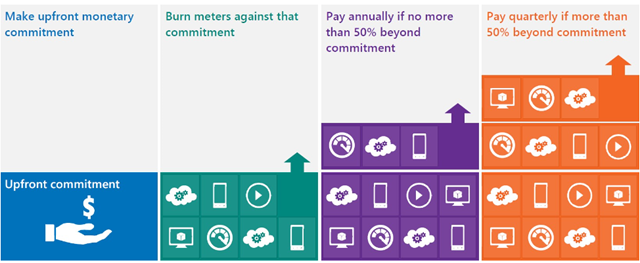
You commit upfront to a monthly amount that you feel will cover all your needs, and that monetary commitment can be utilised in any way within Azure.

image

Previously, you would receive great payment terms for your monetary commitment but – should you go over that amount (known as “overage”) – the extra usage would be charged at much higher rates. This effectively punished organizations who thought “wow, this Azure stuff is cool” – but no more, Overage is now charged at the same rates as the initial agreed amount. This makes increasing the usage of Azure a much more compelling proposition.

See Josh Waldo’s full post here:

http://www.digitalwpc.com/Community/Perspectives/Pages/Windows-Azure-added-to-Enterprise-Agreement-Use-it-to-power-your-solutions-.aspx?wt.mc_id=corp_mpn_tw_dwpc_joshwaldoazureagreement#fbid=7Lt8ur4Ygjd

Office 365 Cross Family Transitions


At the 2013 WorldWide Partner Conference (WPC), Microsoft announced plans to make it easier for customers to switch between Office 365 plans – this was greeted by smiles & cheers from many!

The initial introduction worked only for a few cases but the supported switching scenarios have now been expanded to include:

From To
Small Business MidSize Business
Enterprise E1
Enterprise E3
Enterprise E4
Small Business Premium MidSize Business
Enterprise E3
Enterprise E4
Exchange Online Plan 1 Enterprise E1
Enterprise E3
Enterprise E4
MidSize Business
Exchange Online Plan 2
Enterprise E3
Enterprise E4

Microsoft say:

“We continue to work on transition solutions for both additional scenarios (e.g., Exchange Online to Midsize Business) as well as for Open subscriptions and Government/Academic SKUs”

So there will continue to be additions and improvements around this – making Office 365 even more relevant for businesses everywhere.

Office 365 MidSize Business and Exchange Online Archiving


Exchange Online Archiving (EOA) is now available as an add-on for Office 365 MidSize Business; this gives MidSize users unlimited archiving as well as legal hold capabilities.

It’s great to see Microsoft continuing to improve and add to their Office 365 platforms, and this move really helps SMBs to attain Enterprise levels of service.

The Ordering Process

Currently, EOA can only be added to MidSize Business licenses purchased via the Advisor model, that is via the Microsoft Online Portal. If you purchased via Open Licensing (so from your reseller partner – and you pay them rather than MS), you need to add just 1 license of MidSize Business via the Advisor Model. That way, you’ll then be able to attach EOA to that license but fear not, the subscription can be applied to all mailboxes on that tenant – including those purchased via Open.

The process is nice and simple, which is good:

  1. Login to your Office 365 account as the Administrator.
  2. Go to the “Purchase Services” tab in the Admin Console.
  3. Click “Add” to purchase one additional seat of Office 365 Midsize Business.
  4. You can add Exchange Online Archiving at the same time as you add the direct bill seat of Midsize Business:
  5. Select the “Optional Add-ons” dropdown and enter the number of licenses of EOA you want to purchase.
  6. Add to the cart and proceed to payment by clicking “check out.”
  7. Follow the wizard to complete your payment with a purchase by credit card or other locally available payment method.

Microsoft Student Advantage


Microsoft have announced another great benefit available to education customers:

“Any academic institution that licenses Office for staff & faculty can provide Office 365 Office Pro Plus to students AT NO ADDITIONAL COST”

This, known as Student Advantage, starts from December 1st.

Its aim is to help give students the skills they’ll need to be successful out in the world of work, whilst helping schools manage costs – certainly a worthy aim!

You can read more here:

http://blogs.technet.com/b/microsoft_on_the_issues/archive/2013/10/14/microsoft-announces-new-student-advantage-program-to-prepare-students-for-tomorrow-s-jobs.aspx#!