
Microsoft Arc – Azure on other clouds


Photo by Max Avans on Pexels.com

Microsoft Arc has been announced at Microsoft Ignite and it looks like it could be quite the game changer. Microsoft say that it “enables deployment of Azure services anywhere and extends Azure management to any infrastructure” across “across on-premises, edge and multicloud”.

The concept is pretty clever – it will allow certain Azure services to run in a variety of places, including on-premises hardware – both Azure Stack and seemingly regular customer hardware – but also other clouds like Amazon AWS and Google Cloud Platform!
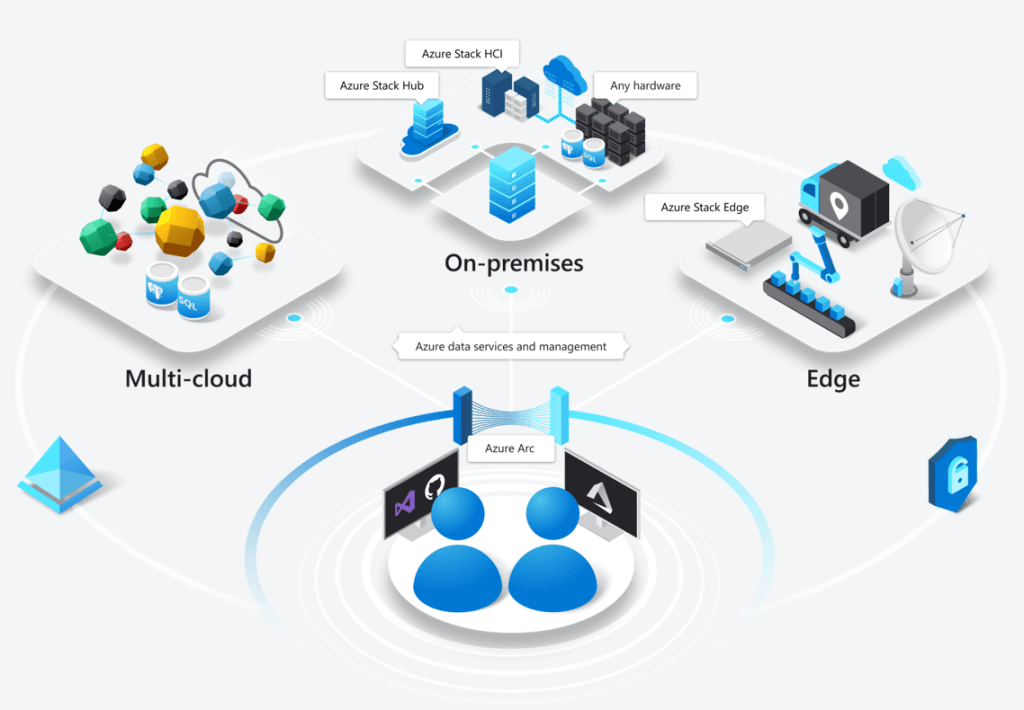
Taken from https://azure.microsoft.com/en-us/services/azure-arc/

Multi-cloud is the concept of an organisation having multiple public clouds (Azure, AWS, GCP etc.) in use at the same time and, while many say it isn’t necessary – and even more say it isn’t a good idea – it’s already reality for many companies around the world. That being the case, anything to help make it easier and more secure to manage is a positive for customers…but I’m really intrigued to see what Amazon and Google make of this! What measures will they put in place to prevent or discourage customers from using Azure Arc within their datacentres?

Microsoft are talking about “Azure data services anywhere”, which looks to be based on a Kubernetes container platform. Some of the benefits Microsoft tout include:

  • Unified Management
  • Consistent cloud billing model
  • Consistent governance
  • Unique security tools like Azure Threat Protection

Currently Azure SQL Database and Azure Database for PostgreSQL Hyperscale are available for private preview on Azure Arc – although this Microsoft site:

https://azure.microsoft.com/en-us/services/azure-arc/hybrid-data-services/

only talks about them being available on-premises. It does however mention that SQL Server customers will be able to “leverage their existing licensing investments” to use SQL on Azure Arc, which suggests a future widening of the Azure Hybrid Benefits available through Software Assurance.

This is definitely one to keep an eye on over the next few months as it goes through private preview, then public preview, and finally out into general availability.

Microsoft Endpoint Manager


Photo by Pixabay on Pexels.com

It’s Microsoft Ignite 2019 and they’ve have announced Microsoft Endpoint Manager – the next generation of their desktop and endpoint management strategy. It brings together the various disparate elements including:

  • System Center Config Manager (SCCM)
  • Intune
  • Device Management Admin Center
  • Desktop Analytics

It will be interesting to see if other desktop related elements come under here too, in time.

As part of this, Microsoft are making Intune licenses available free of charge to all SCCM licensed customers – to manage Windows devices. If you want to manage non-Windows devices, paid licenses will still be required.

See more from Microsoft here – https://www.microsoft.com/en-us/microsoft-365/blog/2019/11/04/use-the-power-of-cloud-intelligence-to-simplify-and-accelerate-it-and-the-move-to-a-modern-workplace/

Microsoft Product Terms: November 2019


Photo by Markus Winkler on Pexels.com

I’ve taken a look at some of the highlights of this month’s Microsoft Product Terms document.

Big news is SQL Server 2019 is here – with a new SKU type and expanded fail-over rights.

We now have “SQL Server Big Data Node (BDN)” – available in 2-core packs via EA & EES. Requires a “master node” of SQL Std/Ent core with SA and includes certain SA rights.

Each SQL Server Ent Core license with SA gives 8 BDN licenses and each SQL Server Std Core license with SA gives 1 BDN license, when assigned to a “master node”.

The updated fail-over info is there too, but I’ll look at that properly in a separate article.

New language that M365 & O365 F1 licenses can only be assigned to users without a dedicated device.

“A Dedicated Device is a computing device used for work with a 10.1” screen or larger, used by the user more than 60% of the user’s total work time during any 90-day period”

F1 licenses are aimed at users who tend not have a device – drivers, nurses, warehouse staff etc. but I know some organisations are looking at them as a way to license traditional office workers and reduce costs. This new language looks to prevent that.

The new Project Plan 1, 3, and 5 licenses are added – only available via CSP. Plan 1 not available in France or South Korea for some reason. 🤔

Terms have been added to cover Azure Spot offers. <– Interestingly, I haven’t seen Microsoft use this term themselves until now. They have referred to them as “low-priority VMs” in Azure, with Spot being a term used by Amazon AWS.

Cloudy with a chance of Licensing podcast – coming soon!


I put out a LinkedIn post and tweet the other week to se who’d be interested in joining me on a Microsoft-focused podcast…and it turns out quiete a few people would! The response was fantastic and means that the CWACOL podcast will definitely be happening – and soon. I’ve got a few things to get out of the way first and then I can start recording some awesome podcasts with some awesome people 😁

If you’ve already been in touch, thank you! If not, and you fancy chatting about anything and everything Microsoft – licensing, new products, hardware, the partner channel, working with Microsoft, Surface, development, ISV, etc. – drop me a comment/tweet/LinkedIn DM/email etc. and we’ll get something setup.

Look out for the first episode in the coming weeks!

Microsoft make security magic


Back in 2005, Microsoft bought an anti-virus company called Sybari to, as this ComputerWorld article put it, “give them more of a presence in the enterprise security market”. They rcontinued with the “Antigen” line and had variants for Exchange, SharePoint etc. and used multiple different scanning engines including Norman, Sophos, Kaspersky, and Computer Associates (CA).

I was a reseller at this point, focused primarily on software. It’s going back quite a while now to be fair but I remember it as being very difficult to sell it, or even to have a proper conversation about it. Those were the days of security dominance by Mcafee, Symantec, and CA eTrust – and Microsoft were not taken seriously when it came to security.

Alongside this, they also had “Internet Security & Acceleration (ISA) Server” and “Intelligent Application Gateway (IAG)”. The former subsequently became “Threat Management Gateway (TMG)” and the latter, “Unified Application Gateway (UAG)”. I remember ISA/TMG being relatively successful, certainly more so than the desktop anti-virus, and I also remember being surprised when Microsoft turned TMG 2010 End of Life with no replacement! We had a range of customers who had been using it for years and, as it covered firewall, router, VPN, web cache and more, it had become quite integral to their server side setup; Microsoft choosing not to replace it definitely led to some negative sentiment among organisations! They announced in 2012 that there’d be no further development and it would no longer be available to buy from the end of that year – although it is still in mainstream support until 2020! If you’re still running TMG 2010, I’d love to hear from you! 😁

Regardless of the product and its capabilities though, there was still a lot of anti-Microsoft sentiment, distrust, and cynicism stemming from the various legal cases of the late 90’s/early 00’s – and this seemed particularly strong in the security space.

All this is to show how far Microsoft have come in the security space in this 14 year period. Now, in Gartner’s latest Magic Quadrant for Endpoint Protection Platforms, they are top for “ability to execute” and 2nd (behind CrowdStrike) for “completeness of vision”.

For them to be so far ahead of established security players like Sophos, Trend Micro, and Symantec is fascinating. Gartner state that Windows Defender Antivirus is the market share leader for business endpoints – quite the turnaround! It’s clear the work Microsoft has been doing around Microsoft Defender Advanced Threat Protection (MDATP) (formerly WDATP) is paying off. Among the “cautions” mentioned by Gartner are:

  • Licensing is difficult to navigate
  • Windows 10 E5 is more expensive than competitive offerings
  • The MDATP features aren’t all available on Windows 7/8
  • No support for XP
  • Group Policy settings can be complex

Nothing too major there really, certainly not compared to many of the other participants. As we move towards 2020, Microsoft’s security game is strong. Not just on the desktop but it so many other areas, some of the cloud security and information protection products seem really good and innovative in numerous areas. I think it’s safe to say that Microsoft are a security company now – as well as everything else!

Check out the Microsoft post here – https://www.microsoft.com/security/blog/2019/08/23/gartner-names-microsoft-a-leader-in-2019-endpoint-protection-platforms-magic-quadrant/.


Microsoft Dynamics 365 Business Central


Microsoft have announced the upcoming release of Dynamics 365 Business Central, with general availability from April 2, 2018 for 14 countries:

  • USA
  • Canada
  • UK
  • Denmark
  • Netherlands
  • Germany
  • Spain
  • Italy
  • France
  • Austria
  • Switzerland
  • Belgium
  • Sweden
  • Finland

with Australia and New Zealand following on July 1, 2018.

What does it do?

Microsoft say this product “brings the full power of Dynamics NAV” to the cloud and covers:

  • Managing finances
  • Operations
  • Sales
  • Customer Service

Licensing

There will be 2 editions available:

  • Dynamics 365 Business Central Essentials
  • Dynamics 365 Business Central Premium

and, although I haven’t seen it confirmed, it’s likely it will have the 300 user limit that applies to the Office 365 Business products.

Interestingly, this product will be available ONLY via the CSP (Cloud Solution Provider) program…there is no volume licensing availability announced.

Further Reading

Microsoft Blog

Microsoft Enterprise Mobility Suite


Microsoft have released further info about the Enterprise Mobility Suite and how it will be licensed.

“Businesses can add Enterprise Mobility Suite to any user or device with active Software Assurance on CoreCAL, ECAL, or BridgeCAL for Microsoft Office 365.”

A big point of EMS is that it offers bundle pricing, making it cheaper for organizations to grab all this Cloud goodness.

image

Download the datasheet here:

http://www.microsoft.com/en-us/server-cloud/products/enterprise-mobility-suite/buy.aspx#fbid=GoFMyywgvz8

Thanks, as ever, to Licensing School for the heads up on the datasheet.

Enterprise Mobility Suite


Satya Nadella didn’t just announce Office for iPad yesterday, he also announced the Enterprise Mobility Suite (EMS).

The capabilities packaged in the EMS are a giant step beyond simple MDM. The EMS is a people-first approach to identity, devices, apps, and data – and it allows you to actively build upon what you already have in place while proactively empowering your workforce well into the future.

The EMS has three key elements:

  • Identity and access management delivered by Azure Active Directory Premium
  • MDM and MAM delivered by Windows Intune
  • Data protection delivered by Azure AD Rights Management Services

What do these bits do?

Azure AD Premium is packed with features that save IT teams time and money, for example:

  • It delivers group management and self-service password reset – dramatically cutting the time/cost of helpdesk calls.
  • It provides pre-configured single sign on to more than 1,000 popular SaaS applications so IT can easily manage access for users with one set of credentials.
  • To improve visibility for IT and security, it includes security reporting to identify and block threats (e.g. anomalous logins) and require multi-factor authentication for users when these abnormalities are detected.

Windows Intune is Microsofts cloud-based MDM and PC management solution.

Since its launch we have regularly delivered updates to this service at a cloud cadence. In October 2013 and January 2014 we added new capabilities like e-mail profile management for iOS, selective wipe, iOS 7 data protection configuration, and remote lock and password reset.

Following up on these new features, in April we will also be adding more Android device management with support for the Samsung KNOX platform, as well as support for the upcoming update to Windows Phone.

Microsoft Azure Rights Management is a powerful and easy-to-use way for organizations to protect their critical information when it is at rest or in transit.

This service is already available today as part of Office 365, and Microsoft recently added extended capability for existing on-prem deployments. Azure RMS now supports the connection to on-prem Exchange, SharePoint, and Windows Servers.

For example, if an employee leaves an organization or if a document is accidentally sent to the wrong individual, the company’s data is protected because there is no way for the recipient to open the file.

The Enterprise Mobility Suite (EMS) will be available via Microsoft’s Enterprise Volume Licensing programs from May 1st.

See more info here:

http://blogs.technet.com/b/in_the_cloud/archive/2014/03/27/enterprise-mobility-for-every-business-and-every-device.aspx

Microsoft Enterprise Mobility Suite Rumour


Rumours abound that Microsoft are set to make 2 announcements at tomorrow’s (27/03/14) web conference:

1) Office for iPad

2) Enterprise Mobility Suite

Office for iPad is a big one, that’s been talked about for a long while, and is a tricky thing to consider. On one hand, there are millions of people with iPads who will surely buy Office – bringing in significant revenue to Redmond. On the other hand, does Office on iPad weaken the Windows tablet message somewhat?

I don’t think it does, Office isn’t the only benefit of a Windows tablet – but I can see it being a question MS will need to address.

The second point is a newer rumour – the Enterprise Mobility Suite (EMS). According to ZDNet, this will be a bundle of:

  • Windows Intune
  • Azure Active Directory Premium (a new offering)
  • Azure Rights Management Services

This would enable organizations to easily manage 1000’s of devices – Windows, Windows RT, Windows Phone as well as iOS & Android – with features such as self service password reset, group management and more.

Source – ZDnet: http://www.zdnet.com/microsoft-to-unveil-enterprise-mobility-suite-alongside-office-for-ipad-7000027717/

Adobe, Creative Suite & Volume Licensing


Adobe are continuing to make big changes to the world of Creative Suite licensing in their move towards Creative Cloud.

From June 1st, Creative Suite products will no longer be available via TLP or CLP, the 2 Adobe Volume Licensing programs.

This affects Commercial & Government (NOT Education) and the last order date will be May 30th.

As always, there are exceptions:

  • No change for Education
  • Still available for Government customers in Japan
  • China will continue to sell CS6 throughout 2014 in all segments.
  • Individual copies of CS6 will still be available to purchase via adobe.com

It is to be noted that this ISN’T the end of TLP & CLP as all non-CS products are still available via Volume Licensing – in particular Acrobat.