What is Spotify?


I just posted about Spotify coming to mobile platforms and while I gave a brief mention to what Spotify is, I thought a post dedicated just to that would be a good idea.

Spotify is an online “Jukebox” of music that users connect to via a downloaded desktop application (which is available for Windows & Mac as well as Linux via WINE). One could look at it as a legal version of the original Napster-a way to listen to all the songs you haven’t got but without illegally downloading them. Spotify is a streaming music service so you don’t download any of the music to your hard drive-it’s all held in “The Cloud”-this makes it supremely easy to access from pretty  much any location (Internet connection permitting of course).

A look at the Spotify desktop client

The features are excellent, a huge catalogue of music, the ability to create playlists, genre based radio stations and a great search function. Of those the most interesting is probably the playlists, specifically Collaborate Playlists. These can be shared among users via a URL allowing all those with access to add and remove tracks to that listing. I think this will be one of the killer features of Spotify, especially as the user base increases; it’s a great way to find new songs/songs you’d forgotten about but your friends hadn’t 🙂 If there are any songs that you really want to own-to play when away from the PC, in the car etc then the ability to right click and purchase the track (from Amazon, iTunes etc) is going to be added; the menu item is already there but isn’t yet active.

Spotify is available via a free-ad supported version (only available if you receive an invite from another user) or an ad-free  implementation for £9.99 a month. The ads are pretty unobtrusive-they play in between perhaps every 10 songs and visuals ads also appear in the desktop app too. I’m not usually a fan of ads in places like this but with Spotify it doesn’t bother me at all 🙂

There are a few things that are missing but as Spotify is such a new entity, I’m sure these will get added in as we go along-the 2 big ones being

No mobile support: This is being worked on as we speak-see my post here.

No support to stream to external speakers: While this still isn’t officially supported-there are work arounds.

On the plus side, you can scrobble to Last.fm should you wish. On a side note I tried to get along with Last.fm a few times but it never worked out (for various reasons) but Spotify clicked instantly!


Spotify on Windows Mobile


Spotify is the hot new kind on the block and it looks like it’s about to get even hotter-Spotify is coming to Windows Mobile!

If you’re not familiar with Spotify, it’s an online catalogue of music that you can listen to from any desktop/laptop on which you’ve installed the application. There are no restrictions on what you can listen to, you don’t have to wait for anything to download and the catalogue is truly huge-I’ve managed to fox it with some relatively obscure early 90’s hip-hop (Souls of Mischief, Del Tha Funkee Homosapien etc) but it’s hard to do 🙂

Anyway, the one thing that you can’t do is listen to Spotify via your mobile device which, as the world is getting more and more mobile is a bit of a shame. I’ve been using Spotify for about 1 week now and already there have been occasions where I wanted to pull out my Diamond and get on to Spotify-but I couldn’t.

However that all looks set to change because Gustav Söderström (@GustavS) (former Yahoo “Director of Product Management” and later “Director of Business Development” and before that CEO of “Kenet Works AB”) has left Yahoo and set up camp over at Spotify. Kenet Works focused on allwoing mobile devices to access internet fourms/communities wirelessly and while I don’t know if this tech helped Yahoo, it certainly sounds like just what Spotify need!

Also it isn’t just conjecture and guess work that Mobile Spotify is his project. On his blog Gustav says:

“Starting in February, I will head up something that a lot of users have already requested and discussed extensively, Spotify on the Mobile”

Nice 🙂

Spotify’s site list a vacancy for a Nokia S60 platform engineer so it’s apparent Nokia users will be getting this excellent addition to the world of music meets mobile. There is also a vacancy for a Windows Applications Engineer so hopefully they’ll be working on Windows Mobile…

spotify-logo-96x96-pos-tagline

*Update* It was announced in the past week that Spotify have created an app for Android phones which will allow you to play your Spotufy tracks offline! Spotify CEO Daniel Ek also said that an iPhone app is in the works…but no mention of anything for Windows Mobile 😮 Hopefully, it won’t be far behind!

*Update* I’ve just had  a Twitter reply from Gustav (in response to my “any news on a Windows Mobile app”) which said:

“Sorry, can’t comment on future plans 😦 Just keep you fingers crossed!”

Not much to go on-but at least it’s not a definite no!

*Update* Spotify have had their iPhone app approved by Apple so Premium users will soon be able to download songs to their handset to listen to when offline…which is pretty good. I’d like to see it make an appearance on Windows Mobile too but the more I think about it, the less sure I am that I’d pay £120 a year for it. I’m perfectly happy buying songs from Amazon for as little as 29p and listening to them in Media Player on my Diamond 🙂

*Update* Today, 23/11/09, Spotify announced that they now have an app for Nokia phones. I find it very strange that they’ve developed for Symbian before Windows Mobile, are they purposefully shunning Microsoft’s mobile platform?

Steve Ballmer on the Economy


Steve Ballmer has been speaking on the current economic situation at the recent Democratic Caucus Retreat and I think it’s a great speech.

ballmer

Just like Kevin Turner’s at WPC 2008, it’s upbeat, positive and gives ideas for the future, rather than focusing on the bad points of this “economic recalibration”. The whole thing can be seen here but I thought I’d give you a few of my favourite soundbites:

“We believe this is a once-in-a-lifetime economic event, but it’s not unique frankly in U.S. history.”

“In my view, what we now have will be a fundamental economic reset.”

“In addition, despite the tough economy — I might even say because of the tough economy — our company will continue to invest more than US$9 billion a year in R&D, because we think it’s that R&D spending that will cause us to remain strong.”

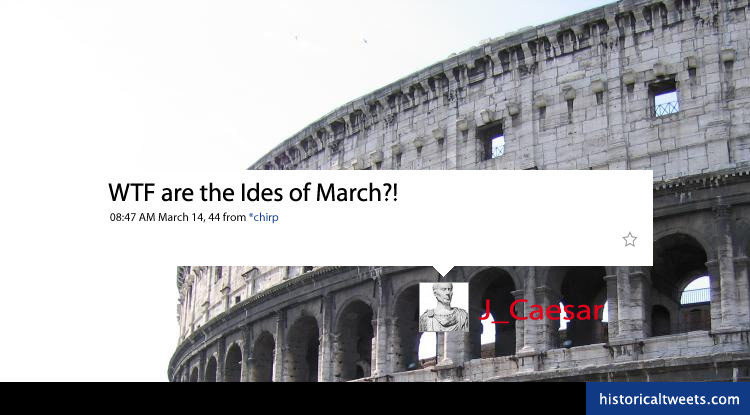
My very own Historical Tweet


Continuing with my fledgling internet star career, not only is my Windows 7 diary available on Microsoft Technet but I have also got a post up over at Historical Tweets.

caesar-tweet

Embed YouTube in PowerPoint 2007


I now know how to embed YouTube clips into Powerpoint 2007 slides. It is amazingly easy and just as useful 🙂

Thanks to a tweet from @jamestutt which pointed me to this link I can now harness the power of YouTube in my presentations-just today I delivered one where this was a perfect fit.

How to embed YouTube into PowerPoint 2007:

Steve Clayton blogged about a brilliant video from CommonCraft that explains Software + Services very succinctly in less than 4 minutes, and I needed to create an internal S+S training presentation-so I used that. Initially I just had a link to the video on YouTube so the presentation was interrupted while it went off to the YouTube site, but now it’s all contained within the .pptx; giving me a much smoother, more professional looking session 🙂

Common Craft S+S Video:

I think this holds the record for the most links in one post!

itunes DRM Free!!!


It’s not often you’ll see an Apple related post on here…I’m not a big fan of His Steveness et al…but this is a big one.

iTunes will be completely DRM free by Spring/end of Q1, so late March/early April time and it’s about time too! Despite my opposition to Apple, I have to admit that, as a concept, iTunes is great (let’s not get into how slow, sluggish and buggy it can be) but only being able to play the tracks in iTunes really winds me up. Either that, or having to double up on everything in various formats in various placed just makes things complicated…and it’s an extra thing that you have to explain to parents 🙂

The big change that has allowed this is variable pricing so newer, more popular “bangers” will be around $1.29 but on the flip side-older songs will be as low as $0.69.

One thing that is very exciting about this is that Microsoft recently announced that Windows 7 will be able to play AAC files natively, so once they’re DRM free you can buy them from iTunes and then easily play them in Windows Media Player…nice 🙂

These two announcements being so close together does make me wonder if Bill & Steve had a little chat and decided to play nice!

I’m now trying to find out if this is going to be a US only thing, or if we’ll get it here in the UK too. I’ll update as soon as I know.

Amazing PDF Related Tricks


I’ve jsut seen this PDF How To over @ Mobile Read Networks and it’s pretty awesome! It’s “How to do Everything with PDF Files” without using Adobe Acrobat-so helping keep the costs down in these turbulent times 🙂

It’s basically a guide to all the various online sites and tools that can help with converting, generating and using PDG files. It includes all kinds of tips, tricks and hints some things I knew, some things I wished I knew and some things I hadn’t even thought of…includes gems such as:

Q: First things first – How do I create PDF documents on my computer without Adobe Acrobat?

A: Get a copy of DoPDF– it installs as a virtual printer driver on your desktop just like Acrobat and lets you print PDF files from any Windows application including images, documents, emails, websites, etc.

Q: How do I create a single PDF package by merging files of different formats.

A: Try Loop PDF– it’s a free service that lets you combine multiple documents, images and even web pages into a single PDF file.

Q: A PDF document has lot of links but I can’t click them as they are in plain text. How do I make them clickable?

A: Go to PDF Escape, upload the PDF and then place hyperlinks anywhere on the page.

This is a great collection of tips to have as PDF’s can be somewhat tricky when they want to be 🙂

Microsoft eBook reader


I wasn’t aware that Microsoft had any real entry into the eBook reader world but thanks to MobileRead Networks, I do now! They have in fact, got a whole web site devoted to it here.

From that site you can download “Microsoft Reader” a “free, downloadable software application that allows you to read eBooks on Windows-based devices you may already own.” which sounds pretty good to me 🙂 There are 3 versions of the software for Desktops/Laptops, Tablets & UMPC’s and Pocket PC’s.

eBooks seem like a great idea but I can’t be bothered to get another device a la Kindle so being able to read eBooks on my HTC Diamond seems like a good idea. Yeah, the screen isn’t particularly big but I don’t mind-the convenience wins for me.

*Update* I’ve been doing a bit of Googling and it seems that MS Reader doesn’t yet work with WinMo 6.1, which is a bummer. It will install but won’t activate, which is always the key part with Microsoft 🙂 The forum post here shows that MS are aware of it (as do other Google finds) but there still doesn’t seem to be a fix. This is a shame as it’s going to put a lot of people off upgrading to 6.1 and then people like me who are already on 6.1 are stuck 😦

When and if I hear something further, I’ll update this post ASAP!

There is an octopus in the Goonies!


I got the Goonies on DVD for Xmas and have spent an enjoyable couple of hours re-watching what is one of my favourite ever films, and a true classic piece of cinema. Not only that but I finally got an answer to one part of the film that has always puzzled me…near the end when the kids escape and are fielding questions from the reporters; Data says “…the part with the Octopus was very scary” and I’ve wondered for years what he was on about.

Now, having watched the DVD deleted scenes in turns out there actually WAS a giant Octopus in it originally! After they’ve all jumped off One-Eyed Willy’s ship-it attacks them in the water and good ol’ Data saves the day 🙂