Microsoft Security Copilot SCU included with Microsoft 365 E5


Microsoft Security Copilot uses Security Compute Units (SCU) to measure the compute power used to run various workloads. A quantity of these is now available with Microsoft 365 E5 licenses, rollout starting from November 18th 2025..

What SCU capacity is included with Microsoft 365 E5 licenses?

Each Microsoft 365 E5 license includes 0.4 SCU so, for example, an organisation with 1,000 M365 E5 licenses will have 400 SCU per month. The allocation resets monthly and unused SCU cannot be rolled over to the next month.

There is a maximum limit of 10,000 included SCU per month – this is equivalent to 25,000 M365 E5 licenses.

Pricing considerations

Should organisations exceed their M365 E5 included SCU quantity, overage SCU will be available for $6 per SCU on a Pay As You Go (PAYG) basis. That is 50% higher than the “Provisioned” SCU pricing of $4.

However, an interesting point – and something that adds complexity to these decisions – is that the included SCU provide more flexible billing than the traditional provisioned capacity model.

Under provisioned capacity, an organisation commits to a set number of SCU per hour and is charged for that amount even if actual usage is lower. With E5, the included SCU are drawn down only by the amount actually consumed each hour, which provides a more accurate reflection of usage and avoids paying for unused capacity:

  • With Provisioned Capacity, if you provision 5 SCU but only use 3.5 – tough, you pay for all 5.
  • With E5 Included, you would only use 3.5 SCU.

This addition is another move to keep organisations on M365 E5, rather than stepping down to E3 +add-on.

SCU included with Microsoft 365 E5 – https://learn.microsoft.com/en-gb/copilot/security/security-copilot-inclusion


Microsoft end AI Builder Credits


AI Builder Credits have been around for a while as a way of paying for AI features within various Microsoft products including Power Apps Premium, Power Automate Premium, Dynamics 365 Finance and more. They’re being replaced by Copilot Credits and that means the seeded AI Builder Credits, where they came bundled along with other licenses, are disappearing.

From November 1, 2025 new customers – those who didn’t already have some AI Capacity add-ons – cannot buy any…but can still buy new Premium licenses that come bundled with AI Credits.

From November 1, 2026 AI Builder capacity add-ons can still be used but cannot be purchased or renewed. Also at this time, seeded credits will stop – to quote Microsoft “seeded AI Builder credits will be definitively removed from their premium licenses.

Action: You should count up how many AI Builder credits you currently receive as part of your Premium licenses, and also how many of those credits you actually use. Then calculate, as well as you’re able, how much that usage will cost you once you have to start paying for it all separately.

You can see the pricing here – https://learn.microsoft.com/en-us/ai-builder/administer-licensing#aibuildercapabilityrate-table

The cost of basic prompts has increased by 33% while object detection has risen by 1400%! These price rises must be taken into account…and note that those prices are based on the annual commitment price so the differences will likely be larger for those who choose to use PAYG billing.

A related question – will Microsoft reduce the price of the premium licenses, now that something is being removed from them?

You can see the Microsoft page here – https://learn.microsoft.com/en-us/ai-builder/endofaibcredits

You can see more about Microsoft Copilot Credit Pre-Purchase Plan here – https://cloudywithachanceoflicensing.com/2025/11/03/microsoft-copilot-credit-pre-purchase-plan/

Microsoft Copilot Credit Pre-Purchase Plan


Photo by energepic.com on Pexels.com

Microsoft are moving more and more towards consumption billing for their products – right across the portfolio. This makes it much more difficult for customer organisations to predict and forecast usage, which will generally lead to over-commitment and uncertainty. It also, however, means that Microsoft’s revenues and product sales are less predictable, which isn’t what they want.

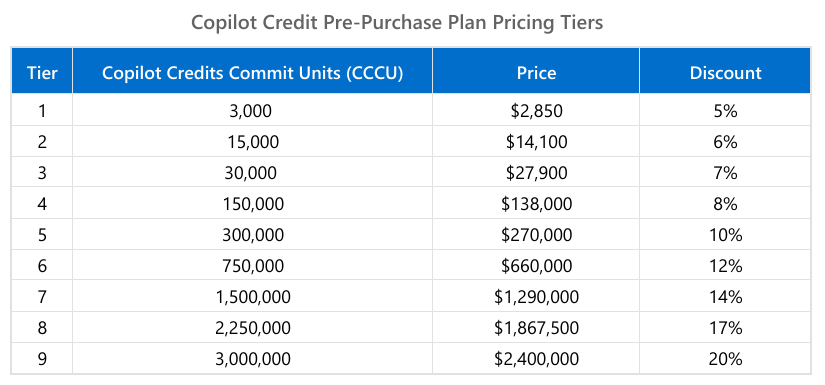
Copilot is a huge focus for Microsoft as is moving towards Agentic AI – which is done via Copilot Studio. Much of this is billed via Credits (formerly Messages) and Microsoft have now introduced the “Copilot Credit Pre-Purchase Plan” (aka “P3“) to help with some of the unpredictability (on both sides). You purchase an amount of “Copilot Credit Commit Units (CCCU)” and pay upfront for the year.

Each CCCU is worth $1 and is equivalent to 100 credits. There are 9 tiers:

These credits expire annually which is a better than the Microsoft Copilot Studio Copilot Credit capacity packs, which expire monthly.

Understanding when to buy this, which level to buy, and whether they’re being used effectively will be a great example of collaboration between ITAM & FinOps teams.

See more here – https://techcommunity.microsoft.com/blog/finopsblog/unlock-savings-with-copilot-credit-pre-purchase-plan/4464511

Microsoft 365 Copilot Chat


Microsoft have launched a new addition to the Copilot family, confusingly called Microsoft 365 Copilot Chat.

Copilot Chat was already a thing (that is different to Copilot Biz Chat) and this seems to be a re-positioning as they add some new capabilities too. It is a basic, entry point tool that sits below Microsoft 365 Copilot.

Microsoft 365 Copilot Chat is free and has access to internet info to give “web-grounded” responses. Additionally it can interact with Agents (more on that later) and also has elements of the “Copilot Control System” to help with corporate data privacy.

The table below shows how it stacks up against the “full” Microsoft 365 Copilot product:

https://www.microsoft.com/en-us/microsoft-365/blog/2025/01/15/copilot-for-all-introducing-microsoft-365-copilot-chat/?msockid=1c5969e97aa36c313d327b0f7b586d33

One of the new additions is that users of this free product can use 2 types of agents on a Pay As You Go (PAYG) basis, they are:

  • “Tenant Graph” grounded agents
  • Autonomous action agents

“Tenant Graph” grounded means agents that can access internal company data as well as internet information, giving answers with additional, organisation specific info and context. This is an additional PAYG per-message cost for M365 Copilot Chat users but is included within the M365 Copilot license – adding a new variable to consider when pricing up licensing options.

Autonomous actions are where the agent uses “generatively orchestrated triggers, topics, data connectors, and workflows” to act on behalf of a user. This is an additional PAYG per-message cost for all users – it is an additional cost even for users licensed with M365 Copilot.

For more info and details on the PAYG per-message pricing model – see my post here.

You can see Microsoft’s announcement here.

Microsoft 365 Copilot Pay As You Go (PAYG) pricing


Microsoft are huge fans of the Pay As You Go (PAYG) licensing/billing model for various products and now it has been extended for M365 Copilot and Copilot Studio.

Agents created with Copilot Studio provide answers to users, and these answers are measured in “messages:

Classic Answers

These are static answers written when the agent is created and only change when manually updated. These cost 1 message.

Generative Answers

These are dynamically generated answers using the conversation’s context and other knowledge. These cost 2 messages.

Tenant Graph grounded

This is a new option and allows agents to access internal information in SharePoint and also other sources via Graph connectors. This information will be incorporated within “generative” answers given by agents. These cost 30 messages.

This capability is included for users licensed with M365 Copilot and is also available on a PAYG basis for other users.

Autonomous Actions

As the name suggests, these agents act on their own via “generatively orchestrated triggers, topics, data connectors, and workflows” to complete tasks, answer queries etc. These cost 25 messages.

These are NOT included with the M365 Copilot license, so using agents with autonomous actions will be additional spend on top of the $30 per user per month license…which is already an add-on to your existing M365 license!

How does the pricing work?

Each message costs $0.01 which seems very low…however…it can quickly start to add up. Here is an example from Microsoft:

12,800 x $0.01 = $128 in PAYG costs.

Not a huge amount, about $33,280 per year. However, that’s for 100 users. If you had 1,000 users in that scenario it becomes $332,800 per year which is a much more significant amount…it’s about the same as buying M365 Copilot licenses for those users in fact.

You can purchase messages in bundles of 25,000 for $200 per month ($0.008 per message) which can help reduce spend a little on PAYG.

It seems likely that the behaviour Microsoft are hoping to drive will be for organisations to start out with this model and then, as spend increases, move them across to M365 Copilot licenses to increase the stickiness and adoption of their latest focus product.

You can see more from Microsoft here.

Microsoft Product Terms: August 2024


Photo by Markus Winkler on Pexels.com

It’s the Microsoft Product Terms for August 2024 – the first of the new FY so not much going on but let’s take a look.

O365/M365 A1 added as a base license for Copilot for M365

The base licenses for Copilot for Sales & Services have been expanded, although not to the extent of Copilot for M365. You can now add these to:
Microsoft 365 Business Basic/Standard/Premium/F1/F3/E3/A1/A3/E5/A5
Office 365 F3/E1/E3/A1/A3/E5/A5

Intune Frontline Worker SKUs added to MCA

Changes to (seemingly) tighten the wording around using Open AI content for training purposes.

Copilot for Microsoft 365 expands AGAIN


Much like a modern Augustus Gloop or Marjorie Dursley, Copilot for Microsoft 365 keeps expanding!

On June 12th, Microsoft added several more eligible base licenses for the Copilot add-on meaning the full list is now:

  • Microsoft 365 Apps for Business
  • Microsoft 365 Apps for Enterprise
  • Microsoft 365 Business Basic
  • Microsoft 365 Business Standard
  • Microsoft 365 Business Premium
  • Microsoft 365 E3/E5 (A3/A5)
  • Microsoft 365 F1/F3
  • Office 365 E1/E3 (A3/A5)
  • Office 365 F3
  • Exchange Online
  • SharePoint Online
  • OneDrive for Business
  • Microsoft Clipchamp
  • Microsoft Teams EEA/Enterprise/Essentials
  • Planner Plan 1
  • Project Online
  • Visio Online

I haven’t seen any news that Copilot has new capabilities that relate to these new licenses so I struggle to see the point of these scenarios. If I have Project Online or Clipchamp or Visio but not Apps for Business/Enterprise…why would I buy Copilot for M365?

Perhaps we’re about to see an expansion in Copilot’s capabilities in the new FY?

Microsoft Copilot for Security


After a seemingly successful preview period, Microsoft’s Copilot for Security is now generally available.

Capabilities

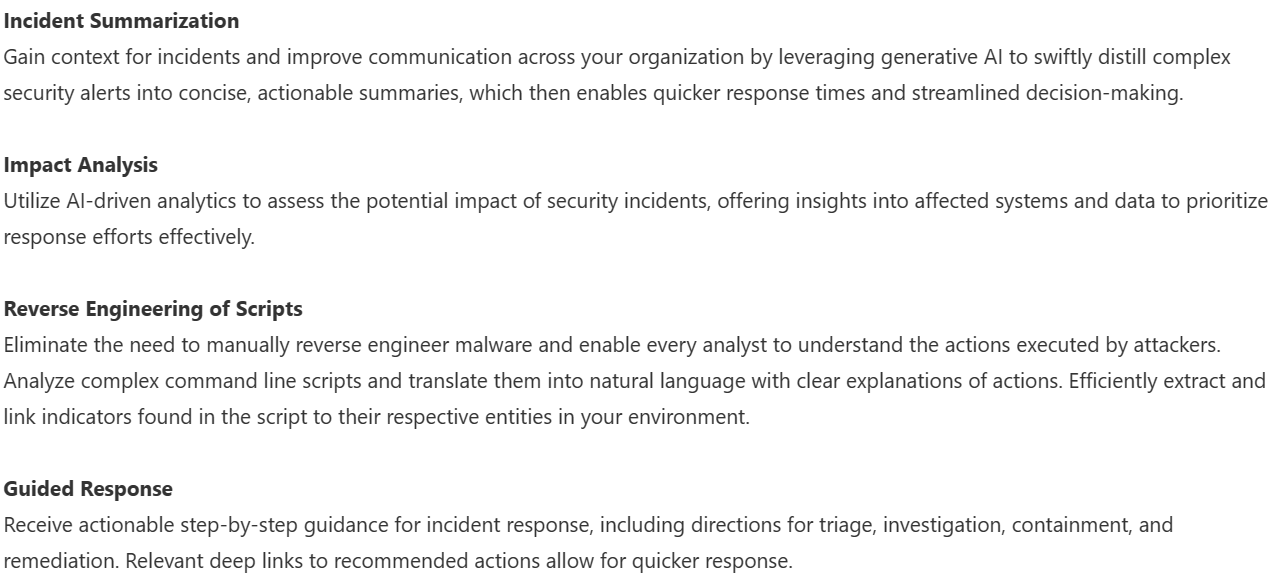
Copilot for Security has a range of features and capabilities that help organisations across the range of Microsoft’s security products such as Defender, Intune, and Purview. These include:

and many more can be found here – https://techcommunity.microsoft.com/t5/microsoft-security-copilot-blog/microsoft-copilot-for-security-general-availability-details/ba-p/4079970

Licensing & Pricing

Copilot for Security uses a consumption model based on Security Compute Units (SCU), which are charged at $4 per hour. For example:

40 security staff using it for 1 hour every weekday = 40 (hours) x 22 (days) x 4 (dollars)

40 hours x 22 days = 880 hours per month which is = $3,520 per month.

I feel like for many organisations those numbers will end up being higher in reality.

Copilot for Microsoft 365 expands to F SKUs


Microsoft have announced expanded Copilot for M365 access to a range of new SKUs including:

M365 F1/F3
Office 365 E1
M365 Business Basic


The Microsoft post says “and more” so we’ll have to wait for the full list to appear soon.

This change means that a huge additional number of Microsoft users will be able to buy it the new AI tool.

I have a couple of initial questions:

1) Why do this now?

I thought it would take a lot longer to get to this point. This feels like Microsoft are not selling Copilot for M365 anywhere near the rate they expected/want/need and so, to help recoup more of the enormous amount of money that must have been spent, they’re widening the pool quickly.

2) What about the price?

Are orgs really going to spend an additional $30 per user on top of these low cost SKUs? Particularly where the users will likely have fewer opportunities to benefit from Copilot’s assistance? I think perhaps we’re about to see a price drop or tiered pricing… I.e. Copilot for M365 Standard and Premium.

Microsoft Copilot Dashboard


Since the introduction of Copilot for Microsoft 365, one of the big questions I, and others, have been asking is “how do you determine value?”. I laid out my initial concerns, questions, and actions here and now want to look at Microsoft’s offerings to enable this kind of insight. Currently available in preview (https://insights.cloud.microsoft/#/CopilotDashboard) – although I couldn’t get it to work – Microsoft’s Copilot Dashboard is their option to get the much needed insights.

Microsoft Copilot Dashboard

Microsoft aim for this to help customers across the 3 stages of the adoption journey:

It will show:

  • Who is eligible for Copilot for M365
  • How people are currently using M365 apps
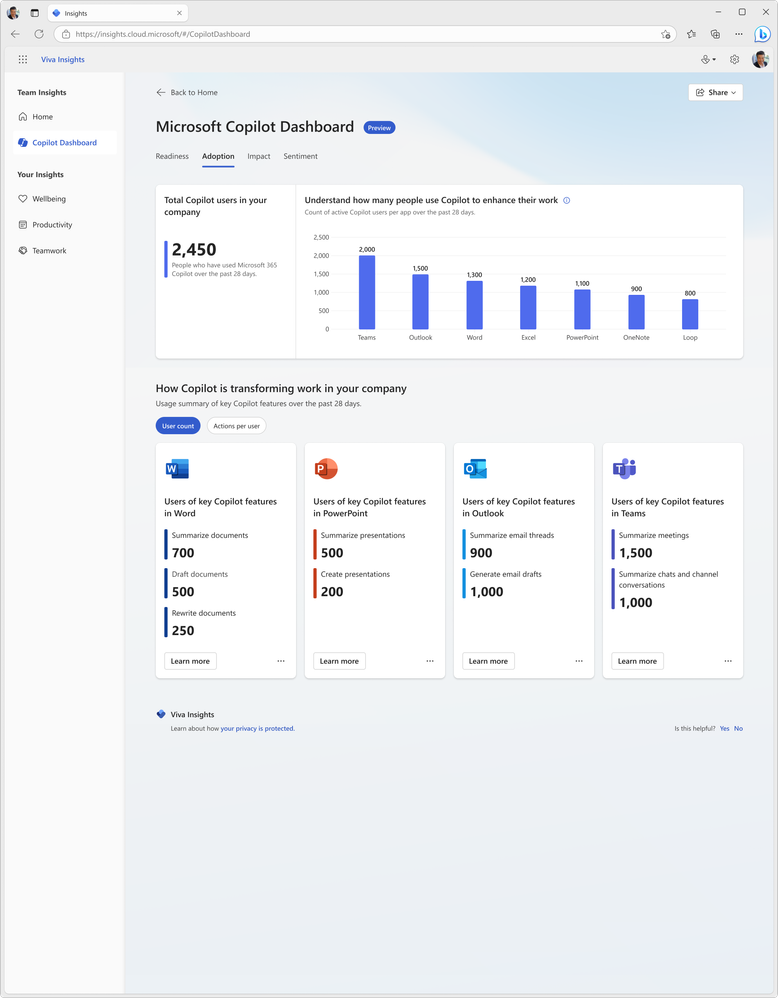
  • How people are using Copilot and in which different apps
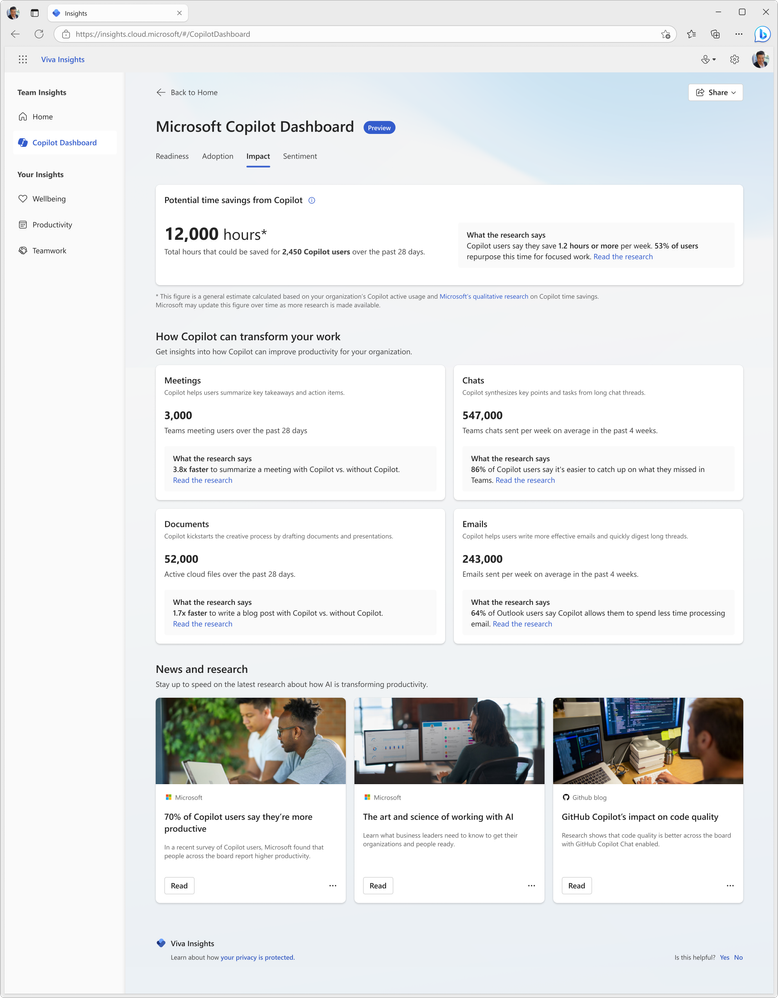
  • Information on how Copilot is impacting productivity
https://techcommunity.microsoft.com/t5/microsoft-viva-blog/new-ways-microsoft-copilot-and-viva-are-transforming-the/ba-p/3982293

Access to this information and data will be key for businesses looking to make informed decisions on where Copilot can offer real benefits and ROI.

https://techcommunity.microsoft.com/t5/microsoft-viva-blog/new-ways-microsoft-copilot-and-viva-are-transforming-the/ba-p/3982293

Being able to see where it can get involved to help users is helpful for getting started:

https://techcommunity.microsoft.com/t5/microsoft-viva-blog/new-ways-microsoft-copilot-and-viva-are-transforming-the/ba-p/3982293

Viva gives more features

Microsoft are referring to it as “Microsoft Copilot Dashboard, powered by Viva” and from “early 2024” there will be additional dashboard features available to users with Viva Insights licenses. According to Microsoft, these will include:

Copilot adoption and usage metrics combined with collaboration data, out-of-the box reports for organizational leaders, before and after behavioral data and even insights from employee surveys.”

and will also show time spent in meetings, processing emails, and creating content with before and after Copilot information.

All in all, the Copilot dashboard will be useful for organisations looking to understand more about their Copilot readiness and then their Copilot usage. However, some may have concerns about the reliability and objectivity of the data and reports generated by Microsoft on their own software. Ideally, Microsoft will be transparent and accountable in how they collect, process, and share the data from the Copilot dashboard. They should also provide ways for users to verify, challenge, or complement the data with their own sources and feedback.