Microsoft Product Terms: October 2017


Microsoft have introduced a number of changes in the October 2017 Product Terms document – let’s take a look.

SQL Server 2017

Linux

SQL Server 2017 has been released, and the big thing is its support for Linux.

Microsoft point out page 29 of the Product Terms that “SQL Server Licenses are platform agnostic” and can be used on “Windows or Linux platforms”.

Machine Learning Server

The Product Terms also states that only customers with SQL Server Enterprise + SA may use updates to “Machine Learning Server for Windows or Linux” that are released after October 2017.

Additionally, for each SQL Server Enterprise core license with active SA, customers may run “Machine Learning Server for Hadoop” on up to 5 (five) servers.

What is “Machine Learning Server” you ask? Good question! It was “Microsoft R Server” and now, with the 9.2 release, it becomes “Machine Learning Server”.

For more info – head to this Microsoft blog.

R Server

The various flavours of “R Server” are being retired and so there are transition plans in place for those organisations with Software Assurance.

R Server for Hadoop

For each 1 (one) R Server for Hadoop license with active SA, you may renew SA for 2 (two) x SQL Server Enterprise Core Licenses.

R Server for Linux

For each 2 (two) R Server for Linux licenses with active SA, you may renew SA for 2 (two) x SQL Server Enterprise Core Licenses.

R Server for Teradata DB

For each 1 (one) R Server for Teradata license, you may renew SA for 6 (six) x SQL Server Enterprise Core Licenses.

SQL Server for Linux Promotion

On page 95, we see there is a promo running from October 1, 2017 to September 30, 2018 where:

“Microsoft will offer a Linux-specific subscription license for SQL Server 2017”

and, unlike the regular license this promo offering will:

“allow use of SQL Server on the Linux platform only”.

I can currently only assume that this promo offering will be cheaper than the license that offers dual platform rights, but let’s see!

Microsoft 365 F1

This is a new offering, aimed at those “Firstline” (formerly Kiosk) workers, for whom Office 365 F1 (formerly K1) was intended. Microsoft are now looking to extended the features and benefits of Windows 10 and EMS to these workers too – hence an F1 version of the recently renamed Microsoft 365 bundle license.

There are a couple of key things to note:

“The Windows component of Microsoft 365 F1 operates as an Online Service” and does NOT have rights to:

  • Prior versions
  • Different language versions
  • Different platform versions
  • Lower editions of Windows (including LTSB)

Nor does it grant rights to access or use “virtualized instances of Windows”.

A Microsoft 365 F1 USL DOES grant access to Windows Servers, but is not a “CAL Equivalent License” for any other product.

A “step-up” from Office 365 F1 to Microsoft 365 F1 is available.


Visio Online licensing

There have been changes to the licensing here. We can see on page 5 of the Product Terms that:

Visio Pro for Office 365

has been removed and replaced by:

Visio Online Plan 1 & Plan 2

There doesn’t appear to be any further public info on what the plans contain etc. but, as it appears, I’ll be sure to post.

Exchange Online Inactive Mailboxes

A new license has been added to the Exchange Online product line – the “Exchange Online Inactive Mailbox” SKU.

The product name is fairly self-explanatory as this license is required when licensing inactive mailboxes. Again, when there is more public information, I will update with the ins & outs.

UPDATE: Microsoft have confirmed that this change WILL NOT be taking place currently. Although the SKU has been added to the Product Terms, it is not active.

Skype for Business Online Renaming

We get confirmation this month of the Skype for Business Online name changes:

Skype for Business Online PSTN Calling = Calling Plan

Skype for Business Online PSTN Conferencing = Audio Conferencing

Skype for Business Online PSTN Consumption = Communication Credits

Skype for Business Online Cloud PBX = Phone System

Education

We see that Microsoft 365 (the bundle of Windows 10 Enterprise, Office 365 & Enterprise Mobility + Security (EMS)) A3 & A5 have been added to the product line-up.

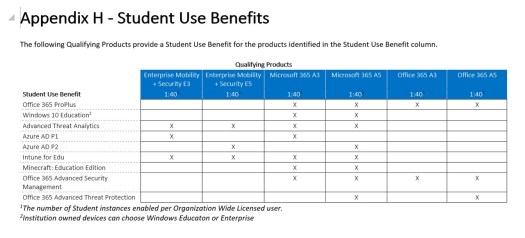
There have also been changes to the Student Use Benefits:
Student Use Benefit

Things I DIDN’T see at Microsoft Inspire 2017


There were LOADS of announcements and updates at Microsoft Inspire but equally, there were some things that weren’t mentioned very much, or even at all. This is a run down of the things I noticed by their absence and I’d love to hear your thoughts. If you DID hear about some of these things, then please let me know!

Azure Stack

Much talked about for the last couple of years has been Azure Stack. The next iteration of Hybrid Cloud, it allows organisations to run Microsoft Azure services within their own datacentre. In the weeks leading up to MS Inspire 2017, information around the licensing models and costs was released online. I was VERY excited (which to be fair isn’t that unusual) but I also saw a fair amount of interest from partners and end users, across Twitter and LinkedIn.

I thought we’d be seeing plenty of talk about Azure Stack in the Inspire keynotes but, unless I missed something, it wasn’t mentioned at all. There were a few sessions being run by the Azure Stack hardware vendors such as Dell EMC and one licensing related session, but that was it.

Workplace Analytics

A little before Inspire, Microsoft started to release information about Workplace Analytics, which uses Office 365 data to help:

business leaders understand collaboration patterns across organizations that influence productivity and employee engagement

Workplace Analytics

With its aim of making collaboration more fruitful and efficient, and to help with hiring staff and building teams, it seems like it could be a key product for many organisations. I expected to see talk of this in one of the keynote sessions but again, it didn’t appear to get a mention. I also didn’t see any sessions talking about Workplace Analytics.

Perhaps it was felt that the the product didn’t fully fit with the messaging around the four solution areas of:

  • Modern Workplace
  • Business Applications
  • Applications & Infrastructure
  • Data & Artificial Intelligence

Whatever the reason, I was surprised not to hear more about it.

Windows 10 Mobile

This one didn’t surprise me to be honest. While it’s clear that Microsoft are still very much working towards the “Cloud First, Mobile First” mantra – it’s also become clear that a mobile phone OS isn’t high up on the list…if it’s on the list at all!

There were lot of sessions aimed at the mobile world. Sessions on building apps with Xamarin, managing mobile devices with EMS and how BlockChain can integrate with the mobile world were all on show…but nothing specifically on the Windows mobile OS.

Conclusion

Microsoft have so many products and threads to their business, and Inspire is a relatively short amount of time in which to get important messages across, that – of course – not everything can be covered in huge detail. However, these 3 stuck out as quite conspicuous by their absence.

Were there products or topics that you thought were under represented? What are your thoughts on the above?

New apps added to Office 365 Business Premium


Microsoft are adding a range of new apps to Office 365 Business Premium – and by extension – to the newly announced Microsoft 365 Business (more on this in another post). These are:

Microsoft Connections

This Mailchimp-esque tool is designed to help organisations create email marketing campaigns with a host of templates for different scenarios.

Connections.jpg

It also features many of the key metrics needed to track the success of an email campaign, such as:

  • Open rate
  • Clicks
  • Sign ups
  • Unsubscribes

and more. Connections will be available via the web and also Android & iOS apps.

Microsoft Listings

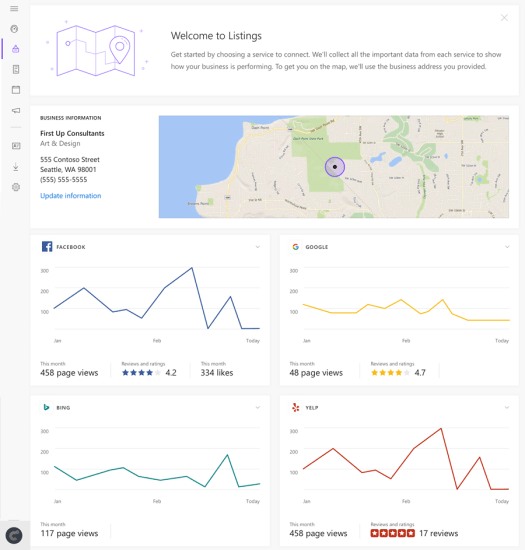
This tool helps business manage their business information across a range of key sites including Facebook, Google and Bing.

Listings

Updating once in Microsoft listings will push the changes out to the various platforms and the web dashboard will also give a single place to see page views and reviews.

Microsoft Invoicing

Another tool aimed at making business easier for smaller organisations, this tool helps create and track invoices and also connects with PayPal and QuickBooks for added functionality. Invoicing can be accessed via the web and Android & iOS apps.

Invoicing

Microsoft Business Center

This is a web based, unified dashboard for the newly added apps – giving organisations one place to see their outstanding invoices, the success of their email campaigns, their online standing and more.

Business Centre

Availability

These are currently rolling out in Preview to users in US, Canada & UK, starting with those set to “First Release”.

MileIQ

Microsoft purchased MileIQ in 2015, and a now adding it into Office 365 Business Premium. The iOS/Android app is used for mileage logging, when using a personal car for business purposes, and making it easier to claim back the expenses.

Microsoft’s aim

These new additions are aimed at making things easier for smaller businesses and, as Microsoft say, to make Office 365 Business Premium “more valuable for your small business”. Microsoft are looking to move this far beyond “hosted email” and for organisations to see Office 365 as an integral tool across multiple parts of their business – helping them win new business and reduce costs at the same time.

Adding new features and increased value is a key aspect of success for vendors in the new, SAAS world as every year, customers have the option to choose to leave. As a manufacturer, if your product isn’t giving your customers what they want, it is now often easier for them to move to a competitor than ever before.

Further Reading

https://blogs.office.com/en-us/2017/07/10/new-business-apps-in-office-365-business-premium-help-you-run-and-grow-your-small-business/

https://www.microsoft.com/en-us/microsoft-365/business

Microsoft 365


What

First we had Enterprise Cloud Suite (ECS) and then we had Secure Productive Enterprise (SPE)…now we have Microsoft 365.

As with the previous iterations, Microsoft 365 is a single SKU that combines:

  • Windows 10 Enterprise
  • Office 365
  • Enterprise Mobility + Security (EMS)

but Microsoft 365 does bring a change: there are now 2 versions – Enterprise & Business.

Enterprise

Aimed, not surprisingly, at larger organisations, Microsoft 365 Enterprise comes in 2 flavours: E3 and E5 – where each includes the components of the same level.

Business

This is a combination of:

  • Windows 10 Pro
  • Office 365 Business Premium
  • Enterprise Mobility + Security (EMS)

and features some new tools such as Microsoft AutoPilot and the ability to automatically deploy Office apps to Windows 10 PCs.


OneDrive up the storage


OneDrive – Microsoft’s personal Cloud storage offering – has, with Office 365, offered 1TB of storage PER USER… but not anymore. Microsoft have increased that to…UNLIMITED!

This really helps with Microsoft’s attempts to position OneDrive as a top contender for Cloud storage among businesses of all sizes.

Read more here:

https://blog.onedrive.com/office-365-onedrive-unlimited-storage/

Windows Intune & Power BI coming to Open Licensing


In a very encouraging move, Microsoft have announced that, from April 1st 2014, customers will be able to purchase both Windows Intune through the Open licensing program.

Currently Intune is available only via the MS portal but will now sit alongside Office 365 (and soon Power BI too) on the regular pricelists.

See more here:

http://www.digitalwpc.com/Community/Perspectives/Pages/Windows-Intune-and-Power-BI-coming-to-Open-Volume-Licensing.aspx?fbid=-jjTmFnB-aO&mtag=mbar-twitter&mtag=mbar-linkedin#fbid=PVSRpLQGbVC

Hat tip to Licensing School for finding this.

Adding Azure to an Enterprise Agreement


It’s now easier than ever for customers to add Windows Azure to their Enterprise Agreement (EA).

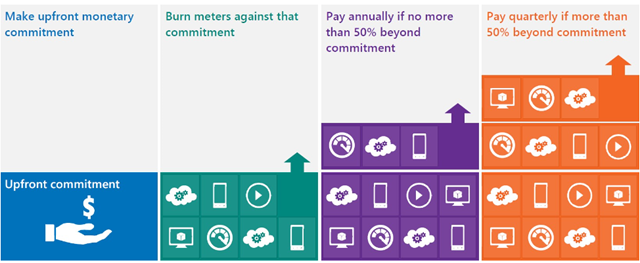
You commit upfront to a monthly amount that you feel will cover all your needs, and that monetary commitment can be utilised in any way within Azure.

image

Previously, you would receive great payment terms for your monetary commitment but – should you go over that amount (known as “overage”) – the extra usage would be charged at much higher rates. This effectively punished organizations who thought “wow, this Azure stuff is cool” – but no more, Overage is now charged at the same rates as the initial agreed amount. This makes increasing the usage of Azure a much more compelling proposition.

See Josh Waldo’s full post here:

http://www.digitalwpc.com/Community/Perspectives/Pages/Windows-Azure-added-to-Enterprise-Agreement-Use-it-to-power-your-solutions-.aspx?wt.mc_id=corp_mpn_tw_dwpc_joshwaldoazureagreement#fbid=7Lt8ur4Ygjd

Server & Cloud Enrollment


Microsoft make yet another change to their licensing programs, aimed at making it easier for organizations to license what they need.

The Server & Cloud Enrollment (SCE) is related to an EA (Enterprise Agreement) offers four components:

  • Core Infrastructure
  • Application Platform
  • Developer Platform
  • Windows Azure

Customers can choose any of these components individually or group them as needed. When choosing any of the first three components, customers will also have access to Windows Azure at the best pricing available.

How to get started

To enroll in an SCE, customers make an enterprise-wide commitment to one or more components.  This means committing to full Software Assurance coverage across the installed base of an SCE component and in the case of System Center, committing to full System Center coverage on their Windows Server installed base through Core Infrastructure Suites (CIS).

Benefits include:

  • 15% off L+SA products and 5% off SA products, as well as 5% off Azure when another component is included.
  • New subscription-based licensing options are available alongside perpetual licenses.  This gives customers access to more flexibility when they need to retire workloads, consolidate, or migrate to the cloud.
  • Core Infrastructure Suite (CIS) committed customers receive incremental rights to use System Center to manage Azure virtual machines and resources at no additional cost.
  • Microsoft Premier Service’s customers may also qualify for unlimited problem resolution support for SQL Server, Windows Server and System Center, BizTalk Server and SharePoint Server.
  • All the benefits of Software Assurance (SA).  This includes access to License Mobility for many of our applications, which enables even more seamless migrations to the cloud.

The SCE makes it easier for customers to standardise on MS technologies, easier for customers to migrate to the Cloud and simplifies the licensing involved.

More info is available in the datasheet here:

Server and Cloud Enrollment Datasheet and FAQ

Install Office 365 on Mobile devices


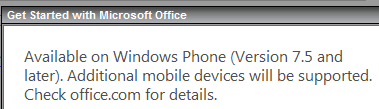
I meant to post this a while back, but clearly didn’t get the chance. It’s interesting to note that the Office 365 Home Premium subscription allows users to install Office on “select mobile devices” as well as the ability to install on 5 PCs or Macs.

image

image

I take it this refers to the expected Office for iPad and Office for Android editions that will be here soon. It’s good to see that these non-MS platforms will be included within the standard device total of the subscription, rather than incurring extra cost for home users who also have these devices.

MS to change Office 365 support?


CRN, Channel Reseller News, has just reported that MS are set to revamp the structure for Office 365, by giving sales and support responsibilities to distributors.

This will mean rather than customers purchasing directly from Microsoft and them giving resellers a rebate, resellers will purchase from distribution partners as they currently do for other items such as Office & Windows via the Open license models. They go on to say that distributors will also provide end user support but MS will retain ownership of the billing functionality; which raises two points for me:

1) End User Support: MS have invested quite heavily in their support teams and, in my experience, they are really good. Quick, knowledgeable, keen to help etc…it strikes me as odd that Redmond would look to move away from that and put it on the channel. Perhaps distributors will have the option to offer end-user support but I would imagine that MS will keep that support element.

2) Billing: Selling it through the channel but Microsoft keeping the billing seems overly complicated. A sales cycle would be:

  • Distributor buys from MS
  • Reseller buys from Distributor
  • Customer buys from Reseller

and payment would follow that back through the channel so I’m not sure where MS would fit in?

Feel free to offer your thoughts on all the above too!

I think it will, overall, be a good move to include the channel more in this but hey, I’ll see what new info we get at WPC and let you know Smile