As well as the Azure Stack HCI news, Microsoft have also added Azure Hybrid Benefit (AHB) for AKS (Azure Kubernetes Service).
How it works
This benefit is available for Windows Server Standard and Datacenter (both with SA) and also CSP server subscriptions. Hosts must be Windows Server 2019 (and later) or Azure Stack HCI
Each Windows Server core license w/SA allows use of 1 virtual core of AKS. The AKS AHB is additive, meaning the licenses can be used to cover on-prem/Azure workloads AND to use AKS. You can see more info here.
Ignite 2022 saw Microsoft expand the Azure Hybrid Benefit (AHB) to grant access to Azure Stack HCI.
What is it?
It is only available for Enterprise Agreement customers and only applies to Windows Server Datacenter licenses w/SA; licenses must be allocated for all physical cores in the Azure Stack HCI cluster. Licensing in this way allows you to use unlimited Windows Server base instances across the cluster. Furthermore, as per the Product Terms, the “dual-use” rights do not apply so licenses can be used as Windows Server licenses OR as Azure Stack HCI licenses.
It is activated in the Azure portal:
I question the phrasing in the Microsoft announcement here as it says that customers “exchange” their Windows Server licenses to get Azure Stack HCI. This suggests that they are somehow transformed from one type into another but that doesn’t appear to be the case – as this is via AHB, it is simply an additional right that doesn’t change the underlying licenses. As with allocating Windows Server licenses to “regular” Azure, it seems one can re-assign from Azure Stack HCI licenses back to Windows Server Datacenter licenses following the 90-day rule.
Given the increasing level of focus on CSP and the MCA, it’s interesting to see that it is restricted to Enterprise Agreement customers only. It not being made available for Open Value and MPSA customers is, rightly or wrongly, business as usual these days but CSP has been getting a lot of shiny things lately.
This new way of paying for Microsoft Azure was announced at Microsoft Ignite 2022 and seems to bear more than a passing resemblance to Amazon AWS Savings Plans. The similarities are probably a bonus for customers, meaning you don’t have to learn 2 totally different IaaS cloud payment options.
What is it?
Azure Savings Plans is, to some degree, the next step beyond Reserved Instances (RI). This new offering comes with a spend commitment on an hourly basis (over 1 or 3 years) and gives discounts over the PAYG pricing on resources where you have consistent usage. Eligible compute services include:
Virtual Machines
Dedicated Hosts
Containers
Azure premium functions
Azure app services
How it works
Savings Plans discounts are applied automatically (starting where the largest discount exists) to any eligible services on spend up to the hourly commitment i.e. £7 per hour. Any spend over that amount is then charged at PAYG pricing so, just as with Reserved Instances, accurate understanding of current and future usage is a must.
They only apply to infrastructure costs but can be combined with Azure Hybrid Benefits for Windows Server & SQL Server etc.
How to buy
Savings Plans are available for Enterprise Agreements, Microsoft Customer Agreements (MCA), and Microsoft Partner Agreements.
Enterprise Agreements
EA admins with write permissions can directly purchase savings plans from Cost Management + Billing > Savings plan. No specific permission for a subscription is needed.
Subscription owners for one of the subscriptions in the EA enrollment can purchase savings plans from Home > Savings plan.
Enterprise Agreement (EA) customers can limit purchases to EA admins only by disabling the Add Savings Plan option in the Azure portal. Navigate to the Policies menu to change settings.
Notifications are sent to EA administrators and EA notification contacts.
Users added to a savings plan using Azure RBAC (IAM) permission don’t receive any email notifications.
Microsoft Customer Agreements
Customers with billing profile contributor permissions and above can purchase savings plans from Cost Management + Billing > Savings plan experience. No specific permissions on a subscription needed.
Subscription owners for one of the subscriptions in the billing profile can purchase savings plans from Home > Savings plan.
To disallow savings plan purchases on a billing profile, billing profile contributors can navigate to the Policies menu under the billing profile and adjust Azure Savings Plan option.
Microsoft Partner Agreements
Partners can use Home > Savings plan in the Azure portal to purchase savings plans for their customers.
Savings Plans can be paid for upfront or on a monthly basis, and you don’t pay any more for choosing to spread payments. That said, monthly prices may vary on MCA due to impact of exchange rates.
If you currently have Azure Reserved Instances but would like to move to Savings Plans, you’re in luck – you can trade in Reservations for Savings Plans. The hourly commitment of the new savings plan must be greater than the leftover payments that are cancelled for the returned reservations. That said, not all reservations can be traded – those not eligible are:
Azure Databricks reserved capacity
Synapse Analytics Pre-purchase plan
Azure VMware solution by CloudSimple
Azure Red Hat Open Shift
Red Hat plans
SUSE Linux plans
Beware – Savings Plans cannot be cancelled, exchanged, or refunded. Automatic renewal of Savings Plans isn’t on by default but can be activated if you so wish.
Setting the scope
You can set the scope of Savings Plans to restrict where the savings can be applied. Your options are:
Shared
Single subscription
Management group
Single resource group
Reporting
Microsoft have provided information to help with reporting and cost analysis including how to identify wasted spend and how to access the CSV files here.
To get this, and more, in your inbox each month – sign up to my newsletter here!
At Microsoft Build 2022, they have introduced us to the new Intelligent Data Platform.
They say this will help in “removing points of friction between your databases and analytics systems while automatically mapping and governing your full data estate” and allow developers/organisations to “Focus on building innovative apps—and spend less time managing your data“.
Is it a new product?
No – instead it’s a collection of existing products that MS position as forming a better, cohesive eco-system for organisations. Those products are:
Azure SQL
Azure Cosmos DB
SQL Server 2022
Azure Arc
Azure Synapse Analytics
Power BI
Azure Machine Learning
Microsoft Purview
The latter enabling comprehensive governance of data across all these different locations, products, and use cases.
For many organisations across a variety of verticals, data is the key to success. However, given the increasing regulatory pressures and growing threat of cyber attacks – not managing that data effectively can be one of the largest risks a business faces. The dual concept of helping organisations better connect their data to extract more useful insights more quickly AND securing all that data will surely seem a particularly attractive offering for a lot of customers. Several other organisations, including Amazon and Google, are heavily focusing on data too – it’s the next frontier for winning/losing customers in many ways – and I’m sure Microsoft will continue to enhance this area of their business. I’m also sure they will be selling this concept, and the underlying products, heavily during renewals and customer briefings etc.
Microsoft’s financial results for Q3 FY22 (Jan – Mar 22) are in and, once again, they’re showing strong growth in all their key focus areas. They also listed several big name customers that they’re working with including:
Bridgestone
Lufthansa
Fujitsu
Woolworths
Cracker Barrel
Heineken
and called out Boeing, Heinz, and Westpac among customers making “strategic” Azure commitments.
Satya Nadella always hits us with a good quote during the earnings call and this quarter’s was:
“The last two years have proven that every organization needs a digital fabric that connects the entire organization”
Let’s take a look at some of the numbers:
Overall
Revenue = $49.4 billion – up 18%
Operating income = $20.4 billion – up 19%
Really strong top line numbers as always – remember, this is for just 3 months!
Productivity & Business Processes
Revenue = $15.8 billion – up 17%
Office 365 Commercial up 17%
Dynamics 365 up 35%
LinkedIn up 35%
Microsoft saw growth in SMB and frontline SKUs as well as increase in Revenue Per User – a key SaaS metric.
Office on-prem revenue was down 28%, continuing the downwards trend that we’ve been seeing for a couple of years now. It was noted as well that the end of Open Licensing has caused a drop in transactional license sales during the last quarter.
Intelligent Cloud
Revenue = $19.1 billion – up 26%
Azure (and other cloud services) up 46%
Server products up 5%
Another strong showing from Azure…with the number of $100 million Azure deals more than doubling over the previous year.
The server products increase includes Window Server & SQL Server in hybrid use cases (as well as Nuance) and again Microsoft mentioned the impact of Open Licensing’s end.
What else did we learn?
Satya Nadella once again called out the performance of Cosmos DB, with 100%+ YoY growth for 3 quarters in a row.
Power Platform, as a family, was up 72% year on year.
Microsoft Viva has over 10 million monthly active users.
Overall this is another great performance from Microsoft, giving them good momentum as they move into their Q4 (April – June) which is always a busy time of year. It will be interesting to see the full FY results in July for sure!
Microsoft Defender for Cloud is a relatively new product name – created through a combination of “Azure Defender” and “Azure Security Center” – and is Microsoft’s solution for “cloud security posture management” (CSPM) and “cloud workload protection” (CWP).
It works not only in Azure but also Amazon AWS and Google GCP and hybrid scenarios via Azure Arc.
Licensing & Pricing
The main thing to understand is that Microsoft Defender for Cloud isn’t one thing, it is an umbrella for several separate products that all have their own costs.
Microsoft Defender for IoT agentless monitoring covers existing environments and is deployed on-premises. It can be connected to Microsoft Sentinel with no additional Sentinel charges – but it will require an IoT Hub which costs between £7.61 – £1903.17 per month.
For new IoT devices deployed via Azure IoT Hub, Defender pricing is:
Solution
Price
Defender for IoT for devices managed by IoT Hub – by device
£0.0008/month
Defender for IoT for devices managed by IoT Hub – by messages
£0.153/25K transactions
Both of these offer free usage for the first 30 days and then the pricing kicks in, so be aware of what things people are turning on within your organisation.
Microsoft Defender for Cloud Free Tier
This is enabled on all Azure subscriptions when you visit the Defender for Cloud section of the Azure portal and includes:
Under the Azure meter, the prices are listed here as:
Plan 1 = £0.006 per server per hour
Plan 2 = £0.016 per app service per hour
Volume Licensing
If you have 50 or more combined licenses of:
Microsoft Defender for Endpoint
Windows E5/A5
M365 E5/A5
M365 Security USLs
you can acquire Microsoft Defender for Endpoint (Server) under EA/EAS/MCA/EES agreements.
If you have these licenses and then choose to cover the same servers with Microsoft Defender for Cloud (the new name for Azure Security Center + Azure Defender), you will be eligible for a credit towards the cost of the latter.
SQL Server 2012 goes end of support on July 12, 2022 – that’s about 10 weeks from the time of writing! This means even security updates from Microsoft will no longer be provided to customers running this software – a situation organisations really don’t want to find themselves in.
It only seems like 5 minutes since this was the situation with SQL Server 2008 (it was actually almost 4 years ago!) which causes headaches for a lot of organisations. I’d say that, based on conversations at conferences and training sessions etc., SQL Server 2012 is going to be at least equally painful as many businesses seem to have got to 2012 and then no further, considering it to be much more modern than 2008.
If your business is still running SQL Server 2012 – what are your options?
Remain on-premises
Assuming you want to remain up to date on security patches (which I’d say you do!), you’ll need to acquire Extended Security Updates (ESU) from Microsoft which will give you 3 more years of security updates. That however, comes at a price:
Year 1 = 75% of SQL Server license price
Year 2 = 100% of SQL Server license price
Year 3 = 125% of SQL Server license price
Let’s say you have a 4-core SQL Server 2012 Std box – approx. license cost of £5,000. That will mean:
Year 1 = £3,750
Year 2 = £5,000
Year 3 = £6,250
3 year total = £15,000
Migrate to Azure
ESUs are included free of charge for workloads running in Microsoft Azure VMs – including “regular” Azure VMs as well as:
Azure Dedicated Host
VMware on Azure
Nutanix Clusters on Azure
Azure Stack HCI/Hub/Edge
You can save a big amount of money through not having to pay for the ESUs…but cloud migrations come with their own set of costs…as well as benefits.
If you’ve not already made a decision on this, please gather the relevant people together and discuss the option. While both the above options can seem expensive, I’d suggest they’re nothing when compared to the cost of a security breach/ransomware attack.
You can see more info in the Microsoft blog post here.
Available for EA and MCA customers, the Microsoft Azure Consumption Commitment (MACC) is a 3-year agreement where an organisation commits to spend a certain amount on Azure over that time period.
It doesn’t require an upfront payment of the agreed amount, rather the total must be reached by the end of the MACC term. Ongoing qualifying Azure spend (either PAYG or the purchase of Azure Prepayment) is deducted* from the total on a regular basis by Microsoft and the remaining balance can be seen in the Azure portal (or via REST API). In this way, it adds some flexibility to what’s possible with Azure commitment and budgets.
However, it is a contractual commitment so if future Azure spend has been over-estimated, an organisation will find itself expected to make up any shortfall at the end of the agreement.
*If you receive Azure credits from Microsoft, any services paid for using those will not count towards your MACC total.
Azure Marketplace
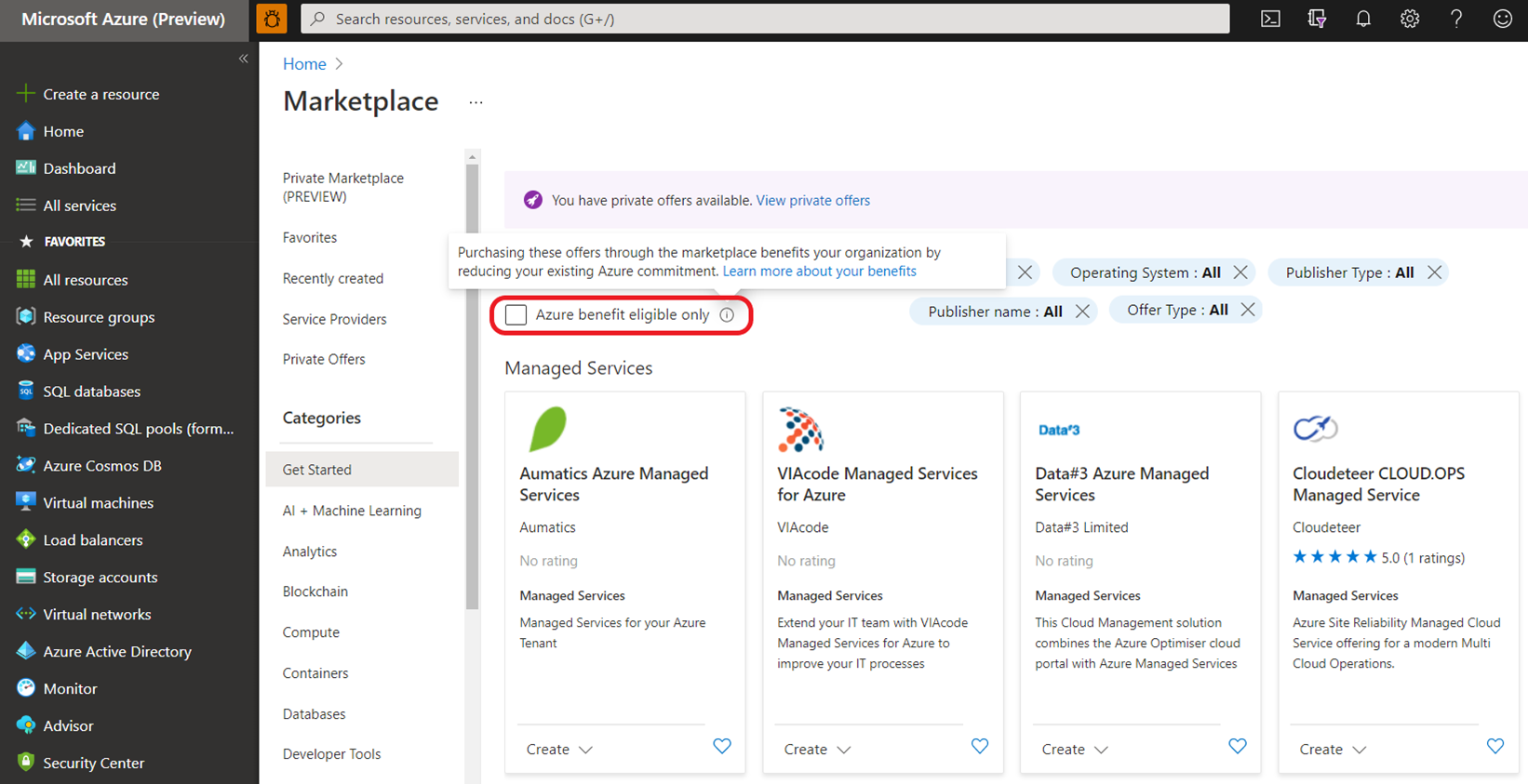
Certain 3rd-party services in the Azure Marketplace are eligible to count towards a MACC. In the Marketplace portal, there will be an “Azure benefit eligible” option to filter the applicable services.
Microsoft have added another Industry Cloud to the Product Terms – this time it’s Microsoft Cloud for Retail.
I’m still working through some of the info and it doesn’t necessarily all seem complete yet but here’s the overview I can give so far.
Licensing
It is available as an add-on SKU, currently only Dynamics 365 Customer Insights is listed as an eligible base license to purchase the add-on. The Microsoft Docs site lists other licenses that are required in order to use certain elements of the retail cloud solution, these are:
Retail cloud feature
Required license
Omnichannel for Customer Service
Dynamics 365 Commerce / Dynamics 365 Customer Service
Microsoft 365 for Frontline Workers
Microsoft 365 (F or E SKUs)
Power Virtual Agents
as well needing an Azure subscription to use:
Synapse Analytics
Cognitive Search
Intelligent Recommendations
Pricing
The Microsoft datasheet lists it as being $20,000 per tenant per month but also states that you “only pay for what you don’t already own“.
This makes sense as they won’t want to penalise customers who are already investing in some of these products but does suggest negotiations will be needed to get pricing…leading to the potential for different rates at different points of the year.
Availability
Available only via EA/EAS, Microsoft Cloud for Retail can currently be deployed from:
USA
Canada
United Kingdom
Singapore
Australia
and is available in English and French – the latter only being an option in Canada at the moment though.