Microsoft Strata-Cloud OS name leak?


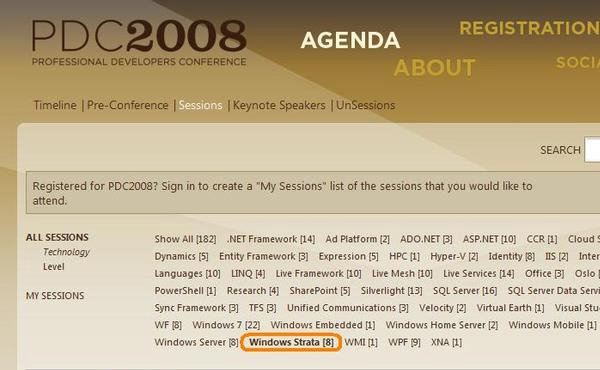
Microsoft’s Cloud Computing OS could be called “Strata”, if a now removed addition to the PDC session list is right.

**UPDATE** What was once called Strata is now known as Microsoft Windows Azure-see more info in my post here.

Got this from Kit Ong via The Register.

Symantec buy MessageLabs


Symantec is set to buy MessageLabs for $695m in cash, with the deal expected to close by the end of the year (2008).

The British email security firm is set to be merged with the Symantec Protection Network to provide a comprehensive SAAS (software as a service) solution. You can read more over at The Register.

Veritas, Altiris, Vontu and now Messagelabs..Symantec have, over the last few years, become a huge software company with a very wide ranging portfolio which is something of a double edged sword really…it allows partners to provide a more holistic solution to their customers which benefits all parties involved; but equally it means Symantec’s focus is spread quite thin…

Microsoft-Facebook Live Search


The guys over at ReadWrite Web have got some news on Microsoft’s activities with Facebook.

Today see’s the release of Microsoft Live Search for Facebook which Microsoft say will provide “great search results while receiving highly relevant ads that are personalized by either my Facebook profile or search query”

and FaceBook give an example of it’s use over at their blog:

“For example, your friend may invite you to an event at a new restaurant. Without leaving Facebook, you can check out the details of the restaurant on the web”

I’m not a Facebook user at the minute..it’s one of the Web 2.0 things I’ve managed to resist but this sounds like a great addition to me!

Virtualization, the Mr T way


I found this Mr T does Virtualization video on Youtube earlier and it is an absolute classic! It’s actually an advert for Hitachi Network Virtualization but a lot of what T says can easily apply to Hyper-V 🙂

Check it out here

“You talkin about Storage Tiers? Hitachi are so good they bring their competition to tears”..Mr T does Homophones..

Microsoft Enterprise CALs


Microsoft Enterprise CALs are a relatively new addition to the world of MS licensing, and from conversations I’ve had at work, I know some people are a little unsure as to what they’re for, how they’re licensed etc.

Why have they made more CALs?

A lot of people viewed the addition of these extra CALs as a way for Microsoft to make more money and make life more difficult, but that’s not the case at all. The Enterprise CALs actually give organizations more flexibilty and help reduce wasted expenditure on software.

What do they do?

The Enterprise CALs offer an extended range of features over and above the Standard CAL; this can be thing such as Unified Messaging, Call Management or Excel Services. I’ll give a breakdown of the complete differences later in this post.

How are they licensed?

There are 2 main points to this and not everyone is aware of them.

1) The Enterprise CALs are Additive, which means you must have the Standard CAL as well in order to be correctly licensed. So Std CAL + ENt CAL = 🙂

2) You aren’t required to have the same number of Enterprise CALs as you have Standard CALs. For example, if a company has 500 workers who use Outlook, all 500 will need an Exchange Std CAL. However if only 46 of those need Unified Messaging (Voicemail in their inbox etc), you would need just 46 additive Enterprise CALs so 500 Std + 46 Ent = 🙂


Which products have Standard & Enterprise CALs?

Exchange 2007, Office Communications Server (OCS) 2007 and Sharepoint Server (MOSS) 2007.

Here is an explanation as to the differences between the Std & Ent CALs for the products listed above:

Exchange 2007:

Standard CAL gives:

  • Email, Shared Calendars, contacts etc
  • Outlook Web Access (OWA)
  • ActiveSync
  • Managed E-Mail Folders (Default)

On top of that, the Enterprise CAL gives:

  • Advanced ActiveSync Policies (with Exchange 2007 SP1)
  • Unified Messaging – A single inbox for mail, voice and fax
  • Per User/Per distribution list journaling
  • Managed E-Mail Folders (Custom)

Office Communications Server (OCS) 2007:

Standard CAL gives:

  • Presence- Instantly find and communicate with fellow workers. Use presence to see people’s online status and initiate real-time conversations
  • Federation-Establish trusted relationships between your organization and others, allowing workers to communicate via IM (Instant Messaging)

On top of that, the Enterprise CAL offers:

  • Conferencing–Experience multi-party audio/video conferencing from within Microsoft Office Communicator.
    Meeting scheduling–Instantly establish ad-hoc meetings from a variety of Microsoft Office applications.
    Conduct online meetings–Use the power of the Live Meeting client to conduct conference meetings with participants inside and outside the organization with an on premise solution.
    VOIP capabilities: Software-powered VoIP that works with your existing messaging and telephony infrastructure and can adapt to your changing business needs.
    Call Management–Give users call management capabilities like call forwarding, hold, dynamic routing, and simultaneous ringing on all commonly used phones right from their desktop.

Microsoft Office Sharepoint Server (MOSS) 2007:

Standard CAL gives:

  • Content Management–Out-of-the-box workflows initiate, track, and report common business activities such as document review and approval, issue tracking, and signature collection.
  • Records Management–Record repository provides for the collecting, managing, and disposing of corporate records in a consistent and uniform manner based on the company’s policies.
  • Portal Site Management–Site Manager tools help personalize, deploy, and maintain portals using drag-and-drop capability.
  • Search–Extensible and customizable search of enterprise content and people.
  • Portals–Portal sites provide convenient starting points to connect your people to business-critical information, expertise, and applications.

On top of that, the Enterprise CAL gives:

  • Report Center–Broadly shares business data through personal or shared dashboards that include Microsoft Office Excel 2007 controls and key performance indicators.
  • Business Data Catalog–Discover more information through the ability to index business data and access it through your portal and search capabilities.
  • Excel Services–Help secure, manage, and control spreadsheets through a Web browser. Integrate Microsoft Office Excel as a part of your business intelligence infrastructure.
  • Forms Server–Enables the storage and organization of rich, dynamic server-based forms to gather, share, reuse, and manage information.



Backup Exec 12.5 Virtual Licensing


Backup Exec 12.5 claims virtual machine licensing is a lot easier and cheaper now, but I’ve been doing some research…and that claim isn’t quite as true as it seems!

The new agents for ESX & Hyper-V are claimed to be able to back up all the Virtual Machines on a physical server..but this is only true as long as they are all file servers!

If you have any application on the VM’s such as SQL, Exchange, Sharepoint, Oracle, SAP etc, you will still need to licence each VM with an application agent and treat it like a separate physical machine…just like before.

Also, the new Virtual Agents only allow you to perform FULL backups. If you want to perform incrementals etc, you will need to buy an Agent for Windows Systems for each VM…just like before.

While the new Virtual Agents will reduce costs and complexity to some degree and they show a step in the right direction, they are by no means the revolution that Symantec indicated!

Microsoft System Center Virtual Machine Manager 2008


What is Virtual Machine Manager?:

The clue is in the name, but Virtual Machine Manager (VMM) is a management system for virtual machines (VM’s)..however, and this is the ace up Microsoft’s sleeve…it also manages physical servers-this is in contrast to VMWare’s VirtualCenter as that can only manage VM’s. That means IT Administrators only need to learn to use one console to manage ALL their servers and anything that makes an Admin’s job easier is a good thing yes? 🙂

Microsoft Virtual Machine Manager delivers end to end support for consolidating physical servers onto virtual, fast Physical to Virtual (P2V) conversion “Intelligent Placement” of server workloads to balance performance and of course, the centralized console.

It also contains V2V conversion, making it easy to convert any existing VMWare VMDX/VMX files to Microsoft’s VHD format.

Further info on VMM’s features can be found here.

What’s new in VMM 2008?:

Good question! VMM 2008 is packed full of great new features including:

·         Allows for fault tolerant and cluster aware VM’s to be created

·         Integration with VMWare’s Virtual Center

·         Windows PowerShell scripts for automation etc supported across multiple platforms

·         Performance and Resource Optimization (PRO) is a feature of VMM that can dynamically respond to failure scenarios or poorly configured components identified in hardware, operating systems, or applications

·         Working through PRO-enabled Management Packs together  with System Center Operations Manager 2007’s, PRO can either alert an administrator of an unhealthy system or application state and its proposed recommended corrective action or it can respond by automatically creating a system that is responsive and self-healing. PRO features are available to ESX VM’s as well.

·         VMM 2008 is now fully cluster-aware, meaning that it can detect and manage Hyper-V host clusters as a single unit

·         New in this version of VMM is automatic detection of virtual hosts that are added or removed from the cluster—thus easing the burden on the administrator to manage this function

·         Creating a High Availability (HA) VM is a simple as selecting a tick box

·         VMM 2008 also supports VMware host clusters in which the nodes of the cluster are VMware ESX Servers

A great White Paper on VMM 2008 can be found here

Google Mail Goggles


Google Mail Goggles is a new feature available through Gmail to help prevent those late night drunken emails to exes, co-workers, evil park keepers etc.

You can set it to be active at the times you’re most likely to be drunk in charge of a PC, and it will give you a few simple maths questions just to make sure you’re coherent and in charge of your faculties.

I don’t think I’ve ever sent a regrettable email due to drinking, but I don’t think this would stop me really as the questions are very easy!

Examples include:

69-38

11 x 2

2 x 5

and so on..I’m pretty sure even if I was so wasted I thought it would be a good idea to email all of America and say that Tina Fey sucked, I could still answer those problems correctly!

At least they tried right?!

Backup Exec 12.5-ESX Backups


Symantec Backup Exec 12.5 & VMWare ESX are a lot easier to use together now, however I’ve had a few questions on the subject of performing ESX backups with BE 12.5 so I thought I’d post up some info here. As always, any questions-feel free to leave a comment..

Backup Exec 12.5 Agent for VMware Virtual Infrastructure (AVVI) brings many of the advantages of VMWare Consolidated Backup (VCB) while removing some of the challenges a script-based approach can give. It integrates with key VMware APIs to ensure that VCB “scripting” or “integration modules” are not required & eliminates separate VCB backups for system-level vs. individual file-level recovery to recover a single file from within a .vmdk file.

Backup Exec 12.5 doesn’t require the installation of an agent onto the VMWare host server; the AVVI licence is activated via the Backup Exec (BE) Media Server and then automatically discovers the ESX infrastructure (through Virtual Center).

The entire guest VM and all it’s components are selected for backup automatically. This includes the .vmdk files, .vmx, log files and .nvram files. The Granular Recovery Technology (GRT) can recover individual files/folders from withing the .vmdk without having run a separate backup of the file/folder.

You can use the AVVI agent to restore files to their original location or alternate locations, including alternate datastores, host ESX Servers, different virtual machine names, and different virtual networks by leveraging VMWare Converter.

The following components are required to support Backup Exec 12.5 AVVI:
• VMware ESX 3.0.2, 3.0.3, 3.5, or later
• VMware Converter 3.0.3 or later
• VMware VCB 1.1, 1.5 or later
• VMware Tools (must be installed on guest virtual machines)

If performing Granular Recovery of a .vmdk from tape, this will require staging the entire file on disk, so make sure there is enough room on the temporary staging location specified in the restore job properties.

More info on the Virtual Agents can be found here.

Microsoft System Center Data Protection Manager (DPM)


Microsfot Data Protection Manager delivers continuous data protection for Microsoft Applications & File servers. It was specifically built to protect and recover SQL Server, Microsoft Exchange Server, SharePoint Portal Server, Microsoft Virtual Server, as well as Windows file services through a disk to disk to tape backup strategy. An example of a typical setup can be seen below:

The Continuous Data Protection means that changes are backed up almost as they happen, giving you near up to the minute protection in the event of a disaster. It also means that when you restore the data, you’ve lost only 15 minutes worth of emails, transactions etc..not a whole day as with traditional tape backups.

Disk Based Backups also allow you to restore data in a few minutes, rather than hours with tape. Another benefit is that users can restore their own files (if allowed) without hassling IT 🙂

That being said, I’d still backup up to tape as well, giving you the added security of off site backups if you needed them.

You can see the Top 10 Benefits of DPM 2007 here.