Microsoft have announced the Agent Pre-Purchase Plan (P3) – a new unified offer that covers both Copilot Studio and Microsoft Foundry services with one pool of credits.
How is the Agent Pre-Purchase Plan priced?
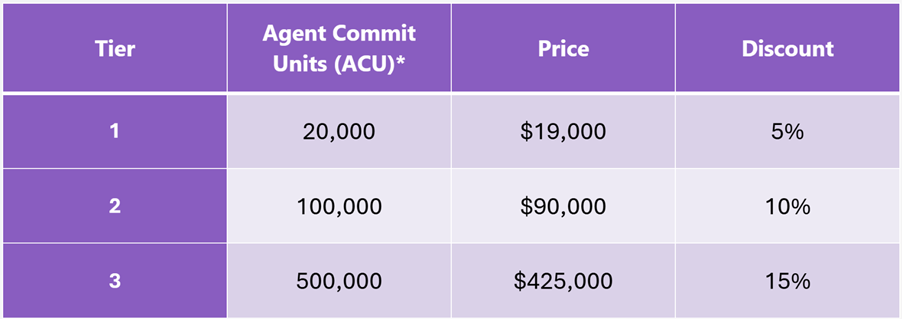
This annual commitment has 3 pricing tiers:
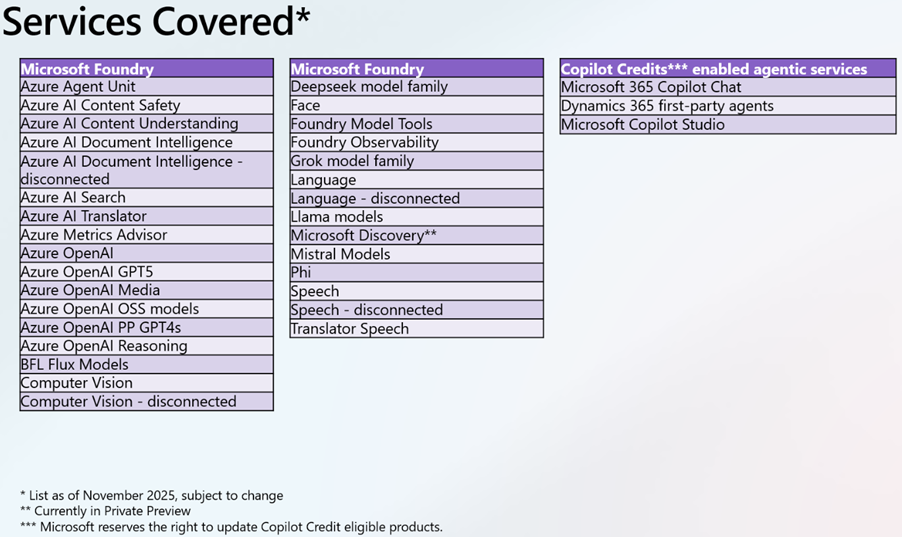
And covers a range of services:
Note the asterisks as always – some things are in preview and all are subject to change.
My big question is whether this offer sits alongside the recently announced “Copilot Credit Pre-Purchase Plan (P3)” or if it replaces it after just 3 weeks?! They seem slightly different but also very similar…
Microsoft Security Copilot uses Security Compute Units (SCU) to measure the compute power used to run various workloads. A quantity of these is now available with Microsoft 365 E5 licenses, rollout starting from November 18th 2025..
What SCU capacity is included with Microsoft 365 E5 licenses?
Each Microsoft 365 E5 license includes 0.4 SCU so, for example, an organisation with 1,000 M365 E5 licenses will have 400 SCU per month. The allocation resets monthly and unused SCU cannot be rolled over to the next month.
There is a maximum limit of 10,000 included SCU per month – this is equivalent to 25,000 M365 E5 licenses.
Pricing considerations
Should organisations exceed their M365 E5 included SCU quantity, overage SCU will be available for $6 per SCU on a Pay As You Go (PAYG) basis. That is 50% higher than the “Provisioned” SCU pricing of $4.
However, an interesting point – and something that adds complexity to these decisions – is that the included SCU provide more flexible billing than the traditional provisioned capacity model.
Under provisioned capacity, an organisation commits to a set number of SCU per hour and is charged for that amount even if actual usage is lower. With E5, the included SCU are drawn down only by the amount actually consumed each hour, which provides a more accurate reflection of usage and avoids paying for unused capacity:
With Provisioned Capacity, if you provision 5 SCU but only use 3.5 – tough, you pay for all 5.
With E5 Included, you would only use 3.5 SCU.
This addition is another move to keep organisations on M365 E5, rather than stepping down to E3 +add-on.
AI Builder Credits have been around for a while as a way of paying for AI features within various Microsoft products including Power Apps Premium, Power Automate Premium, Dynamics 365 Finance and more. They’re being replaced by Copilot Credits and that means the seeded AI Builder Credits, where they came bundled along with other licenses, are disappearing.
From November 1, 2025 new customers – those who didn’t already have some AI Capacity add-ons – cannot buy any…but can still buy new Premium licenses that come bundled with AI Credits.
From November 1, 2026 AI Builder capacity add-ons can still be used but cannot be purchased or renewed. Also at this time, seeded credits will stop – to quote Microsoft “seeded AI Builder credits will be definitively removed from their premium licenses.“
Action: You should count up how many AI Builder credits you currently receive as part of your Premium licenses, and also how many of those credits you actually use. Then calculate, as well as you’re able, how much that usage will cost you once you have to start paying for it all separately.
The cost of basic prompts has increased by 33% while object detection has risen by 1400%! These price rises must be taken into account…and note that those prices are based on the annual commitment price so the differences will likely be larger for those who choose to use PAYG billing.
A related question – will Microsoft reduce the price of the premium licenses, now that something is being removed from them?
It’s been rumoured for a while that Microsoft would release a new product/license for AI Agents called Agent 365 and we have the first public acknowledgement of this from Redmond.
Microsoft 365 Message MC1183300 is titled “Microsoft Teams and Microsoft 365 Copilot: Discover and create agentic users from Teams and M365 Agent Store” and gives us some initial information.
Starting in mid-November 2025, we will get “AI-powered Agentic Users” that will have “full organisation identities”. Users will be able to request agent templates but, at least for now, admins will control the creation and licensing.
What are AI Agents?
Microsoft differentiate them from bots and say:
Agentic Users are provisioned as full-fledged user objects with their own:
· identity in the organization’s directory (via Entra ID or Azure AD)
· email addresses
· Teams accounts
· presence in the org chart
They can participate in meetings, send and receive emails and chats, access and act upon enterprise data, and learn from interactions to improve over time. They have the ability to “proactively reason and act without explicit instructions”.
Satya Nadella now refers to Microsoft “building a planet-scale cloud and AI factory” which, with the recent agreement with Open AI, including $250 billion of Azure services (these don’t impact the Q1 results), and Copilot, shows they’re not changing direction any time soon.
Is Microsoft Copilot successful?
Lots of talk in the earnings call about Copilot growth and success with 90% of the Fortune 500 using M365 Copilot and various organisations purchasing 15,000+ seats in Q1 and PWC purchasing 155,000 seats. One should always be carefully sceptical of numbers like this from software publishers – what exactly is “using” and how many people within an org are “using” the software for example?
Copilot functionality is being added into almost every facet of Microsoft’s product portfolio, making it ubiquitous whether users really want it or not!
What are Microsoft’s Financial Results for Q1 FY26?
Revenue = $77.7 billion, an 18% increase
Net Income = $27.7 billion, a 12% increase
Microsoft Cloud = $49.1 billion, a 26% increase
What are Microsoft spending?
Capital Expenditure (CAPEX) was up 74% in Q1 FY26 “to support customer demand for…cloud and AI offerings.” Approximately half of that spend was on “short-lived assets” such as GPUs and CPUs for Azure and AI growth.
Long-lived assets spend was up 71%, driven by lease commencements for “large datacenter sites”.
You can see here the huge amount of money that Microsoft are spending on building datacentres, primarily to handle AI growth.
Productivity & Business Processes
Revenue = $33 billion, a 17% increase
Microsoft 365 Commercial Revenue = 17% increase
Dynamics 365 revenue = 18% increase
Operating Expenses increased 6% driven by investments in “compute capacity and AI talent”.
The M365 growth was driven by E5 and Copilot.
Intelligent Cloud
Revenue = $30.9 billion, a 28% increase
Azure = 40% increase
Operating Expenses increased 4% driven by investments in “compute capacity and AI talent”.
Earnings Call highlights
Microsoft plan to increase their total AI capacity by 80% through FY26 and double their datacentre footprint by 2028. They plan to launch the “world’s most powerful AI datacentre” in 2026 which will hit 2 gigawatts itself.
Fabric revenue increased 60% and now has 28,000 paying customers.
Microsoft are moving more and more towards consumption billing for their products – right across the portfolio. This makes it much more difficult for customer organisations to predict and forecast usage, which will generally lead to over-commitment and uncertainty. It also, however, means that Microsoft’s revenues and product sales are less predictable, which isn’t what they want.
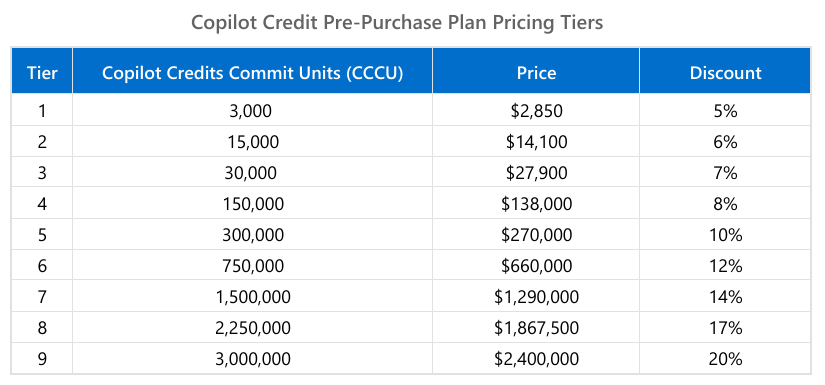
Copilot is a huge focus for Microsoft as is moving towards Agentic AI – which is done via Copilot Studio. Much of this is billed via Credits (formerly Messages) and Microsoft have now introduced the “Copilot Credit Pre-Purchase Plan” (aka “P3“) to help with some of the unpredictability (on both sides). You purchase an amount of “Copilot Credit Commit Units (CCCU)” and pay upfront for the year.
Each CCCU is worth $1 and is equivalent to 100 credits. There are 9 tiers:
These credits expire annually which is a better than the Microsoft Copilot Studio Copilot Credit capacity packs, which expire monthly.
Understanding when to buy this, which level to buy, and whether they’re being used effectively will be a great example of collaboration between ITAM & FinOps teams.
Some Azure AI terms added around “the use of First-Party Consumption services and the use of Web Knowledge Sources while using Grounding with Bing services”.
Microsoft 365 E3 added as the prerequisite for Microsoft eDiscovery Graph API Standard
Terms added following the recent updates around Teams:
“This Notice applies to customers in the European Economic Area (EEA) who purchase through Microsoft’s commercial licensing programs with a billing account that is in the EEA.
Such customers have the right to purchase (no Teams) Suites (and those in multi-year agreements may switch to (no Teams) Suites at their next annual order) at a price below the price of the corresponding Covered Suites. Customers are also eligible to receive the same percentage discount (whether negotiated or offered as a promotion and whether implemented as a price reduction or as a rebate) on the (no Teams) Suites that is offered on the corresponding Covered Suites. These (no Teams) Suites may be used with competitors to Teams if the customer purchases a competing solution.
Rebranded Microsoft 365 E5 Security (and all relevant offers) to Microsoft Defender Suite Rebranded Microsoft E5 Compliance (and all relevant offers) to Microsoft Purview Suite
M365 E5 Security = Microsoft Defender Suite M365 E5 Compliance = Microsoft Purview Suite
M365 F5 Security = Microsoft Defender Suite FLW M365 F5 Compliance = Microsoft Purview Suite FLW
There is also a “Defender + Purview Suite FLW” SKU
FLW = FrontLine Worker
As always, there’s going to be a period of time where the names differ between pages, sites, documents etc. so be prepared…especially for renewals.
2) Removed Microsoft Defender Threat Intelligence from Availability and Prerequisite Tables
3) Azure Firmware Analysis and Azure IoT Operations connectors added
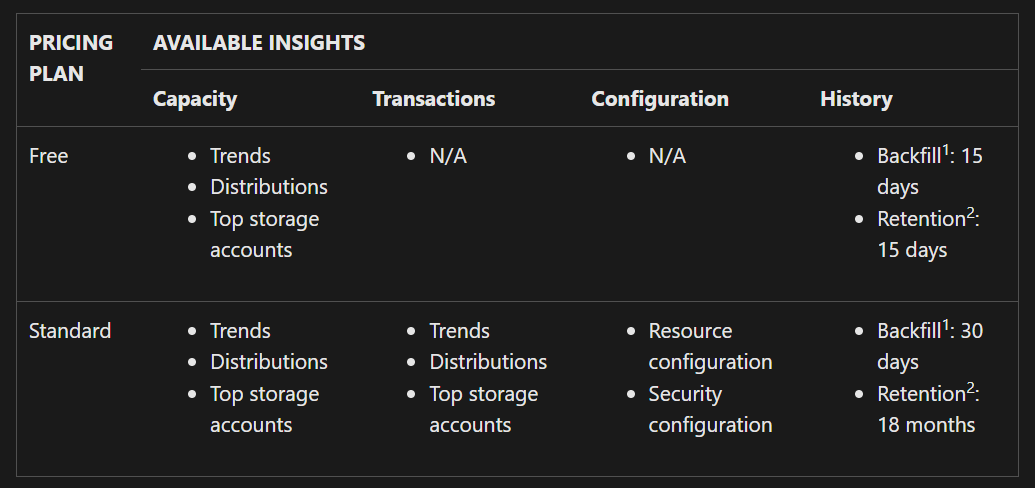
1 The backfill feature automatically adds historic data into a Storage Discovery workspace from before the workspace is created. 2 Every workspace retains insights for some time to allow for historical analysis.
The total cost will be comprised of:
Pricing plan
Workspace configuration
Number of storage resources & data objects analysed
Note that a storage resource can be included in multiple workspaces and will be charged in each one.
How much will all this cost? As the service is in Preview, and you’re able to use it for free, Microsoft haven’t released pricing details. These will become available on Azure.com before October 1, 2025, when billing kicks in.
To find out more about what it does and how it works, head here.
Visual Studio Subscriptions have been added to MCA
Windows 10 ESU added to CSP
Microsoft Defender & Microsoft Purview Suites have now been made available to Business Premium users
That last point is very interesting as this brings a world of new security features to smaller organisations – which will have multiple impacts:
1) directly increase the ARPU (Average Revenue Per User) of SMB customers as they buy new add-ons 2) increase the chances of SMB customers adopting Copilot – as these new products address many of the security/data challenges… 2b) which will further increase the ARPU of SMB customers
Microsoft have long been calling out the strength of SMB driving M365 sales so this is a logical next step.












 Cloudy with a chance of Licensing