Microsoft 365 Copilot: Pricing and Licensing strategy


Microsoft 365 Copilot pricing has been announced and it is more than most were expecting – $30 per user per month.

Given the aim of Microsoft Copilot – to increase user efficiency and productivity when working with Microsoft 365 Apps such as Excel, PowerPoint, and Word – it’s very unlikely that EVERY user in an organisation would be given a license. It will instead be what Microsoft call “Knowledge Workers” i.e. those who spend most of their time creating content in Office…presentations, documents, spreadsheets etc. However, for many organisations that is a considerable proportion of their business and still equals a large outlay.

There are 2 scenarios I can see happening:

  1. Microsoft take note of the “it’s too expensive” feedback and, when M365 Copilot actually becomes available to buy, they announce a lower price based on “listening to customers and partners“. This “put it out there and see what people say” approach has become a somewhat common strategy for Microsoft over the last few years.
  2. They keep the price high for the first 12-18 months for early adopters who are willing to pay to get access to the potential business gains asap. Once adoption and new purchases hit a plateau, they then announce a price decrease to make it more attractive to a new, wider set of customers <– they did this with Power Platform back in October 2021 and it certainly seems to have worked.

What about Office 365 users?

A slight tangent perhaps but it must be noted that Copilot is only an add-on for Microsoft 365, not Office 365. Thus, if you have the latter, you will need to first upgrade from O365 to M365 and then add Copilot on top…making any concept of value and ROI even more complex.

Difficulty for customers

There are a few points that will be tricky for customer organisations:

  1. Defining who needs a Copilot license
  2. Defining what success looks like
  3. Measuring and reporting on success
  4. Tracking & quantifying ROI

Defining who needs a Copilot license

It won’t be every user in the organisation…but which users will it be?

1) Do you base it on existing license allocation i.e. “everyone with M365 E3/E5 gets Copilot as standard”? This is the easiest way but may well lead to over-licensing of Copilot, just as there is probably already over-licensing of M365 E3/E5.

2) Do you base it on job role i.e. “all team managers, accountants, and sales people get Copilot as standard”. There are a few things to consider here:

  • How many different job roles are there within your organisation?
  • Does everyone with the same title do the same thing or does it vary by team/department perhaps?
  • Will you make exceptions for certain people in other roles?
    • If so, how do you define the criteria?
  • How do you manage people who feel left out/under-valued if they don’t get a license?

3) Does each individual user who wants a license need to pass a kind of test to show that they perform relevant tasks and will benefit from Copilot? If so, how do you define the criteria:

  • Do they need to use multiple parts of Office or just one?
  • How heavily must they use it?
  • Are there certain outputs they must produce i.e. customer facing docs, exec reports etc.?
  • How do you track they are actually using it in the agreed way?

What does success look like?

Whatever process you use to decide how you allocate licenses to users, you will need to have a definition of success to know if your investment is worthwhile. This will vary between organisations and market sectors but some options include:

User satisfaction

Are users happier? Do they feel less stressed when they have Copilot to help them on a daily basis?

Output

Are users generating more output faster than before? This could be customer proposals, setting appointments, internal reports/dashboards, pitch decks, marketing collateral and a whole range of other things that your users create on a regular basis?

Do you use quantitative data i.e. “there are more of X thing in Y time than without Copilot” or do you go more qualitative i.e. “they’re not producing more but what they are producing is better” so quality over quantity? Will it be different for different business units?

Measuring and reporting on success

Once you’ve defined your metrics, you need to measure and report on them.

Each of the above options has pros and cons and will require different approaches to measuring success.

User Satisfaction

If you base it on user satisfaction, you will need to develop a way to accurately measure this for users and to account for changes over time.

For example, satisfaction will likely be sky high at first – they have this new tool that’s doing all sorts of cool stuff, helping them and making each day easier. Over time though – that will all become normal, just a regular part of work…so that satisfaction may well drop off somewhat. How do you account for that?

Output

It’s a similar story for output. What was once better/faster will become normal and so measurements will need to be calibrated for this over the years following a Copilot deployment. While you need to make sure, as an organisation, that you’re not paying for licenses that aren’t delivering (enough) value – you must also avoid the opposite. That once Copilot becomes “normal”, the business forgets what it was like BC (Before Copilot) and decides to save money by dropping those add-on licenses.

If Copilot is being used correctly, that will cause a variety of issues – likely including people being unable to do parts of their job anymore! It will be similar to executives trying to save money by dropping Software Assurance…

Reporting

You also need to think about how this data is collected and analysed and who makes any necessary decisions.

  • How do you identify if people are no longer making “proper” use of their Copilot licenses?
  • Is this a constant rolling process or something done once ever 3/6/12 months?
  • Who decided to remove licenses from a user?
    • Their manager
    • HR
    • Finance
    • A designated Copilot Tsar?
  • How are you identifying users who may need a Copilot license part way through the year?

Quantifying Return on Investment (ROI)

  • $30 per user per month
  • $360 per user per year
  • $1,080 per user per 3-year agreement

It’s almost a given that enterprise customers will be paying less but the list price gives us a good base.

How you look at ROI is the first thing to define and that will be related to how you define success. If it is based on hourly rate and time saved then you can calculate it like so:

Tony gets $100,000 p/a so roughly $48 per hour. That’s $0.80 per minute so, if Copilot saves Tony 38 minutes a month then it’s paid for itself.

If it’s user satisfaction then you’ll probably see a wider range of positive results. GitHub Copilot has been available for a while and they released some interesting research last year (2022) that looked at quantifying the ROI.

https://github.blog/2022-09-07-research-quantifying-github-copilots-impact-on-developer-productivity-and-happiness/

For many organisations it would be great to see similar results from your “knowledge workers”. That said, adding Copilot for 5,000 users will be, at list price, $1,800,000 per annum and not all organisations will see that dollar value as worth the above results.

The adoption of Copilot may well be a fairly strong indicator of a company’s ethos and approach to employee wellbeing – at least for certain roles!

Conclusion

For some organisation, Microsoft 365 Copilot at this price point will be a no-brainer. For others, it’s a definite no, and for others it will be a definite no at any price point. However, I’d say that most organisations stand to be convinced…particularly if they’re able to get discounts etc.

As with any software product, make sure you understand why you want it, how you’ll use it, and how you’ll know if you aren’t. Work out what makes it good value for you and measure against that.

If you have questions, feedback, and/or would like to talk about you Microsoft strategy in more depth, get in touch here.

Microsoft 365 Copilot pricing


Photo by Kelly on Pexels.com

Microsoft’s latest AI product Copilot, which promises to be a real game changer when it comes to applying Generative AI to business, now has pricing available.

It will cost $30 per user per month and, as we saw recently, will be an add-on license to Microsoft 365 E3/E5/Business Std/Business Premium.

That’s higher than I was expecting; I thought they’d go lower to ensure as many people as possible got on-board. I know there stand to be some really great time savings and productivity increases but an additional $360,000 per year for an organisation licensing 1,000 users seems quite steep.

Of course, many organisations won’t pay that price in reality with volume discounts on EA, negotiated discounts etc. but it will still represent a large investment for many.

Bing Enterprise Chat

This has also been announced – a way to give employees a more powerful way of searching without risking data leakage. Microsoft state:

Chat data is not saved, and Microsoft has no eyes-on access – which means no one can view your data. And, your data is not used to train the models.”

This is included in Microsoft 365 E3/E5/Business Std/Business Premium free of charge and you can access Bing Chat Enterprise using your work account wherever Bing Chat is supported — Bing.com/chat and the Microsoft Edge sidebar. It will eventually be available as a standalone offering for $5 per user per month.

See the announcement from Microsoft here.

For more news and updates, sign up to my free monthly newsletter here.

Azure Reservations – no more exchanges


From January 1, 2024* it will no longer be possible to exchange reservations for:

  • Azure Reserved Virtual Machine Instances
  • Azure Dedicated Host reservations,
  • Azure App Services reservations

purchased on or after that date. For reservations purchased before that date, you will have the option to exchange once after the cut-off date. There is no limitation being put on trading in reservations for Azure Savings Plans, that will still be perfectly possible.

Ensure you do a review of your Reserved Instances, and how you use exchanges, prior to the end of 2023. If you find a lot of exchanges take place, it’s worth understanding why and what changes you may need to make to processes going forward.

*Update*

Microsoft have extended the deadline to “at least” July 1, 2024, giving organisations at least a further 6 months to get on top of they Azure reservations needs and strategy.

You can see more about the change and grace period here.

For more answers, advice, and insights into Microsoft licensing for you and your organisation – get in touch here:

Tell me more!

Microsoft Dev Box licensing


A new addition to the July 2023 Product Terms is Microsoft Dev Box. This is an Azure services that provides pre-configured, project-specific virtual workstations for developers.

Licensing

Dev Box must be used “to design, develop, or test applications” and users need to be licensed with:

  • Windows 10/11 Enterprise
  • Intune
  • Azure Active Directory P1/P2 (now Entra ID)

These can be licensed individually or as part of:

  • Microsoft 365 F3/E3/G3/E5/G5/A3/A5/Business Premium

Microsoft prohibit using “the service to perform server functions to devices outside of the service or to third parties” and also “for sustained distributed computing or digital asset transaction validation workloads“.

The “Azure Customer Solution” clause in the Azure General Terms:

Customer may create and maintain a Customer Solution. Despite anything to the contrary in Customer’s licensing agreement, Customer may permit third parties to access and use the Microsoft Azure Services solely in connection with the use of that Customer Solution.”

does not apply.

Pricing

Where there will be high ongoing usage, the Max Monthly Price makes sense but for shorter/more variable scenarios, the Hourly Compute price will likely be more effective.

The storage cost is paid each month until the Dev Box is deleted, so make sure to keep an eye on old, unused instances as that can soon start to add up across a large organisation!

See more info here.

Microsoft Entra gains two new products


Photo by George Becker on Pexels.com

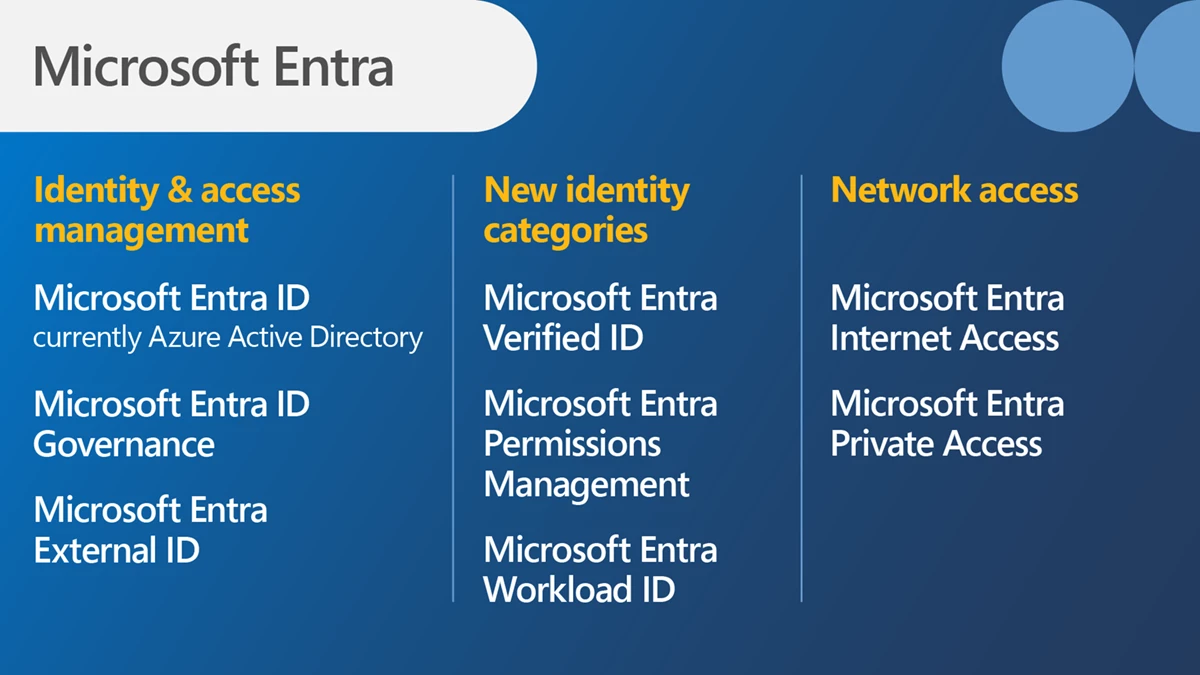
Microsoft have added 2 new products to their Entra family:

  • Microsoft Entra Internet Access
  • Microsoft Entra Private Access

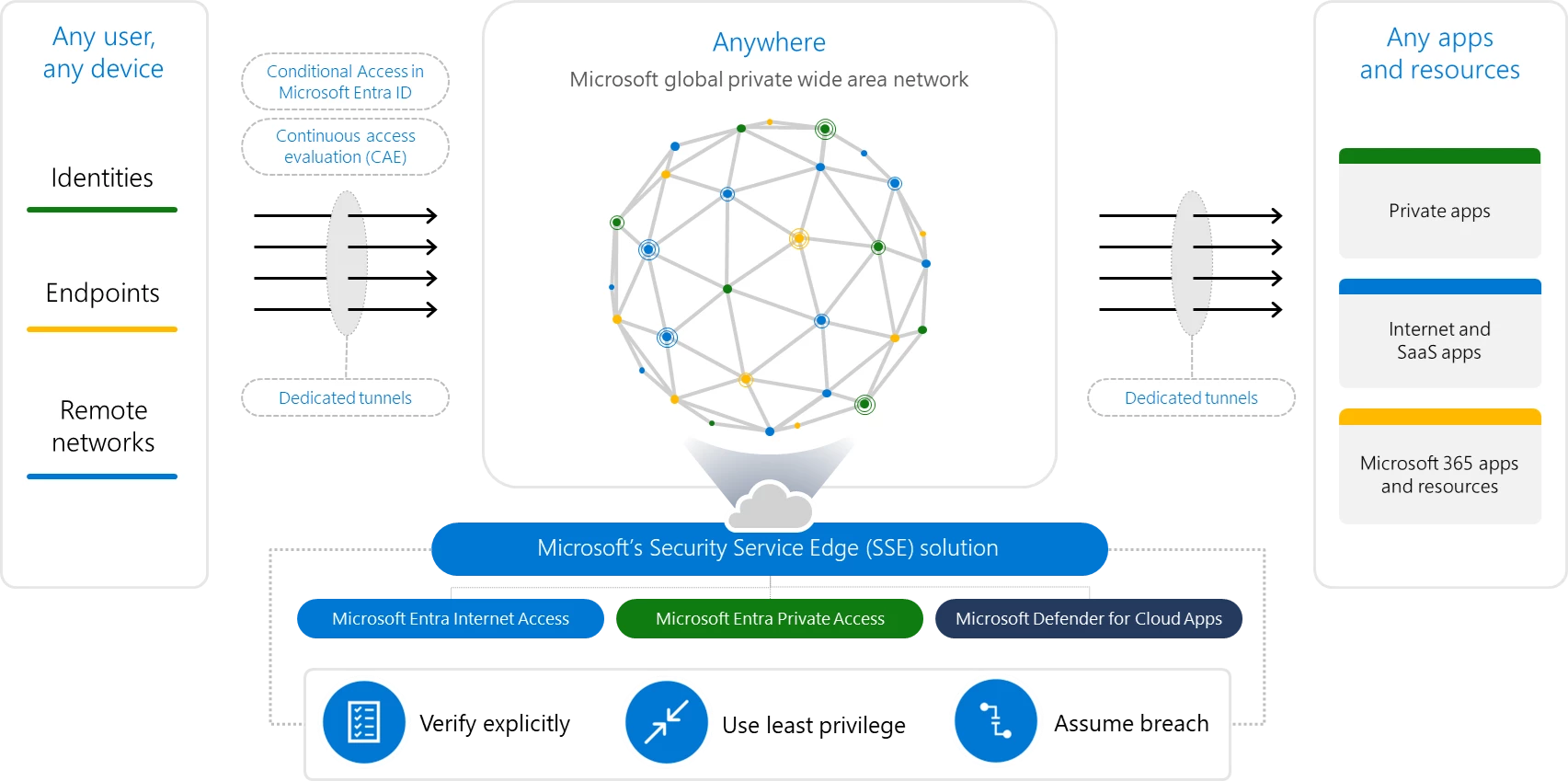
Both are focused on security and protecting access to apps over the internet.

Microsoft Entra Internet Access

An identity-centric Secure Web Gateway that protects access to internet, SaaS, and Microsoft 365 apps and resources. It extends Conditional Access policies with network conditions to protect against malicious internet traffic and other threats from the open internet.

Microsoft Entra Private Access

An identity-centric Zero Trust Network Access that secures access to private apps and resources. It reduces operational complexity and cost by replacing legacy VPNs and offers more granular security. You can apply Conditional Access to individual applications, and enforce multifactor authentication, device compliance, and other controls to any legacy application without changing those applications

These 2 products, plus Defender for Cloud Apps, form what Microsoft call their Security Service Edge (SSE) solution:

https://www.microsoft.com/en-us/security/blog/2023/07/11/microsoft-entra-expands-into-security-service-edge-and-azure-ad-becomes-microsoft-entra-id/

See more info here.

The Entra line-up will soon be:

Azure Active Directory is now Microsoft Entra ID


Microsoft have announced that Azure Active Directory (Azure AD) will, from August 2023, be known as Microsoft Entra ID.

Nothing else changes – no licensing, no capabilities, no portals etc. – it’s just a re-brand:

See the announcement here.

Microsoft Fabric licensing & pricing


Photo by cottonbro studio on Pexels.com

Microsoft Build 2023 saw the announcement of Microsoft Fabric – “an end-to-end, unified analytics platform that brings together all the data and analytics tools that organizations need” by combining various products including Power BI, Azure Synapse Analytics, and Azure Data Factory.

Additionally, “Fabric comes with a SaaS, multi-cloud data lake called OneLake that is built-in and automatically available to every Fabric tenant. All Fabric workloads are automatically wired into OneLake, just like all Microsoft 365 applications are wired into OneDrive.

To get more info about what Fabric is, check out the MS post here. To learn more about the licensing and pricing, read on 😊

Microsoft Fabric licensing

Microsoft Fabric takes its licensing model, and some of its terminology, from Power BI Premium which means parts of this may be familiar to you.

Each organisation must have 1 x “organisational” license and at least 1 x “individual” license and each subscription is broken down into tenants, capacities, and workspaces.

Organisational licenses

These provide the infrastructure for Microsoft Fabric – effectively this is what gets things provisioned in Azure so you have something to access/work with. There are 2 types which follow the Power BI Premium pattern:

Capacity – This provisions a set of resources in Azure with different SKUS providing different amounts of capacity, cores, RAM etc.

Premium Per User – Gives per-user access to Power BI elements on Microsoft Fabric, with shared capacity only.

Capacity SKUs

SKUCapacity UnitsPAYG (Hourly)PAYG (Monthly)Power BI SKUsPower BI v-cores
F2*2$0.36$262.80N/A0.25
F4*4$0.72$525.60N/A0.5
F8*8$1.44$1,051.20EM1/A11
F16*16$2.88$2,102.40EM2/A22
F32*32$5.76$4,204.80EM3/A34
F6464$11.52$8,409.60P1/A48
F128128$23.04$16,819.20P2/A516
F256256$46.08$33,638.40P3/A632
F512512$92.16$67,276.80P4/A764
F10241024$184.32$134,553.60P5/A8128
F20482048$368.64$269,107.20N/A256
Pricing of Fabric capacity SKUs at US west 2

*SKUs smaller than F64 require all users, including those consuming content, to be licensed with a Power BI Pro license.

  • The Azure “F” SKUs are billed PAYG per second
  • The P SKUs are billed monthly/annually with a monthly commitment and support Fabric being enabled on top of the Power BI subscription.
  • The EM SKUs do not support Fabric.

Individual licenses

Free – This allows users with access to Fabric capacity to create and share Fabric content

Pro – Required to create, share, and in some cases consume, Power BI content

This appears to show a differentiation between “Fabric content” and “Power BI content” – even if the Power BI content is being created within Fabric 🤔

Pricing and costs

As well as the SKU pricing above, there will also be additional costs for OneLake storage. Again based on costs in US West, the price is:

$0.023 per GB per month

That equals $23 per TB per month ($276 annually). 500TB of data in Fabric OneLake will be $138,000 per year and I feel like that’s probably a low amount of data for many organisations.

There are also potential bandwidth costs as data is accessed and moved between regions:

Managing these resources and costs can be done through a combination of the Fabric portal and Azure Cost Management:

Furthermore, Azure Reservations (Reserved Instances) are planned for later in 2023 which will make the Fabric capacity pricing comparable to the Power BI capacity pricing.

Microsoft resources

https://learn.microsoft.com/en-us/fabric/enterprise/licenses

https://blog.fabric.microsoft.com/en-us/blog/announcing-microsoft-fabric-capacities-are-available-for-purchase

Microsoft Copilot licensing details


Microsoft Copilot licensing details are here!

While we’re still awaiting the full release, which could be July 1st or perhaps during Microsoft Inspire later that month, we do have more information available.

Eligible base licenses are:

Microsoft 365 E3
Microsoft 365 E5
Microsoft 365 Business Standard
Microsoft 365 Business Premium

And users need to have an Azure AD account too. This is a clear indication that Copilot will be an extra add-on license.

Furthermore, their M365 Apps must be on “Current Channel” or the “Monthly Enterprise Channel” to access Co-pilot.

I haven’t seen any indication of pricing yet but I’m thinking perhaps £10 for E3 and £5 for E5? With some promos at first of course.

*Update* It turns out I was way off base! Microsoft have confirmed the price is $30 per user per month. More info and examples here.

See the MS post here: https://techcommunity.microsoft.com/t5/microsoft-365-copilot/how-to-prepare-for-microsoft-365-copilot/ba-p/3851566

Microsoft Multi-Geo add-on SKU comes to CSP


Photo by Pixabay on Pexels.com

The Multi-Geo add-on SKU is finally arriving on CSP from June 1, 2023 for users licensed with:

  • Microsoft 365 (but seemingly not the Business SKUs)
  • Office 365
  • Exchange Online
  • SharePoint Online
  • OneDrive for Business

This add-on enables customers to manage data-at-rest locations across multiple regions within a single tenant.

Licensing

As a minimum, customers must purchase a quantity of Multi-Geo licenses that is equal to at least 5% of the total number of eligible M365 licenses*. So if you have 1000 eligible licenses, you must purchase at least 50 Multi-Geo licenses.

A tenant must be configured for Multi-Geo support, a process which begins automatically once ordered licenses appear in the tenant. Interestingly Microsoft state that:

the time required to configure a Tenant for Multi-Geo support varies from Tenant to Tenant, but most Tenants finish within a month after receipt of the feature licenses. Larger or more complex Tenants may require more time to complete the configuration process

so make sure you leave enough time before the functionality is needed in production. You can see more details here.

*This applies to EA and CSP.

Microsoft Business Central Premium – new attach licenses


Photo by Ksenia Chernaya on Pexels.com

Two new Business Central Premium attach licenses – Dynamics 365 Sales Ent and Dynamics 365 Customer Service Ent – are now available for $20 each.

It’s also rumoured that we may see a Field Service added as an attach SKU in Microsoft’s new financial year from July 23 onwards.