
To mark the “anniversary” of Windows 7 Multi-Touch, (AKA Windows Touch) being discussed at the D: All Things D conference in 2008, Microsoft have released the Windows 7 Touch Pack. This is a set of 6 multi-touch enabled apps that will be available with Windows 7; it is comprised of 3 games and 3 MS Surface applications.
Microsoft Surface Globe: This is based on the Virtual Earth 3D engine and, using multi-touch, allows users to navigate different area of the globe as well as getting local info and “pinning” top locations. A demo video can be found here.

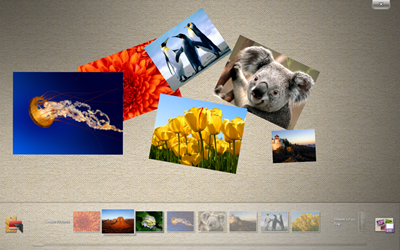
Microsoft Surface Collage: Users can arrange photos with their fingertips to create personalised desktop backgrounds.
Microsoft Surface Lagoon: A screensaver that supports multi-touch interaction. “Ripple” the water with your fingers or watch fish gather around as you press down.

Microsoft Blackboard: A game which may also educate! In this physics based teaser, users must arrange various gears, fans and levers to move objects towards the finish.

Microsoft Rebound: A touch based, electrified version of air hockey that can be played online.

Microsoft Garden Pond: A modern version of a Zen garden, this app allows you to guide your Origami creations around the peaceful ponds and pools with your fingers.

It will be up to the OEM’s whether they include some, all or none of these applications however, following general availability of Windows 7, Microsoft will look to expand this.
Some may see these a great features, some may see them as nothing but filler but if nothing else, they do a great job of showing how clean, easy and fresh multi-touch application can be on Windows 7.
You can see even more over at the Windows Team Blog.
 Cloudy with a chance of Licensing
