

Following Microsoft’s Ignite 2025 conference, they have announced some feature additions to Microsoft 365…and some price increases to go along with it.
Copilot Chat
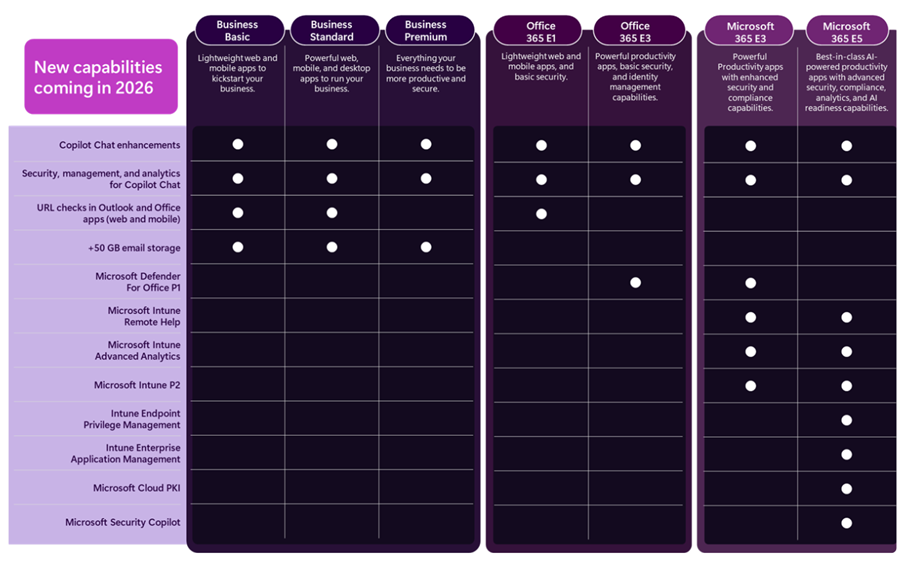
This free entry point to Copilot, included with various Microsoft products, will have new features to work with Outlook inboxes and calendars and standard access to Agent Mode. There will also be additional management and security capabilities around Copilot Chat.
Enhancing Copilot Chat makes sense as an entry point into M365 Copilot…effectively a “freemium” model albeit in a product you’re already paying for.
Addition Security Features
Microsoft Defender for Office 365 Plan 1, currently only available with Microsoft 365 E5, is being added to:
- Microsoft 365 E3
- Office 365 E3
It appears that all features are being added but that is to be confirmed.
Furthermore, URL checking features are being added to Office 365 E1, Business Basic, and Business Standard. The Business SKUs (including Premium) are all getting 50GB email inboxes too.
Boosting the security capabilities of lower SKUs is a welcome move, given the importance of security in today’s tech world.
Endpoint Management
A range of Microsoft Intune products are being added to both Microsoft 365 E3 and E5, these are:
- Intune Plan 2
- Intune Advanced Analytics
- Intune Remote Help
While M365 E5 will also receive:
- Intune Endpoint Privilege Management
- Enterprise Application Management
- Microsoft Cloud PKI
Security Copilot and Microsoft 365 E5
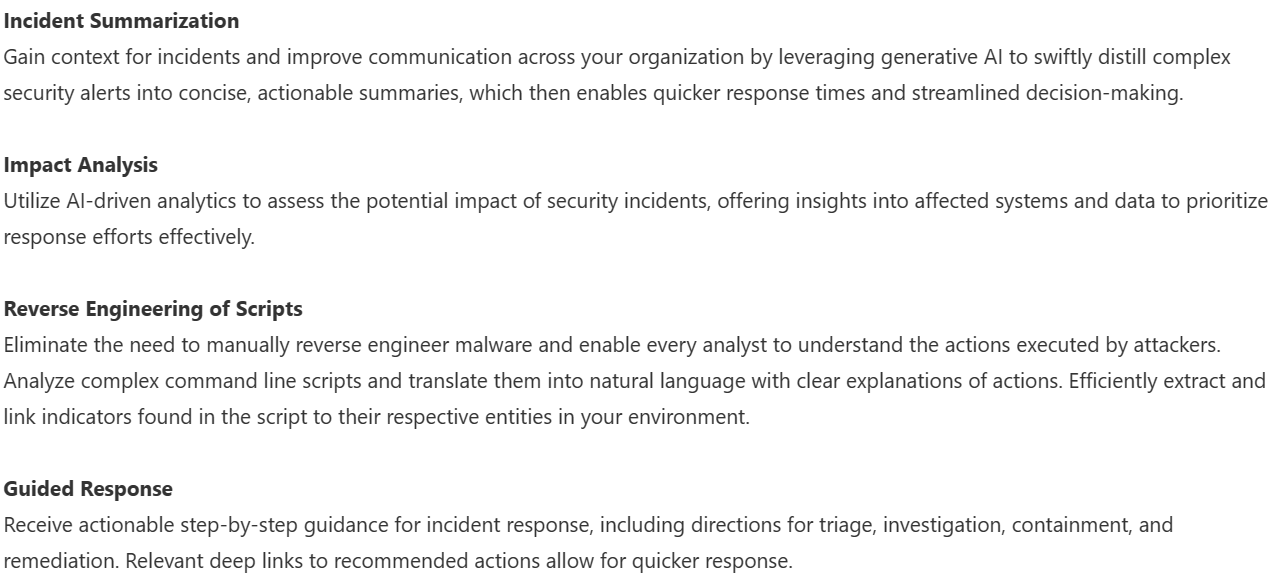
The Microsoft announcement also talks about the adding of Security Copilot SCUs to Microsoft 365 E5. I covered that a few weeks ago here – https://cloudywithachanceoflicensing.com/2025/11/20/microsoft-security-copilot-scu-included-with-microsoft-365-e5/
2026 Pricing
Of course, these new features come at a cost. Pricing for the included suites will be increasing as of July 1, 2026 (aka Microsoft’s new financial year)…even Microsoft 365 E5.
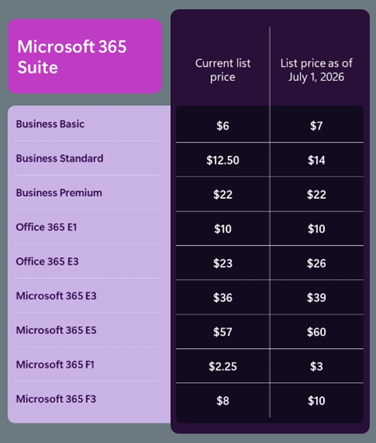
M365 E3 increases by 8% and M365 E5 by 5%. An organisation with 15,000 E5 SKUs will see an increase of $1.6 million over a 3-year contract – so understanding how the additional features may work for you will help you decide what steps to take at renewal.
Something that I did notice is that, while there is no mention of new features being added to the Frontline Worker F SKUs, they too are increasing in price – with M365 F1 rising by 33% and M365 F3 by 25%.
8,000 F3 users will lead to an increase of almost $600,000 over 3 years…seemingly with no new features to show for it.
Note as well that these increases will also apply to non-profit pricing.
See the Microsoft post here – Advancing Microsoft 365: New capabilities and pricing update | Microsoft 365 Blog
What’s it all about?
ARPU (Average Revenue Per User) is a key metric for Microsoft (and all SaaS publishers) and this will help keep that growing for several more quarters through their next financial year and beyond. Increasing the amount they earn from each user is key to driving shareholder value…especially as the amount of new users to buy M365 licenses is decreasing. Higher pricing also increase the Customer Lifetime Value (CLV), another important metric that helps businesses plan future campaigns and initiatives.
There is the risk that customers will become angry and disillusioned and look for alternatives. However it’s likely that Microsoft are confident in their view that there are very few real alternatives to many of their products and, even when they are available, the time and effort involved in swapping will discourage most organisations. While some may leave, the increased revenue from those who stay will more than offset the losses.
For some organisations, the additional products in E3 and E5 may mean that they can reshape their licensing slightly – dropping additional SKUs or possibly even dropping from E5 to E3. However, it is yet another price increase from Microsoft…particularly galling if you don’t need or want those additional features. Review your Microsoft budget projections and work to lock in the lower pricing for as long as possible.


 Cloudy with a chance of Licensing