Visual Studio Subscriptions have been added to MCA
Windows 10 ESU added to CSP
Microsoft Defender & Microsoft Purview Suites have now been made available to Business Premium users
That last point is very interesting as this brings a world of new security features to smaller organisations – which will have multiple impacts:
1) directly increase the ARPU (Average Revenue Per User) of SMB customers as they buy new add-ons 2) increase the chances of SMB customers adopting Copilot – as these new products address many of the security/data challenges… 2b) which will further increase the ARPU of SMB customers
Microsoft have long been calling out the strength of SMB driving M365 sales so this is a logical next step.
Microsoft have launched a new addition to the Copilot family, confusingly called Microsoft 365 Copilot Chat.
Copilot Chat was already a thing (that is different to Copilot Biz Chat) and this seems to be a re-positioning as they add some new capabilities too. It is a basic, entry point tool that sits below Microsoft 365 Copilot.
Microsoft 365 Copilot Chat is free and has access to internet info to give “web-grounded” responses. Additionally it can interact with Agents (more on that later) and also has elements of the “Copilot Control System” to help with corporate data privacy.
The table below shows how it stacks up against the “full” Microsoft 365 Copilot product:
One of the new additions is that users of this free product can use 2 types of agents on a Pay As You Go (PAYG) basis, they are:
“Tenant Graph” grounded agents
Autonomous action agents
“Tenant Graph” grounded means agents that can access internal company data as well as internet information, giving answers with additional, organisation specific info and context. This is an additional PAYG per-message cost for M365 Copilot Chat users but is included within the M365 Copilot license – adding a new variable to consider when pricing up licensing options.
Autonomous actions are where the agent uses “generatively orchestrated triggers, topics, data connectors, and workflows” to act on behalf of a user. This is an additional PAYG per-message cost for all users – it is an additional cost even for users licensed with M365 Copilot.
For more info and details on the PAYG per-message pricing model – see my post here.
We’ve got some new M365 licenses added to EA, EAS, and MCA (CSP) – first up, a bunch more Frontline Worker SKUS:
10-Year Audit Log Retention
Defender Vulnerability Management
Entra Internet Access
Entra Private Access
Secure Access Essentials Frontline Worker
Also “Python in Excel” is now available as an add-on license for:
M365 Apps for Business/Enterprise M365 Business Standard/Premium O365 E3/E5
One would assume it can also be added to M365 E3/E5, as that includes Apps for Enterprise…but then why are Business Std/Prem listed separately?
It’s to be noted that “Python in Excel” has been in public preview since August 2023 with the features freely available for Excel within Microsoft 365 subscriptions. However, the intention has always been to move some of the features behind a paid license:
“While in Preview, Python in Excel will be included with your Microsoft 365 subscription. After the Preview, some functionality will be restricted without a paid license. More details will be available before General Availability.”
It’s that time of year again – Microsoft have announced their Q4 and full financial year results…so let’s take a look.
Full Year FY24 Results
Revenue = $245.1 billion, a 16% increase
Net Income = $88.1 billion, a 22% increase
Microsoft Cloud = $135 billion +, a 23% increase.
Q4 FY 24 Results
Q4 Revenue = $64.7 billion, a 15% increase
Q4 Net Income = $22 billion, a 10% increase
Microsoft Cloud
This isn’t a Business Unit but rather a group of related products across the organisation including:
Azure
O365 Commercial
Dynamics 365
Parts of LinkedIn
“Other cloud properties”
Revenue was $36.8 billion, an increase of 21% Year on Year (YoY).
Microsoft note that gross margin decreased YoY to 69%. This is driven by “sales mix shift to Azure” but was partially offset by Microsoft making Azure improvements including scaling their AI Infrastructure.
Now let’s look at some of the individual Business Units and how they performed in Q4 FY24.
Productivity and Business Processes
Revenue = $20.3 billion, an 11% increase
Office 365 Commercial = 13% increase. Seat growth was again driven by SMB and Frontline Worker growth while Average Revenue Per User (ARPU) growth was driven by E5 and Copilot for M365.
LinkedIn = 10% increase
Dynamics 365 = 19% increase <– This is now almost 90% of all Dynamics revenue.
This gives a good overview of growth over the last 5 quarters:
Intelligent Cloud
Revenue = $28.5 billion, a 19% increase
Azure (and other cloud services) growth was 29% for this quarter, a little drop from the percentage point increase of the last 2 quarters but, as it’s Q4, likely increasing from a higher base. Microsoft highlight that 8 points of this growth was from AI services.
Amy Hood (CFO) states that AI demand is higher than Microsoft’s currently available capacity but they expect availability to increase in H2 FY25 aka Jan 2025 onwards.
Server Products grew by 2% this quarter, again driven by hybrid BYOL use with Azure Hybrid Benefit.
Overall growth over the last 5 quarters looks like this:
Overall business and FY25
In terms of how Microsoft are spending money, Amy Hood, CFO, stated that:
“Cloud and AI related spend represents nearly all of total capital expenditures [CAPEX]. Within that, roughly half is for infrastructure needs where we continue to build and lease datacenters that will support monetization over the next 15 years and beyond. The remaining cloud and AI related spend is primarily for servers, both CPUs and GPUs, to serve customers based on demand signals.”
Amy Hood gave her expectations for Q1 FY25 (and beyond) and they are:
Productivity and Business Processes
Expected revenue growth of between 10% and 11% in constant currency (or $20.3 to $20.6 billion), with O365 driven by E5 and Copilot for M365.
Intelligent Cloud
Expected revenue growth of 18 – 20% (or $28.6 to $28.9 billion) with Azure expected to be 28% – 29% up.
Earnings Call highlights
42 mentions of Copilot.
Number of customers with 10,000+ licenses of Copilot for Microsoft 365 doubled quarter over quarter,
Industry specific Copilots are here. DAX Copilot for Healthcare (over on the Nuance side of the portfolio) has over 400 customers currently.
Over 1,000 paying customers of Copilot for Security. Satya Nadella also states they have “1.2 million security customers” <– that indicates a lot of potential growth for Copilot there!
60,000+ Open AI customers – with average spend per customer increasing.
GitHub Copilot accounts for over 40% of GitHub’s revenue and is bigger than GitHub was when Microsoft acquired it.
36,000 Azure Arc customers, a 90% YoY increase.
14,000+ paying Microsoft Fabric customers.
48 million Monthly Active Users of Power Platform, a 40% YoY increase.
Over 40,000 organisations using Dynamics 365 Business Central.
Over 3 million users of Teams Premium.
More large-scale SAP workloads being migrated to Azure.
There was further growth in the “number of 10-million-dollar-plus and 100-million-dollar-plus contracts for both Azure and Microsoft 365“
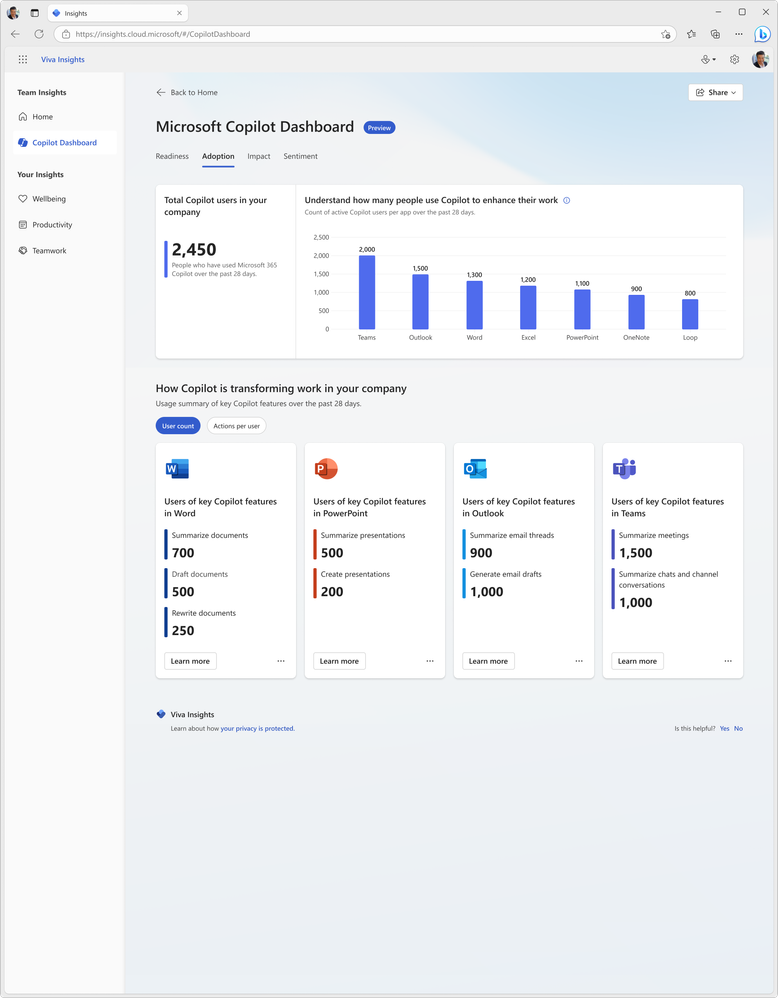
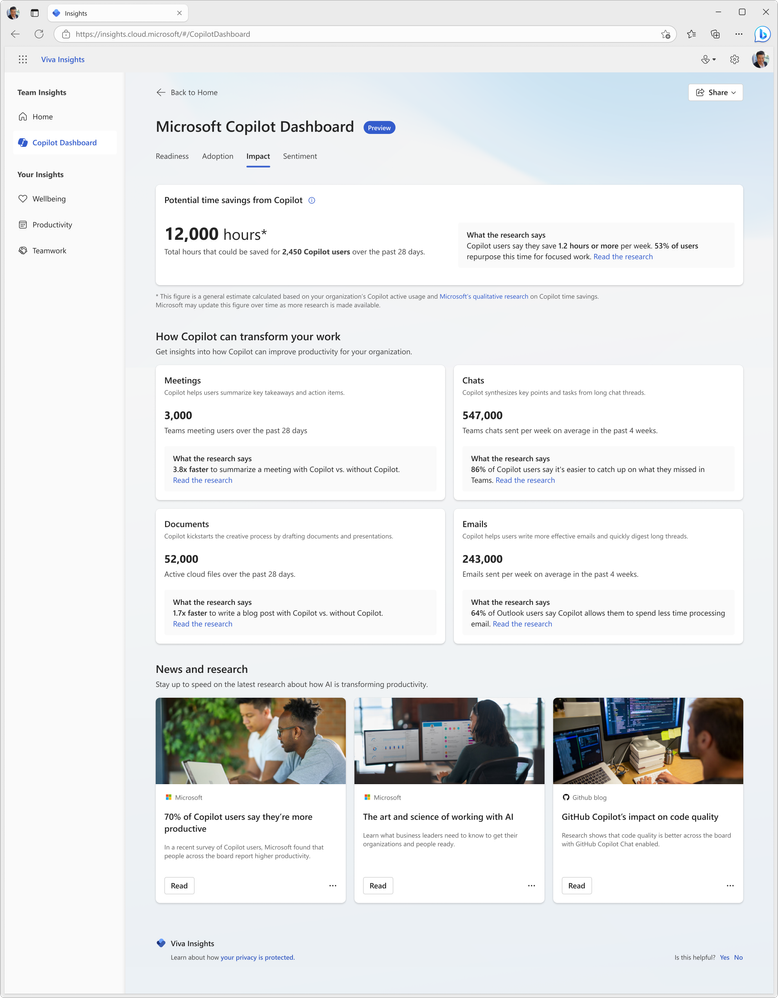
Since the introduction of Copilot for Microsoft 365, one of the big questions I, and others, have been asking is “how do you determine value?”. I laid out my initial concerns, questions, and actions here and now want to look at Microsoft’s offerings to enable this kind of insight. Currently available in preview (https://insights.cloud.microsoft/#/CopilotDashboard) – although I couldn’t get it to work – Microsoft’s Copilot Dashboard is their option to get the much needed insights.
Microsoft Copilot Dashboard
Microsoft aim for this to help customers across the 3 stages of the adoption journey:
It will show:
Who is eligible for Copilot for M365
How people are currently using M365 apps
How people are using Copilot and in which different apps
Information on how Copilot is impacting productivity
Microsoft are referring to it as “Microsoft Copilot Dashboard, powered by Viva” and from “early 2024” there will be additional dashboard features available to users with Viva Insights licenses. According to Microsoft, these will include:
“Copilot adoption and usage metrics combined with collaboration data, out-of-the box reports for organizational leaders, before and after behavioral data and even insights from employee surveys.”
and will also show time spent in meetings, processing emails, and creating content with before and after Copilot information.
All in all, the Copilot dashboard will be useful for organisations looking to understand more about their Copilot readiness and then their Copilot usage. However, some may have concerns about the reliability and objectivity of the data and reports generated by Microsoft on their own software. Ideally, Microsoft will be transparent and accountable in how they collect, process, and share the data from the Copilot dashboard. They should also provide ways for users to verify, challenge, or complement the data with their own sources and feedback.
I’ve recently recorded a couple of videos with Nathan Miller, Microsoft Program Manager at Bytes.
In the first, we discuss Copilot for Microsoft 365 (we recorded this in October 2023 but it took me ages to edit it!):
We talk about the General Availability of Copilot for M365 as well as tips for preparing for deployment.
We then talk about the Microsoft Azure Consumption Commitment (MACC): agreement:
where we explain what the MACC agreement is, how it works, and the potential pros and cons for customer organisations. We also talk about the Azure cloud marketplace and the impact this will have on customer procurement processes and also the wider IT channel.
I hope you find the videos useful and informative – as there are more planned! Let me know if you have requests for topics and also if you’d like to jump on a video or podcast with me at some point. I usually focus on blog posts but am looking to get all multimedia on you in 2024 so this is just the start 😁
Microsoft have announced a new Copilot – we now have Copilot for Service.
Copilot has been within Dynamics 365 for a few months already and now Microsoft bring the ability to “synthesize[s] vast amounts of data already available from an organization’s trusted knowledge sources to provide relevant, timely guidance to agents in their flow of work” to users of other CRM and Contact Centre solutions including Salesforce and ServiceNow, and Zendesk.
How does it work?
Microsoft say that it will very easy:
“Organizations can simply point to their data—such as public websites, SharePoint, knowledgebase articles, and offline files—and in a few minutes unlock generative AI-powered conversations across all of their data”
It will enable customer service agents to ask natural language questions of their data, whether in Teams or another client. Further down the line additional features will include email summaries, email drafts, and meeting recaps as well as automating common CRM tasks based on emails and context.
Interestingly, this product will include the much hyped Copilot for Microsoft 365 – meaning these users will also have access to Copilot across their Office suite.
Pricing and availability
Copilot for Service will be $50 per user per month (pupm). Remember that this includes Copilot for M365 which is priced at $30 pupm alone.
Copilot for Service is currently in public preview in US-based environments only, and the Copilot for M365 features may not be available during preview.
Announcement here and more info sign up form here.
It seems Microsoft will be adding some new security and compliance SKUS in February 2021. According to a post from Bytes, a top UK Microsoft partner and LSP, we will soon be able to purchase:
Premium Compliance Assessments
There will be a range of over 150 assessments available which can be added to any Office 365 E5 or Microsoft 365 E5 plan, at a cost of $2,500 per assessments per month.
10-year audit log retention to Advanced Audit
This will enable organisations to retain audit logs for up to 10 years and can be added to:
Microsoft 365 E5
Microsoft 365 E5 Compliance
Microsoft 365 E5 eDiscovery & Audit
Office 365 E5
for $2 per user per month.
Data Connectors to E5
This looks like it will extend Microsoft 365 security and compliance capabilities to 3rd party services such as Slack and Zoom. It can be added to any Office 365 E5 or Microsoft 365 E5 plan and will cost $400 per 500GB of data.
Conclusion
The Data Connectors are, I think, the most interesting. Back in November 2019, Microsoft launched a preview of Azure Arc, which enables organisations to run Azure technologies and policies across other clouds such as Amazon AWS, and this new addition is the same thought process. The first time we saw this was when Satya Nadella opened up Office across Apple and Android – making Office available on those devices enables Microsoft to sell more Office 365 AND reach new customers…customers who may eventually purchase other Microsoft services.
While Microsoft would love everyone in every organisation to use Microsoft Teams, they’re pragmatic enough to realise that will never happen – their competitors’ products will always exist…so why not make some money out of it? 500GB of data isn’t much so that $400 a month will quickly start to become a pretty big number of organisations! It also helps Microsoft retain relationships with these organisations, ensuring they stay updated on respective changes and have reasons to talk – giving the chance for future sales…
I’ll keep an eye for more information and, hopefully, an entry in the February 2021 Product Terms.
Microsoft have introduced their first vertical specific cloud offering – Cloud for Healthcare. Currently in public preview, the stated aims of this are to:
Enhance patient engagement
Empower health team collaboration
Improve insights
and, considering the current Coronavirus situation, focusing first on healthcare makes sense. They highlight that over 1,600 “COVID-19 bots” have gone live since March across 23 countries and we’ve already seen a huge rise in Azure usage during the last couple of months. The offering will span Azure, Microsoft 365, Dynamics 365 and more.
What’s next?
I look forward to seeing which other verticals are next to receive their own cloud and also, over the long term, if we start to see features and licensing differences between them. As cloud goes from being presented as one monolithic thing that everyone uses to separate, discrete offerings tailored to different industries, it will be much easier to introduce commercial differences. I imagine we’ll see some more about these at Microsoft Inspire in July.
This month’s Product Terms has got a few cool additions – one in particular!
Microsoft Defender Advanced Threat Protection for Servers
This was previously only available via an Azure Security Center subscription but can now be obtained via EA/EAS and CSP. It covers Windows Server 2008 R2/2012R2/2016/2019.
In order to purchase MDATP for Servers, organisations must have a combined minimum of 50 licenses of:
Microsoft Defender ATP
Windows E5/A5
Microsoft 365 E5/A5
Microsoft 365 E5 Security
Interestingly, if ATP for Servers customers decide to migrate to using Azure Security Center (ASC) on those same servers, active ATP for Server licenses will be credited against the ASC price.
New Microsoft 365 SKUs
April 2020 sees the introduction of:
E5 eDiscovery & Audit
E5 Information Protection & Governance
E5 Insider Risk management
Prerequisites
For eDiscovery & Audit and Insider Risk Management, the license prerequisites are:
Microsoft 365 (any)
Office 365 (any)
Exchange Online
SharePoint Online
OneDrive for Business
For Information Protection & Governance, the prerequisite licenses are:
Microsoft 365 (any)
Office 365 (any)
Exchange Online
SharePoint Online
OneDrive for Business
Azure Information Protection
EMS E3/A3
Office / Microsoft 365 F1 & F3
Microsoft have renamed the old F1 licenses to F3, and introduced a new F1 SKU to sit underneath, with limited capabilities as it only includes EMS E3 and “limited” Office services. The F1 license is pretty much just Teams really – no email, no Onedrive etc.
Microsoft licensing for Robotic Process Automation (RPA)
I’ve saved the best ’til last here – in my opinion at least! RPA is a growing area of business – the idea of using bots, rather than humans, to perform repetitive tasks to increase efficiency and, when used properly, job satisfaction. However, it’s also a licensing minefield – and Microsoft have been very quiet on this subject…until now! Well, actually, they’re still being quiet because these new additions were just slipped into the April Product Terms without any other mention – it strikes me as odd because these new licenses could herald a pretty significant change.
What have they added?
The Product Terms now contains:
Microsoft 365 E3/A3 – Unattended license
Power Automate per user with attended RPA plan
Power Automate unattended RPA add-on
There’s not a huge amount of extra info in the Product Terms but it does say that the E3/A3 unattended license includes Office 365 E3/A3, Windows 10 E3/A3, and EMS E3/A3 – no mention of them being restricted or limited at all.
Some definitions
The OST (Online Service Terms) gives more information. Microsoft’s definition of RPA is:
“An application (or set of applications) used to capture data and manipulate applications to perform repetitive tasks. Bots operate upon any UI element of Windows 10 within an OSE and/or operates upon any Office application in any OSE.”
Attended bot = This is a bot that “assists a person to execute automation on the person’s local and/or remote workstations.” They go on to say that “it operates concurrently with the person on the same workstation/s to accomplish repetitive tasks and is triggered by explicit actions of that person“.
In this scenario, it sounds like you would assign a regular M365 license to both the user and the bot?
Unattended bot = “Any bot that doesn’t strictly conform to the definition of an attended bot“.
The Power Automate unattended RPA add-on can be added onto the Power Automate per user with attended RPA plan and Power Automate per flow plan.














 Cloudy with a chance of Licensing