Microsoft Product Terms: March 2025


Photo by Markus Winkler on Pexels.com

Removed “without Microsoft’s prior written approval” from the clause preventing using MS service to mine crypto…I guess they realised they were never going to give anyone permission for this!

Changed the Use Rights for Azure Local software from:

Customer may use the Azure Local software only (i) on servers dedicated to Customer’s internal use

to

Customer may use the Azure Local software only (i) on devices dedicated to Customer’s internal use

Microsoft say this represents a move to “include smaller, more affordable devices than traditional servers

They also removed the following clause “Any customer support for Azure Local that may be available from Microsoft requires that Azure Local runs on server hardware that is pre-validated and listed in the Azure Local catalog or any successor.”

Added Microsoft 365 Copilot Chat to the list of EU Data Boundary Services

March 5th

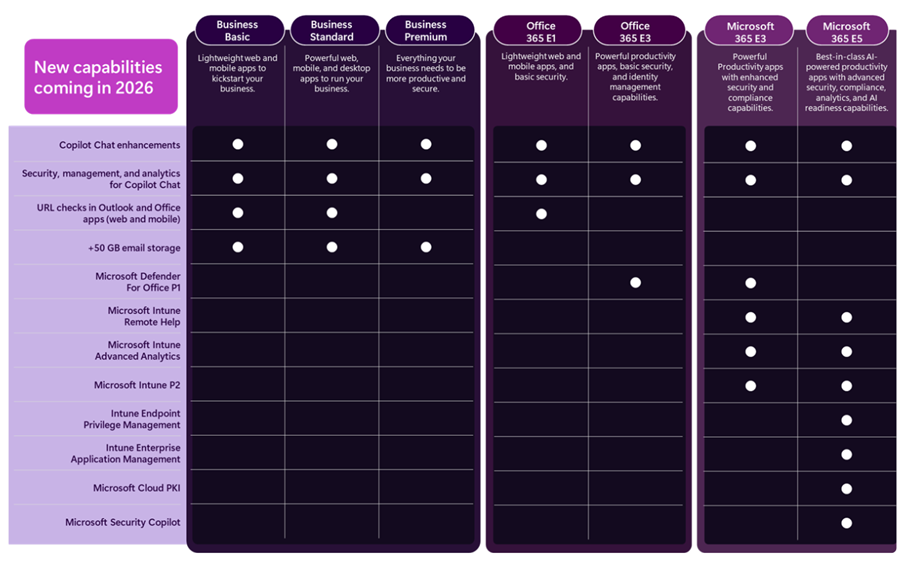
You can now add the Microsoft 365 E5 Security add-on to the Business Premium SKU.

March 12th

Added a section on Data Handling of Query Data with M365 Copilot & M365 Copilot Chat:

  • Microsoft has no rights in Query Data other than as needed to provide the services,
  • Query Data is not used to improve Bing,
  • Query Data is not used to create advertising profiles or track user behavior,
  • Query Data is not shared with advertisers or otherwise beyond Microsoft and its contracted suppliers who are subject to terms no less protective than these provisions,
  • Query Data is not used to train generative AI foundation models, and
  • Query Data is treated as Customer confidential information and protected by appropriate technical and organizational measures.

Clarification that certain concurrent use rights for Defender on up to 5 devices does not include Server OSEs:

  • Eligible Licensed Users may use Microsoft Defender for Business on up to five concurrent devices. Customer may not use a Microsoft Defender for Business User SL with server OSEs.
  • Eligible Licensed Users may use Microsoft Defender Vulnerability Management or Microsoft Defender Vulnerability Management Add-on on up to five concurrent devices. Customer may not use Microsoft Defender Vulnerability Management or Microsoft Defender Vulnerability Management Add-On User SLs with server OSEs.

Microsoft 365 Copilot Chat


Microsoft have launched a new addition to the Copilot family, confusingly called Microsoft 365 Copilot Chat.

Copilot Chat was already a thing (that is different to Copilot Biz Chat) and this seems to be a re-positioning as they add some new capabilities too. It is a basic, entry point tool that sits below Microsoft 365 Copilot.

Microsoft 365 Copilot Chat is free and has access to internet info to give “web-grounded” responses. Additionally it can interact with Agents (more on that later) and also has elements of the “Copilot Control System” to help with corporate data privacy.

The table below shows how it stacks up against the “full” Microsoft 365 Copilot product:

https://www.microsoft.com/en-us/microsoft-365/blog/2025/01/15/copilot-for-all-introducing-microsoft-365-copilot-chat/?msockid=1c5969e97aa36c313d327b0f7b586d33

One of the new additions is that users of this free product can use 2 types of agents on a Pay As You Go (PAYG) basis, they are:

  • “Tenant Graph” grounded agents
  • Autonomous action agents

“Tenant Graph” grounded means agents that can access internal company data as well as internet information, giving answers with additional, organisation specific info and context. This is an additional PAYG per-message cost for M365 Copilot Chat users but is included within the M365 Copilot license – adding a new variable to consider when pricing up licensing options.

Autonomous actions are where the agent uses “generatively orchestrated triggers, topics, data connectors, and workflows” to act on behalf of a user. This is an additional PAYG per-message cost for all users – it is an additional cost even for users licensed with M365 Copilot.

For more info and details on the PAYG per-message pricing model – see my post here.

You can see Microsoft’s announcement here.

Microsoft Financial Results: FY 24


It’s that time of year again – Microsoft have announced their Q4 and full financial year results…so let’s take a look.

Full Year FY24 Results

Revenue = $245.1 billion, a 16% increase

Net Income = $88.1 billion, a 22% increase

Microsoft Cloud = $135 billion +, a 23% increase.

Q4 FY 24 Results

Q4 Revenue = $64.7 billion, a 15% increase

Q4 Net Income = $22 billion, a 10% increase

Microsoft Cloud

This isn’t a Business Unit but rather a group of related products across the organisation including:

  • Azure
  • O365 Commercial
  • Dynamics 365
  • Parts of LinkedIn
  • “Other cloud properties”

Revenue was $36.8 billion, an increase of 21% Year on Year (YoY).

Microsoft note that gross margin decreased YoY to 69%. This is driven by “sales mix shift to Azure” but was partially offset by Microsoft making Azure improvements including scaling their AI Infrastructure.

Now let’s look at some of the individual Business Units and how they performed in Q4 FY24.

Productivity and Business Processes

Revenue = $20.3 billion, an 11% increase

Office 365 Commercial = 13% increase. Seat growth was again driven by SMB and Frontline Worker growth while Average Revenue Per User (ARPU) growth was driven by E5 and Copilot for M365.

LinkedIn = 10% increase

Dynamics 365 = 19% increase <– This is now almost 90% of all Dynamics revenue.

This gives a good overview of growth over the last 5 quarters:

Intelligent Cloud

Revenue = $28.5 billion, a 19% increase

Azure (and other cloud services) growth was 29% for this quarter, a little drop from the percentage point increase of the last 2 quarters but, as it’s Q4, likely increasing from a higher base. Microsoft highlight that 8 points of this growth was from AI services.

Amy Hood (CFO) states that AI demand is higher than Microsoft’s currently available capacity but they expect availability to increase in H2 FY25 aka Jan 2025 onwards.

Server Products grew by 2% this quarter, again driven by hybrid BYOL use with Azure Hybrid Benefit.

Overall growth over the last 5 quarters looks like this:

Overall business and FY25

In terms of how Microsoft are spending money, Amy Hood, CFO, stated that:

“Cloud and AI related spend represents nearly all of total capital expenditures [CAPEX]. Within that, roughly half is for infrastructure needs where we continue to build and lease datacenters that will support monetization over the next 15 years and beyond. The remaining cloud and AI related spend is primarily for servers, both CPUs and GPUs, to serve customers based on demand signals.”

Amy Hood gave her expectations for Q1 FY25 (and beyond) and they are:

Productivity and Business Processes

Expected revenue growth of between 10% and 11% in constant currency (or $20.3 to $20.6 billion), with O365 driven by E5 and Copilot for M365.

Intelligent Cloud

Expected revenue growth of 18 – 20% (or $28.6 to $28.9 billion) with Azure expected to be 28% – 29% up.

Earnings Call highlights

  • 42 mentions of Copilot.
  • Number of customers with 10,000+ licenses of Copilot for Microsoft 365 doubled quarter over quarter,
  • Industry specific Copilots are here. DAX Copilot for Healthcare (over on the Nuance side of the portfolio) has over 400 customers currently.
  • Over 1,000 paying customers of Copilot for Security. Satya Nadella also states they have “1.2 million security customers” <– that indicates a lot of potential growth for Copilot there!
  • 60,000+ Open AI customers – with average spend per customer increasing.
  • GitHub Copilot accounts for over 40% of GitHub’s revenue and is bigger than GitHub was when Microsoft acquired it.
  • 36,000 Azure Arc customers, a 90% YoY increase.
  • 14,000+ paying Microsoft Fabric customers.
  • 48 million Monthly Active Users of Power Platform, a 40% YoY increase.
  • Over 40,000 organisations using Dynamics 365 Business Central.
  • Over 3 million users of Teams Premium.
  • More large-scale SAP workloads being migrated to Azure.
  • There was further growth in the “number of 10-million-dollar-plus and 100-million-dollar-plus contracts for both Azure and Microsoft 365

Microsoft Copilot Dashboard


Since the introduction of Copilot for Microsoft 365, one of the big questions I, and others, have been asking is “how do you determine value?”. I laid out my initial concerns, questions, and actions here and now want to look at Microsoft’s offerings to enable this kind of insight. Currently available in preview (https://insights.cloud.microsoft/#/CopilotDashboard) – although I couldn’t get it to work – Microsoft’s Copilot Dashboard is their option to get the much needed insights.

Microsoft Copilot Dashboard

Microsoft aim for this to help customers across the 3 stages of the adoption journey:

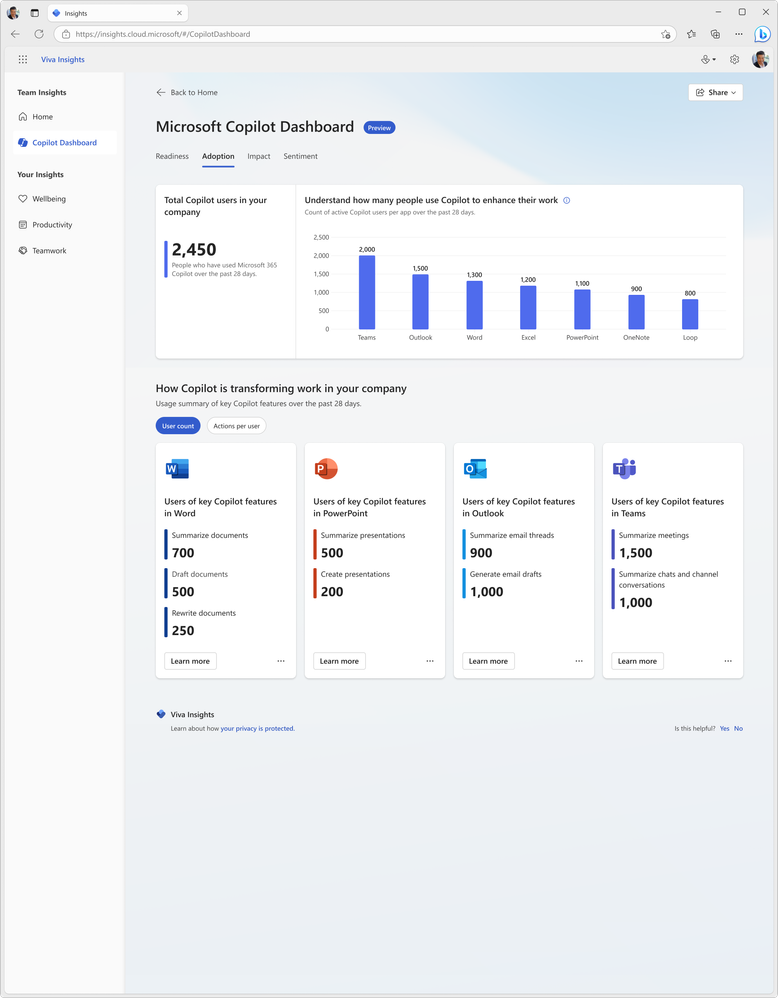
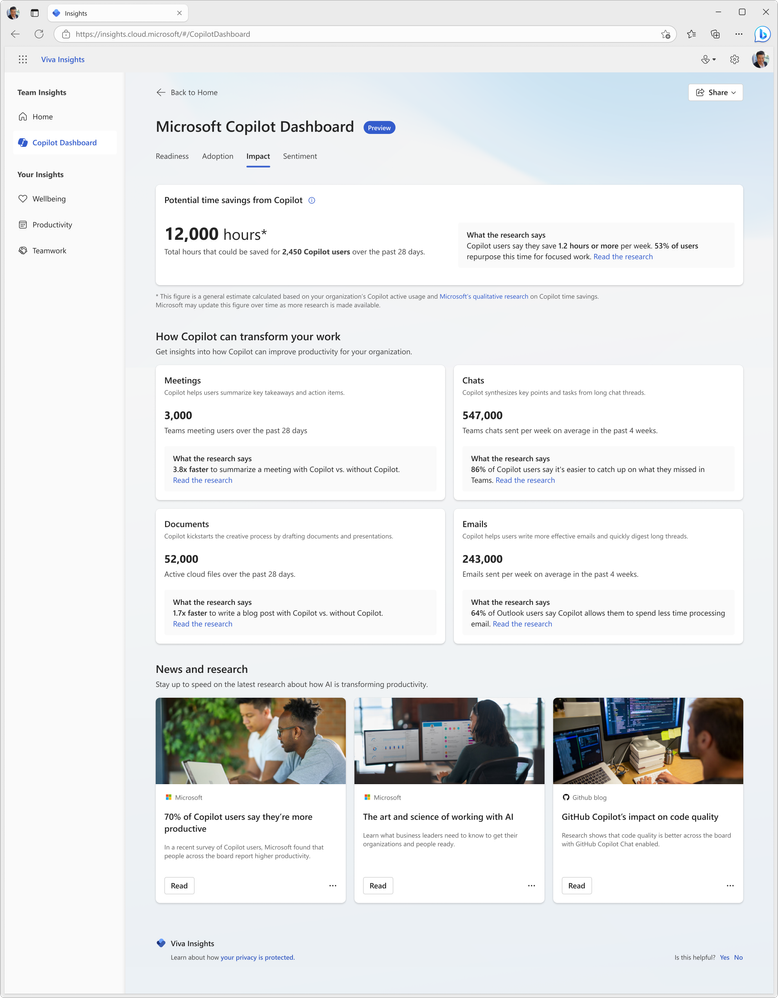
It will show:

  • Who is eligible for Copilot for M365
  • How people are currently using M365 apps
  • How people are using Copilot and in which different apps
  • Information on how Copilot is impacting productivity
https://techcommunity.microsoft.com/t5/microsoft-viva-blog/new-ways-microsoft-copilot-and-viva-are-transforming-the/ba-p/3982293

Access to this information and data will be key for businesses looking to make informed decisions on where Copilot can offer real benefits and ROI.

https://techcommunity.microsoft.com/t5/microsoft-viva-blog/new-ways-microsoft-copilot-and-viva-are-transforming-the/ba-p/3982293

Being able to see where it can get involved to help users is helpful for getting started:

https://techcommunity.microsoft.com/t5/microsoft-viva-blog/new-ways-microsoft-copilot-and-viva-are-transforming-the/ba-p/3982293

Viva gives more features

Microsoft are referring to it as “Microsoft Copilot Dashboard, powered by Viva” and from “early 2024” there will be additional dashboard features available to users with Viva Insights licenses. According to Microsoft, these will include:

Copilot adoption and usage metrics combined with collaboration data, out-of-the box reports for organizational leaders, before and after behavioral data and even insights from employee surveys.”

and will also show time spent in meetings, processing emails, and creating content with before and after Copilot information.

All in all, the Copilot dashboard will be useful for organisations looking to understand more about their Copilot readiness and then their Copilot usage. However, some may have concerns about the reliability and objectivity of the data and reports generated by Microsoft on their own software. Ideally, Microsoft will be transparent and accountable in how they collect, process, and share the data from the Copilot dashboard. They should also provide ways for users to verify, challenge, or complement the data with their own sources and feedback.

Microsoft Copilot and Microsoft MACC


Photo by Donald Tong on Pexels.com

I’ve recently recorded a couple of videos with Nathan Miller, Microsoft Program Manager at Bytes.

In the first, we discuss Copilot for Microsoft 365 (we recorded this in October 2023 but it took me ages to edit it!):

We talk about the General Availability of Copilot for M365 as well as tips for preparing for deployment.

We then talk about the Microsoft Azure Consumption Commitment (MACC): agreement:

where we explain what the MACC agreement is, how it works, and the potential pros and cons for customer organisations. We also talk about the Azure cloud marketplace and the impact this will have on customer procurement processes and also the wider IT channel.

I hope you find the videos useful and informative – as there are more planned! Let me know if you have requests for topics and also if you’d like to jump on a video or podcast with me at some point. I usually focus on blog posts but am looking to get all multimedia on you in 2024 so this is just the start 😁

Microsoft Copilot for Service


Microsoft have announced a new Copilot – we now have Copilot for Service.

Copilot has been within Dynamics 365 for a few months already and now Microsoft bring the ability to “synthesize[s] vast amounts of data already available from an organization’s trusted knowledge sources to provide relevant, timely guidance to agents in their flow of work” to users of other CRM and Contact Centre solutions including Salesforce and ServiceNow, and Zendesk.

How does it work?

Microsoft say that it will very easy:

“Organizations can simply point to their data—such as public websites, SharePoint, knowledgebase articles, and offline files—and in a few minutes unlock generative AI-powered conversations across all of their data”

It will enable customer service agents to ask natural language questions of their data, whether in Teams or another client. Further down the line additional features will include email summaries, email drafts, and meeting recaps as well as automating common CRM tasks based on emails and context.

Interestingly, this product will include the much hyped Copilot for Microsoft 365 – meaning these users will also have access to Copilot across their Office suite.

Pricing and availability

Copilot for Service will be $50 per user per month (pupm). Remember that this includes Copilot for M365 which is priced at $30 pupm alone.

Copilot for Service is currently in public preview in US-based environments only, and the Copilot for M365 features may not be available during preview.

Announcement here and more info sign up form here.

Microsoft Copilot Studio licensing


It’s been announced that Power Virtual Agents (PVA) is now part of Copilot Studio so let’s look at the licensing for this new product.

Microsoft Copilot Studio for Microsoft Teams

Just as there is Dataverse for Teams, this is a cut-down version for use exclusively with Teams and the rights are included with “select” M365 licenses. These seem to be a way of keeping PVA available to many users and further promoting the idea that Teams is where all internal bot related scenarios should occur.

As you can see, the features are relatively limited:

https://learn.microsoft.com/en-us/microsoft-copilot-studio/requirements-licensing-subscriptions

It will be possible to acquire a full Copilot studio license via the Teams app so SAM managers beware! I’m yet to find pricing for the standalone license but will update once I see it.

  • Microsoft state that “use rights and functionality available as part of paid, standalone Power Automate subscriptions serve automation scenarios cannot be applied to Microsoft Copilot Studio scenarios“.
  • Copilot Studio entitlements are also included within D365 Customer Service Digital Messaging and Chat add-ons.

The Microsoft page is here.