Microsoft remove Azure Reservation exchange policy


Customer and store employee discussing a receipt at customer service counter
A customer discusses a return with a store employee near a return policy sign.

From February 1st, 2027 – Azure Reservations will no longer be eligible* to be exchanged if the service also has a Savings Plan available. This applies to:

  • Azure Virtual Machines
  • Azure App Service
  • Azure SQL Database
  • and “similar services”.

*Reservations purchased before February 1, 2027, keep the right to one final exchange.

Equally, from that date any additional compute or database services that also become available for a Savings Plan will be subject to this change. Instance Size Flexibility isn’t impacted by this change.

The following are excluded from the change:

  • Reservations for products or services that are deprecated and approaching end of life.
  • Reservations for products and services that aren’t covered by savings plans, such as Azure VMware Solution. If you have a reservation for Azure VMware Solution, this policy change doesn’t affect it.
  • Cloud environments that don’t currently support savings plans.

Microsoft initially announced this change in October 2022 with a date of Jan 1, 2024. That was then pushed back to July 1, 2024 and then postponed indefinitely – with a promise of 6 months notice before it would be implemented again…and that’s what Microsoft have given. Could we see another postponement? Perhaps, but it seems unlikley tbh.

It’s clear that Microsoft want Savings Plans to be the primary option for organisations so here’s a quick overview if you’re not familiar:

FeatureAzure Reserved InstancesAzure Savings Plans
CommitmentCommit to a specific Azure resource (e.g. VM family, SQL Database, App Service)Commit to an hourly spend amount on eligible compute & database services
Term1 or 3 years1 or 3 years
DiscountTypically offers the highest discount when usage is stableLower maximum discount, but greater flexibility
FlexibilityLow – tied to the purchased resourceHigh – discounts automatically apply across eligible compute resources
Changing VM SizeAllowed within instance size flexibility rules for some servicesNo action required
Changing VM FamilyPreviously possible through Reservation exchanges (being phased out)No action required
Changing RegionMay require a Reservation exchange (being phased out)No action required
Workload ChangesBest suited to stable, predictable workloadsDesigned for dynamic, changing cloud environments
AdministrationRequires ongoing monitoring and optimisation to ensure Reservations still match usageMuch lower administrative overhead once purchased
Best ForLong-running production workloads with predictable resource requirementsOrganisations with frequently changing compute usage, autoscaling or modern cloud architectures
RiskHigher risk of underutilisation if workloads changeLower risk, as discounts follow eligible usage automatically

FinOps impact

The ability to exchange Reserved Instances has been part of mature Azure commitment strategies for quite some time but this is bringing much of that to an end. Strategies will need to be reviewed and a decision made on whether Savings Plans are now a better option, even with the potential loss of discount.

Make sure you communicate this change internally and work to update your governance and strategy asap.

You can see the Microsoft Learn page, with examples, here – Changes to the Azure reservation exchange policy – Microsoft Cost Management | Microsoft Learn

Microsoft announces Azure Savings Plan for Databases


Microsoft has announced “Savings Plan for Databases” – a new option to manage Azure cloud costs, alongside the existing “Savings Plan for Compute”.

Just like the AWS version (announced in December 2025), this helps organisations reduce spend on certain databases while giving additional freedom when compared to Reserved Instances – but, due to the added flexibility, giving lower discount levels.

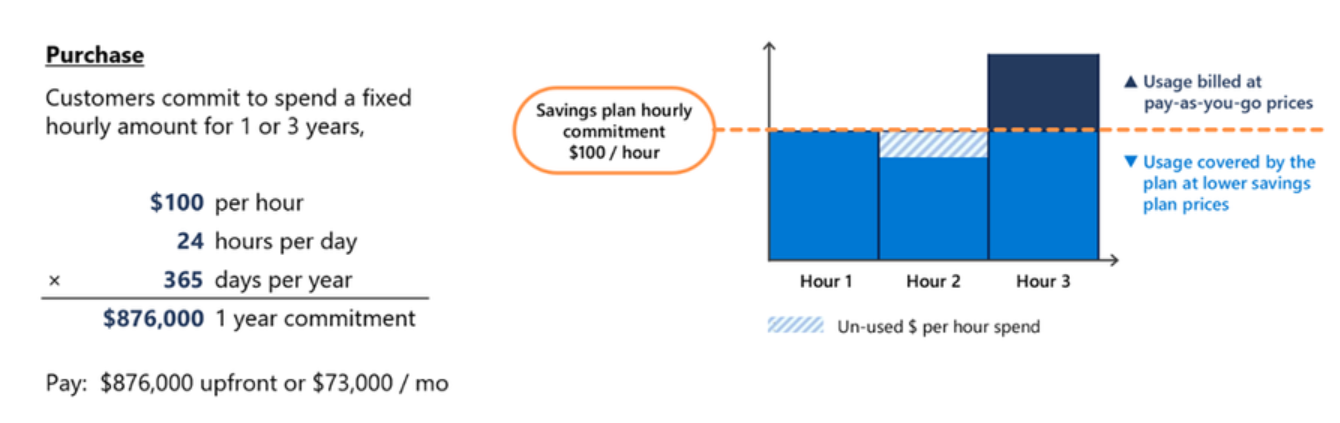
Rather than committing to a specific service/region etc., Savings Plans allow you to commit to a level of hourly spend that can be applied across a range of services.

Savings Plans for Databases are worth considering when you have a predictable baseline of database spend but still need flexibility in how that spend is consumed. If your environment includes multiple database engines, regions, or services that change over time, committing to a fixed hourly spend can unlock savings without being as specific as with Reserved Instances.

They are particularly useful where workloads are steady in aggregate but variable at an individual service level. If you can reliably forecast a minimum level of database spend each hour, a savings plan can reduce costs while preserving freedom.

Announcing savings plan for databases: flexible savings for modern, evolving workloads | Microsoft Community Hub

What services are covered?

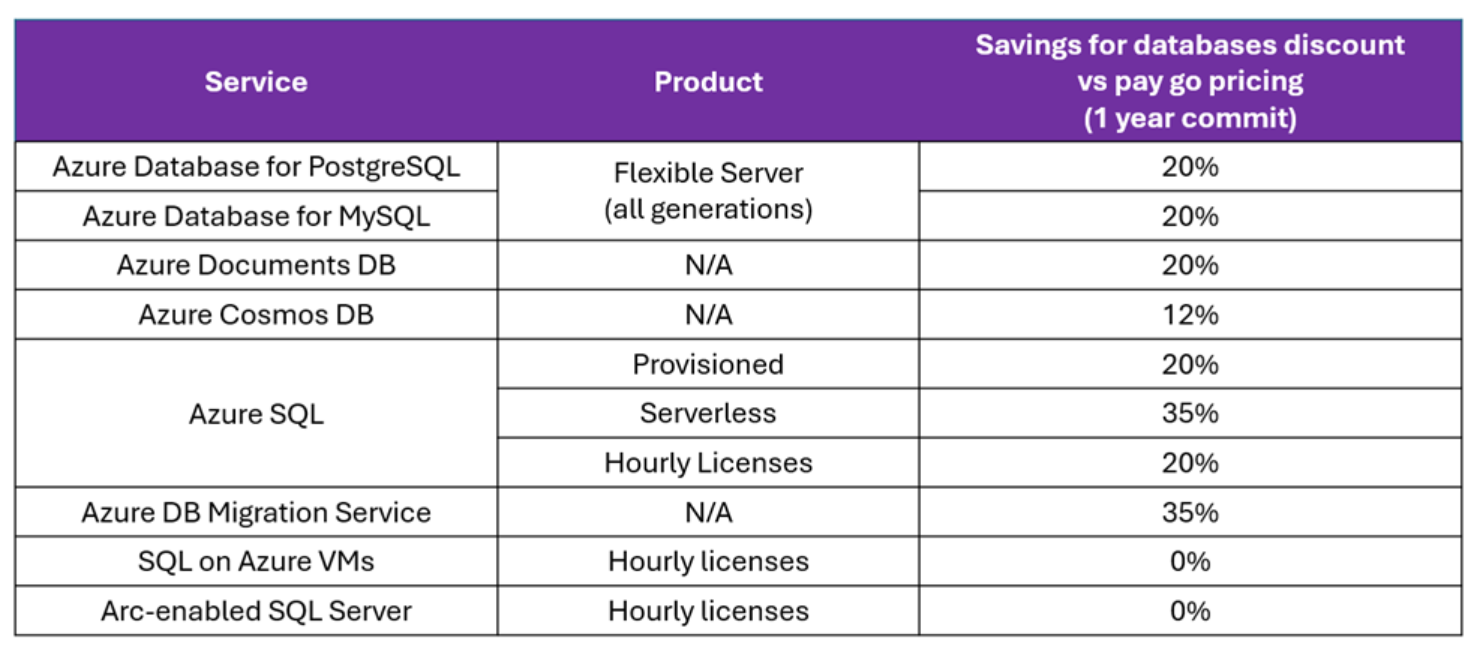
A range of database options, including Cosmos DB, are covered with discount levels varying:

Announcing savings plan for databases: flexible savings for modern, evolving workloads | Microsoft Community Hub

It seems these new Savings Plans are available just in 1-year variants and, assuming they follow the same method as Savings Plan for Compute, can be paid for upfront or monthly with no impact to the total amount.

This announcement helps bring Azure to parity with AWS (in this area) and will enable some organisations to make additional savings. As always, be sure to work out how it will apply to your specific contract and scenario.

See more from Microsoft here – Announcing savings plan for databases: flexible savings for modern, evolving workloads | Microsoft Community Hub

Azure Reservations – no more exchanges


From January 1, 2024* it will no longer be possible to exchange reservations for:

  • Azure Reserved Virtual Machine Instances
  • Azure Dedicated Host reservations,
  • Azure App Services reservations

purchased on or after that date. For reservations purchased before that date, you will have the option to exchange once after the cut-off date. There is no limitation being put on trading in reservations for Azure Savings Plans, that will still be perfectly possible.

Ensure you do a review of your Reserved Instances, and how you use exchanges, prior to the end of 2023. If you find a lot of exchanges take place, it’s worth understanding why and what changes you may need to make to processes going forward.

*Update*

Microsoft have extended the deadline to “at least” July 1, 2024, giving organisations at least a further 6 months to get on top of they Azure reservations needs and strategy.

You can see more about the change and grace period here.

For more answers, advice, and insights into Microsoft licensing for you and your organisation – get in touch here:

Tell me more!

Microsoft Product Terms: June 2020


Photo by Markus Winkler on Pexels.com

June is the last month of Microsoft’s financial year but they’re still made a few changes worth noting in this month’s Product Terms:

  • 5 year reservations for Azure VMs are added – with a 35% early termination fee
  • Azure Hybrid Rights for SQL have been expanded so now:
    • on-premises SQL Server Standard licenses can be used to run SQL Server Enterprise VMs in Azure
    • on-premises SQL Server Enterprise licenses can be used to run SQL Server Standard VMs in Azure
  • Changes to the eligibility for Office 365 and Microsoft 365 F1 & F3 licenses

SQL Server

The core conversion ratio is different for the two new scenarios:

4 x SQL Server Std on-prem cores w/SA = 1 x SQL Server Ent Azure core

1 x SQL Server Ent on-prem core w/SA = 4 x SQL Server Std Azure core

You can see the above table, and the info, on pages 54-54 of the June 2020 Product Terms.

F1/F3 changes

Microsoft have again changed the rules around who is eligible for a “Firstline” SKU. The new requirements are that to qualify for an F1/F3 license a worker must satisfy at least one of these conditions:

  • Uses a primary work device with a single screen smaller than 10.1”
  • Shares their primary work device with other qualifying Microsoft 365 or Office 365 Firstline Worker licensed users, during or across shifts
    • Other licensed Microsoft Firstline Worker users must also use the device as their primary work device
    • Any software or services accessed from the shared device requires the device or users to be assigned a license that includes use of those software or services

The previous guidance, updated in November 2019, was:

“A Dedicated Device is a computing device used for work with a 10.1” screen or larger, used by the user more than 60% of the user’s total work time during any 90-day period.”

These new rules should make it a bit easier for everyone to police but, for organisations already licensed for F1/F3 prior to June 1, 2020, you can continue to license based on the previous rules until your next renewal.