Microsoft announce 2026 price increases


Following Microsoft’s Ignite 2025 conference, they have announced some feature additions to Microsoft 365…and some price increases to go along with it.

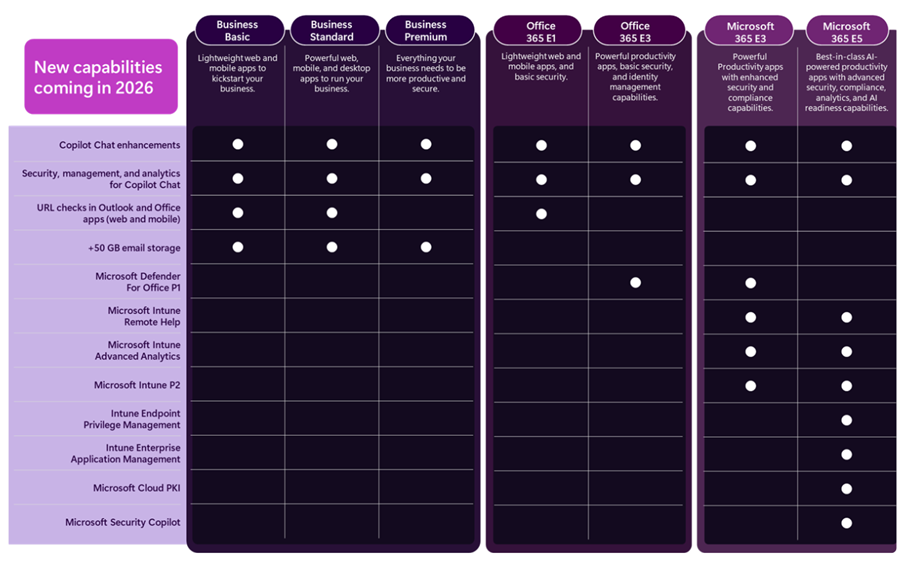
Copilot Chat

This free entry point to Copilot, included with various Microsoft products, will have new features to work with Outlook inboxes and calendars and standard access to Agent Mode. There will also be additional management and security capabilities around Copilot Chat.

Enhancing Copilot Chat makes sense as an entry point into M365 Copilot…effectively a “freemium” model albeit in a product you’re already paying for.

Addition Security Features

Microsoft Defender for Office 365 Plan 1, currently only available with Microsoft 365 E5, is being added to:

  • Microsoft 365 E3
  • Office 365 E3

It appears that all features are being added but that is to be confirmed.

Furthermore, URL checking features are being added to Office 365 E1, Business Basic, and Business Standard. The Business SKUs (including Premium) are all getting 50GB email inboxes too.

Boosting the security capabilities of lower SKUs is a welcome move, given the importance of security in today’s tech world.

Endpoint Management

A range of Microsoft Intune products are being added to both Microsoft 365 E3 and E5, these are:

  • Intune Plan 2
  • Intune Advanced Analytics
  • Intune Remote Help

While M365 E5 will also receive:

  • Intune Endpoint Privilege Management
  • Enterprise Application Management
  • Microsoft Cloud PKI
https://www.microsoft.com/en-us/microsoft-365/blog/2025/12/04/advancing-microsoft-365-new-capabilities-and-pricing-update/

Security Copilot and Microsoft 365 E5

The Microsoft announcement also talks about the adding of Security Copilot SCUs to Microsoft 365 E5. I covered that a few weeks ago here – https://cloudywithachanceoflicensing.com/2025/11/20/microsoft-security-copilot-scu-included-with-microsoft-365-e5/

2026 Pricing

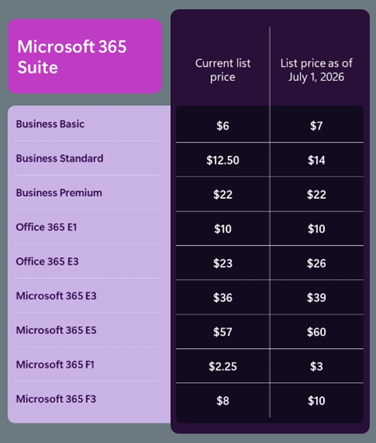
Of course, these new features come at a cost. Pricing for the included suites will be increasing as of July 1, 2026 (aka Microsoft’s new financial year)…even Microsoft 365 E5.

https://www.microsoft.com/en-us/microsoft-365/blog/2025/12/04/advancing-microsoft-365-new-capabilities-and-pricing-update/

M365 E3 increases by 8% and M365 E5 by 5%. An organisation with 15,000 E5 SKUs will see an increase of $1.6 million over a 3-year contract – so understanding how the additional features may work for you will help you decide what steps to take at renewal.

Something that I did notice is that, while there is no mention of new features being added to the Frontline Worker F SKUs, they too are increasing in price – with M365 F1 rising by 33% and M365 F3 by 25%.

8,000 F3 users will lead to an increase of almost $600,000 over 3 years…seemingly with no new features to show for it.

Note as well that these increases will also apply to non-profit pricing.

See the Microsoft post here – Advancing Microsoft 365: New capabilities and pricing update | Microsoft 365 Blog

What’s it all about?

ARPU (Average Revenue Per User) is a key metric for Microsoft (and all SaaS publishers) and this will help keep that growing for several more quarters through their next financial year and beyond. Increasing the amount they earn from each user is key to driving shareholder value…especially as the amount of new users to buy M365 licenses is decreasing. Higher pricing also increase the Customer Lifetime Value (CLV), another important metric that helps businesses plan future campaigns and initiatives.

There is the risk that customers will become angry and disillusioned and look for alternatives. However it’s likely that Microsoft are confident in their view that there are very few real alternatives to many of their products and, even when they are available, the time and effort involved in swapping will discourage most organisations. While some may leave, the increased revenue from those who stay will more than offset the losses.

For some organisations, the additional products in E3 and E5 may mean that they can reshape their licensing slightly – dropping additional SKUs or possibly even dropping from E5 to E3. However, it is yet another price increase from Microsoft…particularly galling if you don’t need or want those additional features. Review your Microsoft budget projections and work to lock in the lower pricing for as long as possible.

Microsoft SQL Server 2025 Failover Rights – staying or going?


Microsoft released SQL Server 2025 on November 18th 2025 and updated the Product Terms. However, the update has caused confusion and consternation amongst the Microsoft community – as it seems to suggest that failover rights as a Software Assurance benefit have been removed!!! 😱 (Spoiler alert – it’s almost certain they haven’t).

If you’re not familiar with this right it means, in a nutshell, that organisations who purchase SQL Server licenses with Software Assurance (SA) may license additional servers at no extra cost, as long as those servers are used only for disaster recovery/failover purposes. This is a long standing and widely used benefit – removing this right will mean one of 2 things:

  • Organisations’ SQL Server licensing will double/triple by millions of £/$/€ more per year
  • Organisations will be forced to have less resilient SQL Server systems, potentially leading to more downtime and lost revenue

Ultimately, if either of those were the case, I believe it would lead to a mass exodus of SQL Server customers. Microsoft may hope they would move to SQL Azure/SQL Server enabled by Azure Arc but I’d expect many to explore other options – Oracle, Postgres, Amazon RDS etc.

Largely because of that, and the fact that we have seen an increase in Product Terms errors over the last couple of years, I’m of the opinion that it is an error and will – eventually – be corrected…but it is worth looking at anyway.

As I was about to press publish, Peter Van Uden has commented on LinkedIn that he’s had confirmation that it is an error and will be corrected in the coming days.

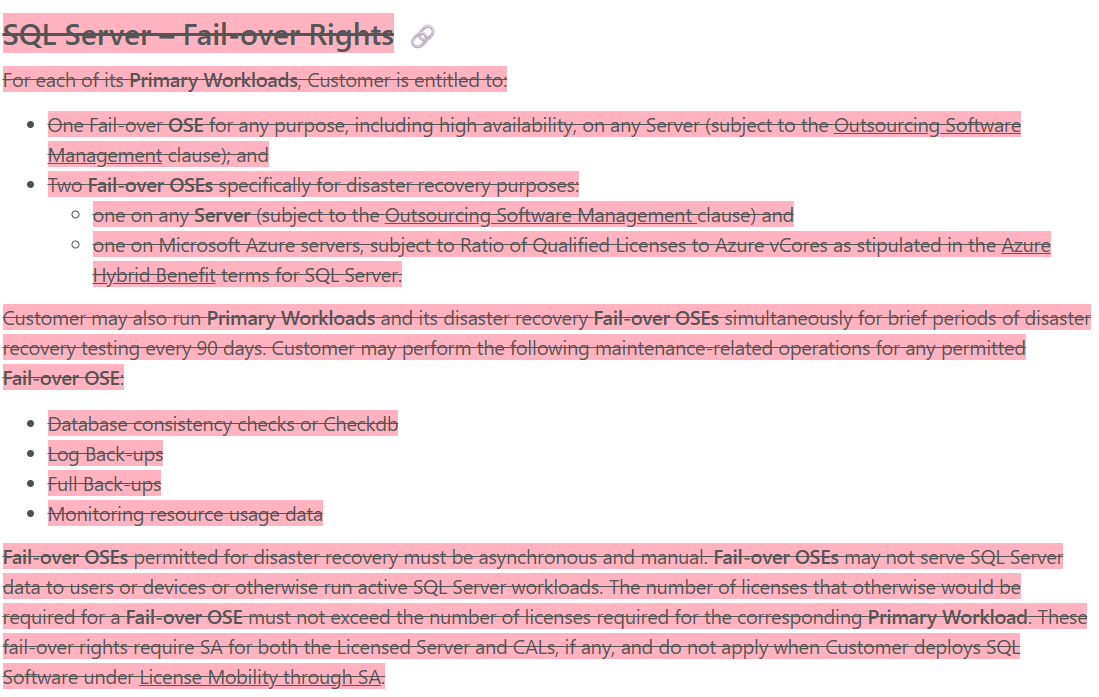
Fellow Microsoft watcher Alex Golev noticed that the whole section had been deleted without replacement:

Other parts of the Product Terms still refer to this section which suggests this is an erroneous deletion…but it could also mean that they just didn’t edit those sections correctly.

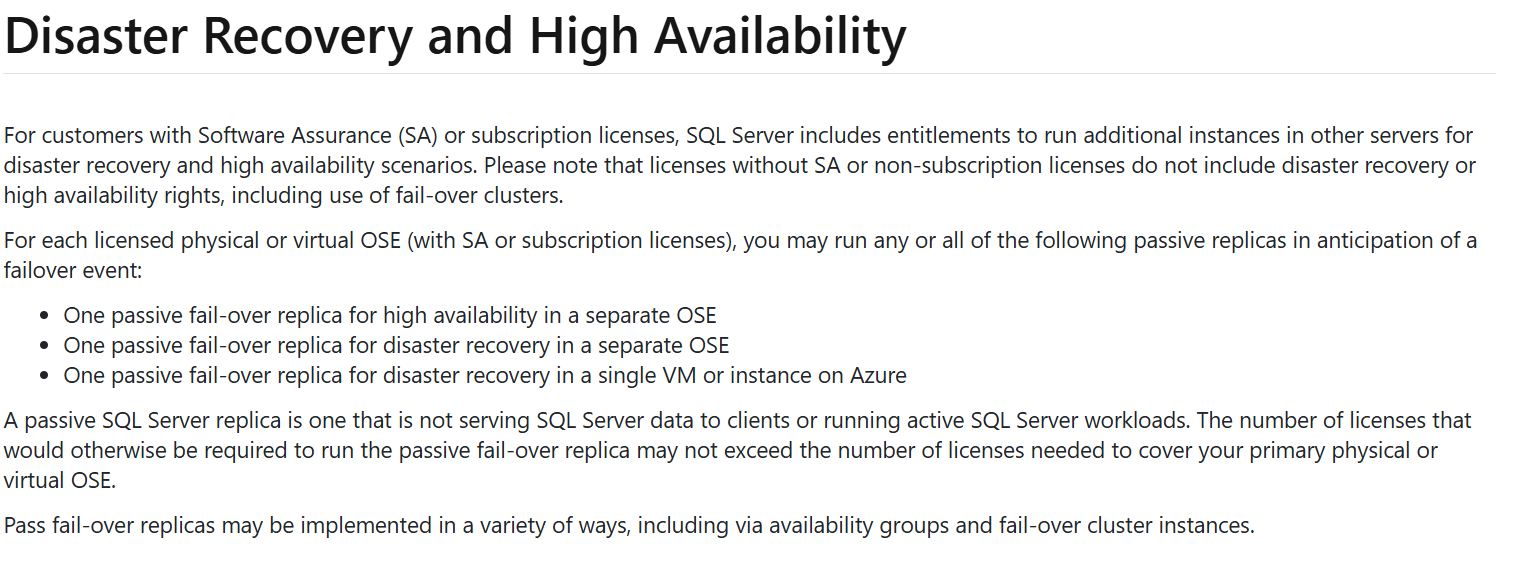
This Microsoft page – https://www.microsoft.com/licensing/guidance/SQL?msockid=144db73d53b469e721fda347528468b6 which is licensing guidance for SQL Server 2025 still contains the failover rights information:

I genuinely believe this is an error. It is a huge change that would have significant consequences for most Microsoft customers, including their largest and most significant customers. Making this change would be an enormous risk and to do so without any official announcement or warning is unbelievable. I’m sure we’ll see a reversal in the coming days and that’s why I haven’t posted about this already.

However, I feel it does highlight the increasingly slapdash approach that has been taken to the Microsoft Product Terms since it became an online site, rather than document downloads. It seems likely to me that updates are being made by people with little understanding of software licensing and so they don’t see the consequence of their actions.

The fact that it’s 4 days since this change was made and there has been no word from Microsoft is disappointing – but hopefully that correction will appear soon.

So, don’t panic but do remember that these things happen and that Microsoft experts like me, Alex, Peter and more can be very useful in these scenarios. 😁

Update: The missing text has been reinstated so the panic is over. It does highlight the need for us all to be vigilant in the future though.

Microsoft 365 Copilot Chat


Microsoft have launched a new addition to the Copilot family, confusingly called Microsoft 365 Copilot Chat.

Copilot Chat was already a thing (that is different to Copilot Biz Chat) and this seems to be a re-positioning as they add some new capabilities too. It is a basic, entry point tool that sits below Microsoft 365 Copilot.

Microsoft 365 Copilot Chat is free and has access to internet info to give “web-grounded” responses. Additionally it can interact with Agents (more on that later) and also has elements of the “Copilot Control System” to help with corporate data privacy.

The table below shows how it stacks up against the “full” Microsoft 365 Copilot product:

https://www.microsoft.com/en-us/microsoft-365/blog/2025/01/15/copilot-for-all-introducing-microsoft-365-copilot-chat/?msockid=1c5969e97aa36c313d327b0f7b586d33

One of the new additions is that users of this free product can use 2 types of agents on a Pay As You Go (PAYG) basis, they are:

  • “Tenant Graph” grounded agents
  • Autonomous action agents

“Tenant Graph” grounded means agents that can access internal company data as well as internet information, giving answers with additional, organisation specific info and context. This is an additional PAYG per-message cost for M365 Copilot Chat users but is included within the M365 Copilot license – adding a new variable to consider when pricing up licensing options.

Autonomous actions are where the agent uses “generatively orchestrated triggers, topics, data connectors, and workflows” to act on behalf of a user. This is an additional PAYG per-message cost for all users – it is an additional cost even for users licensed with M365 Copilot.

For more info and details on the PAYG per-message pricing model – see my post here.

You can see Microsoft’s announcement here.

Microsoft Copilot Dashboard


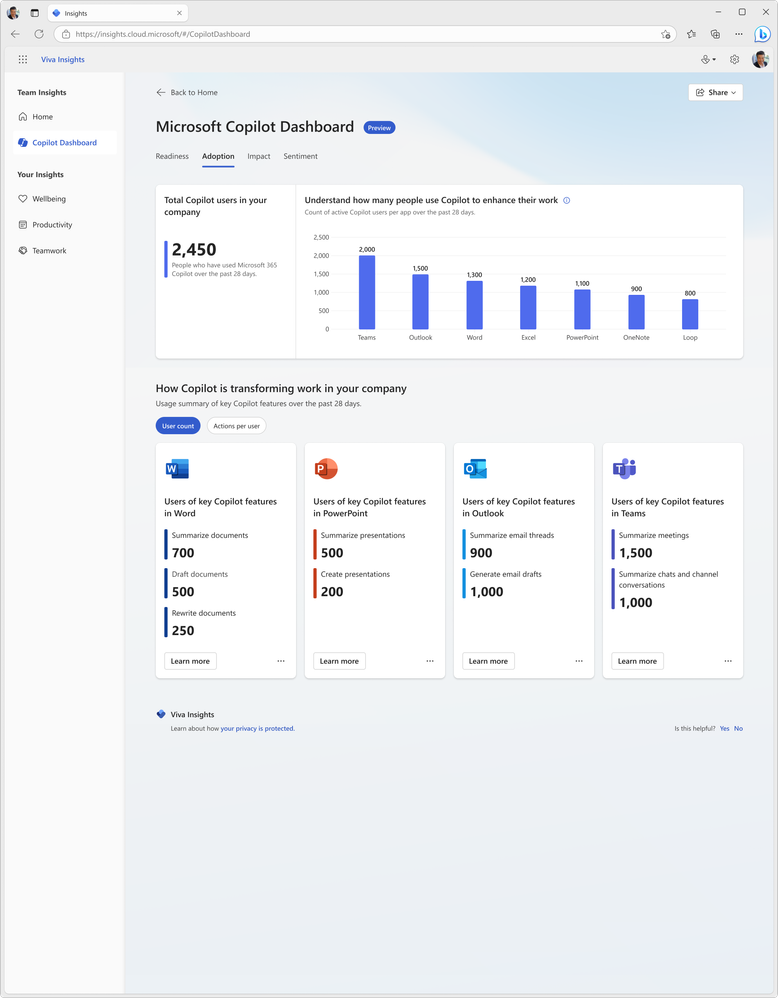
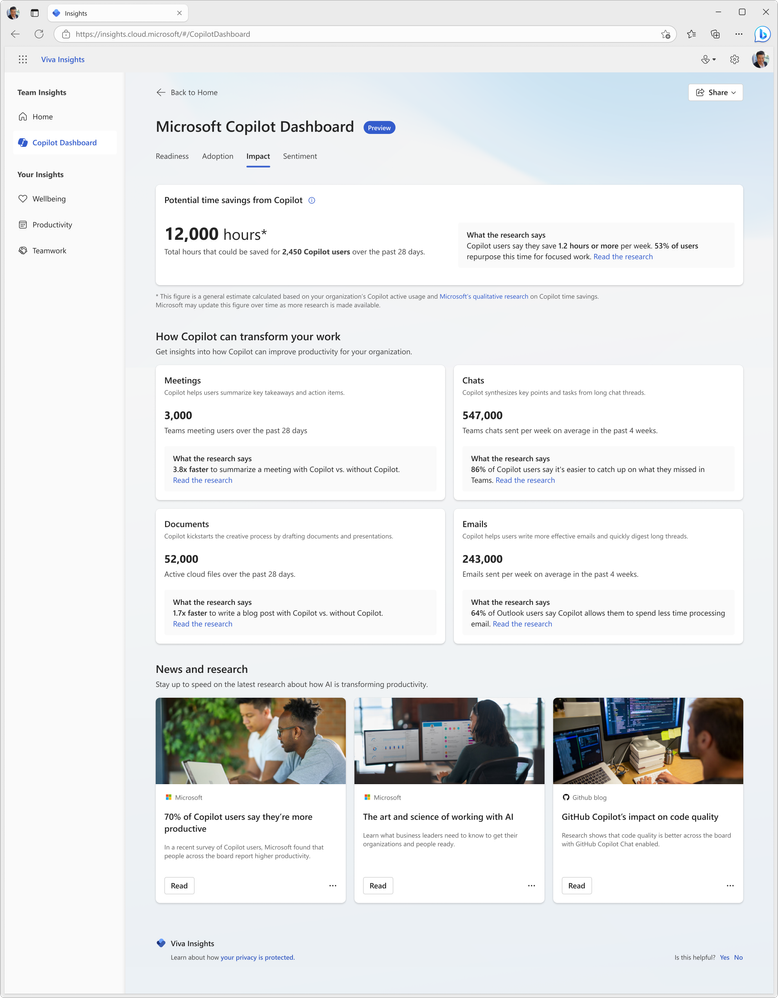
Since the introduction of Copilot for Microsoft 365, one of the big questions I, and others, have been asking is “how do you determine value?”. I laid out my initial concerns, questions, and actions here and now want to look at Microsoft’s offerings to enable this kind of insight. Currently available in preview (https://insights.cloud.microsoft/#/CopilotDashboard) – although I couldn’t get it to work – Microsoft’s Copilot Dashboard is their option to get the much needed insights.

Microsoft Copilot Dashboard

Microsoft aim for this to help customers across the 3 stages of the adoption journey:

It will show:

  • Who is eligible for Copilot for M365
  • How people are currently using M365 apps
  • How people are using Copilot and in which different apps
  • Information on how Copilot is impacting productivity
https://techcommunity.microsoft.com/t5/microsoft-viva-blog/new-ways-microsoft-copilot-and-viva-are-transforming-the/ba-p/3982293

Access to this information and data will be key for businesses looking to make informed decisions on where Copilot can offer real benefits and ROI.

https://techcommunity.microsoft.com/t5/microsoft-viva-blog/new-ways-microsoft-copilot-and-viva-are-transforming-the/ba-p/3982293

Being able to see where it can get involved to help users is helpful for getting started:

https://techcommunity.microsoft.com/t5/microsoft-viva-blog/new-ways-microsoft-copilot-and-viva-are-transforming-the/ba-p/3982293

Viva gives more features

Microsoft are referring to it as “Microsoft Copilot Dashboard, powered by Viva” and from “early 2024” there will be additional dashboard features available to users with Viva Insights licenses. According to Microsoft, these will include:

Copilot adoption and usage metrics combined with collaboration data, out-of-the box reports for organizational leaders, before and after behavioral data and even insights from employee surveys.”

and will also show time spent in meetings, processing emails, and creating content with before and after Copilot information.

All in all, the Copilot dashboard will be useful for organisations looking to understand more about their Copilot readiness and then their Copilot usage. However, some may have concerns about the reliability and objectivity of the data and reports generated by Microsoft on their own software. Ideally, Microsoft will be transparent and accountable in how they collect, process, and share the data from the Copilot dashboard. They should also provide ways for users to verify, challenge, or complement the data with their own sources and feedback.

Microsoft Copilot and Microsoft MACC


Photo by Donald Tong on Pexels.com

I’ve recently recorded a couple of videos with Nathan Miller, Microsoft Program Manager at Bytes.

In the first, we discuss Copilot for Microsoft 365 (we recorded this in October 2023 but it took me ages to edit it!):

We talk about the General Availability of Copilot for M365 as well as tips for preparing for deployment.

We then talk about the Microsoft Azure Consumption Commitment (MACC): agreement:

where we explain what the MACC agreement is, how it works, and the potential pros and cons for customer organisations. We also talk about the Azure cloud marketplace and the impact this will have on customer procurement processes and also the wider IT channel.

I hope you find the videos useful and informative – as there are more planned! Let me know if you have requests for topics and also if you’d like to jump on a video or podcast with me at some point. I usually focus on blog posts but am looking to get all multimedia on you in 2024 so this is just the start 😁

Microsoft Copilot for Service


Microsoft have announced a new Copilot – we now have Copilot for Service.

Copilot has been within Dynamics 365 for a few months already and now Microsoft bring the ability to “synthesize[s] vast amounts of data already available from an organization’s trusted knowledge sources to provide relevant, timely guidance to agents in their flow of work” to users of other CRM and Contact Centre solutions including Salesforce and ServiceNow, and Zendesk.

How does it work?

Microsoft say that it will very easy:

“Organizations can simply point to their data—such as public websites, SharePoint, knowledgebase articles, and offline files—and in a few minutes unlock generative AI-powered conversations across all of their data”

It will enable customer service agents to ask natural language questions of their data, whether in Teams or another client. Further down the line additional features will include email summaries, email drafts, and meeting recaps as well as automating common CRM tasks based on emails and context.

Interestingly, this product will include the much hyped Copilot for Microsoft 365 – meaning these users will also have access to Copilot across their Office suite.

Pricing and availability

Copilot for Service will be $50 per user per month (pupm). Remember that this includes Copilot for M365 which is priced at $30 pupm alone.

Copilot for Service is currently in public preview in US-based environments only, and the Copilot for M365 features may not be available during preview.

Announcement here and more info sign up form here.