Microsoft Product Terms: November 2023


Photo by Markus Winkler on Pexels.com

Microsoft 365 Copilot is added
It’s listed for Enterprise Agreements (as expected) but also the MCA (Microsoft Customer Agreement) and nowhere is there any mention of a 300 license minimum.

I assume it is listed under MCA as it’s available on the MCA for Enterprise Customers aka MCA-E – that is for Enterprise customers buying directly from Microsoft rather than those in the CSP channel. It’s rightly been noted that Copilot isn’t visible on the public pricelists so almost certainly isn’t magically available via CSP but without clarifying text in the Product Terms (or anywhere else), it’s not clear. Nothing like a bit of licensing confusion for one of the biggest product releases in ages!

System Center is added to CSP and the “16-cores” per customer requirement is removed when licensing by virtual OSE.

There’s a new AI related term too:
Excessive use of a Microsoft Generative AI Service may result in temporary throttling of Customer’s access to the Microsoft Generative AI Service

Microsoft Financial Results: Q1 FY24


Microsoft have announced their financial results for Q1 FY24 (July – Sept 2023) so let’s dive in and take a look.

Overall revenue was $56.5 billion, a 13% increase Year on Year (YoY), while net income was up 27% to $22.3 billion. The “Microsoft Cloud” revenue hit $31.8 billion which was a 24% increase.

Productivity & Business Processes

  • Revenue = $18.6 billion, up 13%
  • Office 365 Commercial = up 13%
  • Dynamics 365 = up 29%

Office 365 growth is primarily driven by SMB and Frontline SKUs.

Intelligent Cloud

Revenue = $24.3 billion, up 19%

Azure growth was 29% which is the first time for 2 year that the rate of growth has increased quarter on quarter. Q4 FY23 was 26% and now it’s at 29% which shows that spend in Azure is picking up at a newly increased speed.

Earnings call highlights

  • Azure Arc up to 21,000 customers – a 140% increase YoY. <– How much of this is driven by the new PAYG ESUs and Microsoft’s push?
  • 16,000+ customers using Microsoft Fabric.
  • 20 million Monthly Active Users (MAU) for Power Apps.
  • Total headcount is 7% lower than 1 year ago.
  • Satya Nadella gives a shoutout to the newly announced Oracle@Azure program as a driver of cloud growth:

“Once we announced that the Oracle databases are going to be available on Azure, we saw a bunch of unlock from new customers who have a significant Oracle estate that have not yet moved to the cloud, because they needed to rendezvous with the rest of the app estate in one single cloud”

Interesting to see Oracle contributing to Microsoft’s growth!

  • Lots of talk of AI throughout, looking ahead to the launch of M365 Copilot on November 1st.

It’s clear that Microsoft are in a strong position and it looks like growth will continue for the foreseeable. Yes there’s a lot of volatility in the world, both economically and politically, but Microsoft have first mover advantage on per-user generative AI for business users with Copilot as well as several other growing products.

See more info on the Microsoft site here.

Microsoft Azure Container Apps eligible for Savings Plans


Microsoft have announced that Azure Container Apps are now eligible for coverage with Azure compute savings plans, receiving discounts of 15% and 17% with the 1 year and 3 year plans respectively.

With savings plans, you commit to an hourly amount of Azure spend (say £5) and then any eligible services you use receive the discounted rate up to that amount. Anything over £5 will be charged at the regular PAYG rate:

https://azure.microsoft.com/en-gb/pricing/offers/savings-plan-compute/

Eligible services for Compute savings plans are currently:

  • Azure Virtual Machines
  • Azure App Service
  • Azure Functions Premium plan
  • Azure Container Instances
  • Azure Container Apps
  • Azure Dedicated Hosts

according to Microsoft here.

Windows Server Azure Arc ESU licensing


Microsoft recently announced the option to license Extended Security Updates (ESU) for Windows Server & SQL Server via Azure Arc, enabling a monthly Pay As You Go (PAYG) model.

The public pricing page here shows different pricing for Standard edition and Datacenter edition:

As you’d expect, ESUs for Standard edition are significantly cheaper than for Datacenter.

What you wouldn’t expect, or at least I didn’t (!), is this:

When you license ESU for Windows Server via Azure Arc and choose the “vCore licensing” option – which is based on the number of virtual cores being used – Microsoft allows you to pay the Standard edition rate “irrespective of how the underlying server or operating system is licensed”.

This information is found on this Microsoft Learn page.

If that’s correct, you can save $361 per 16 cores…that’s 83%! Truly a big push to get customers to activate Azure Arc connections.

Microsoft 365 E5 gets new IoT addition


The October Microsoft Product Terms introduced a new SKU “Microsoft Defender for IoT – EIoT Device License – add-on“.

This add-on license will enable “real-time device discovery, continuous monitoring, and vulnerability management capabilities for eIoT devices licensed per device“.

Although it appeared this month (October), Microsoft have now stated it won’t actually be available until November 1st due to “a slight delay”.

Availability

The Product Terms list the pre-requisite licenses as:

  • Microsoft 365 A5/E5
  • Microsoft 365 A5/E5/F5 Security
  • Microsoft 365 F5 Security and Compliance
  • Microsoft Defender for Endpoint P2
  • Windows 10/11 Enterprise A5/E5

This capability will also be included within Microsoft 365 E5 and E5 Security from November 1st.

Hang on…

If it’s included in M365 E5/Security, why would you purchase the add-on for those licenses? That’s a good question and there is an answer:

Each M365 E5/Security license allows you to cover up to 5 IoT devices so, if you have more IoT devices than M365/Security USLs x 5, you can buy add-on licenses to cover the rest.

Definitions

IoT = Internet of Things

EIoT = Enterprise Internet of Things <–This appears to mean, to Microsoft, devices being used “in the context of business operations

Microsoft Product Terms for October 2023


Photo by Markus Winkler on Pexels.com

The Office 365 “no Teams” EEA SKUs have been added

Azure AD rebranded to Microsoft Entra ID

Universal Print per user added

Microsoft Defender for IoT – EIoT Device License – add-on added

Bit of Viva name tweaking, we now have:
   Microsoft Viva Employee Communications and Communities
   Microsoft Viva Workplace Analytics and Employee Feedback

The Copilot Copyright Commitment is added

New Copilot/Generative AI relation terms including:

“Customer may not…try to gain unauthorized access to or disrupt any service, device, data, account or network, including by intentionally evading or disrupting restrictions in Metaprompts”

Microsoft Sentinel for Power Platform


Microsoft have released the preview of “Microsoft Sentinel for Power Platform” without much fanfare (overshadowed by Copilot really) but I think it could be a very interesting offering. Microsoft Sentinel is a SIEM (security information event and management) platform, aimed at enabling organisations to monitor, discover, remediate, and prevent security attacks across their organisation.

Low code risks

As more and more users develop low code applications within organisations, the risks to those businesses increase. The apps will connect to various internal and external systems, containing and moving data – some of which may be sensitive and/or covered by regulations such as the GDPR or HIPAA – and perhaps linking to web servers and SaaS applications too.

Applications created by highly trained developers with years of experience and huge budgets often suffer from security weaknesses; one can only imagine the potential problems with apps created by citizen developers!

Microsoft Sentinel for Power Platform

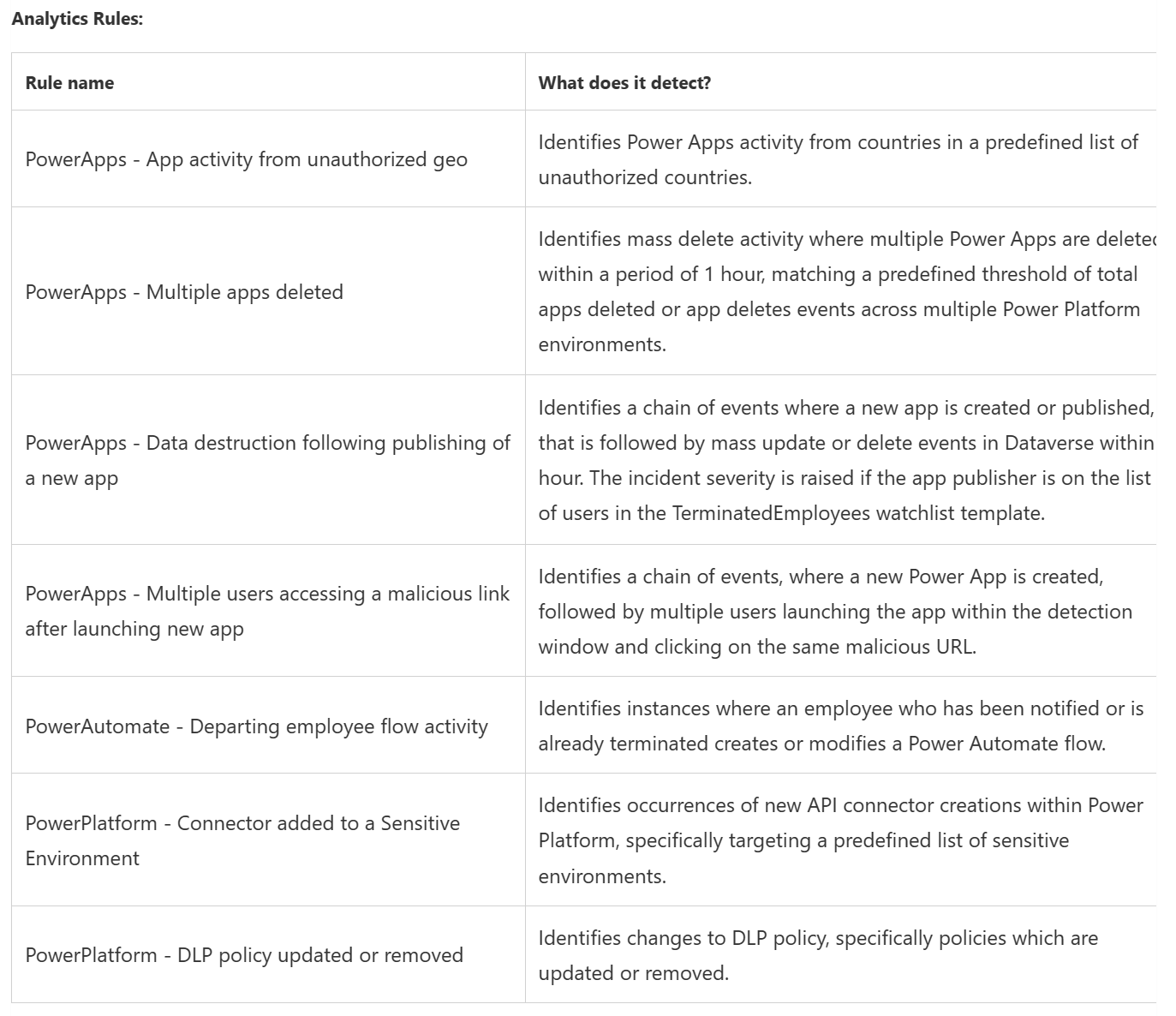
This will enable organisations to monitor Power Platform environments and detect any suspicious activity such as:

  • Power Apps execution from unauthorized geographies
  • Suspicious data destruction by Power Apps
  • Mass deletion of Power Apps
  • Phishing attacks made possible through Power Apps
  • Power Automate flows activity by departing employees
  • Microsoft Power Platform connectors added to the an environment
  • Update or removal of Microsoft Power Platform data loss prevention (DLP) policies

The initial rules included are:

but as we’ve seen with Microsoft Sentinel itself, these will be added to over time.

Almost every organisation will find itself with a large Power App and Power Automate user base so Sentinel for Power Platform could really be worthwhile.

See more info here and here.

Microsoft ESUs come to CSP


Photo by Pixabay on Pexels.com

Microsoft Extended Security Updates (ESUs) are a paid for subscription that provides 3 additional years of security updates for Windows Server and SQL Server versions that are no longer in support. First released for 2008/R2 (which are now so old even ESUs aren’t an option), they are now available for 2012/R2.

For the last few years, ESUs have been available to Enterprise customers only but now, as of October 1st 2023, Microsoft have announced their arrival on CSP:

CSP partners will be able to offer ESUs for end of support versions of Windows Server and SQL Server.

Customers will then have the right to use licenses covered by ESUs on deployments on-premises or within outsourced environments running on Authorized Outsourcers. Customers may also apply ESU licenses to “license-included” workloads acquired from Services Provider Licensing Agreement (SPLA) partners or CSP-Hosters.”

In terms of eligibility, Microsoft say:

Customers will require Software Assurance (SA) or an equivalent subscription to be eligible to buy the associated ESU. Perpetual licenses only don’t qualify.

However, a customer doesn’t require SA or subscription to utilize ESUs with license-included services purchased from SPLA providers.

Pricing

Microsoft Product Terms: September 2023


Photo by Markus Winkler on Pexels.com

Name changes were the name of the game this month:

Microsoft Viva Sales has its named changed to “Microsoft Sales Copilot”
Dynamics 365 Marketing = “Dynamics 365 Customer Insights – Journeys”
Dynamics 365 Customer Insights = “Dynamics 365 Customer Insights – Data”
Sold together as “Dynamics 365 Customer Insights” 🙄

More Microsoft Copilot news – September 2023


Photo by APEX.GRAPHICS on Pexels.com

Microsoft have announced a new offering, Microsoft Copilot.

No, I haven’t been under a rock for the last 12 months…I know there are already a bunch of Copilots but it looks like Microsoft have, in their infinite wisdom, decided to bundle some of the Copilots (but not all of them) together into 1 thing called Copilot 🙄

The entity known as “Microsoft Copilot” will include (if that is the right word?):

  • Windows 11
  • Microsoft 365
  • Edge
  • Bing

Microsoft say:

Copilot will begin to roll out in its early form as part of our free update to Windows 11, starting Sept. 26 — and across Bing, Edge, and Microsoft 365 Copilot this fall.”

With regards to the M365 piece, I think it means that “Copilot” will be able to interact with M365 Copilot – rather than include its capabilities…but it’s not really clear.

Microsoft 365 Copilot

Release date

Microsoft have announced that Microsoft 365 Copilot General Availability for Enterprise customers is November 1, 2023. There is a 300 user minimum purchase for Copilot too – meaning a $9,000 per month spend at least. While it’s a surprise to see this minimum, it’s not a huge outlay for most Enterprise Agreement customers really.

It’s been noted that 300 is the maximum for the Business plans so, despite announcing a Copilot add for Business SKUs, this effectively precludes the majority of SMBs. In my opinion, Microsoft will reduce/remove the minimum at the point they make Copilot available on other agreements.

Why is there a minimum? That’s a great question and one that we don’t have a definite answer for. It seems most likely that Copilot needs a certain amount of data (and perhaps connections )to really work its magic – although, saying that, all the Copilot examples I’ve seen wouldn’t seem to require that. They’ve all focused on individual areas – add a column to this table, calculate the average sales for next year, makes all slides the same font etc. and that wouldn’t need aggregated internal training data.

Some people suggest it’s to set a minimum revenue threshold but I’m not sure about that either tbh.

New feature

Microsoft 365 Copilot Chat works across all your data including, but not limited to:

  • Emails
  • Meetings
  • Chats
  • Documents
  • Web

and will work as an assistant that understands “you, your job, your priorities and your organization“.

Big thanks to Jack Rowbotham, Microsoft Product Marketing Manager, for sharing this info on LinkedIn 😊

See my other posts on Microsoft 365 CoPilot here:

Licensing details

Pricing

Adoption Guide