
This might be the most off topic thing I’ve posted on here so far but it’s awesome. This guy Isao Machii is a master of the sword-cutting string beans horizontally, slicing moving bullets in half and all sorts! Also, the “English Subtitles done by a Japanese speaker” are brilliant 🙂
Outlook Thread Compressor
Geek in Disguise Steve Clayton has posted about a great utility, Ewan Dalton’s Outlook Thread Compressor.
“it’s an add-in to Outlook which removes unnecessary emails, on the assumption that most people reply to mail and leave the original intact, so you could keep the last mail in each branch of a thread, and remove all the others.”
I’d just like to re-iterate Ewan’s disclaimer:
“Let me say that again: Thread Compressor, as it is configured by default, WILL DELETE DATA FROM YOUR INBOX.
If you choose to download it and use it from here, you do it with the author’s blessing, but it’s completely at your own risk and Microsoft cannot be held responsible for what it does.”

Head over to http://threadcompressor.co.uk/default.aspx for more info and to download this great tool.
I know every man and his dog has blogged about Twitter by now but I just want to do a quick post with my thoughts on the hottest Web 2.0 topic of the moment.
I took a while to get in to Twitter. I’d tried a few times but thought it was boring, pointless and vain and then around November 2008 I finally got it 🙂 I saw the potential within Twitter for increasing/creating business contacts as well as discovering and learning about new things-and that’s how I use it.
You may have seen my “Windows 7 Diary” on the MS Technet letter a few weeks back…I found out about that through Twitter. I’ve got the Royal Institute Xmas Lectures on DVD…got that through Twitter. Got an early invite to Spotify…through Twitter. There are plenty more. too. It’s also great for connecting with people for work (I follow, and am followed by, a number of MS people) and strengthening relationships etc. For things like this I think Twitter is great and invaluable but there are 2 things I don’t get at all:
1) Following “celebs” for the sake of it. These can be media celebs such as Stephen Fry, Wossy, Russell Brand, Lily Allen and the 100’s others and/or “web celebs” such as Scobelizer, Loic etc. I follow Mr Fry as his tweets are for the most part interesting and pertinent while most, if not all, other celebs are amazingly bland and boring; however they still have 1000’s/10,000’s of followers for no real reason. I found particularly “Wossy” was very boiring and irritating!
2) Tweeting about what you’re doing: doesn’t that mean you’re not doing it?! I often see tweets such as “Am having lovely meal with family-great night”…really? If it’s that good why have you got your phone out and started Tweeting? Surely if it was that good, you’d be too busy enjoying yourself?! Another one you see is “Am really enjoying being with the kids”…do the kids really enjoy watching you type?!
I don’t want to sound too militant about it but certainly number 2 really strikes me as being odd! That said it’s each to their own and Twitter is great 😉
Google Search Suggestions
As you’ve probably noticed, Google has recently started to suggest auto-completes for your searches…at first this annoyed me but now I quite like it. Not so much because it saves me an all important 0.75 seconds when searching but because it’s a great source of amusement; seeing what has been searched for, and how many people have used that search is brilliant! Here are some examples:


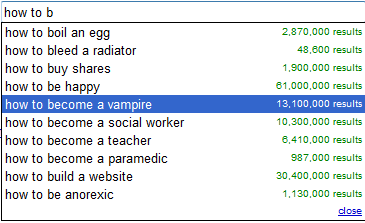
There are quite a few more just using “how to”…some surprisingly rude, (although with it being the internet perhaps not that surprising!) which I decided not to put up here.
This is another favourite of mine:

Is this the same “Matt” who keeps getting lost or does this show that all people called Matt are no good at being on time?!
One thing I find a little odd (what with it being the internet) is that “porn” doesn’t come up with any suggestions…I was at least expecting to see “How to become a porn star” but no! However, there are 54,000 searches for:

I’d love to see what great examples you can find 🙂
Microsoft Online/BPOS Guide
I’ve been working with Microsoft for months on BPOS, their Software Plus Services offering and getting the word out to customers etc…helping them align their business decisions with MS Online and more. I think that MS Online Services are excellent and will be a real game changer-allowing end users to increase profitability while simultaneously reducing costs and streamlining processes…what more could you want?! 🙂
I’ve put together a guide to MS Online Services (collectively called BPOS) over at:
https://richardgibbonsuk.wordpress.com/ms-onlinebpos/
which should answer most questions you might have. I’m constantly updating it as I discover/remember more info but please feel free to leave a comment if you’re question hasn’t been answered.
Azurelight
Microsoft Architect Aleksey Savateyev is building a basic product support app…that is based in the cloud and is to be called “Azurelight”. It will collect feedback about products and allow users to exchange opinions on the products too. “It’s also intended to be used by developers as a reference application utilizing both Windows Azure and Silverlight for rich yet scalable and highly available business solutions…” as described by Savateyev himself.
Mary Jo Foleyreports that as well as utilizing Azure & Silverlight (as it’s name suggests) Azurelight will also use Microsoft’s ADO.NET Entity Framework, ADO.NET Data Services (aka Astoria) and SQL Data Services.

Once it’s all up and running “sometime in the summer” of 2009 (via MSDN it seems) this should be a great example of what Microsoft’s technologies, both cloud and programming, can do 🙂
I’m excited about this program and as the source code will be released Free of Charge, I hope I’ll be able to make full use of Azurelight!
Flutter-The New Twitter?
Are Tweets too long for you? Do Twitters 140 characters weigh you down? Would you rather Flap than Tweet?
If so-Flutter could be the hot new thing for you:
Although just a joke, this does say something about the way things are going…and certainly how people not “with it” perceive sites like Twitter.
The big question is-how long until this becomes real?!
Sharepoint Online & Groove
This week I ‘ave been mostly…using Groove.
Groove has been the one bit of MS technology that I’ve never taken a look at before and I’ve always thought it was a bit pointless…but not anymore! Now I think it’s awesome and perhaps the best product they’ve got, alongside Sharepoint. I’ve had it installed for years as part of Office ’07 but I have literally never opened it up until this week. The thing that prompted me was this post here over on Dutch Technet about using it with Sharepoint Online and as MS Online is my big thing-I figured it was worth investigating.
Groove is essentially a collaboration tool that let’s you create “workspaces” and then invite co-workers and/or external people to join; you can then share and edit files, chat via IM, track issues, play chess (!) and more-all with a minimum amount of effort. As an example, I’ve created a MS Online/BPOS workspace and have invited the various people involved @ MS-this way we can share info, ask questions and keep updated much easier than simply via email.
The Technet post revealed to me that you can link Groove to Sharepoint and thus share files from your site collections without the hassle/cost of giving users direct access to Sharepoint…even better, you can do this with Sharepoint Online too!
Internet Explorer 8.1 is an April Fool
Internet Explorer 8.1 AKA “Eagle Eyes” has been all over the net this afternoon, sitting on the Front Page of Digg and Techmeme…but it’s an April Fool’s joke-at least according to Mary Jo.
It did perhaps sound too good…faster Javascript and better Acid 3 testing and, best of all, support for Firefox extensions. Would MS really have released IE8 without these features if they were so close at hand? Apparently not…
I thought it was against the rules to do the pranks early so I think that means the joke is on you Jacob Gube (technically) Good skills though 🙂
Windows 7 Release Candidate
Thanks to some eagle eyed spotting by Ars Technica, we now know that the Windows 7 Release Candidate (RC) is slated for a May 2009 release-(that’s only 5 weeks away!) and will run through until June 2010.
Both 32-bit and 64-bit versions will be available in English, French, German, Japanese, and Spanish. The hardware requirements remain unchanged:
- 1 GHz 32-bit or 64-bit processor or higher
- 1 GB of system memory or more
- 16 GB of available disk space
- Support for DirectX 9 graphics with 128 MB memory (to enable the Aero theme)
- DVD-R/W Drive
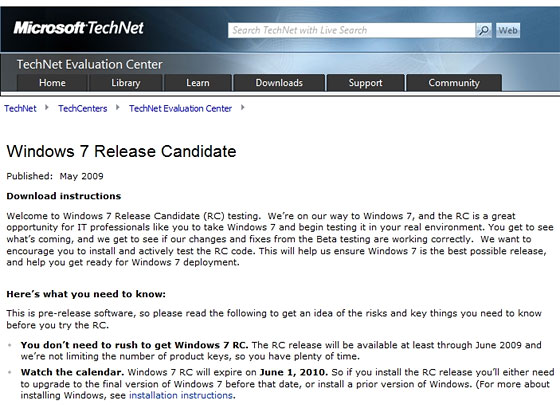
I think this will see another wave of people moving into the world of Windows 7, there are a few people at work who’ve been too scared/cautious to install the beta but can’t wait to get hold of the RC 🙂
 Cloudy with a chance of Licensing