Microsoft Data Protection Manager 2010 & Seagate


Microsoft’s Data Protection Manager (DPM) is soon to arrive in it’s 2010 incarnation (first half 2010) so this week’s TechEd Conference is revealing a host of new features.

DPM is currently a Windows focused product which, while not surprising, is quite limiting in many corporate IT environments these days. So with 2010, Microsoft have joined together with Seagate and OEM’d their i365 software to extend protection to heterogeneous environments including:

  • Linux
  • Unix
  • Netware
  • IBM iSeries
  • Oracle
  • VMWare

A great list…but you’ll notice no Mac support 🙂

This will instantly remove one of the main barriers to DPM adoption in enterprises,as many places have at least a few Linux/Unix servers running in their datacenters.

Microsoft will also be offering online backups via Seagate’s EVault service and datacenters. It includes data compression and data de-duplication to reduce bandwidth hit and has:

“a network of SAS 70 Type II certified, Tier 3 and 4 hosting facilities, WAN optimised backup and recovery, disaster recovery experts and processes, and a 12-year track record protecting data for over 22,000 customers across the globe”

according to Seagate.

What I find strange is that this doesn’t utilise any of Microsoft’s online services…in particular Microsoft Azure. With BPOS offering an online hosted archive, it seems strange that this technology can’t be extended to store other, non email, data too.

Is using eVault just a temporary measure until Azure is fully up and running? I don’t know but I would expect that it’s in the long term plan to fold all this inside Azure…maybe some kind of Seagate purchase will happen?!

I’m also keen to find out if the data compression and de-duplication are offered to customers who choose to back up on-site to local tape, NAS, SAN etc. De-Dupe is one of the big features Symantec are touting for the next release of Backup Exec (14 I guess to keep with superstition); if MS are including that too then it will really steal some thunder!

Thanks to The Register for this…

Microsoft “Geneva”: Single Sign On & Online Services


Microsoft Geneva:

“provides companies with simplified user access and single sign-on, for on-premises and cloud-based applications in the enterprise, across organizations, and on the Web to facilitate collaboration, increase security and reduce cost.”


There are 3 components to Geneva which now have more official names:

Geneva Framework = Windows Identity Foundation: provides developers pre-built .NET security logic for building claims-aware applications

Geneva Server = Active Directory Federation Services (ADFS) 2.0: a security token service (STS) for issuing and transforming claims, enabling federations, and managing user access

Geneva Cardspace = Windows Cardspace: helps users navigate access decisions

The aim of Geneva is to provide a true “Single Sign On” (SSO) experience to users across the various platforms that they come across, be they corporate and/or personal.

For example, once a user is logged in with their corporate domain credentials they could then access Microsoft Online Services such as Hotmail, MSDN, LiveSpaces etc; without being prompted to enter their @hotmail/@live credentials. All this requires is 1 Geneva Server and a Windows Live Tool currently called “Microsoft Online Services Federation Utility”.

Federation Gateway

The Microsoft Federation Gateway is a cloud based identity service, that extends beyond your corporate domain out into the internet. This is the hub for all the connections users want to make to external MS technologies, be it Azure, Live or BPOS (MS use CRM Online as an example on the MSDN site).

Cc287610.405c867e-b9fe-4933-8ca1-7387ae678041(en-us,MSDN.10).gif

The above shows the federation of identities between partners. An example of how the data flows between the different points of the SSO setup can be seen below:

Cc287610.83e88583-1e36-4e3c-8cfd-51a1a312b9a0(en-us,MSDN.10).gif

You can find more information about the Microsoft Federation Gateway on MSDN here.

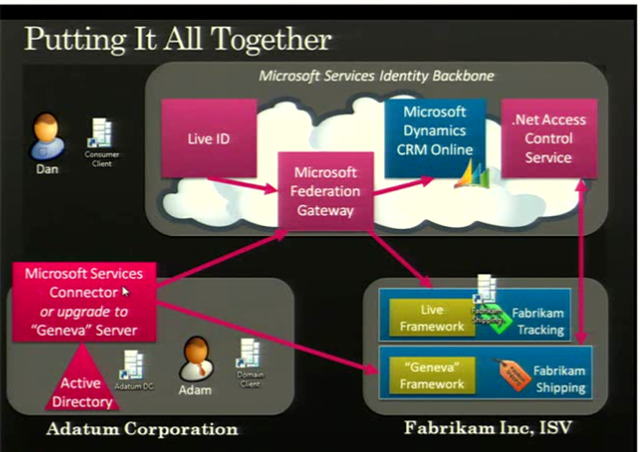
A slide from PDC 2008 showed an example of Geneva working with a BPOS component for the US:

image

The full 1hour+ video of the “Identity Roadmap for Software + Services” presentation video from PDC 2008 can be viewed here on Channel 9.

I know that BPOS, Microsoft’s hosted offerings of Exchange & Sharepoint (among others) will start using ADFS 2.0 at some stage next year. Most likely when the 2010 versions are deployed to the cloud, which I expect to be around late calendar Q3 so August/September. This is where I’m particularly keen to see what Geneva can do for SSO…it should make it pretty much seamless for corporate users whether they’re accessing on-site applications such as Exchange, their Online brethren, custom developed applications, hotmail, MSDN and more…and that will be excellent!

I use a variety of different MS Online Services and have at least 3 different logins for them…I’ll be interested to see if Geneva can look after that for me 🙂 BPOS currently comes with a separate SSO client which needs to be installed for each user and comes with it’s own unique set of issues, so having a corporate wide SSO would definitely be better. Also, you currently need to re-enter your details for OWA with BPOS as it’s on an HTTPS connection…I assume Geneva would remove that need?

Some great technical documents, step-by-step guides and Virtual Machine demos of Geneva can be found on the Technet site here.

Microsoft BPOS Updates for November


Microsoft are constantly improving BPOS and adding new features each month, and November is no different.

Mailbox Access Permissions

Powershell commandlets are being added to increase the range of mailbox permission settings that can be done by BPOS administrators including:

  • Full Mailbox Access
  • Delegate Send As
  • Send On Behalf

These provide capabilities including:

“up shared mailboxes, granting “send as” permissions for administrative assistants, and enabling full mailbox access for third party applications, such as archiving applications and fax servers”

No more opening a ticket with support!

The CMDlets are:

Add Mail Permission

Remove Mail Permission

These will require an update to the Transporter/Migration tools which will be downloadable from MS Download Centre once the update is deployed across all datacenters; this should be completed by early December.

Bulk User Management

A new set of CMDlets for bulk adding and removing users have been added too. These will also rely on the updated Transporter tool being made available. The CMDlets are:

Sharepoint Auditing

Admins will soon be able to view data and reports on site collection activities including:

  • items added
  • changes to permissions
  • documents viewed

Having access to this information can help track the utilisation of the Sharepoint investment within the company and so will be very useful. Companies will be able to see how users are interacting with the system and identify any areas that need improving or conversely, which areas are a roaring success 🙂

Partners on Invoices

Customers who use a Partner of Record will soon see that partner named on their invoices. From a Partner’s point of view, this is a great addition as it helps solidify the relationship between the Partner and the customer and reduces any confusion as to points of contact for support etc.

Once again, the updates have given BPOS an even stronger message and this, coupled with this week’s price cuts, should definitely see an increase in BPOS takeup.

The full MS Online blog post is here.

Computer Weekly Blog Awards


I’ve just discovered that I’m in the running for Best Blog in the “Company / Corporate – Large Enterprise” category at the Computer Weekly Blog Awards 2009 🙂

I’m very happy just to be on the list but it’s be even better to win it…especially as I’m up against people such as Tech Crunch, Twitter, Google, the BBC and the Guardian! To that end, you can vote for me here:

http://www.computerweekly.com/Articles/2009/09/20/237826/it-blog-awards-2009-company-corporate-large-enterprise.htm

blogawards

Any and all votes are greatly appreciated…thank you!

Cheers

Rich


Exchange 2007 & Server 2008 R2


Windows Server 2008 R2 doesn’t support Exchange 2007. That is a fact and it has caused confusion, consternation & anger among many of Microsoft’s customers and indeed partners (I can confirm that!).

The big question was “Why"?”…as when Server 2008 R2 was released in September, Exchange 2007 was the current version. While Exchange 2010 is almost upon us it is still unlikely that companies will instantly move to the new version…particularly on something as important as their email infrastructure. So that meant either:

a) Customers stayed on Exchange 2007 and Server 2008

b) Customers had a mixed Server 2008/2008 R2 environment

and, aside from the technical aspect, many people viewed it as a cynical ploy by Redmond to force them to upgrade. The message alongside Windows 7 is “Deploy with Server 2008 R2, they’re better together” (which is true!) but then it seemed a little like “Gotcha! Now you’re got R2…you’ve got to buy Exchange 2010”. While that wasn’t the case, that’s how it seemed to customers and really-that’s what matters. Vista wasn’t anywhere near a terrible as a lot of people say it is…but it didn’t do very well did it…and that was because of user perception.

Now however, that’s all changed! This post on the Exchange Team Blog (You had me at EHLO) reveals that:

“In the coming calendar year we will issue an update for Exchange 2007 enabling full support of Windows Server 2008 R2”

They say that customers spoke, Microsoft listened and the change is happening…brilliant 🙂

Good work Microsoft!

Thanks to @JohnFontana for the tweet that flagged this up…

Exchange 2010 Licensing Considerations


Exchange 2010 is now in the price files so you can all go out and buy it 🙂 There is a lot of information about the technical differences, but not so much about the licensing changes…so let me change that 😉

Replication Licensing

The current “Local Continuous Replication” is being replaced by “Mailbox Resiliency” in 2010; Mailbox resiliency requires 2 active instances of Exchange 2010…and thus 2 licences.

As a one-time exception, customers with Exchange 2007 and Software Assurance (SA) on Select, Enterprise Agreement, Open, Open Value, Campus & School get:

“One complimentary Exchange Server 2010 Standard license for each datacenter where the customer has at least one server licensed for Exchange Server 2007 Standard with active Software Assurance as of November 1, 2009.”

The additional licences that you receive under this offer all included SA that expires at the same time as your originally purchased licence.

As an additional offer, if your Exchange SA expires between November 1st 2009 – November 1st 2010 you can renew just the SA for the original licence, and that will also renew the SA for the 2nd additional licence 🙂 However, after that the licences will need to be renewed separately.

The original MS post is here.

Microsoft BPOS Price drop


Microsoft BPOS (Business Productivity Online Suite) has been available in the US for over a year, the UK for 6-7 months and is appearing in more and more countries all the time.

It offers online versions of:

  • Exchange
  • Sharepoint
  • Live Meeting
  • Office Communications

and has been seeing great success in all areas. Today Microsoft have announced something that will surely lead to even greater adoption…a price cut 🙂

Pricing was previously:

  • Exchange = £6.69
  • Sharepoint = £4.85
  • Live Meeting = £3.01
  • Office Communications = £1.67
  • BPOS Suite = £10.04
  • it is now:

  • Exchange = £3.35
  • Sharepoint = £3.51
  • Live Meeting = £3.01
  • Office Communications = £1.34
  • BPOS Suite = £6.69
  • All pricing is per user per month.

    The suite which includes all the online products above is now the same price as Exchange on it’s own!

    While BPOS has always represented great value for money, price is often a big consideration for customers…especially in these times of economic recalibration. I believe that these price cuts will really drive an upsurge in BPOS adoption…which is good for everyone!

    You can download the announcement document here.

    Microsoft Semblio


    Microsoft Semblio is a new iteration of their development platform which utilises .NET and WPF (Windows Presentation Foundation) and is specifically targeted towards the educational market.

    Semblio can be used to create information rich, graphically engaging, immersive learning materials using a wide range of multimedia, all aimed at enhancing the learning experience for students (and indeed, the teaching experience for teachers!). As it is based on the .NET Framework:

    “it works across software, services, and learning management systems.”

    However, it isn’t just for developers. The Semblio assembly tool, which will ship with Office 2010, will:

    “allow multiple content types to be combined into a single, rich, multimedia presentation, all in a single, familiar, and easy-to-use Microsoft Office-like application”

    image

    This has got something of a Web 2.0 “mashup” stle about it and will certainly be familiar and more engaging for students than more traditional methods. This next screenshot shows the kind of interactivity that can be expected:

    Semblio screenshot1

    Using the slider to increase/decrease the temperature and seeing the effects on the water…

    Benefits:

    This can either mean that schools will have the ability to create exciting learning materials in-house as well as making it easier for partners to create such materials too. You can:

    • Increase the value of your content by enabling educators to customize materials to their specific requirements.
    • Engage today’s students and foster exploratory learning with packaging and arrangement of dynamic, interactive, and rich instructional material.
    • Improve efficiency during content creation by enabling nontechnical subject matter experts to participate in the content creation process
    • Reduce the cost of going digital by creating your content once, then delivering it to all customers regardless of platform.

    To me this looks like a great new addition to the Office suite of products and also a great addition to schools, for students and teachers alike. Having been on visits to various schools this year, it’s clear that they’re much more advanced that back in my day (!) and can sometimes rival corporations when it comes to technology adoption.

    VLE’s (Virtual Learning Environments) such as Moodle, and products such as Sharepoint have made big changes to learning over the past few years; and I can see Semblio really making a mark. These interactive lesson modules delivered in Moodle accessed via Sharepoint would give a great experience for students at home/learning remotely.

    I’d be interested to hear what people involved with Education think about this…be it students, teachers, IT managers, suppliers, coders etc 🙂

    Get Started:

    Download the Semblio SDK.

    Download Visual Studio 2008

    Get familiar Service pack 1 of .NET 3.5 platform

    Get familiar with WPF

    If you want to get more in-depth, grab the programmer’s guide here.

    Other Links:

    Semblio: How it works

    Semblio Blog

    MS BPOS Connectivity Test


    The Microsoft Online (BPOS) team have released an excellent tool, which measures the upload/download speeds of your connection to show how it would fare with using BPOS services.

    This tests the speed of your connection:

    image

    This looks at the routes:

    image

    This analyses the capacity:

    image

    Details:

    This tool helps you understand the quality of the Internet connection between your environment and Microsoft Online Services. It does not measure your environment compatibility with Microsoft Online Services. The tool performs three tests:

    • Speed: This test measures your actual download and upload speeds, quality of data, and TCP efficiency. It uses TCP/20000 for download testing and TCP/20001 for upload testing.
    • Route: This test validates your connection quality, including packet loss, latency, round trip, and ISP peering points. It uses Internet Control Message Protocol (ICMP).
    • Capacity: This test measures your potential maximum download and upload speeds. It uses UDP/8090.


    Thoughts:

    Potentially this is going to be very useful when speaking to customers about BPOS, as one of the big worries that many people have is there connection not being good enough. They worry that suddenly throwing all their internal email, as well as Sharepoint uploads/downloads could be too much for their existing networks; this could be an easy way of showing exactly what it can and can’t handle. The reason I say “potentially” and “could” is this:

    image

    The results seem to be aimed solely at VOIP traffic for using Office Communications Online (OCO). However, it still shows them that their bandwidth etc is, so it’s definitely useful but it would be nice if it had a separate answer for each of the products.

    That said, the above does point towards something else…currently OCO only contains the Presence and Instant Message (IM) features. I’ve heard on the grapevine that VOIP calls will be coming to OCO but this is the first definite sign that this is underway 🙂

    Being able to use Office Comms Online for Voice calls will be a huge selling point for customers as the on-site version (Office Communications Server (OCS)) can be quite tricky to install and get running correctly. Normally I’d guess we’ll see this in the US first and not here for a while but the URL for this tool is:

    http://speedtest.emea.microsoftonline.com/

    Note the EMEA (Europe, Middle East & Africa) part…looks like we’ll be getting it pretty soon too…I’ll see what further info I can find out from MS 😉

    As Paul from Worktivity points out in the comments, if you’re outside of EMEA the links you need are:

    For the APAC region: http://speedtest.apac.microsoftonline.com/
    For America’s region: http://speedtest.microsoftonline.com/

    Thanks to @worktivity who’s tweet alerted me to this…

    Accessing Zune Marketplace in UK


    As you can see from my previous post (here) I am now a huge fan of Microsoft’s Zune 4.0 desktop software. However being in the UK means that a lot of the features are unavailable to us…mainly the Zune marketplace.

    Zune Marketplace:

    The Marketplace is where you can preview and purchase songs, videos, apps, podcasts, games and more.

    Zune marketplace

    As you can see in the screenshot above, it’s got pretty much everything you could want:

    • New releases
    • Top Songs
    • Top Videos
    • Topical/focus sections

    and you can split it down into genre, which then gives you all the above but specific to that kind of music.

    Zune marketplace video

    The video section is similar and also lets you purchase movies.

    Zune marketplace apps

    Above is the Zune App section of the marketplace, which looks pretty great. If I actually had a Zune HD, I’d definitely be loving this!

    Anyway I digress slightly. You’re quite probably wondering how this is possible-what with me residing in England and Zune Marketplace being US only…well let me tell you.

    UK Access

    I was having a look around the internet to see what I could find on accessing the Zune Marketplace from outside the US and I came across this blog. Here the author, Ian Blackburn, details how to get initial access to the Marketplace; and it’s much simpler than I would have thought.

    You simply change your PC location to “United States” via “Region & Language” in Control Panel.

    The next step is being allowed to download things. To do this, you simply need to log into Zune Marketplace with a Live ID that is set to US location.

    I changed my Live ID location and it worked. I was in Marketplace and downloading a free track from “People Under the Stairs”…brilliant 🙂 However, when I tried to download something a few minutes later, it said that “marketplace wasn’t available in my location” and blocked me from downloading anything 😦

    The way I found around this was to download HotSpot Shield (available here) which masks your IP address. This gave me proper, full access to the Marketplace as well as Zune Social; plus little things such as syncing my proper play count…and the big one – enabling me to download things once again! The only downside I’ve found to Hot Spot Shield is that it places banner ads at the top of web pages which is a bit annoying; however I can put up with that…

    Over at Bbits, Ian ponders how one would purchase things from Zune…and I agree with his theory. As the Zune marketplace users Xbox points as currency, one should be able to redeem a code against the LIve ID used for Zune and be able to download freely, without worrying about a US address/credit card etc. I haven’t tried it but if I do, I’ll let you know 😉 Another thing I’m going to investigate is getting a Zune Pass…but that’s for another day.

    So there you have it, a relatively easy way to access the Zune marketplace from the UK, or indeed anywhere else…have fun!