Microsoft Announce Windows Phone 8


Just days after the Microsoft Surface tablet event, MS held another – this time to officially announce Windows Phone 8.

There were a lot of announcements, a lot of news – some good, some bad, a lot of innovations and a lot of reasons to get a Windows Phone 8 device. I’ll try and cover them off as best I can here:

New Start Screen

The Start Screen with it’s Metro interface and Live Tiles is one of the key eye grabbers of Windows Phone and it’s being improved in Windows Phone 8 (and 7.8 but we’ll come to that later).

First up is a new, third size for tiles giving us “small, medium & large” with the new “small” size enabling users to fit more on their home screen.

Secondly, Microsoft are removing the blank strip down the right hand side of the screen (you know, with the side arrow at the top), giving users a fair bit more screen real estate to play with.

image

They’re also going to be expanding the number of colours available.

NFC

Near Field Communication (NFC) is going to be integrated right into WP8, enabling payments by waving your phone at things, the ability to store card details, store cards etc and more…essentially a combination of Google Wallet & Apple Passbook with extras on top. It will also enable each pairing with a range of accessories such as, and I only discovered these today, Nokia’s NFC enabled speakers…you just touch your phone to them and BOOM – connected. These are available for Nokia’s current range of NFC enabled Symbian devices so I can only assume WP8 will be invited to the party. Another feature will be the ability to “bump” phones and transfer contact details etc…cool and useful for trade shows, impromptu meetings etc…I’m sure I’d end up using it all the time.

SD Support

Proper SD support is coming to Windows Phone 8 devices. SD cards that can be used as true removable storage…transfer music, pictures, documents and also install apps!

Windows 8 Core

This is a huge one – MS are moving away from the former Windows CE core and instead implementing the same NT Kernel as the new Windows 8 desktop OS! This means that file system, media, drivers and a lot of the security will be the same across desktop & mobile; allowing many of the features mentioned above as well as games/apps that can move between the two. That last point will make for a great user experience as well as making things much easier and more attractive for developers – which is always a good thing!

Another thing enabled by the move to the NT Kernel is multi-core processor support which will drive the next generation of WP mobile apps and games.

Internet Explorer 10

IE 10 will be on Windows Phone 8 bring the SmartScreen URL screening & phishing protection. That’s about all the news on that for now though…

VOIP Integration

VOIP is going to be “industry leading” when it comes to integration on WP8, with not just Skype but also Tango et al becoming “first class” app; giving them deep integration into things such as the People Hub and the dialler. The next crop of WP8 devices will surely (nearly) all come with front facing cameras – those 2 things combined could help to make video calling as ubiquitous as people have been predicting for years.

Enterprise Features

One of the (quite) valid criticisms levelled at WP 7/7.5 is its lack of Enterprise features; in some areas it was actually less feature rich than Windows Mobile 6.5. New business centric features WP8 will bring include:

  • On-Device Encryption
  • Device Management
  • Line Of Business (LOB) app support
  • Private market places for internal business app distribution
  • Side-Loading

Now for the bad news…

This ISN’T coming to existing Windows Phone devices. None of them. Not the Lumia 800. Not the Lumia 900. None of them.

Yes, if you’ve just upgraded to a shiny new Lumia (or other WP device) that is a bit of a rage-inducing moment but hey, there’s always Mazuma and Envirofone Open-mouthed smile

Microsoft have taken quite a brave step of angering some people to make wholesale changes that straight away move Windows Phone to the front of the mobile pack. Yes those recent adopters will be a bit annoyed but when their contracts come up for renewal again it seems likely that WP devices will be the best on market so they’ll be able to stick with it going forwards.

One thing that IS coming to current handsets is the new, improved Start Screen under the Windows Phone 7.8 update. Although it doesn’t bring the new features it does make an already great mobile OS even more aesthetically pleasing.

Microsoft Surface Tablet


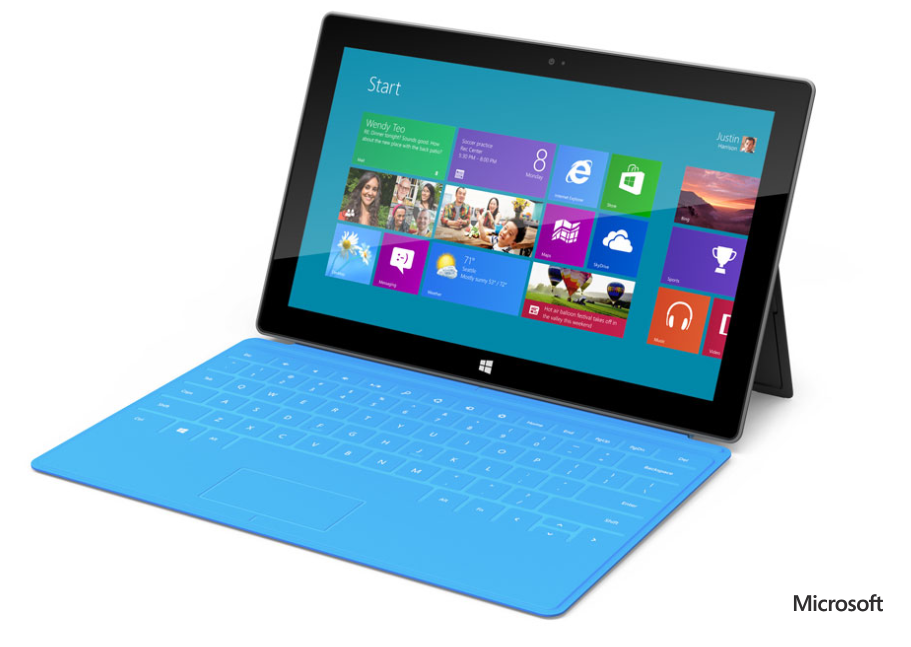
Well, Monday’s hyped up yet super secret announcement has been made…and it’s brilliant! Microsoft are introducing their own Microsoft branded tablets – “The Surface”, and they look stunning:

image

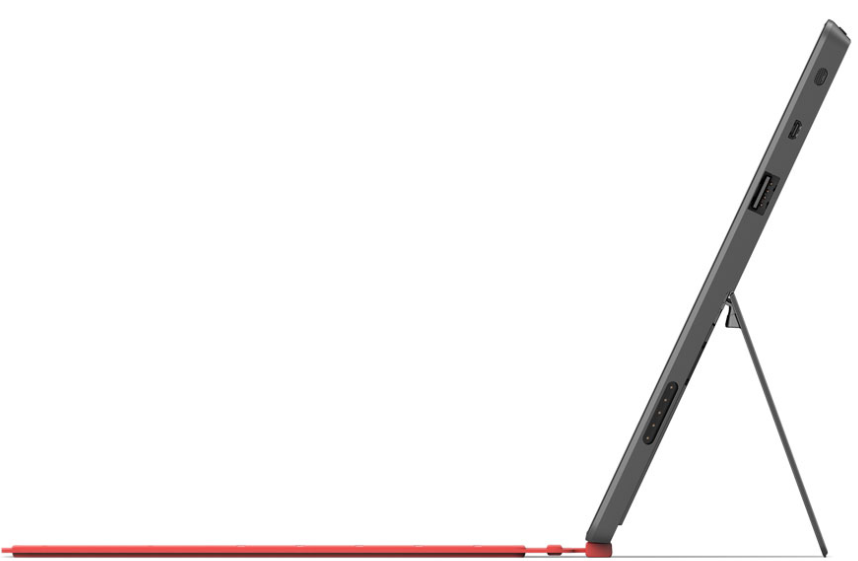
Just look at it. Glossy bezel, rounded corners, integrated kickstand AND A COVER THAT IS A KEYBOARD! I really can’t get over that, it’s such an ingenious innovation and a great unique selling point…not only that but it’s just 3mm thick.

image

Down to details – there are 2 versions of the Surface tablets:

OS Windows RT Windows 8 Pro
Weight 676g 903g
Thickness 9.3mm 13.5mm
Screen 1.06” Cleartype HD 10.6” Cleartype Full HD
Battery 31.5 W-h 42 W-h
Connections microSD, USB 2.0, Micro HD Video, 2xMIMO Antennae microSDXC, USB 3.0, Mini DisplayPort Video, 2xMIMO Antennae
Productivity Office 15, Touch Cover, Type Cover Touch Cover, Type Cover, Pen w/ Palm Block
Practical VaporMg Case & Stand VaporMg Case & Stand
Hard Drive 32GB, 64GB 64GB, 128GB

For now that’s all we’ve got in the way of confirmed features – but it’s a good start in my opinion…definitely enough to let me know that I want one. The 2 missing features that I’m most interested in are CPU & RAM – the latter especially as the iPad’s 768MB lets it down quite a lot.

I’m taking it that the keyboard cover comes with the tablet as standard rather than being an optional accessory – I hope that’s right!

Nothing too much has been said about the pricing other than the Pro version will be “priced similarly to a comparable ultrabook” which I’d say puts it between £700 & £1000…and also suggests it will be rolling with Core i5 processors and 4GB+ of RAM. If that’s right it will be a portable beast Smile

The interest & buzz has been really great to see too. I saw people on Twitter who usually only tweet about MUFC talking about the Surface and saying how cool it looked and I’d fielded 2 customer enquiries by 09:20 at work this morning – love it!

Microsoft finalizes Price Increases


Microsoft’s impending price increases have been the subject of much discussion recently, with customers and partners working together to negate the impact this will have on budgets going forward. However we’ve only had rough figures as to what the price increases will actually be so it’ s been a little odd! However, we now have final numbers for the percentage increases:

image

As you can see, the increases aren’t as hefty as first expected, due to the volatile Euro.

You’ll also notice that Government Open License is being re-instated from next month.

MS to change Office 365 support?


CRN, Channel Reseller News, has just reported that MS are set to revamp the structure for Office 365, by giving sales and support responsibilities to distributors.

This will mean rather than customers purchasing directly from Microsoft and them giving resellers a rebate, resellers will purchase from distribution partners as they currently do for other items such as Office & Windows via the Open license models. They go on to say that distributors will also provide end user support but MS will retain ownership of the billing functionality; which raises two points for me:

1) End User Support: MS have invested quite heavily in their support teams and, in my experience, they are really good. Quick, knowledgeable, keen to help etc…it strikes me as odd that Redmond would look to move away from that and put it on the channel. Perhaps distributors will have the option to offer end-user support but I would imagine that MS will keep that support element.

2) Billing: Selling it through the channel but Microsoft keeping the billing seems overly complicated. A sales cycle would be:

  • Distributor buys from MS
  • Reseller buys from Distributor
  • Customer buys from Reseller

and payment would follow that back through the channel so I’m not sure where MS would fit in?

Feel free to offer your thoughts on all the above too!

I think it will, overall, be a good move to include the channel more in this but hey, I’ll see what new info we get at WPC and let you know Smile

Tabbed Conversations in Microsoft Lync


If you’ve been using Microsoft Lync for any length of time you’ll that, while it’s a great product there’s one slight issue with it…you end up with IM windows all over the place.

For some, that might not be an issue but it winds me up quite often and now it seems it’s not just me as Microsoft have made a Tabbed Conversations download available.

image

I’ve been using this for a few days and I like it…it reduces the clutter on the desktop and keeps it all tidy.

image

It’s a small download to run and install the add-on & the tabs will appear when you restart Lync. Grab it here:

http://lync.microsoft.com/Adoption-and-Training-Kit/tools-and-apps/Pages/Tabbed-Conversations.aspx

Office 365 Update


I’m not sure when this update happened but the “Kiosk Worker” SKU for Exchange on Office 365 (K1) now gives you a 1GB mailbox…an increase from the previous limit of 500MB.

A nice little update from Microsoft there…

Claim your 25GB in SkyDrive


As you may well have seen, Microsoft’s SkyDrive has been revamped with a Windows app, new features and the ability to purchase extra storage – all bringing it in line with DropBox and Google Drive.

It’s always offered 25GB free storage but going forwards, this will be reduced to 7GB – which is still plenty for most people I’d say. However, if you’re an existing SkyDrive user you loyalty is being rewarded as MS are giving you the chance to keep your full 25GB.

When you log into SkyDrive you should see this:

image

image

A couple of clicks and Boom:

image

Nice and simple.

Windows 8 Editions


Microsoft have announced the editions of Windows 8 that will be available:

  • Windows 8
  • Windows 8 Pro
  • Windows 8 Enterprise
  • Windows RT

Let’s take a look at each edition and what you get.

Windows 8

This is the new incarnation of “Home Premium” as it cannot join a domain or be managed via group policy. New/updated features include:

  • Updated Windows Explorer
  • Updated Task Manager
  • Better multi-monitor support
  • Ability to switch languages on the fly (previously ENt/Ultimate edt only!)


Windows 8 Pro

This is, as the name suggests, the new “Professional” offering of Windows and it brings with it a few new things:

  • Boot from VHD
  • Client Hyper – V
  • Bit Locker & Bitlocker to Go

Now the first 2 are pretty cool and will come in very handy but in my opinion, that 3rd one is the biggie:

Hard Drive and USB encryption built in as part of the OS!

Previously Bitlocker was available only as an Enterprise feature which required SA to be purchased on top of the Windows 7 Pro SKU, and for the last almost 3 years we’ve had customers asking:

“Why isn’t this in the Pro version?”

so it’s great that it now is Smile

Windows RT

This has previously been known as “Windows on ARM” or “WOA” and is exclusively for devices powered by ARM processors. These devices will typically be thinner, lighter and have better battery life than regular devices so it’s aimed very much at the tablet market.

One of the interesting features is that Windows RT is listed as including Microsoft Office (Word, Excel, PowerPoint, OneNote). No more solid information has been given on this, leading to some speculation. Over on LinkedIn, Paul DeGroot has said:

image

I imagine it will be something akin to what is built into Windows Phone, certainly not equivalent to the full desktop version but more than capable of handling what users need to do when they’re out and about – perfect for tablets once again and a great USP against Apple & Android devices.

One of the big differences with Windows RT is that X86/X64 software and desktop software cannot be installed on it, again keeping it focused on the tablet market…just like the iPad iOS and responding to people’s claims of Windows being too “bloated” to run on a tablet.

There is also a lot of noise being made about the name “Windows RT” and how it’s rubbish and no-one will know what it means etc. but I genuinely feel that’s people just complaining for the sake of it.

  • What does iOS mean?
  • What does Ice Cream Sandwich mean?

Nothing yet devices with those OS’s are still selling pretty well so I really don’t see it being a problem Winking smile

The Windows Team Blog post has got a great, although not exhaustive, comparison chart between the 3 above versions here:

http://windowsteamblog.com/windows/b/bloggingwindows/archive/2012/04/16/announcing-the-windows-8-editions.aspx


Windows 8 Enterprise & enhanced Software Assurance

Microsoft have kept the Enterprise edition of Windows going, reserved as always for customers purchasing Windows 8 Pro with Software Assurance.

As you’ve seen above, 2 features previously restricted to Enterprise have been moved into the Pro SKU (BitLocker and Multi-User Interface) but the other key differentiators from Windows 7 are there including:

  • Direct Access
  • Branch Cache
  • AppLocker
  • VDI Enhancement

as well as a couple of new ones:

  • Windows 8 App Deployment – “Domain joined PCs and tablets running Windows 8 Enterprise will automatically be enabled to side-load internal, Windows 8 Metro style apps”
  • Windows To Go – “a fully manageable corporate Windows 8 desktop on a bootable external USB stick.”

That second addition aims to ease the pain around BYOD (Bring Your Own Device), which going to be a huge thing over these coming months and years.

Microsoft are also adding new benefits to Software Assurance on Windows 8 Pro, which will include:

  • Windows To Go Use Rights: Windows To Go will allow companies to support Bring Your Own PC scenarios and will give employees who need to work from home more secure access to their full corporate environment. With Windows To Go use rights under Software Assurance, an employee will be able to use Windows To Go on any company PC licensed with Windows SA as well as from their home PC. Additionally, through a new companion device license for SA, employees will be able to use WTG on their personal devices at work.
  • Windows RT Virtual Desktop Access (VDA) Rights: When used as a companion of a Windows Software Assurance licensed PC, Windows RT will automatically receive extended VDA rights. These rights will provide access to a full VDI image running in the datacenter which will make Windows RT a great complementary tablet option for business customers.
  • Companion Device License: For customers who want to provide full flexibility for how employees access their corporate desktop across devices, we are introducing a new Companion Device License for Windows SA customers. For users of Windows Software Assurance licensed PCs this optional add-on will provide rights to access a corporate desktop either through VDI or Windows To Go on up to four personally owned devices.

These again make strides towards addressing the changes being brought about through BYOD and remote working.

You can see more info on the Windows Team Blog here:

http://windowsteamblog.com/windows/b/business/archive/2012/04/18/introducing-windows-8-enterprise-and-enhanced-software-assurance-for-today-s-modern-workforce.aspx

That said, it will be interesting to see what changes (if any) are made to Office licensing (most probably through SA again) to bring it into line with BYOD needs…but that’s a separate topic Winking smile

SQL 2012 Core Factor Table


You may well have seen by now that SQL 2012 bring with it a big change, moving from “Per CPU” to “Per Core” licensing. (Read more here.)

Well there’s one more bit that hasn’t been widely announced but can make a fair difference in certain scenarios, and that is the “Microsoft SQL 2012 Core Factor Table”:

image

What?

There is a minimum of 4 core licenses per physical processor so the above table shows that:

1 x Single Core = 4 Cores

2 x Dual Core = 4 Cores

which fits the model. However you can see that there is special dispensation for certain AMD processors where each physical core is worth just 0.75 cores when it comes to SQL. S0 that means:

6 physical cores on an AMD 32XX CPU = 4.5 SQL Cores*

*I believe this would be rounded up to 5…and you have to buy in multiples of 2 so doesn’t alter anything…but if you have an 8 core CPU of the above kinds, you’d then only need to buy 6 SQL cores (8*.75=6).

This does add an extra bit of complexity to correctly designing an SQL solution but hey, that’s what us licensing gurus are for right? Smile

I do wonder how this will affect decisions when companies are speccing up hardware for SQL deployments. Will previously 100% Intel houses start looking at AMD chips for the SQL cost savings they can bring?

New MDOP family Member: UE-V


MDOP, the add-on available to organizations with Windows 7 Pro w/SA that gives a number of great desktop management tools, has a new member coming to join it’s ranks:

User Experience Virtualization (UE-V)

What does it do?

“By implementing UE-V, IT departments can enable a consistent experience for users who have multiple devices provided by their company or choose to bring their personal PC or tablet to work. Now users can change their device and keep their experience without reconfiguring applications each time they login to Windows 7 or Windows 8. “

So you can deploy an app to multiple devices at the same time, keeping the same configurations across the board…improving the user experience and reducing the load on IT – both of which are key as IT continues to become more of a leading part within organizations