I posted at the end of July about the new EU probe into Microsoft’s practice of bundling Teams with Office 365 and now, just four or so weeks later, Microsoft have announced a significant change for customers in the EEA (European Economic Area) and Switzerland.
Microsoft state these changes have 2 aims:
To enable organisations to buy Office/Microsoft 365 without Teams – and pay less
To improve interoperation between rival communication/collaboration products
Licensing changes
From October 1st, 2023 the “Teams Included” Enterprise O/M 365 suites in the EEA and Switzerland will be discontinued. This means the suites will still be available, just without Teams included, and they will be €2 per user per month cheaper.
Net new customers will need to buy 2 separate SKUs: the EEA O/M365 SKU and the separate Teams SKU…which will cost €5 per user per month.
Existing customers can choose to stay with the Teams inclusive suite and renew/add seats or choose to switch to the new offering at anniversary/renewal.
The old and new F SKUs and Business SKUs will co-exist, meaning organisations can choose to buy the with or without Teams licenses.
Interoperability changes
Microsoft will provide additional information and resources around APIs and extensibility to 3rd party providers and ISVs. They will also “develop a new method for hosting the Office web applications within competing apps and services much like Microsoft accomplishes in Teams“
Microsoft links
You can see the full announcement here and more licensing details here.
The European Commission (EC) announced on July 27th, 2023 that they have opened a formal investigation into Microsoft. The focus is whether they have breached EU anti-competition rules through the bundling of Teams with Office/Microsoft 365.
Slack filed a complaint back in July 2020 that alleged Microsoft had:
“created a weak, copycat product and tied it to their dominant Office product, force installing it and blocking its removal, a carbon copy of their illegal behavior during the ‘browser wars.”
and now the European Commission have taken it up. I take it that at least part of the 3 year gap has been used by the EC to look into the situation and decide that there is merit to it being investigated formally.
“concerned that Microsoft may grant Teams a distribution advantage by not giving customers the choice on whether or not to include access to that product when they subscribe to their productivity suites and may have limited the interoperability between its productivity suites and competing offerings.
These practices may constitute anti-competitive tying or bundling and prevent suppliers of other communication and collaboration tools from competing, to the detriment of customers in the European Economic Area (‘EEA’)”
This isn’t the first time Microsoft have been here with the EU so I thought a little look back would be in order 😊
Media Player and the N SKU
As well as the “browser wars”, this is also reminiscent of the ruling in 2004 that Microsoft were guilty of breaching these rules by including Media Player with Windows, which led to the creation of the Windows “N” SKU…and a €497 million fine which was, at the time, the largest ever dished out by the EU.
In the 2004 ruling, the initial fine was €165 million which was then doubled to €331 million due to “Microsoft’s significant economic capacity” and finally an additional 50% was added due to the length of time the issue had been happening (5.5 years).
In FY 2003, Microsoft had revenue of $32.1 billion with operating income of $13.2 billion. In FY 2023, Microsoft had revenue of $211.9 billion and operating income of $88.5 billion…that’s a roughly 6.5x increase over the last 20 years. Should the EC decide to fine Microsoft in this latest case, simply multiplying the previous amount x 6.5 would come to a little over $3 billion!
It must be noted that the 2004 ruling was not just about Media Player, it also covered interoperability between Operating Systems.
The European Commission’s decision found that:
“Microsoft infringes Article 82 of the Treaty by tying WMP with the Windows PC operating system (Windows). The Commission bases its finding of a tying abuse on four elements:
(i) Microsoft holds a dominant position in the PC operating system market
(ii) the Windows PC operating system and WMP are two separate products
(iii) Microsoft does not give customers a choice to obtain Windows without WMP
(iv) this tying forecloses competition.”
What is Article 82?
“Article 82 of the Treaty” refers to the “Treaty establishing the European Community (TEC)” which is now Article 102 “Treaty of the Functioning of the European Union” (TFEU). This states:
“Any abuse by one or more undertakings of a dominant position within the internal market or in a substantial part of it shall be prohibited as incompatible with the internal market in so far as it may affect trade between Member States.
Such abuse may, in particular, consist in:
(a) directly or indirectly imposing unfair purchase or selling prices or other unfair trading conditions;
(b) limiting production, markets or technical development to the prejudice of consumers;
(c) applying dissimilar conditions to equivalent transactions with other trading parties, thereby placing them at a competitive disadvantage;
(d) making the conclusion of contracts subject to acceptance by the other parties of supplementary obligations which, by their nature or according to commercial usage, have no connection with the subject of such contracts.”
and is primarily focused on abuses by companies with a dominant position.
My thoughts
It’s true that you don’t get a choice as to whether Teams is included in your Office package when you purchase it. It is possible to prevent Teams from installing with M365 Apps, it isn’t the default option but the guidance is available here from Microsoft.
I can see it being quite likely that an organisation would stop paying for Slack once they purchased Office 365 and got Teams included with that, effectively for free. Now, with all the features and functionality it contains, I imagine that Teams would be successful as a standalone, paid for product but I suppose something the EC will consider is whether it would have reached that point without being bundled for the last few years? Also, what is the impact on consumers if Microsoft make O/M365 more expensive to include a paid-version of Teams?
Finally, I want to state that I Am Not A Lawyer and these are my own thoughts and musings on the subject based on the publicly available information.
Following recent security breaches where important information was only available to those customers paying for Office 365 E5, Microsoft have announced they are moving certain Microsoft Purview Audit features from the Premium tier into the Standard tier. Following urging from the ‘Cybersecurity and Infrastructure Security Agency’ (CISA), updates will start from September 2023.
Purview audit availability
Purview Audit Premium is only available with E5 licenses while Purview Audit Standard is part of:
Microsoft Business Basic/Standard subscriptions
Microsoft 365 Apps for Business subscription
Microsoft 365 Enterprise E3 subscription
Microsoft 365 Business Premium
Microsoft 365 Education A3 subscription
Microsoft 365 Government G1/G3 subscriptions
Microsoft 365 Frontline F1 or F3 subscription, or F5 Security add-on
Office 365 Enterprise E1/E3 subscription
Office 365 Education A1/A3 subscriptions
which covers a significantly wider portion of Microsoft’s customer base.
Customer with these licenses “will receive deeper visibility into security data, including detailed logs of email access and more than 30 other types of log data” and Microsoft are also doubling the default retention length from 90 to 180 days.
Microsoft Inspire saw a range of announcements about Power Automate licensing and a little bit of Power Apps too.
Power Automate Premium
From August 1st, 2023, the “Power Automate Attended RPA per user” license will become “Power Automate Premium” and will include:
“both unlimited cloud flows, known as digital process automation (DPA), and unlimited desktop flows, known as robotic process automation (RPA) in attended mode as well as entitlements to Power Automate Process Mining“
This new license is going to be $15 per user per month while the current price for Power Automate Attended RPA per user is $40 per user per month…a 62.5% reduction!
Available as an add-on to the Power Automate Premium license, this will cost $5,000 per tenant per month for 100GB of additional Process Mining data storage.
Power Automate Process
A new license that gives access to an automation bot “which can be used for unattended desktop automation (RPA), or to run an organization-wide cloud-flow based process that needs to be accessed by unlimited users in an organization“.
Power Apps Premium
The “Power Apps per User” license is being renamed to “Power Apps Premium“.
June 31st saw the end of another financial year for Microsoft and, despite there being many 1000’s of layoffs, the final numbers were very positive indeed for Redmond – yet again.
Full year FY23 results
Overall revenue = $211.9 billion, up 7%
Operating Income = $88.5 billion, up 6%
For specific product areas:
Dynamics 365 surpassed $5 billion
Microsoft Cloud hit $111 billion
Azure Virtual Desktop & Windows 365 combined for $1 billion
Q4 FY23 results
Revenue = $56.2 billion, up 8%
Operating Income = $24.3 billion, up 18%
Then looking at the individual business units we see:
Productivity & Business Processes
Revenue was up 10% to $18.3 billion and within that:
Office 365 Commercial up 15%
Dynamics 365 up 26%
LinkedIn up 5%
Intelligent Cloud
Revenue was up 15% to $24 billion and this included Azure (and other cloud services) growth of 26%. Nadella mentioned that optimisation is continuing within Azure and there were a record number of contracts over $10 million as well as the highest annualized value for long-term Azure contracts.
Microsoft Cloud
This isn’t a Business Unit but rather a grouping of various cloud products including:
Azure
O365 Commerical
Dynamics 365
Parts of LinkedIn
“Other cloud properties”
and this hit $30.3 billion for the quarter (up 21%) and $111 billion for the year. Satya Nadella mentioned that Azure was over 50% of this for the first time…which puts a number of just over $55 billion on annual sales for Azure. That means (according to this list) if Azure became its own company, it would be approx. the 64th biggest company in the US, surpassing Novartis, Cisco, Nike, Oracle, and Coca-Cola among others.
Earnings call comments
recognition from Copilot will be weighted towards the 2nd half of this financial year, which suggests M365 Copilot won’t be generally available until later in 2023 – perhaps October?
Azure Arc now has 18,000 customers, a 150% Year on Year (YoY) increase
Microsoft Fabric has over 8,000 trial customers
Viva has over 35 million Monthly Active Users (MAU)
EMS has over 256 million users (up 11%)
Teams Premium has over 600,000 seats
Teams Phone PSTN users increased 45% YoY to 17 million
Making it the “market leader in cloud calling” according to Nadella
Teams Revenue more than doubled YoY
Microsoft 365 saw a record number of $10 million+ contracts
They saw “particular strength” in Office 365 upsell at renewal
Things are all going in the right direction and there’s plenty of room for growth in areas like Azure Arc, Fabric, Windows 365, and Teams Premium.
Microsoft Inspire 2023 saw the announcement of two services that have been long awaited:
Microsoft 365 Backup
Microsoft 365 Archive
While 3rd-parties such as AvePoint, Veritas, Veeam, and SkyKick have offerings, many customers have wanted a native Microsoft product.
Microsoft 365 Backup
This provides protection and restore for:
OneDrive
SharePoint
Exchange
and keeps all data within the Microsoft 365 security boundary. You will be able to:
Backup all or select SharePoint sites, OneDrive accounts, and Exchange mailboxes in your tenant.
Restore files, sites, and mailbox items in your tenant in parallel to a prior point-in-time in a granular manner or at massive scale.
Search or filter content in your backups using key metadata such as item or site names, owners, or event types within specific restore point date ranges.
It will be accessed via the M365 Admin Center.
Microsoft 365 Archive
This will provide a cold storage tier within SharePoint for old/inactive data at a “cost effective price”. This will allow you to:
Select and archive or reactivate full sites in place without needing to migrate your data outside of Microsoft. File level archiving will be coming in the second half of 2024.
Maintain full admin-level search, eDiscovery, access policy, sensitivity label, DLP (Data Loss Prevention), retention policy, access control settings, and other security and compliance functionality.
Site-level archiving will be the only option at first until file-level archiving arrives mid-2024.
Overview
Sensibly, Microsoft have made APIs available for both services so partners (such as those mentioned above) can make use of this functionality too. Both of these new services are powered by Microsoft Syntex, a set of tools/products that is yet to truly find its place but is clearly becoming utilised more by Redmond.
You can see more info here and sign up for the previews of these products here.
Windows Server 2012/R2 goes out of support on October 10th, 2023 – that’s less than 3 months from the time of writing. Additionally, SQL Server 2012 went out of support on July 12th, 2023 – that’s 11 days ago at the time of writing!
Microsoft’s preference is, as always, that you upgrade to a newer version of the software…ideally in Azure. However, for Enterprise Agreement organisations that don’t want to/can’t AND have money to spare (as well as existing Software Assurance), there is another option – Extended Security Updates (ESU). Introduced with the 2008 wave of support ending, they are again available for 2012…but now, announced at Inspire 2023, there is a new twist.
ESU via Azure Arc
Azure Arc is Microsoft’s ever-growing platform for connecting resources across Azure, on-premises, and 3rd-party cloud environments too. Connecting your 2012/R2 servers to Azure Arc enables you to acquire ESUs via a Pay As You Go (PAYG model – one of Microsoft’s new favourite things.
This means you can pay on a monthly, rather than annual, basis. While this will help customer budgets, I suspect it is also Microsoft’s hope that it will make organisations more likely to continually work to upgrade and migrate old servers. Previously, if you’ve paid for a year you might as well take a year to do that process but now – the sooner you upgrade/migrate, the faster you can remove that ongoing cost.
You can use your Microsoft Azure Consumption Commitment (MACC) funds to cover ESUs on PAYG via Azure Arc and manage costs using Azure Cost Management. There are also technical benefits such as not needing to acquire additional license keys.
Availability
Currently the PAYG ESUs are available via:
EA
EAS
SCE
EES
agreements…no CSP you’ll notice.
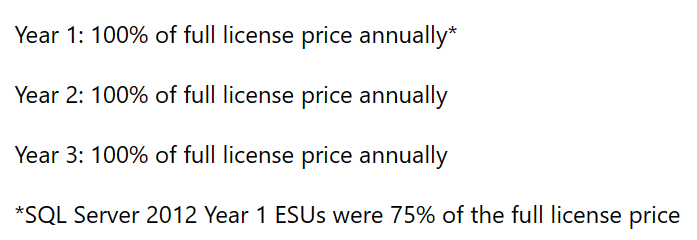
Finally, it is to be noted that, according to Microsoft here, the ESU pricing is now the same each year:
For more information, check out the Microsoft posts below:
Just 16 months since its first rebrand in years to become the “Microsoft Cloud Partner Program”, the Microsoft Partner program is now the “Microsoft AI Cloud Partner Program”.
As far as I can see, nothing is changing within the program itself – including the Solution designations. Just as adding the word “cloud” showed Microsoft’s focus in March 2023, this clearly demonstrates that AI is going to be a key part of Microsoft’s strategy for the future.
ISV Partners can benefit from the newly available “ISV Success” program and an expanded range of benefits. ISV Success is, according to Microsoft, “the pathway for ISV partners within the AI Cloud Partner Program to access product and cloud benefits, demo and sandbox environments, technical consults to build and publish applications, and once published, sales and marketing benefits to help accelerate deals through marketplace“. One of those expanded benefits is the addition of GitHub Copilot towards the end of 2023.
Microsoft 365 Copilot pricing has been announced and it is more than most were expecting – $30 per user per month.
Given the aim of Microsoft Copilot – to increase user efficiency and productivity when working with Microsoft 365 Apps such as Excel, PowerPoint, and Word – it’s very unlikely that EVERY user in an organisation would be given a license. It will instead be what Microsoft call “Knowledge Workers” i.e. those who spend most of their time creating content in Office…presentations, documents, spreadsheets etc. However, for many organisations that is a considerable proportion of their business and still equals a large outlay.
There are 2 scenarios I can see happening:
Microsoft take note of the “it’s too expensive” feedback and, when M365 Copilot actually becomes available to buy, they announce a lower price based on “listening to customers and partners“. This “put it out there and see what people say” approach has become a somewhat common strategy for Microsoft over the last few years.
They keep the price high for the first 12-18 months for early adopters who are willing to pay to get access to the potential business gains asap. Once adoption and new purchases hit a plateau, they then announce a price decrease to make it more attractive to a new, wider set of customers <– they did this with Power Platform back in October 2021 and it certainly seems to have worked.
What about Office 365 users?
A slight tangent perhaps but it must be noted that Copilot is only an add-on for Microsoft 365, not Office 365. Thus, if you have the latter, you will need to first upgrade from O365 to M365 and then add Copilot on top…making any concept of value and ROI even more complex.
Difficulty for customers
There are a few points that will be tricky for customer organisations:
Defining who needs a Copilot license
Defining what success looks like
Measuring and reporting on success
Tracking & quantifying ROI
Defining who needs a Copilot license
It won’t be every user in the organisation…but which users will it be?
1) Do you base it on existing license allocation i.e. “everyone with M365 E3/E5 gets Copilot as standard”? This is the easiest way but may well lead to over-licensing of Copilot, just as there is probably already over-licensing of M365 E3/E5.
2) Do you base it on job role i.e. “all team managers, accountants, and sales people get Copilot as standard”. There are a few things to consider here:
How many different job roles are there within your organisation?
Does everyone with the same title do the same thing or does it vary by team/department perhaps?
Will you make exceptions for certain people in other roles?
If so, how do you define the criteria?
How do you manage people who feel left out/under-valued if they don’t get a license?
3) Does each individual user who wants a license need to pass a kind of test to show that they perform relevant tasks and will benefit from Copilot? If so, how do you define the criteria:
Do they need to use multiple parts of Office or just one?
How heavily must they use it?
Are there certain outputs they must produce i.e. customer facing docs, exec reports etc.?
How do you track they are actually using it in the agreed way?
What does success look like?
Whatever process you use to decide how you allocate licenses to users, you will need to have a definition of success to know if your investment is worthwhile. This will vary between organisations and market sectors but some options include:
User satisfaction
Are users happier? Do they feel less stressed when they have Copilot to help them on a daily basis?
Output
Are users generating more output faster than before? This could be customer proposals, setting appointments, internal reports/dashboards, pitch decks, marketing collateral and a whole range of other things that your users create on a regular basis?
Do you use quantitative data i.e. “there are more of X thing in Y time than without Copilot” or do you go more qualitative i.e. “they’re not producing more but what they are producing is better” so quality over quantity? Will it be different for different business units?
Measuring and reporting on success
Once you’ve defined your metrics, you need to measure and report on them.
Each of the above options has pros and cons and will require different approaches to measuring success.
User Satisfaction
If you base it on user satisfaction, you will need to develop a way to accurately measure this for users and to account for changes over time.
For example, satisfaction will likely be sky high at first – they have this new tool that’s doing all sorts of cool stuff, helping them and making each day easier. Over time though – that will all become normal, just a regular part of work…so that satisfaction may well drop off somewhat. How do you account for that?
Output
It’s a similar story for output. What was once better/faster will become normal and so measurements will need to be calibrated for this over the years following a Copilot deployment. While you need to make sure, as an organisation, that you’re not paying for licenses that aren’t delivering (enough) value – you must also avoid the opposite. That once Copilot becomes “normal”, the business forgets what it was like BC (Before Copilot) and decides to save money by dropping those add-on licenses.
If Copilot is being used correctly, that will cause a variety of issues – likely including people being unable to do parts of their job anymore! It will be similar to executives trying to save money by dropping Software Assurance…
Reporting
You also need to think about how this data is collected and analysed and who makes any necessary decisions.
How do you identify if people are no longer making “proper” use of their Copilot licenses?
Is this a constant rolling process or something done once ever 3/6/12 months?
Who decided to remove licenses from a user?
Their manager
HR
Finance
A designated Copilot Tsar?
How are you identifying users who may need a Copilot license part way through the year?
Quantifying Return on Investment (ROI)
$30 per user per month
$360 per user per year
$1,080 per user per 3-year agreement
It’s almost a given that enterprise customers will be paying less but the list price gives us a good base.
How you look at ROI is the first thing to define and that will be related to how you define success. If it is based on hourly rate and time saved then you can calculate it like so:
Tony gets $100,000 p/a so roughly $48 per hour. That’s $0.80 per minute so, if Copilot saves Tony 38 minutes a month then it’s paid for itself.
If it’s user satisfaction then you’ll probably see a wider range of positive results. GitHub Copilot has been available for a while and they released some interesting research last year (2022) that looked at quantifying the ROI.
For many organisations it would be great to see similar results from your “knowledge workers”. That said, adding Copilot for 5,000 users will be, at list price, $1,800,000 per annum and not all organisations will see that dollar value as worth the above results.
The adoption of Copilot may well be a fairly strong indicator of a company’s ethos and approach to employee wellbeing – at least for certain roles!
Conclusion
For some organisation, Microsoft 365 Copilot at this price point will be a no-brainer. For others, it’s a definite no, and for others it will be a definite no at any price point. However, I’d say that most organisations stand to be convinced…particularly if they’re able to get discounts etc.
As with any software product, make sure you understand why you want it, how you’ll use it, and how you’ll know if you aren’t. Work out what makes it good value for you and measure against that.
If you have questions, feedback, and/or would like to talk about you Microsoft strategy in more depth, get in touch here.












 Cloudy with a chance of Licensing