Hotpatching – the ability to install patch updates without needing to restart the server – has been available in Microsoft Azure for a while. It is now coming to on-premises Windows Server 2025 machines…for a fee.
This new capability requires connection to Azure Arc and is currently free in preview but, from July 1 2025, it will cost $1.50 per core per month. That’s over $100,000 per year for 100 x 64 core servers…
If you’ve enrolled into the Preview, make sure you unenroll by June 30th to avoid being charged!
Interestingly, it doesn’t remove reboots completely but reduces the number from 12 per year to 4.
After a delay of several hours where the website wasn’t working (one of the perils of this current format), we can now see the changes this month are:
Windows Server 2025 added
Windows Server PAYG via Azure Arc is added
System Center 2025 added
Windows 10 ESU added
Various additional/refined terms for Azure Services
Let’s take a look at the Win Svr PAYG option in more detail based on the Product Terms:
Customer must have a valid Windows Server Standard or Windows Server Datacenter License to use the PAYG option. <– Just one license or all cores in the server?
For Licensed Servers running PAYG virtual machines, there are no restrictions on the number of PAYG virtual machines that can be deployed.
Additional virtualization rights are not granted. A separate License is required for each guest. <– So you don’t get 2 OSEs for Std and Unlimited for Datacenter…each PAYG VM needs to be paid for.
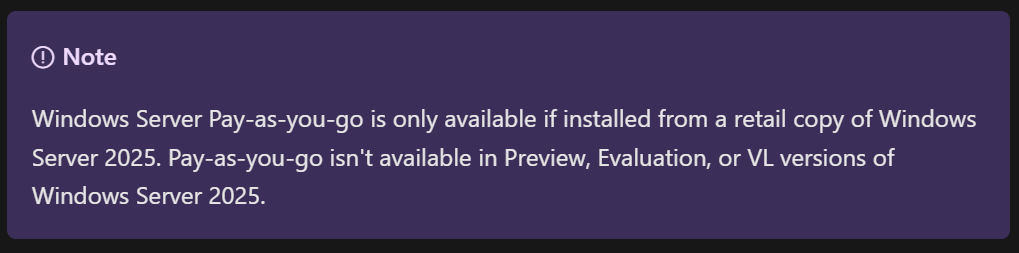
This, taken from the Microsoft Learn page, is very odd:
Apparently, you can only use Windows Server PAYG if you install a retail copy of Windows Server 2025?!
We have also seen that there will be a 10% price increase for Windows Server 2025 & System Center 2025 from December 1st 2024 and then also for SPLA from January 1st, 2025.
Microsoft recently announced the option to license Extended Security Updates (ESU) for Windows Server & SQL Server via Azure Arc, enabling a monthly Pay As You Go (PAYG) model.
The public pricing page here shows different pricing for Standard edition and Datacenter edition:
As you’d expect, ESUs for Standard edition are significantly cheaper than for Datacenter.
What you wouldn’t expect, or at least I didn’t (!), is this:
When you license ESU for Windows Server via Azure Arc and choose the “vCore licensing” option – which is based on the number of virtual cores being used – Microsoft allows you to pay the Standard edition rate “irrespective of how the underlying server or operating system is licensed”.
Microsoft Extended Security Updates (ESUs) are a paid for subscription that provides 3 additional years of security updates for Windows Server and SQL Server versions that are no longer in support. First released for 2008/R2 (which are now so old even ESUs aren’t an option), they are now available for 2012/R2.
For the last few years, ESUs have been available to Enterprise customers only but now, as of October 1st 2023, Microsoft have announced their arrival on CSP:
“CSP partners will be able to offer ESUs for end of support versions of Windows Server and SQL Server.
Customers will then have the right to use licenses covered by ESUs on deployments on-premises or within outsourced environments running on Authorized Outsourcers. Customers may also apply ESU licenses to “license-included” workloads acquired from Services Provider Licensing Agreement (SPLA) partners or CSP-Hosters.”
In terms of eligibility, Microsoft say:
“Customers will require Software Assurance (SA) or an equivalent subscription to be eligible to buy the associated ESU. Perpetual licenses only don’t qualify.
However, a customer doesn’t require SA or subscription to utilize ESUs with license-included services purchased from SPLA providers.“
As well as the Azure Stack HCI news, Microsoft have also added Azure Hybrid Benefit (AHB) for AKS (Azure Kubernetes Service).
How it works
This benefit is available for Windows Server Standard and Datacenter (both with SA) and also CSP server subscriptions. Hosts must be Windows Server 2019 (and later) or Azure Stack HCI
Each Windows Server core license w/SA allows use of 1 virtual core of AKS. The AKS AHB is additive, meaning the licenses can be used to cover on-prem/Azure workloads AND to use AKS. You can see more info here.
Microsoft first announced these changes in May 2022 and, after an update in September, we’ve now got the majority of the info in the October 2022 Product Terms document. Let’s take a look at what’s changed and what it means for us all.
First things first, the Listed Providers:
Microsoft Azure
Amazon AWS
Google Cloud Platform
Alibaba Cloud
are not included in any of these changes.
Outsourcing Software Management clause
This is in the “Universal license terms for all Software” which means it applies to all products under this category. There are 3 new elements within this clause:
Flexible Virtualisation Benefit
The Microsoft wording:
“Customers with subscription licenses or Licenses with active Software Assurance (including CALs) may use licensed copies of the software on devices, including shared Servers, that are under the day-to-day management and control of Authorized Outsourcers.”
This is similar to the existing “License Mobility through Software Assurance” benefit but doesn’t have the requirement to use an “Authorized Mobility Partner” -rather, you can use any “Authorized Outsourcer” partner…which is any partner that isn’t a Listed Provider.
While much of the focus here is on Windows Server, this new benefit applies to other products such as SQL Server too.
CSP Hoster
The Microsoft wording:
“Customers with subscription licenses or Licenses with active Software Assurance (including CALs) may access their licensed copies of software that is provided by a Cloud Solution Provider-Hoster and installed on that partner’s devices.”
Dedicated device outsourcing
The Microsoft wording:
“Customers may use licensed copies of the software on devices that are under the day-to-day management and control of Authorized Outsourcers, provided all such devices are and remain fully dedicated to Customer’s use.”
As I say, these apply to all Microsoft Software products and, as we’ll see, individual products may have their own additional terms.
Windows Server – license individual VMs
You are now able to license individual Windows Server virtual machines rather than licensing the underlying physical hardware. As expected, there are a few rules you need to follow:
Minimum of 8 core licenses per VM
Minimum of 16 core licenses per customer
Licenses must have active SA or be active subscriptions – this includes CALs used to access the Windows Server instances
Licenses can be re-assigned with the same server farm as often as needed.
90-day rule applies if moving to another server farm/cloud provider
Windows 11
Customers with per-user licenses for Windows 11:
Enterprise
Education
VDA
install Windows 10 Creators Update or later in an Azure VM or a server that meets the requirements in the “Outsourcing Software Management” clause. The QMTH language has been removed from this section too, opening this up to the wider pool of Authorized Outsourcers.
Reading the terms, it appears that the restriction on local virtualisation with CSP licenses has been removed too – bringing them even closer to parity with volume licenses. The language now states that customers can install Windows in a VM running on their Azure or “a server” – which I read as including their own servers as well as those of an authorized outsourcer.
Desktop Applications
For Office/Project/Visio, the word “dedicated” has been removed from the terms which means hosting on shared servers is now possible:
“Remote use of the software running on a Server is permitted for any user from a Licensed Device”
Microsoft 365
There have been changes to the use rights for the Windows component of Microsoft 365 too. The previous language was:
“rights to access and use remote virtualized instances of Windows only apply to Licensed Users that are the Primary User of a device licensed with a Qualifying Operating System.”
While it now says:
“Licensed Users may only run Windows Enterprise locally on devices with a Qualifying Operating System.”
Removing the primary user requirement to access remote virtual instances. Microsoft say:
“Essentially, when licensed as part of Microsoft 365, the requirement to use VDA rights for remote access from desktops without Qualifying Operating Systems no longer applies“
There is also a change for Microsoft 365 F3 to loosen the remote virtualisation restriction. The previous clause:
“rights to access and use virtualized instances of Windows only apply to Licensed Users of a shared device with a Qualifying Operating System“
has been removed.
Microsoft 365 Apps
There is definitely some further clarification needed here. Microsoft released a new licensing guide “Using software products under the Flexible Virtualization Benefit” this month and that document states that the Flexible Virtualisation Benefit applies to Microsoft 365 Apps (formerly Office 365 Pro Plus).
“With the introduction of the Flexible Virtualization Benefit, customers’ options for using Microsoft 365 Apps…outside their own data centers are expanded to include any Authorized Outsourcer’s shared servers“
However, I can’t find language which clearly states this in the current Product Terms, so for now I’d advise not to get too carried away! I expect we’ll see an update to the Product Terms soon to add that language in – but I’ll update either way once we see something from Microsoft.
Thoughts
This is all pretty exciting for a licensing fan like myself – lots of new language and terms and things to check and understand. Also lots of training presentations to update!
For customers though, I’m not sure how much impact this will really have. Yes, it enables organisations to work with a much larger pool of potential hosting providers…but, in my experience at least, most orgs that are struggling want to work with Amazon AWS…and they’re not included in these changes as they’re a Listed Provider. I’m keen to see what real world impact these changes have and who wins (and loses) from it all.
PS: I’m still processing all this new info so will update with corrections as/if needed!
October 2022 will see some Microsoft price changes and new options added to the Server Subscriptions for Azure on the CSP program:
Windows Server 2022 Std 8-core license pack (1yr) drops from $272 to $213.60
Windows Server 2022 RDS User CAL (1yr) increases from $56.04 to $77.04
They are also adding Windows Server Datacenter 8-core license packs in 1 & 3 year variants, to complement the existing Windows Server Std offering.
Microsoft also state that, “over time”, the 1-year software subscriptions via CSP will be aligned with pricing on SPLA – meaning some products will increase while others decrease.
Microsoft have announced a new way for Azure Stack HCI customers to license their Windows Server guest VMs. The snappily titled “Windows Server subscription for Azure Stack HCI” (WSSASHCI) allows organisations to purchase Windows Server licenses via their Azure subscription.
Currently the versions available are:
Windows Server 2022 Datacenter: Azure Edition
Windows Server 2022 Datacenter
Windows Server 2019
Windows Server 2016
Windows Server 2012 R2
Pricing
WSSASHCI is currently free in public preview but once it hits General Availability (GA) it will be $23.6 per physical core (in your Azure Stack HCI cluster) per month.
Microsoft have updated the release model for Windows Server 2022. There will no longer be a Semi-Annual Channel, instead there will only be the Long Term Servicing Channel (LTSC). A new version of the LTSC will be released every 2-3 years, and each release will receive 10 years of support – 5 mainstream + 5 extended.
They state the focus of the Semi-Annual Channel was innovation around containers and microservices and that this work will continue within Azure Stack HCI instead.
Extended Security Updates (ESUs), available for Windows Server 2008/R2 and SQL Server 2008/R2, were introduced in 2019 to extend available security support for 3 more years beyond the end of the products’ extended support periods.
It’s now less than 12 months until the end of the ESU period for SQL Server 2008/R2 and Microsoft have announced they will be providing 12 additional months of cover – but only for workloads running in Azure. This will also apply to Windows Server 2008/R2 – the end of ESU dates are:
SQL Server 2008/R2 – July 12, 2022
Windows Server 2008/R2 – January 10, 2023
End of support for 2012 Server versions
They have announced the availability of ESUs for the 2012/R2 releases of SQL Server and Windows Server. Extended Support for these ends:
SQL Server 2012 – July 12, 2022
Windows Server 2012/R2 – October 10, 2023
It’s now less than 12 months until SQL Server 2012 goes out of support so if you’re using that within your organisation, you need to come up with a plan to:














 Cloudy with a chance of Licensing