Windows Automated Installation Kit (WAIK) for Windows 7


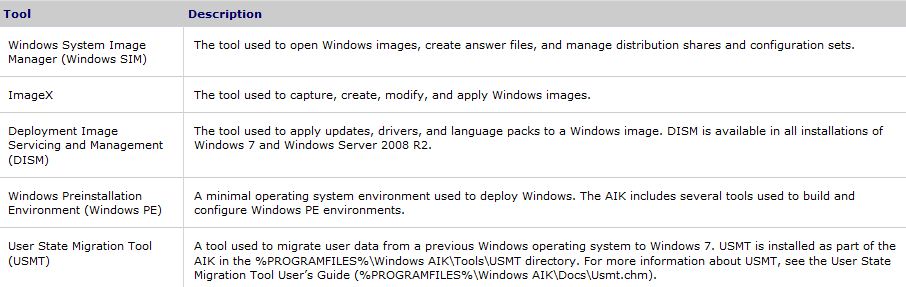
I was out at a customer site today working on some Windows 7 deployment stuff and saw a great example of how Windows Automated Installation Kit (WAIK) can be used to make OS deployments a whole lot easier.

WAIK

You can download the WAIK here.

*Update* The original link I posted has stopped working-I guess there is a new version of WAIK now the RTM is available. The new download link is here.

I want to apologise to the people who’ve followed the original link and got a "Page cannot be found" error-sorry! It’s a shame MS couldn’t re-direct the link but hey ho 🙂

As I get a chance to play around with it, I’ll post more but what I saw today was pretty amazing 🙂

There is a great Technet article on using WAIK here. Although it is focussed on Vista it seems that everything will still apply-happy playing!

Windows 7 Family Pack


Windows 7 news keeps on coming and unfortunately, it isnt always good.

First of all is more info on the “Family Pack“. It will cost $150 to upgrade 3 Pcs in the same house to Windows Home Premium which is great value but:

  • It still hasn’t been announced if it’s available in the UK
  • It is a “limited time only” offer so once the stock is gone-that’s it.

I don’t understand why it’s not a proper, standard Windows 7 edition-it would surely increase the take up of WIndows 7 AND reduce the chance of people being tempted by pirated copies.

The second piece of news was pricing for the Windows Anytime Upgrades (WAU). These are an easy way for users to move from one edition of Windows 7 to another such as Home Basic to Home Premium and, in most cases, it is quite cost effective too.

  • Windows 7 Starter to Windows 7 Home Premium: $79.99 · €74.99 · £69.99
  • Windows 7 Starter to Windows 7 Professional: $114.99 · €184.99 · £119.99
  • Windows 7 Starter to Windows 7 Ultimate: $164.99 · €204.99 · £139.99
  • Windows 7 Home Premium to Windows 7 Professional: $89.99 · €179.99 · £119.99
  • Windows 7 Home Premium to Windows 7 Ultimate: $139.99 · €189.99 · £124.99
  • Windows 7 Professional to Windows 7 Ultimate: $129.99 · €134.99 · £84.99
  • As you can see, the dollar vs GBP prices don’t compare particularly well-coming out at almost DOUBLE in some cases!

    As much as I am a fan of Microsoft and their products, it is often the pricing and promotions side of things that they fall down on. They’ve really seem to have stuck it to UK users with the WAU pricing; things are always cheaper in the States but this seems to be a little extreme.

    ZDNet’s Ed Bott has more info here and NeoWin’s article on the WAU is here.

    Windows 7 WILL have IE


    The EU fuelled saga of IE8 in Windows 7 has taken another turn now-it seems Windows 7 WILL included Internet Explorer here in Europe. Microsoft have instead agreed with the EU’s idea of having a “ballot screen” allowing users to choose and download other competing browsers such as Firefox or (the instigators of this whole thing) Opera…This is a bit of an about-turn as MS were dead set against this idea initially.

    The interesting thing is how this affects the availability of Windows 7 upgrades in Europe. The last minute creation of “Windows E” meant that an upgrade version wouldn’t be available in Europe so users would need to do a clean install-which wasn’t an ideal situation. However with this change, perhaps we will get the ability to upgrade after all?

    It seems that Microsoft will continue with Windows 7 “E” until the EU formally accepts the Ballot proposal. Hopefully that won’t take too long (in the work of international law) to go through and Europe will be able to get it’s upgrade on! The RC installation of Windows 7 doesn’t expire until March 2010 so if they can get it wrapped up before then-that should suit everybody…expect those who’ve pre-ordered!

    Thanks to Mary Jo for this and as she updates, I’ll update 🙂

    *Update* It seems that Windows 7 E may well still be the plan!

    *Update* There is now an official statement on the Microsoft PressPass site here. The most exciting bit is:

    “Under our new proposal, among other things, European consumers who buy a new Windows PC with Internet Explorer set as their default browser would be shown a ‘ballot screen’ from which they could, if they wished, easily install competing browsers from the Web. If this proposal is ultimately accepted, Microsoft will ship Windows in Europe with the full functionality available in the rest of the world.” (Bold mine).

    The EU should accept it as it was their/Opera’s idea in the first place so hopefully we’ll all be doing nice upgrade installs on our machines soon-whoo hoo!

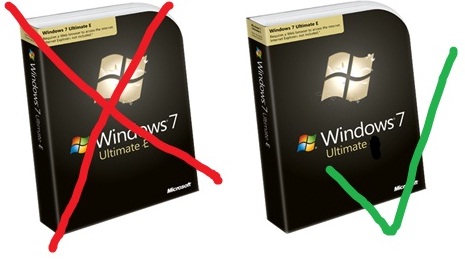
    Windows 7 e

    Check out my sweet photo editing skills 😉

    *Update* Opera now want the Ballot screen to be logo free (See techflash)! I’ve said it before that Opera are, and pardon my French, taking the piss…as formerly funny fellow Northerner Peter kay once said “Too far (Tony), too far”!

    Applocker & Windows 7


    What is Applocker?

    Applocker allows you to prevent programs from executing on desktop machines, through central administration. It is one of the many new features of Windows 7, although it is only included in the Enterprise version of the OS.

    It is similar to the “Software Restriction Policies” (SRP) from previous incarnations of Windows but much improvement with more power and greater flexibility.

    How does it work?

    There are 3 kinds of rules available with Applocker:

    Path Rules: Allows you to restrict program execution to certain directory paths, such as Program Files etc but is only effective if users are unable to install their own applications. Monitoring and tracking allowed folders can be time consuming and difficult.

    Hash Rules: Uses cryptographic hashes of executables to identify them. Very secure but can be time consuming as the hash must be updated after any updates to the program.

    Publisher Rules: Identify applications based on digital signatures issued by the publisher. While these are similar to “Certificate Rules” in SRP, they are more sophisticated. You can restrict execution to the:

    Publisher (I.e. Microsoft)

    Product name (such as Office 2007)

    File name (office2007.exe)

    File version (14.0.1.1 for example)

    All 3 rules can be applied to:

    Executables (.exe)

    Installer Files (.bat, .cmd etc)

    System Libraries (.dll etc)

    and all three rules allow the creation “exceptions” such as:

    “Allow Publisher “Microsoft” except file name mediaplayer.exe”

    In the Windows 7 deployment I’m working on, and I’m sure many, many more, AppLocker is if great interest to System Administrators. It’s ability to block programs will lead not only to increased security but could also be used for increased productivity-particularly in schools.

    You can see Microsoft’s Paul Cooke talking about AppLocker here.

    For a great look at the technical aspects of using and setting up Applocker-head over to 4Sysops here.

    When will I get Windows 7?


    It might seem that this question has already been answered with “October 22nd” but there are numerous different ways for people to access Microsoft software these days so here’s a complete list:

    OEM’s: 2 days after RTM (Release to Manufacture)

    Technet and MSDN Subscribers: August 6th in English and October 1st for other languages. *Update* The download will appear, as if by magic (!), at 6pm GMT tonight…so not long left!

    MS Partners via the Partner Network: August 16th in English and October 1st for other languages

    MS Action Pack Subscribers: August 23rd in English and October 1st for other languages

    Volume Licence customers with Software Assurance: August 7th in English and a couple of weeks later for other languages

    Volume Licence customers without Software Assurance: September 1st

    Home Pack Confirmed:

    Microsoft have confirmed (via the Windows Team Blog) that there will be a Windows Home Premium Family Pack, which can be installed on up to 3 machines! However-they have said it will be available in “selected markets” and no more…I’m waiting to hear back as to whether the UK has been selected 🙂 21-07-09 Microsoft have told me they’ll be releasing “more details on the family pack in the near future” so keep checking back for updates!

    Windows 7 available in September


    Microsoft today announced that customers who purchase via Volume licensing (which is the majority of businesses I’d have thought) will be able to order Windows 7 from September 1st!

    Another Windows 7 announcement from the 1st day of Microsoft’s Worldwide Partner Conference 2009 was that there will be a 6 month promotion making Windows 7 up to 15% cheaper than Vista.

    Windows 7 Upgrade Coupon Limit


    As you have probably seen, new PC’s are now shipping with Vista AND an Upgrade Coupon to give users a copy of Windows 7 too. This is a great offer, however it’s been discovered that the offer has a maximum limit of 25 machines.

    This isn’t anywhere near as bad as some people will no doubt try and make out. The upgrade coupon offer is aimed primarily at small businesses, for whom 25 PC’s is a pretty decent number. Larger companies will be more likely to purchase their Vista/Windows 7 via Volume Licensing (Open, Select etc) and so have access to Software Assurance…and one of the many benefits it gives is Upgrade protection.

    All in all, it’s a good deal for all involved I think 🙂

    Windows 7 Pricing Revealed


    Windows 7 news is coming pretty thick and fast at the moment and now we’ve got word on the official pricing structure for the latest OS-and it’s pretty good 🙂

    Windows 7 Home Premium = £149.99

    Windows 7 Professional = £219.99

    Windows 7 Ultimate – £229.99

    The Home edition represents a £20/12% reduction in price when compared to Vista, while the others are the same…

    The biggest change is that there won’t be an upgrade version available in Europe. “WHAT-NO UPGRADES??!!” I hear you cry…don’t worry-the Full version will be the same cost as the equivalent upgrade sku’s available in other countries.

    The reason behind this is…THE EU (duhn duhn duhn). As a result of their “investigations”, MS have had to create a Windows 7 “E” edition that doesn’t contain IE8. This has pushed back the schedule for the European release,m eaning there won’t be a specific upgrade version ready in time. MS had to choose between delaying the European release of Windows 7 or not having an upgrade version…I think they chose right!

    Windows 7 Downgrade Rights


    The ability to downgrade Windows 7 to a previous version has been a hot topic these last few days and can be quite confusing, so I thought I’d put a post together to help make it clear what the rules will be 🙂

    Windows 7 Pro & Windows 7 Ultimate OEM licences will be able to downgrade to Vista for an unlimited amount of time.

    Windows 7 Pro & Windows 7 Ultimate OEM licences will be able to downgrade to XP Pro for 18 months only or until a Service Pack is released, whichever is first.

    Q: What is an OEM licence?

    A: OEM stands for “Original Equipment Manufacturer” and these are licences that come pre-installed on PCs when you buy them from PC World, Dixon’s etc.

    Q: What about OEM licences of Windows 7 Home or Starter?
    A: The OEM EULAs of these version do not permit downgrade rights.

    Q: What if I purchase Windows 7 through Volume Licensing?
    A: The versions of Windows 7 available through Volume Licensing (Open, Open Value, Schools, Select, EA ) will contine to have full downgrade rights to any previous version without time restrictions.

    There are lots of people saying lots of things about this but I don’t really see it as being too much of an issue. In a nutshell, Microsoft are saying that after June 2011 the majority of home users won’t be able to downgrade a new PC to an OS that is 9 years old.

    When you really think about it-who will want to? In 2 years-will there really be any reason for people to be using XP? I don’t think so. The applications that won’t work on Windows 7 will have been replaced with new, Windows 7 compatible versions and all will be good 🙂

    Windows 7 without IE 8


    Windows 7 will ship without Internet Explorer 8 in EU, and we’ll have to download it if we want to use it.

    I’m a fan of IE & MS in general, and am pretty fed up with how much meddling the EU have done with their products…first Vista N (with Media Player) and now Windows 7 E (without IE). I don’t know anyone who has pro-actively purchased the Vista N product, either in the consumer or business world. There is one company I know who, for whatever reason, got the “N” version and then spent a fair amount of time getting Media Player back on to users pcs!

    My thoughts are this:

    The people who want to change browsers for whatever reason (better ACID test scores, better extensions, faster loading etc) will have no trouble in downloading a new browser and setting that as their default.

    The people that don’t know how to do that (Mum’s, Dad’s,OAP’s etc) are also the people who don’t care what brwoser they use. As long as they can access the web they’re happy-they don’t mind if some things are rendered in a non-standards compliant way or if it takes 4/5ths of a second longer to load up…they just want to check their email etc and be done with it.

    So who benefits from the un-bundling of IE 8 with Windows 7? That is a question I’m not sure there is an answer to…other than no-one, and maybe the EU getting their power fix.

    I see this as at best going almost completely un-noticed as people just download IE 8 anyway or at best, causing extra confusion for users.

    Opera are annoying me as they are now saying:

    “However, we do not believe that Microsoft’s move will restore competition for desktop browsers. Most users get their operating systems from the OEM channel and Microsoft will recommend that OEMs pre-install IE8. As such, users are unlikely to be given a genuine choice of browsers.”

    The way I look at it is:

    If Opera is that brilliant and Opera did a proper job marketing it etc, then it’s market share would be bigger…the same goes for the other browsers guys.

    I’m a big fan of Microsoft but I wouldn’t refuse to use a better product just because it was made by a competitor. I’ve got an iPod, I always used Google instead of Live Search (although I now Bing), I use VMWare Workstation instead of Virtual PC and there are other examples too. For a number of reasons I prefer Internet Explorer as my default browser but, if I need to, I will use another browser alongside it…I’ve got Firefox on this machine next to IE 8…but I’ve only used it once this year.