SQL Server 2019 Big Data Nodes


Photo by ThisIsEngineering on Pexels.com

The release of SQL Server 2019 sees the introduction of Big Data Nodes. This new family member aims to help organisations create data lakes, combining big data tools such as Hadoop with SQL Server – all supported by Microsoft.

To run a Big Data Node cluster, you first require a SQL Server Master Instance. This must be running SQL Server 2019 – Standard or Enterprise – with SA and licensed via the per core model.

The licenses on the Master Instance give an entitlement to a certain number of Big Data Node core licenses. For Standard edition it’s a 1:1 ratio, while for Enterprise it’s 1:8 – as an example, a server with 32 cores of SQL Server 2019 Standard w/SA would give rights to 32 cores of Big Data Node, while the same server licensed with Enterprise edition would allow 256 Big Data Node cores. Additional Big Data Node cores can be purchased separately.

The big data nodes can also be deployed in Azure using the Azure Kubernetes Service (AKS).

Microsoft Product Terms: November 2019


Photo by Markus Winkler on Pexels.com

I’ve taken a look at some of the highlights of this month’s Microsoft Product Terms document.

Big news is SQL Server 2019 is here – with a new SKU type and expanded fail-over rights.

We now have “SQL Server Big Data Node (BDN)” – available in 2-core packs via EA & EES. Requires a “master node” of SQL Std/Ent core with SA and includes certain SA rights.

Each SQL Server Ent Core license with SA gives 8 BDN licenses and each SQL Server Std Core license with SA gives 1 BDN license, when assigned to a “master node”.

The updated fail-over info is there too, but I’ll look at that properly in a separate article.

New language that M365 & O365 F1 licenses can only be assigned to users without a dedicated device.

“A Dedicated Device is a computing device used for work with a 10.1” screen or larger, used by the user more than 60% of the user’s total work time during any 90-day period”

F1 licenses are aimed at users who tend not have a device – drivers, nurses, warehouse staff etc. but I know some organisations are looking at them as a way to license traditional office workers and reduce costs. This new language looks to prevent that.

The new Project Plan 1, 3, and 5 licenses are added – only available via CSP. Plan 1 not available in France or South Korea for some reason. 🤔

Terms have been added to cover Azure Spot offers. <– Interestingly, I haven’t seen Microsoft use this term themselves until now. They have referred to them as “low-priority VMs” in Azure, with Spot being a term used by Amazon AWS.

SQL 2014 Release Date


Microsoft have announced that SQL Server 2014 has been RTM’d (Released To Manufacturing) and will be generally available from April 1st.

SQL 2014 brings a host of new and improved features, particularly around Business Intelligence and Cloud computing.

  • In-memory transaction processing (In-Memory OLTP), speeds up an already very fast experience by delivering speed improvement of up to 30x.
  • Customers do not have to rewrite their application or deploy new servers. We approached in-memory columnstore the same way – it is built into SQL Server.
  • Customers can easily and securely backup and recover on-premises SQL Server databases using Windows Azure
  • SQL Server 2014’s AlwaysOn technology was not just improved for this release, it was built to enroll Windows Azure virtual machines running SQL Server into a customers’ disaster recovery solution.

You can read more about this release here:

http://blogs.technet.com/b/microsoft_blog/archive/2014/03/18/sql-server-2014-released-to-manufacturers-will-be-generally-available-april-1.aspx?WT.mc_id=Blog_SQL_RTM_SQL14

Microsoft SQL 2012 Licensing Changes


Microsoft have this week announced some relatively major changes to the SQL 2012 product line up and it’s licensing.

Editions

There are now 3 editions of SQL Server:

  • Standard
  • Enterprise
  • Business Intelligence

Licensing

Here’s the big change – there’s no more Per CPU licensing…now it’s by Core.

This is a major, although not wholly unexpected, move by Microsoft. Other vendors such as Oracle have long charged by the core but Microsoft have always stayed with physical sockets as their measure…until now.

I’ve been expecting this for a while, especially as 6-core processors become more commonplace and Intel keep making them more powerful. What once took 2 processors can now be done with 1 and what once took 4 now needs just 2, so Microsoft must have been seeing a decline in their SQL revenue over the last 18 months or so.

To break down the licensing:

Standard = Per Core or Server + CAL

Enterprise = Per Core only

Business Intelligence = Server + CAL only

You’ll notice that the new Business Intelligence (BI) edition is Server+CAL only so what should you do if you have external/anonymous users and/or a huge number of people accessing the BI server/s? SQL Enterprise Edition 2012 contains ALL features of the BI edition so use that to license by core.

Let’s go a little deeper into the licensing and see what else there is for us Smile

It’s worth noting that “Core based licences will be sold in 2 core packs.” but a big clause is:

“To license a physical server properly, you must license all cores in the server with a minimum of 4 cores required for each physical processor in the server.”

This means if you’re running with dual core CPU’s you’re going to have to buy more cores than you have. <—This will be a big cause of outrage I’m sure however it does mean that as you upgrade your server hardware and get CPUs with higher core counts, there won’t be a big extra licensing cost.

Transition to new Licensing Models

Whenever Microsoft bring out new versions of software and change the licensing rules, the big question is always “What if I need to buy new licenses in the meantime?” and we, as partners, have to work to make sure that we help customers future proof any investments they make in the run up to the new product release.

What’s the deal with the run up to SQL 2012?

  • After 30/06/12, no Enterprise Edition Server licenses will be sold. (EA/EAP customers will have until their next renewal after 30/06/12 to purchase additional server licences for current projects.)
  • All existing SQL Enterprise Editions licensed via Server + CAL with SA (Software Assurance) can be upgraded to SQL 2012 and the SA can be maintained to provide access to future updates.
  • Here’s a point to take note of:
  • Newly purchased Enterprise Edition (EE) 2012 server licenses and/or those server licenses upgraded via SA will be limited to server deployments with 20 cores or less.
  • Customers with processor licenses under SA can upgrade to SQL 2012 at no additional cost.
  • At the end of the SA term, processor licences can be exchanged for core licenses and the SA can then be renewed.
  • SQL Std & Enterprise Processor licensed covered with SA will be exchanged for a minimum of 4 core licenses or the actual number of cores in use.
  • SQL DataCenter (a version of 2008 that’s disappearing in 2012) will swap out for a minimum of 8 cores or the actual number of processors in use.

There are some other rules and guides around the ability to add core licenses mid term to an EA/EAP etc but I don’t want to make this section TOO big!

Pricing

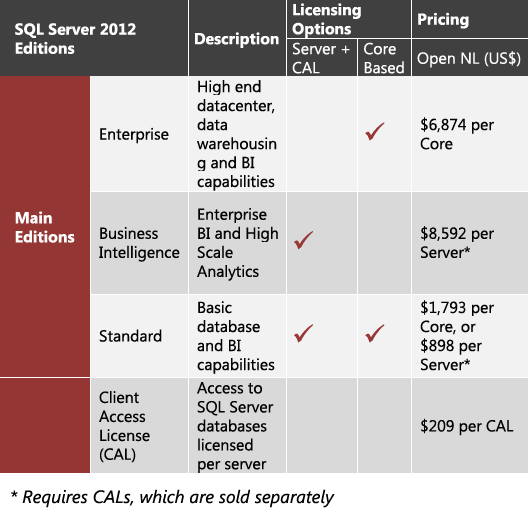
Microsoft have released estimated pricing in dollars so let’s take a look at that and see how it stacks up to current 2008 R2 costs.

image

So you’re looking at $7172 at a minimum for a SQL Std server which stacks up pretty well against the current processor licensing costs. I’m sure people will find scenarios where this is more expensive but they’ll surely forget to take into account all the new features like Project Crescent & Juneau that have been integrated into the new editions, and so I don’t think that price should really be the big thing here.

Any other editions available?

SQL Datacenter, Workgroup & Standard for Small Business editions are all being retired with the 2012 release.

Web Edition will only be available to hosters via SPLA (Service Provider License Agreement).

Developer, Express & Compact editions will continue to be available in the same ways as right now.


SQL Server 2008 R2: Licensing Changes


SQL Server 2008 R2 has got a whole host of new features and now it’s got some new licensing too 🙂

The big move is that SQL’s licensing will follow the same path as Windows Server, both in editions and also virtual licence allowances:

  • SQL Server 2008 R2 Standard = 1 VM per licence
  • SQL Server 2008 R2 Enterprise = 4 VM’s per licence
  • SQL Server 2008 R2 Standard = Unlimited VM’s per licence

Here’s a Microsoft diagram that shows many of the main differences between the now 3 editions:

clip_image002

If you currently have SQL Server 2008 Enterprise and Software Assurance there is “a complete transition/migration path” but I don’t have any details yet…they will be available nearer launch on May 6th 2010.

For more info on SQL Server 2008 R2, see my other post here:

Read What’s New in SQL Server 2008 R2

Original post from MS here.

SQL Server 2008 R2 Release Date


SQL Server 2008 R2 AKA Kilimanjaro now has a release date..May 6th 2010.

A post over on one of the MSDN blogs confirms this:

image

This tightens it up from “1st half 2010”, which is good for partners and customers…enabling us all to plan a bit better.

Props to Mary Jo Foleys for this.

SQL Server 2008 for Small Business


There are many version of SQL Server 2008. Standard, Enterprise, Web, Express, per Processor and more…and now there is one more…SQL Server for Small Business.

This version appeared pretty quietly and is particularly well known. It follows a similar path to Small Business Server in that it is restricted to 75 users, but it also has many other caveats.

First of all, it can only be installed on certain versions of Windows Server 2008. These are:

  • Server 2008 Std
  • Server 2008 Std without Hyper-V
  • Small Business Server 2008
  • Windows Server 2008 for Windows Essential Server Solutions
  • Windows Server 2008 without Hyper-V for Windows Essential Server Solutions

You’ll notice there’s no Enterprise or Datacenter and also no Server 2003. I’m going to double check if Server 2008 R2 is now an accepted OS too.

There are some specific rules around the domain too:

  • Must be joined to a domain “where a single server in the domain must contain all the flexible single master operations (FSMO) roles and is the root of the Active Directory forest
  • Domain cannot have trust relationships with any other domain
  • Domain cannot have any child domains

Further details can be found on Microsoft’s site here:

http://www.microsoft.com/sqlserver/2008/en/us/small-business.aspx

This version of SQL is licensed with CALs so cannot be used for Web applications.

It can be purchased through the OEM channel, which makes it an attractive price point for small businesses.

Exchange for Small Business

There is also Exchange for Small Business available now…but it is somewhat shrouded in mystery! It randomly appeared in November’s price file without so much as a “How do you do?” and doesn’t want to give out any information about itself.

The oddest part is that it is Exchange 2007…the month that Exchange 2010 is released brings a Small Business edition of 2007? Why?!

The URL that should give the info page now redirects to the Exchange 2010 site…understandable but a little frustrating. I asked Microsoft today what the restrictions on this edition are and they weren’t able to tell me…the best we can give at the minute is “it’s probably the same as SQL”.

If anyone can shed any light on it – I’d welcome it…