Microsoft Copilot Studio is a new low-code tool to help “citizen developers” within organisations create their own copilots as well as customize Copilot for Microsoft 365.
Microsoft say it is built on the “foundations of Power Virtual Agents” and other parts of Power Platform too – this is a roundabout way of saying that Power Virtual Agents is included within Copilot Studio. Copilot Studio itself will be included within Copilot for Microsoft 365 licenses…does this mean that the only way for users to continue with Power Virtual Agents is to purchase Copilot for Microsoft 365?
The ability to customise and create Copilots seems very cool and I can imagine there being some fantastic results within organisations. I also think the management of them all will be very tricky!
Microsoft have released the preview of “Microsoft Sentinel for Power Platform” without much fanfare (overshadowed by Copilot really) but I think it could be a very interesting offering. Microsoft Sentinel is a SIEM (security information event and management) platform, aimed at enabling organisations to monitor, discover, remediate, and prevent security attacks across their organisation.
Low code risks
As more and more users develop low code applications within organisations, the risks to those businesses increase. The apps will connect to various internal and external systems, containing and moving data – some of which may be sensitive and/or covered by regulations such as the GDPR or HIPAA – and perhaps linking to web servers and SaaS applications too.
Applications created by highly trained developers with years of experience and huge budgets often suffer from security weaknesses; one can only imagine the potential problems with apps created by citizen developers!
Microsoft Sentinel for Power Platform
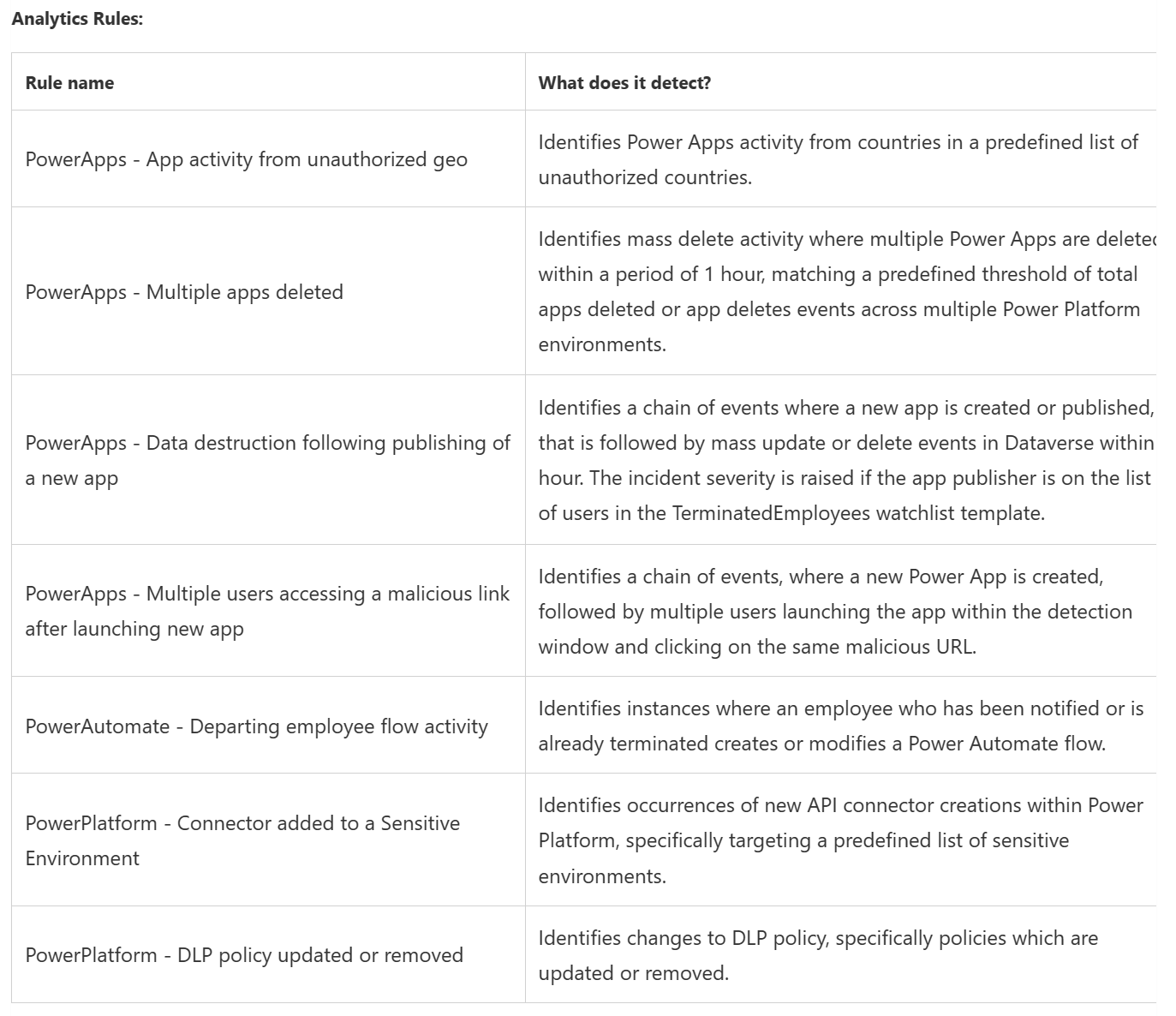
This will enable organisations to monitor Power Platform environments and detect any suspicious activity such as:
Power Apps execution from unauthorized geographies
Suspicious data destruction by Power Apps
Mass deletion of Power Apps
Phishing attacks made possible through Power Apps
Power Automate flows activity by departing employees
Microsoft Power Platform connectors added to the an environment
Update or removal of Microsoft Power Platform data loss prevention (DLP) policies
The initial rules included are:
but as we’ve seen with Microsoft Sentinel itself, these will be added to over time.
Almost every organisation will find itself with a large Power App and Power Automate user base so Sentinel for Power Platform could really be worthwhile.
Microsoft Inspire saw a range of announcements about Power Automate licensing and a little bit of Power Apps too.
Power Automate Premium
From August 1st, 2023, the “Power Automate Attended RPA per user” license will become “Power Automate Premium” and will include:
“both unlimited cloud flows, known as digital process automation (DPA), and unlimited desktop flows, known as robotic process automation (RPA) in attended mode as well as entitlements to Power Automate Process Mining“
This new license is going to be $15 per user per month while the current price for Power Automate Attended RPA per user is $40 per user per month…a 62.5% reduction!
Available as an add-on to the Power Automate Premium license, this will cost $5,000 per tenant per month for 100GB of additional Process Mining data storage.
Power Automate Process
A new license that gives access to an automation bot “which can be used for unattended desktop automation (RPA), or to run an organization-wide cloud-flow based process that needs to be accessed by unlimited users in an organization“.
Power Apps Premium
The “Power Apps per User” license is being renamed to “Power Apps Premium“.
Microsoft may have taken a trip to Greyskull as, to paraphrase He-Man they:
“Have the Poweeeeerrrrr…Pages”
The newest member of the Power Platform family, Power Pages is a upgraded version of Power Platform Portals – moving from a component to a fully-fledged standalone product.
What does it do?
Power Pages is designed to help easily create websites using drag & drop plus a range of templates available. Microsoft are positioning it as good for uses including FAQ sites, self-service portals, support sites and more.
Microsoft 365 Education Insights Premium listed as an add-on for Office 365 A1/A3/A5 and Microsoft 365 A3/A5
The “Third Party re-imaging clause” has been added to the Microsoft Customer Agreement (MCA), although I’m not 100% sure why at the moment.
Windows “Get Genuine” licenses have been added to the Microsoft Customer Agreement – is this related to the above addition perhaps?
Various terms and clauses updated – including one which clarifies that Azure Virtual Desktop (AVD) access rights in Window 10 licenses are limited to customers’ own tenant.s
M365 E5 security/compliance add-ons removed as pre-requisites for Premium Assessments.
Professional Direct Support added for Power Platform. Licenses must be acquired for every Dynamics 365 and Power Platform license on the agreement – but has a maximum of 250. Any licenses above that are covered without additional licenses being required.
Microsoft announced on July 1, 2021 that they’re cutting the price of Power Apps in half(ish) from October 1, 2021.
Power Apps per User
This was $40 per user per month but will be $20 from October 1, 2021.
Power Apps per App
This was $10 per user per app per month but will $5 from October 1, 2021. However, it should be noted that the features have been reduced too – currently it gives access to:
2 x Apps and 1 x Portal
But under the new rules, each license will allow access to:
1 x App or 1 x Portal
Meaning certain scenarios may not see a real price reduction.
Customers with licenses purchased before October 1, 2021 will retain the current entitlements until renewal.
For organisations looking to purchase before October 2021, there are two promotions which have been extended:
Power Apps per user Promo
$12 per user per month with a minimum purchase of 5,000 licenses.
Power Apps per app Promo
$3 per user per app per month with a minimum purchase of 200 licenses.
There is also promotional pricing available for Power Apps Portals login capacity – both for Tier 4 (25,000+ logins per month) and Tier 5 (100,000+ logins per month).
Microsoft’s financial results for Q3 FY21 (Jan – Mar 21) are in and, as usual, they’re pretty impressive.
Revenue = $41.7 billion – up 19%
Operating income = $17 billion – up 31%
Looking at the different product divisions we can see:
Productivity & Business Processes
Revenue = $13.6 billion – up 15%
Office 365 Commercial was up 22%, LinkedIn increased 25%, and Dynamics 365 was up 45%.
Microsoft Teams is up to 145 million daily active users, almost doubling YoY and Office 365 Commercial has nearly 300 million paid seats. Office Commercial products (on-premises Office) was down 25% – continuing its downwards trend as organisations continue to move to the cloud.
Satya Nadella revealed that Power Platform now has almost 16 million monthly active users, an increase of 97%, and revenue has increased by 84%. Amy Hood (CFO) called out Power Apps and Dynamics 365 Finance & Operations as strong performers.
Intelligent Cloud
Revenue = $15.1 billion – up 23%
Azure growth was 50% yet again, with Amy Hood highlighting an increase in the number of large, long-term Azure contracts.
On-premises server products grew 3%, although that seems to largely be due to year on year currency fluctuations, and the EMS install base grew again, now sitting at 174 million seats.
SQL Server on Azure VMs grew 129% YoY alongside Cosmos DB growth too.
More Personal Computing
Revenue = $13 billion – up 19%
Again there was a big difference in Windows OEM as Pro revenue declined 2% but non-Pro grew 44%.
Microsoft have announced that their Power Automate Desktop product is going to be free for Windows 10 users. Power Automate is Microsoft’s Robotic Process Automation (RPA) offering and, as the name suggests, the product in question here is the desktop variant.
RPA is a rapidly growing hot topic within businesses as people look to do “more with less” and to use their time to drive and deliver real business value – rather than “busy work”. Typically these will be things like compiling information and creating reports – it needs doing but it’s repetitive (read boring) and doesn’t really need human input…certain things need putting in certain places at certain times. The repetitive nature makes it perfect for RPA – thing of an Excel macro on steroids – replicating actions across a variety of desktop applications and websites…while you do more important things 😊
This is an example of what you can do from Microsoft:
Power Automate Desktop will eventually be built into Windows 10 – it will start to appear in Insider Builds shortly – but for those of you as impatient as me, you can download it here.
I wonder if this will cause any other RPA vendors (such as UIpath) to launch a case against Microsoft for unfair bundling – like Slack recently did re: Teams?
Microsoft 365 Business Voice, the SMB cloud telephony package, is added. Available via CSP and requires Microsoft 365 Business Basic/Business Standard/Business Premium.
The various name changes (ATP = Defender etc.) have (finally) been updated.
2 x Power Apps promotions that could be quite interesting have been added:
“Power Apps per App” promo = Available to new/existing EA/EAS/CSP customers & has a minimum purchase of 200.
“Power Apps per User” promo = Available to new/existing EA or EAS (not CSP) customers & has a minimum purchase of 5,000.
Announced at Microsoft Ignite 2020, Power BI Premium has a new “per-user” licensing model. Previously available only via a “capacity” model, at a pretty high price point, this new licensing option will make it more cost effective for companies to get started.
The main reason I talk to people about Power BI Premium is licensing. With Power BI Pro, EVERY user consuming a dashboard need a Pro license – which can get pretty expensive pretty quickly. Power BI Premium per Capacity removes the need for each user to be licensed with Pro meaning, even with it’s high monthly cost, it can work out more cost-effective for heavy use cases.
While there have been feature differences between Pro & Premium, they’ve not been a reason for these conversations – now however, it looks as though that Microsoft hope that may change. This new licensing model makes it easier, and cheaper, for smaller orgs and teams of developers to access the high-end Power BI Premium features. Perhaps this is an effort to compete further with Salesforce Tableau et al.
To access content in a “Premium per-user workspace”, each user must have a “Premium per-user” license so the licensing, in a nutshell is:
If you want to get access to the additional Premium features for named users, Premium per user (PPU) is the way to go.
If you want to allow unfettered access to dashboards without worrying about per user licensing, Premium per capacity is still the answer.
Getting access
Whilst in preview, Power BI Premium per-user will be free of charge. Regarding eventual pricing, Microsoft said in their announcement:
Premium per user will be uniquely affordable and highly competitive among individual user offerings in the industry. Stay tuned for the official pricing announcement as we get closer to the GA timeframe. I guarantee you won’t want to miss it.
The “further details” link below has a well moderated comments section which features several answers from Microsoft clarifying some of the common questions too.