With the upcoming release of SQL Server 2025, there will not be a new version of SQL Server Reporting Services (SSRS). Instead, Power BI Report Server will be the default – offering new features including PBIX reports, data modelling, and custom visuals.
The Microsoft announcement states that “when SQL Server 2025 becomes generally available, any customer with a paid SQL Server license will have access to Power BI Report Server (PBRS) ” while PBRS was previously limited to Enterprise edition customers with Software Assurance.
Power BI Report Server (PBIRS) installation requires keys from SQL Server 2025 and later versions. For SQL Server 2022 (16.x) and previous versions, access to PBIRS is limited to customers with SQL Server Enterprise edition and Software Assurance (SA), who can use a PBIRS key provided by Microsoft.
You don’t have to transition immediately if you don’t want to as SQL Server Reporting Services (SSRS) 2022 will continue to receive security updates and support through January 11, 2033.
The announcement (with other SQL 2025 info) is here and there is more info here too.
Microsoft have announced the end of Power BI Premium Capacity SKUs in favour of the newer and shinier Microsoft Fabric. Note that the “Power BI Premium per-user” SKU is unaffected.
Key dates
New customers will not be able to purchase Power BI Premium after July 1st, 2024.
Existing non-EA customers can renew until Jan 1st, 2025. If your renewal date is after that, you will need to transition to Fabric at renewal. Additional Power BI Premium capacity can be purchased until the end of the agreement.
EA customers can continue with Power BI Premium until the end of their contract. If that is post Jan 1st, 2025 they will need to switch to Fabric at renewal. Additional Power BI Premium capacity can be purchased until the end of the agreement.
Sovereign Cloud customers are unaffected as they don’t currently have access to Fabric.
Benefits and differences
Fabric is the evolution of Power BI Premium and the next step in Microsoft’s organisation wide data analytics strategy. Thus, as well as the Power BI Premium functionality, Fabric contains additional services and features such as OneLake and various Azure services. Additional benefits include:
Fabric can be used to contribute towards your MACC (Microsoft Azure Consumption Commitment) agreement.
There is a Pay As You go (PAYG) option for Fabric.
Fabric SKUs start at a lower point that Power BI Premium. However, note that Copilot for Power BI (which I assume will become Copilot for Fabric) doesn’t work for the lower end SKUs.
Of course, there is always something that is removed or made more complicated with any product retirement and this is no different.
Each Power BI Premium capacity P-SKU includes the ability to run Power BI Report Server on-premises…but Microsoft Fabric does not, and is not compatible with it. To continue accessing Power BI Report Server, you will need to have SQL Server Enterprise w/SA instead.
Microsoft Build 2023 saw the announcement of Microsoft Fabric – “an end-to-end, unified analytics platform that brings together all the data and analytics tools that organizations need” by combining various products including Power BI, Azure Synapse Analytics, and Azure Data Factory.
Additionally, “Fabric comes with a SaaS, multi-cloud data lake called OneLake that is built-in and automatically available to every Fabric tenant. All Fabric workloads are automatically wired into OneLake, just like all Microsoft 365 applications are wired into OneDrive. “
To get more info about what Fabric is, check out the MS post here. To learn more about the licensing and pricing, read on 😊
Microsoft Fabric licensing
Microsoft Fabric takes its licensing model, and some of its terminology, from Power BI Premium which means parts of this may be familiar to you.
Each organisation must have 1 x “organisational” license and at least 1 x “individual” license and each subscription is broken down into tenants, capacities, and workspaces.
Organisational licenses
These provide the infrastructure for Microsoft Fabric – effectively this is what gets things provisioned in Azure so you have something to access/work with. There are 2 types which follow the Power BI Premium pattern:
Capacity – This provisions a set of resources in Azure with different SKUS providing different amounts of capacity, cores, RAM etc.
Premium Per User – Gives per-user access to Power BI elements on Microsoft Fabric, with shared capacity only.
Capacity SKUs
SKU
Capacity Units
PAYG (Hourly)
PAYG (Monthly)
Power BI SKUs
Power BI v-cores
F2*
2
$0.36
$262.80
N/A
0.25
F4*
4
$0.72
$525.60
N/A
0.5
F8*
8
$1.44
$1,051.20
EM1/A1
1
F16*
16
$2.88
$2,102.40
EM2/A2
2
F32*
32
$5.76
$4,204.80
EM3/A3
4
F64
64
$11.52
$8,409.60
P1/A4
8
F128
128
$23.04
$16,819.20
P2/A5
16
F256
256
$46.08
$33,638.40
P3/A6
32
F512
512
$92.16
$67,276.80
P4/A7
64
F1024
1024
$184.32
$134,553.60
P5/A8
128
F2048
2048
$368.64
$269,107.20
N/A
256
Pricing of Fabric capacity SKUs at US west 2
*SKUs smaller than F64 require all users, including those consuming content, to be licensed with a Power BI Pro license.
The Azure “F” SKUs are billed PAYG per second
The P SKUs are billed monthly/annually with a monthly commitment and support Fabric being enabled on top of the Power BI subscription.
The EM SKUs do not support Fabric.
Individual licenses
Free – This allows users with access to Fabric capacity to create and share Fabric content
Pro – Required to create, share, and in some cases consume, Power BI content
This appears to show a differentiation between “Fabric content” and “Power BI content” – even if the Power BI content is being created within Fabric 🤔
Pricing and costs
As well as the SKU pricing above, there will also be additional costs for OneLake storage. Again based on costs in US West, the price is:
$0.023 per GB per month
That equals $23 per TB per month ($276 annually). 500TB of data in Fabric OneLake will be $138,000 per year and I feel like that’s probably a low amount of data for many organisations.
There are also potential bandwidth costs as data is accessed and moved between regions:
Managing these resources and costs can be done through a combination of the Fabric portal and Azure Cost Management:
Furthermore, Azure Reservations (Reserved Instances) are planned for later in 2023 which will make the Fabric capacity pricing comparable to the Power BI capacity pricing.
Microsoft revealed more details about Power BI Premium at their recent Ignite conference. I covered the initial announcement here but it’s now in General Availability so we now have details on the pricing and licensing.
Availability
April 2, 2021
Pricing
A full license will be $20 per user per month
For customers with Power BI Pro (standalone or as part of E5), it will be $10 per user per month
This Microsoft page has more information on this plus the new features coming to Power BI Premium in general – including vCore auto-scaling charged via Azure PAYG.
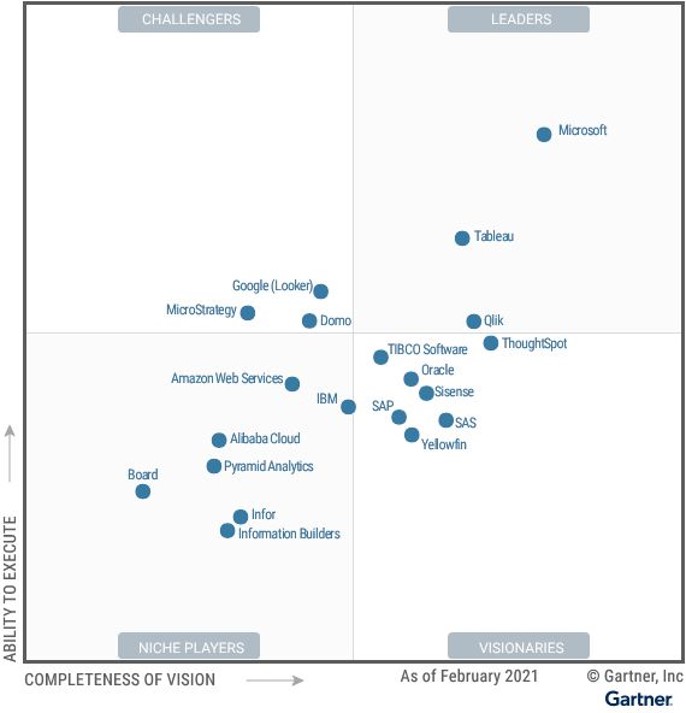
Microsoft have been named a leader in the latest Gartner Magic Quadrant for Business Intelligence and Analytics. Being in the top right corner is the best position and Microsoft are far and away above the rest:
Almost everyone I speak to is a fan of Power BI and it really seems to be the BI tool of choice for those people who newer to the world of dashboard and reports. This LinkedIn post has got some great points and discussion in the comments too.
Microsoft are relatively new to the desktop side of Business Intelligence, although SQL Server has long had BI capabilities, and the fact they’re seemingly so dominant now is very interesting. This ZDNet article has some great background to how it all came to be.
Announced at Microsoft Ignite 2020, Power BI Premium has a new “per-user” licensing model. Previously available only via a “capacity” model, at a pretty high price point, this new licensing option will make it more cost effective for companies to get started.
The main reason I talk to people about Power BI Premium is licensing. With Power BI Pro, EVERY user consuming a dashboard need a Pro license – which can get pretty expensive pretty quickly. Power BI Premium per Capacity removes the need for each user to be licensed with Pro meaning, even with it’s high monthly cost, it can work out more cost-effective for heavy use cases.
While there have been feature differences between Pro & Premium, they’ve not been a reason for these conversations – now however, it looks as though that Microsoft hope that may change. This new licensing model makes it easier, and cheaper, for smaller orgs and teams of developers to access the high-end Power BI Premium features. Perhaps this is an effort to compete further with Salesforce Tableau et al.
To access content in a “Premium per-user workspace”, each user must have a “Premium per-user” license so the licensing, in a nutshell is:
If you want to get access to the additional Premium features for named users, Premium per user (PPU) is the way to go.
If you want to allow unfettered access to dashboards without worrying about per user licensing, Premium per capacity is still the answer.
Getting access
Whilst in preview, Power BI Premium per-user will be free of charge. Regarding eventual pricing, Microsoft said in their announcement:
Premium per user will be uniquely affordable and highly competitive among individual user offerings in the industry. Stay tuned for the official pricing announcement as we get closer to the GA timeframe. I guarantee you won’t want to miss it.
The “further details” link below has a well moderated comments section which features several answers from Microsoft clarifying some of the common questions too.
Business Intelligence is an ever growing area and I think it will continue to grow for quite some time. Taking note of the data you have, analysing it and making decisions based on it is becoming more and more prevalent – think what Billy Beane has been doing at the A’s for years, what Bill James does with the Red Sox, look at how Opta stats have become such a huge thing within premier league football…all these are examples of business intelligence.
The new way:
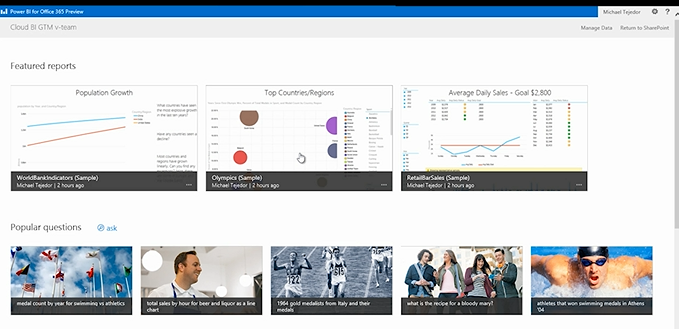
I’m amazed at some of the things that are being done with Power Bi, especially combined with Excel 2013! The opportunity for organizations to become so much smarter with how and what they’re doing is huge – the fact that it’s cloud based so allows access from anywhere is a big deal, especially with the Windows 8 & RT apps AND HTML5 support.
It’s available now so pricing is in the pricefiles – to see some of the things you can do with Power BI, head over to:





 Cloudy with a chance of Licensing