Microsoft Office Web Apps


Microsoft’s Office Web Apps have garnered a lot of interest recently as a new way of interacting with Office, and as a competitive move against Google Docs. Despite me having had the Tech Preview of Office for a while (and indeed, I installed the beta tonight), I’ve just got Web Apps in my Windows Live SkyDrive…so let’s take a look 🙂

I now have a button entitled “New”:

image

Excel Workbook:

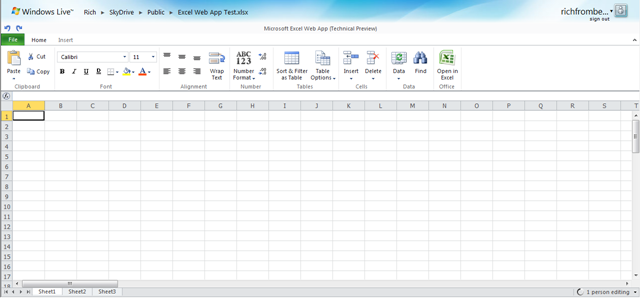
After giving the workbook a name, you’re presented with what is easily recognisable as an Excel Workbook:
image

You can see that most of the ribbons tabs are missing, here we have just “Home” and “Insert”, but I can do pretty much everything I generally need to do in Excel. Admittedly I’m nowhere near a Power User but I think I’m probably a typical user..

FAQs:

Can I do Sums? Yes:

image

Can I drag a formula down into other cells? No

Can I create Charts? No

Can I change font size, colour and type? Yes

Can I insert tables? Yes

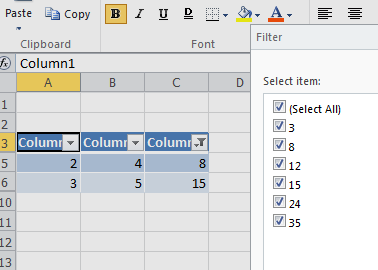
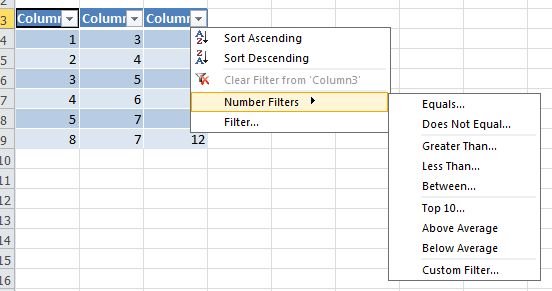
Can I do filters? Yes, if you insert the data into a table:
image

image

Can I paste into Excel Web Apps from other programs? Yes

The “File” menu has some extra options too:

image

Word:

Word Web App isn’t available yet:

image

Powerpoint:

Powerpoint Online is similar to Excel, in that it is cut down but contains all the basic features you’re likely to need:

image

image image

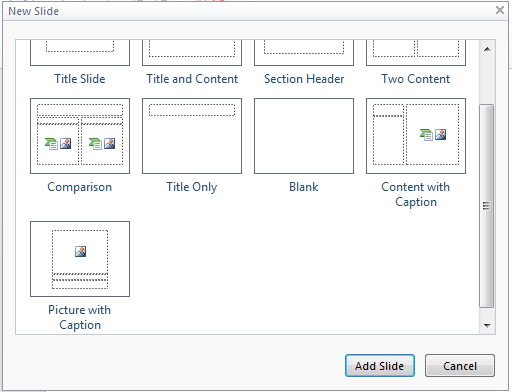
You get a choice of different types of slide when you add a new one:
image

Something I wasn’t expecting is a great choice of Smart Art:

image image

That’s pretty impressive 🙂

The Slideshow works perfectly well but it opens up in a new browser window, so it gets stopped by pop-up blockers.

The big thing that’s missing is Transitions though…maybe they’ll be coming soon…

OneNote:

Same as Word, OneNote isn’t available yet:

image

Microsoft Office 2010: New offerings


Microsoft Office 2010 will be with us next year and there are lots of great new things happening with it. I’ve been running the technical preview for a couple of months now and there are countless new features that I love – you can see more on that here and here.

There are 3 new announcements regarding ways that Office 2010 will be available:

Microsoft Office 2010 Starter:

This is my favourite of the 3, an ad-supported, cut down version of Office 2010 containing Word & Excel…for FREE. It will include the ability to view files as well as creation and basic editing functions and will be easily upgradeable to a full version of Office 2010.

This is of course aimed at increasing Office’s exposure in emerging markets as well as taking market share from Sun’s OpenOffice package; in my opinion that’s a good thing. OpenOffice, while a commendable Open Source effort, just isn’t as good as Microsoft Office. It’s not just me as a Microsoft fan saying that-friends and colleagues who are Mac and/or Linux fans agree too 🙂

The situation I can see Office Started being of most use to me is when I’m setting up new PC’s for friends/family and I get the almost obligatory “Where’s MS Word?”…”What? What do you mean it’ doesn’t come with the computer?!” tirade. It always seems that people buy new machines sans Office and then immediately need to start creating/editing documents…why, I’m not sure! Currently in these case, I recommend they download OpenOffice for the time being and then they can get Office at a later date…but I’d much rather download Office 2010 Starter edition for them! In fact, in the vast majority of cases this will be pre-installed on PC’s by the OEM manufacturer allowing users to get working straight away.

I guess a lot of people just stick with OpenOffice once it’s on their machine-something that Microsoft would clearly like to change. I can imagine that once someone has seen what is possible with Office Starter, quite a high percentage of people will upgrade to Office Home & Student which:

“has been the top selling PC software title at US retail for the last two years”

and is a great value way of getting Office at home. It’s worth noting that MS Works will be discontinued when Office 2010 is released.

Also, to combat what seems to be a common misconception, although Starter will be pre-installed by OEM’s, it WILL also be available for users to download themselves.

Product Key Card:

This is a new way to purchase Office from retail outlets (PC World, Comet,  Currys.digital etc) which is simply a card with an Office licence key on it (no dvd media); allowing you to easily convert trials that are pre-installed on machines. It hits the green mark too by using less packaging 🙂

Click to Run:

This is a new way to download, try and buy Office on existing machines. It uses virtualization technologies (which seem to be based on their corporate App-V technology) to allow multiple version of Office to co-exist. This means consumers can try Office 2010 while still keeping their current 2007 installation with no risk of conflicts.

All in all-these are yet more reasons for Office 2010 to be the best release to date 🙂

The Official Office 2010 Technet post (with videos) is here:

http://blogs.technet.com/office2010/archive/2009/10/07/new-ways-to-try-and-buy-microsoft-office-2010.aspx

Fixing a Corrupt Office installation


I got my invitation to the Office 201 Technical Preview the other day and, quite excitedly, started to install it on my laptop but after about 10 minutes it failed and stated that the previous version of Office (2007) couldn’t be upgraded. I had a look on Twitter and couldn’t see anyone else with the issue so I figured it was specific to my machine, and I was right! My next move was to uninstall the existing Office 2007 and go for a clean install but oh no, “the uninstall has failed”…”WHAT?!”…I was now in the unenviable position of being unable to remove or upgrade Office 2007.

I got Office 2010 installed alongside 2007 but it wasn’t ideal as I could only have 1 copy of Outlook (2007) and having 2 versions of Office takes up a fair amount of room etc so I wasn’t massively happy about it. I did a quick Bing (yes-I Bing everything now!) and found the following Knowledge Base article:

How to manually uninstall the 2007 Office system if you cannot uninstall it by using the “Add or Remove Programs” feature

This covered the very topic I was having (which proved it wasn’t just me!) and gave step by step instructions on how to get Office 2007 removed from my machine. If you’re having the same issue I won’t bother repeating the steps here but I do have a couple of points to add:

1) This isn’t a quick process-it took about 2 hours of manually deleting files and registry entries.

2) Point 2 of Step 5 (the Uninstall Registry key) didn’t exist on my machine but that didn’t cause any problems.

3) Some of the steps involve deleting folders from your hard drive and while most of these were fine, at least one refused to go down without a fight! I got the somewhat common problem of being told I “don’t have permission to delete the folder”, even though I was the admin on my machine. This threw a spanner in the works so back to Bing it was…and it came up trumps again 🙂

Over on petri.co.il there is a post on how to add a “Take Ownership” option to the right click menu in Vista, through creating a quick registry file. The details are there to be pasted into the file, it’s easy to do and it definitely works, the post is here:

http://www.petri.co.il/add-take-ownership-context-menu-vista.htm

With the KB article and the above addin-you should have all you need to sort out your Office installation and be in a position to re-install a properly working edition…I hope this helps and good luck 🙂

Outlook 2007 Forgotten Attachment Detector


The Outlook 2007 Forgotten Attachment Detector (FAD) is amazing; it’s an add-on for Outlook 2007 that helps prevent emails being sent without their required attachments.

I have been saying for years that something like this should be made, as I am forever forgetting to attach files to emails, both at home and at work. If I had the programming skills I would’ve made this myself…but I haven’t so I didn’t…and instead we have Bhavesh Chauhan of the Office Labs team to thank.

How it works:

It scans the body of the email for words and phrases such as “the attached email”, “the email attached”, “please find attached” and then checks to see if there is anything attached. If there isn’t, it flags it up and gives you the chance to recitfy it.

More information is on the Office Labs site here and you can download the FAD here.

Big up to Bhavesh and I can’t wait to install this at work ASAP 🙂

Microsoft BPOS to support Office 2003


Yesterday I was part of a technical roundtable regarding MS Online Services/BPOS and there was a lot of great information revealed, unfortunately I can’t say much as it’s all under NDA…suffice to say it’s a great product that is going to keep on getting better.

There is however, one piece of info I CAN share and that is that BPOS will-from June (next month)-start to fully support Office 2003.

This is brilliant news as the Office 2007 only requirement was preventing a lot of people from being able to seriously consider MS Online Services which was a shame! BPOS is positioned as a great way to reduce the impact on budgets and to help keep costs down but then having to upgrade to the latest version of Office didn’t tend to go down too well…I think a lot of people saw it as “giveth with one hand, taketh with the other”. It is often the smaller companies, who would most benefit from MS Online, that are still on Office 2003 so now a whole new arena is opened up…good skills Microsoft 🙂

Office 2007 SP2 is available


As you may already have seen-SP2 for Office 2007 is out and available now. MS have stated it will be added to Windows updates within 3 months but I seem to have it available today…which is nice 🙂 If you haven’t got it and you can’t wait, head over here to grab it now.

It makes all kinds of improvements but the big one is it gives Outlook a great boost, up to 35% faster at starting up, switching between folders etc! It also helps bring the Excel charting more in line with Excel 2003…

Office 2007 SP2


The Microsoft Office team have released a great big list of fixes contained in Service Pack 2 for Office 2007 and some of them are great, and look like they’ll fix some issues I’m having 🙂 The full article can be found here and my pick of the fixes is below. (ps SP2 will be out 28th of April 2009-so next week!)

Excel: A chart object model has been added to Word and PowerPoint.

Groove: Synchronization reliability has been improved.

Outlook:

  • Performance in startup, shutdown, view rendering, and folder switch has been improved.
  • Calendar updates, search, and RSS are more reliable.
  • Powerpoint: Resaving of files is faster.

     Server side:

    Excel Services: Improved compatibility with Mozilla Firefox browsers.

    Props to Chris Parkes for his tweet on this 🙂