Teams has been “consciously decoupled*” from Microsoft 365 on a global basis, so they’re now only available separately to new users. Existing users can continue to renew but if you need to buy both, it equals more cash more Microsoft.
Teams Enterprise is now listed, which appears to be the standalone version of Teams. From a naming perspective, “that “Enterprise” sounds “bigger” than “Premium” (which is a paid add-on) so I’d expect a rebrand at some point soon🤔
Dynamics 365 Supply Chain Premium has been added…plus another error as “Dynamics 365 Supply Chain Management” is listed as having a minimum purchase quantity of both 10 and 20…clearly one should say “Premium” at the end (the one with 10 I believe).
They’ve still not corrected the D364 error from last month either 🤣
Microsoft have announced expanded Copilot for M365 access to a range of new SKUs including:
M365 F1/F3 Office 365 E1 M365 Business Basic
The Microsoft post says “and more” so we’ll have to wait for the full list to appear soon.
This change means that a huge additional number of Microsoft users will be able to buy it the new AI tool.
I have a couple of initial questions:
1) Why do this now?
I thought it would take a lot longer to get to this point. This feels like Microsoft are not selling Copilot for M365 anywhere near the rate they expected/want/need and so, to help recoup more of the enormous amount of money that must have been spent, they’re widening the pool quickly.
2) What about the price?
Are orgs really going to spend an additional $30 per user on top of these low cost SKUs? Particularly where the users will likely have fewer opportunities to benefit from Copilot’s assistance? I think perhaps we’re about to see a price drop or tiered pricing… I.e. Copilot for M365 Standard and Premium.
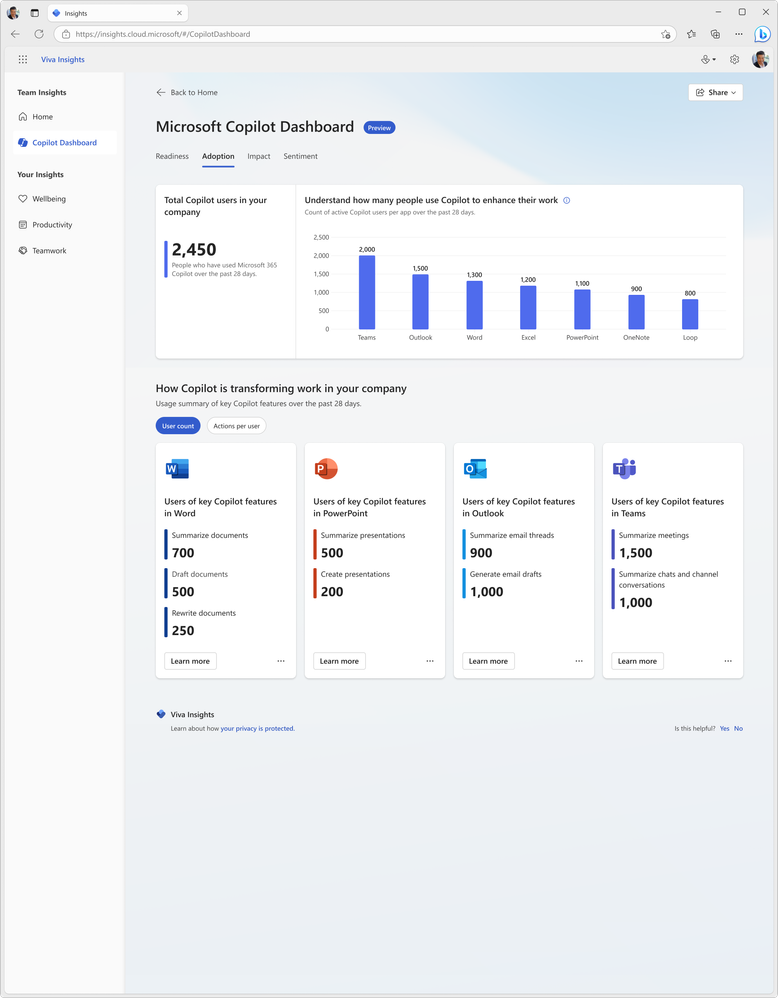
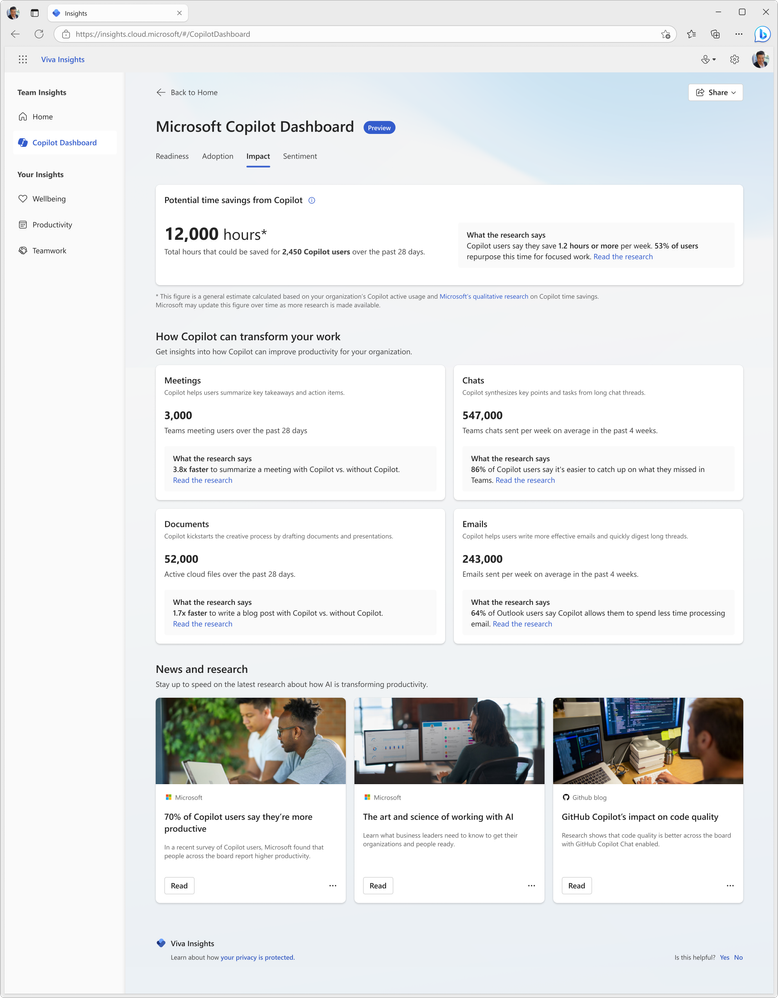
Since the introduction of Copilot for Microsoft 365, one of the big questions I, and others, have been asking is “how do you determine value?”. I laid out my initial concerns, questions, and actions here and now want to look at Microsoft’s offerings to enable this kind of insight. Currently available in preview (https://insights.cloud.microsoft/#/CopilotDashboard) – although I couldn’t get it to work – Microsoft’s Copilot Dashboard is their option to get the much needed insights.
Microsoft Copilot Dashboard
Microsoft aim for this to help customers across the 3 stages of the adoption journey:
It will show:
Who is eligible for Copilot for M365
How people are currently using M365 apps
How people are using Copilot and in which different apps
Information on how Copilot is impacting productivity
Microsoft are referring to it as “Microsoft Copilot Dashboard, powered by Viva” and from “early 2024” there will be additional dashboard features available to users with Viva Insights licenses. According to Microsoft, these will include:
“Copilot adoption and usage metrics combined with collaboration data, out-of-the box reports for organizational leaders, before and after behavioral data and even insights from employee surveys.”
and will also show time spent in meetings, processing emails, and creating content with before and after Copilot information.
All in all, the Copilot dashboard will be useful for organisations looking to understand more about their Copilot readiness and then their Copilot usage. However, some may have concerns about the reliability and objectivity of the data and reports generated by Microsoft on their own software. Ideally, Microsoft will be transparent and accountable in how they collect, process, and share the data from the Copilot dashboard. They should also provide ways for users to verify, challenge, or complement the data with their own sources and feedback.
Microsoft have retired the “From SA” license offering starting from February 1, 2024 for Microsoft 365.
What are they?
Introduced in 2015, these licenses were Cloud USLs at a reduced price for customers who had on-premises licenses with active Software Assurance (SA) and aimed to make it less costly for them to move to Microsoft’s Online Services.
What’s changed?
Microsoft say that “Cloud services are now the predominant way customers use Microsoft products and services” and so these From SA SKUs are no longer needed.
Microsoft 365
Feb 1st 2024: You won’t be able to order additional or new From SA subscription licenses for Microsoft 365 and its standalone products. The impacted products are:
Core CAL Suite Bridge for Office 365 From SA
Enterprise CAL Bridge for Enterprise Mobility + Security From SA (User SL)
Enterprise CAL Suite Bridge for Office 365 From SA
Enterprise Mobility + Security E3/E5/G3/G5 From SA
Microsoft 365 Apps for enterprise From SA
Microsoft 365 E3/E5/G3/G5 From SA
Microsoft Teams Phone Standard From SA
Office 365 E1/E3/E5/G1/G3/G5 From SA
Project Plan 1/3/5 From SA
Visio Online Plan 1 and 2 From SA
Windows 11 Enterprise E3/E5/G5 From SA
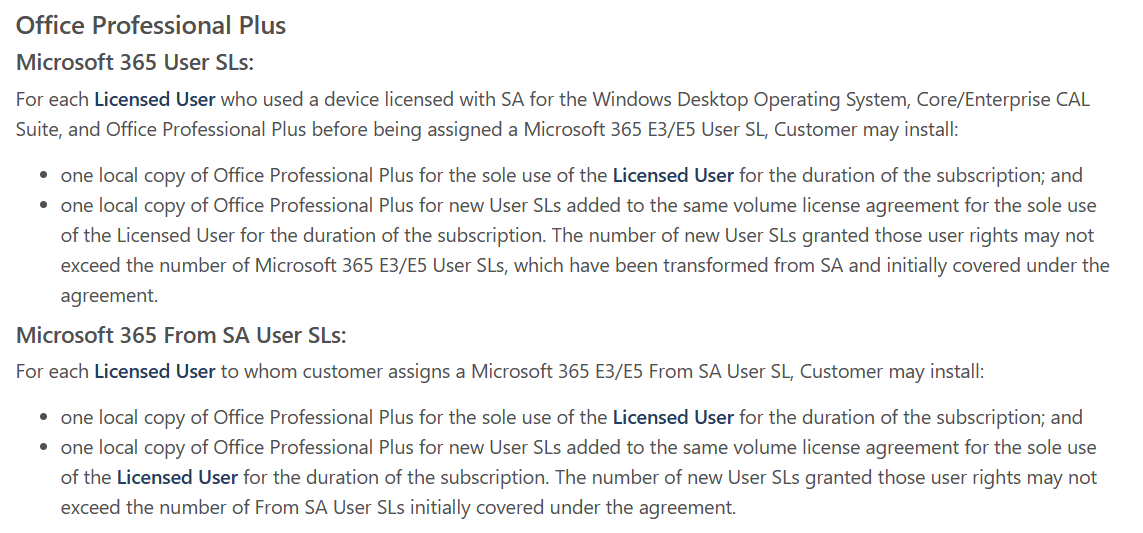
Office Professional Plus rights
There is now also wording that states any “licensed user” who used a device licensed with all 3 of:
Windows OS w/SA
Core/Enterprise CAL w/SA
Office Professional Plus w/SA
and has now been assigned a Microsoft 365 E3/E5 User SL can install a local copy of Office Professional Plus for the duration of the USL subscription.
This section from MS isn’t totally clear as to what it is saying/changing so questions/thoughts welcome. I think the phrase “transformed from SA” is new and is doing some of the work here…
Dynamics 365
April 1st 2024: You won’t be able to order additional or new From SA subscription licenses for Dynamics 365. The impacted products are:
Dynamics 365 Business Central Device From SA
Dynamics 365 Business Central Essentials From SA
Dynamics 365 Business Central Premium From SA
Dynamics 365 Business Central Team Members From SA
Dynamics 365 Commerce From SA
Dynamics 365 Customer Service Enterprise From SA
Dynamics 365 Customer Service Enterprise Device From SA
Dynamics 365 Customer Service Professional From SA
Dynamics 365 Human Resources From SA
Dynamics 365 Field Services From SA
Dynamics 365 Finance From SA
Dynamics 365 Operations – Activity From SA
Dynamics 365 Operations – Device From SA
Dynamics 365 Project Operations From SA
Dynamics 365 Sales Enterprise From SA
Dynamics 365 Sales Enterprise Device From SA
Dynamics 365 Sales Professional From SA
Dynamics 365 Supply Chain Management From SA
Dynamics 365 Team Members From SA
However, there will be a time limited “promotional migration offer” being made available to EA customers by April 1st to help customers migrate.
Any licenses purchased before the change date can continue to be renewed but quantities can’t be increased.
You can see the Microsoft announcement here. Interestingly, it’s dated December 15th but it hasn’t been publicised until today – or at least I didn’t see it!
We’re 15 days into 2024 and Microsoft have dropped some big AI news already. Copilot for Microsoft 365 is now literally Generally Available!
Copilot for Microsoft 365
It’s now available on CSP for businesses with M365 Business Std and Business Premium licenses. $30 each and between 1 – 299 quantity can be purchased.
The 300 license minimum has been removed for commercial plans.
Furthermore, it can now be added to Office 365 E3 and E5. Great that it is available to a wider range of organisations without additional licenses being needed…but surely it needs a name change now? 🤔
Copilot Pro
This new product gives 1 AI that runs across a user’s device and gives access to Copilot in Word, Excel, PowerPoint, Outlook, and OneNote on PC, Mac and iPad for Microsoft 365 Personal and Family subscribers.
I’ve recently recorded a couple of videos with Nathan Miller, Microsoft Program Manager at Bytes.
In the first, we discuss Copilot for Microsoft 365 (we recorded this in October 2023 but it took me ages to edit it!):
We talk about the General Availability of Copilot for M365 as well as tips for preparing for deployment.
We then talk about the Microsoft Azure Consumption Commitment (MACC): agreement:
where we explain what the MACC agreement is, how it works, and the potential pros and cons for customer organisations. We also talk about the Azure cloud marketplace and the impact this will have on customer procurement processes and also the wider IT channel.
I hope you find the videos useful and informative – as there are more planned! Let me know if you have requests for topics and also if you’d like to jump on a video or podcast with me at some point. I usually focus on blog posts but am looking to get all multimedia on you in 2024 so this is just the start 😁
Microsoft have announced a new Copilot – we now have Copilot for Service.
Copilot has been within Dynamics 365 for a few months already and now Microsoft bring the ability to “synthesize[s] vast amounts of data already available from an organization’s trusted knowledge sources to provide relevant, timely guidance to agents in their flow of work” to users of other CRM and Contact Centre solutions including Salesforce and ServiceNow, and Zendesk.
How does it work?
Microsoft say that it will very easy:
“Organizations can simply point to their data—such as public websites, SharePoint, knowledgebase articles, and offline files—and in a few minutes unlock generative AI-powered conversations across all of their data”
It will enable customer service agents to ask natural language questions of their data, whether in Teams or another client. Further down the line additional features will include email summaries, email drafts, and meeting recaps as well as automating common CRM tasks based on emails and context.
Interestingly, this product will include the much hyped Copilot for Microsoft 365 – meaning these users will also have access to Copilot across their Office suite.
Pricing and availability
Copilot for Service will be $50 per user per month (pupm). Remember that this includes Copilot for M365 which is priced at $30 pupm alone.
Copilot for Service is currently in public preview in US-based environments only, and the Copilot for M365 features may not be available during preview.
Announcement here and more info sign up form here.
Update to terms around add-on USLs being purchased on same agreement. It now says “Add-on User SLs, as specified in the Add-ons section of each respective product section,”
New Failover rights for Azure SQL database = “One geo-secondary specifically for disaster recovery purposes“
It has also been spotted that M365 Business Standard and Business Premium have been removed from the license prerequisites for Copilot for Microsoft 365:
Is this a temporary removal to prevent confusion as it is isn’t currently available for those licenses…or is it a sign that M365 Copilot won’t be available for SMB customers? I feel it’s the former but you never know!
It’s been announced that Power Virtual Agents (PVA) is now part of Copilot Studio so let’s look at the licensing for this new product.
Microsoft Copilot Studio for Microsoft Teams
Just as there is Dataverse for Teams, this is a cut-down version for use exclusively with Teams and the rights are included with “select” M365 licenses. These seem to be a way of keeping PVA available to many users and further promoting the idea that Teams is where all internal bot related scenarios should occur.
As you can see, the features are relatively limited:
It will be possible to acquire a full Copilot studio license via the Teams app so SAM managers beware! I’m yet to find pricing for the standalone license but will update once I see it.
Microsoft state that “use rights and functionality available as part of paid, standalone Power Automate subscriptions serve automation scenarios cannot be applied to Microsoft Copilot Studio scenarios“.
Copilot Studio entitlements are also included within D365 Customer Service Digital Messaging and Chat add-ons.












 Cloudy with a chance of Licensing