Microsoft Cloud Mobility Licensing Changes


Microsoft are making a big push with their hosted application offerings (BPOS & Office 365) but are also aware that many customers and partners base their businesses on 3rd party hosted solutions. In an effort to make that easier and more cost effective, the Redmond based company recently announced some changes to their licensing rule, referred to as “Licence Mobility”.

Essentially, these changes will allow customer organizations to deploy their licences in-house or hosted in a 3rd party datacenter. Not all products are covered with these changes, in fact, here are the products that are:

  • SQL Server
  • Exchange Server
  • Sharepoint Server
  • Lync Server
  • System Center Servers (note the plural – this seems to be any and all SC products)
  • Dynamics CRM

If these products are licensed with Software Assurance they

“can be run in service providers’ datacenters on shared hardware for that customer’s dedicated use”

Products that are NOT included are:

  • Windows Server Operating Systems
  • Windows Client Operating Systems
  • Desktop Applications
  • Developer Tools

Other Changes

Also, Microsoft are expanding the Subscriber Access Licences (SALs) for SA SKUs to cover Enterprise licences for

  • Exchange
  • Lync
  • Sharepoint

For more information, see here:

http://www.microsoft.com/licensing/about-licensing/value-of-volume-licensing.aspx#tab=4

Microsoft Exchange Online & Blackberry


Microsoft BPOS, the online versions of Exchange, Sharepoint et al has offered a Hosted Blackberry service for around 12 months now and it’s been pretty popular. The vast majority of organizations that use Exchange also use RIM’s Blackberry’s so offering them a way to push that off to the cloud certainly made the adoption of Exchange Online an even easier deal to sell. It was a pretty cost effective solution too, at £6/$10 per user per month.

As BPOS is soon transitioning to Office 365, with new versions of the MS software available in the cloud, there is also a change happening to the Blackberry service…well actually two changes.

1) The service will move over to be hosted, managed & supported by RIM.

2) The monthly cost is changing to £0/$0

That’s right, the service is going to become a free value add from Microsoft and not only that, it will be better than the current offering! From an email Microsoft sent to customers and partners this morning:

“administrators will be able to create and manage more device policies, change device passwords and settings, and search across large numbers of BlackBerry users at one time.”

The monthly cost is also changing for current customers right now, enabling them to take advantage of the zero cost straight away. This is a significant cost saving for companies, as an example – an organization with 150 Blackberry users would look like this:

£6 x 12 months x 150 users = £10,800 per annum

This move from Microsoft instantly saves almost £11,000 a year in the example above, and 150 BB users isn’t a particularly large installation either. Companies could/should use that money to invest in other areas of infrastructure…they could add Sharepoint Online for those users and still have nearly a 50% saving!

Current Customers

Current Blackberry Online subscriptions are being terminated on June 30, 2011 so if you’re currently using the Blackberry Online Service, there are steps that must be taken to ensure continuous service.

  1. Log in to Microsoft Online: Go to the Microsoft Online Customer Portal and log into your Microsoft Online account.
  2. Locate the Hosted BlackBerry service offer: Click Manage Subscription, choose an active BPOS or Exchange Online subscription*, select Buy Hosted BlackBerry from the Actions dropdown, and click Go.
    * This can be the same BPOS or Exchange Online subscription with which Hosted Blackberry was last purchased.
  3. Checkout: In the Shopping Cart, enter your total required number of Hosted BlackBerry seats** and accept the Hosted Blackberry Service Terms of Use (checkbox). Click Update, then click Checkout. The new $0/user/month pricing for all of your current seats for the Hosted BlackBerry service takes effect at new agreement signature. All users under the old terms of use are now covered by the new terms of use regardless of the user count entered.
    ** At a minimum, customers should enter the number of Hosted BlackBerry licenses in use today across all existing Hosted BlackBerry subscriptions. This number is visible in the Hosted BlackBerry Administration Console which is a part of the Microsoft Online Administration Portal.
  4. Cancel the old subscription(s): To cancel your previous subscriptions and avoid being billed for the Hosted BlackBerry service as of your next billing cycle, you must cancel any previously existing subscriptions through a Service Request, either by phone or through the service request form in your Microsoft Online Administration Console (MOAC). Service use will continue uninterrupted after cancelling the old subscriptions.

Bad News

The good news is that organizations can save £1000’s per year but there is some bad news. Unfortunately, RIM aren’t going to have the new platform ready for the General Availability (GA) of Microsoft Office 365; it will be “beginning in late 2011” according to Microsoft.

We’ve been told that companies on Office 365 will be unable to use Hosted Blackberry until the RIM platform is complete, so perhaps some 6 months after Office 365 becomes available. I am yet to get 100% clarification on this point but it appears this means that existing BPOS & Hosted Blackberry users must choose:

Stay on the BPOS platform with Hosted Blackberry for a further 6 months

or

Move to the new Office 365 platform and lose Hosted Blackberry for around 6 months

Not an ideal situation for anyone so I am looking to get more clarification around this ASAP and will update here. My hope is that although they are terminating subscriptions, Microsoft will keep their platform running for existing customers until such time that RIM get their act together…

Windows InTune V2


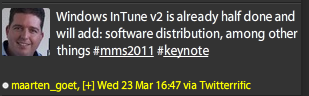
Windows Intune was released to General Availability (GA) today on March 23rd 2011 but already the next version is being worked on, at least according to Twitter.

image

I haven’t seen anyone else mention this but Maarten is a SCOM MVP and the hashtags indicate this came directly from today’s MMS2011 keynote speech, so I think it’s safe to believe it Smile Plus it is in no way unusual for Microsoft to be working on the next version of a product before they’ve even released the first edition…

If Windows Intune V2 does include Software Distribution, that will be pretty amazing. That will enable IT departments/Managed Service Providers (MSP’s) to deploy new software to users from a remote location via the web. Although it will of course be limited by internet bandwidth between the 2 points, this will make so many things so much easier for so many people! That could well be the point that sees InTune take hold in larger organizations…

Microsoft make changes to Core CAL Licensing


Microsoft Management Summit (MMS) 2011 is bringing announcement of a number of things such as new versions of System Center products, deeper integration between Microsoft products and, also Licensing.

Most Microsoft server products require a CAL (Client Access Licence) for each User/Device accessing the server software. To help reduce cost and licensing complexity, Microsoft offer 2 bundles that contain a number of these CALs: dsd

Core CAL

Enterprise CAL

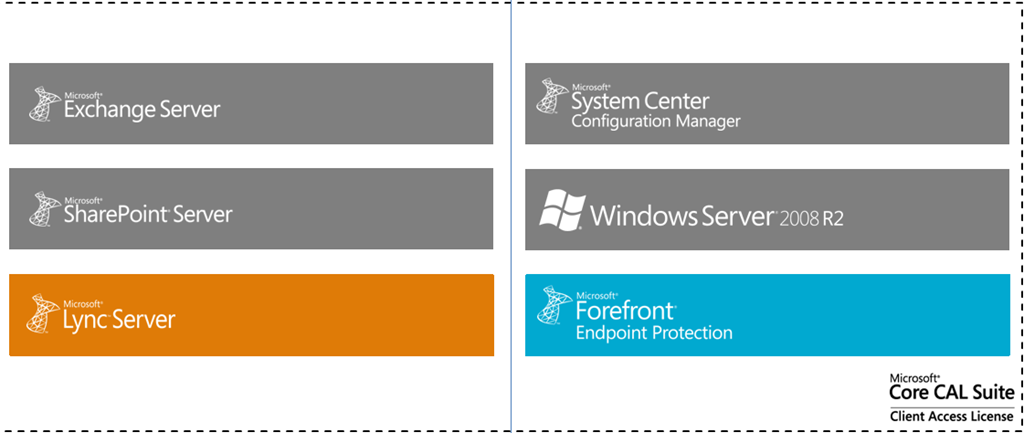
The different products contained within have been, for some time:

clip_image002

but not any more!

Core CAL will now include:

Lync Std CAL

Forefront Endpoint Protection

Notice that it is only “Forefront Endpoint Protection” that is being added to the Core CAL, if organizations require the other parts of the suite, they will still need to look at the Enterprise CAL.

image

Core CAL for the future

image

That is what the updated Core CAL will look like and these changes are going to take effect from the August 2011 price file. This will also see a slight increase in the price of the Core CAL, due to it’s increased product range.

Why do this?

The way people and companies use technology is changing, particularly there is a rapid increase in the use of Instant Messaging & Presence within organisations. Gartner say:

“By 2013, 95% of workers in Global 100 organizations will use the IM client as their primary interface for computer-based, real-time communications”

Microsoft are making it easier and more cost effective for organizations of ALL sizes to embrace these new technologies and reap the benefits they bring.

These changes are now reflected on the Microsoft site here:

http://www.microsoft.com/calsuites/en/us/products/default.aspx

Microsoft Windows Intune


Microsoft have recently announced that Windows Intune will be available on March 23rd 2011. This is their new product aimed at simplifying PC management for SMB organisations.

What is it and what does it do?

Windows Intune is a cloud based, central management system aimed at SMB’s of up to 250 machines (or so).

“Windows Intune simplifies how businesses manage and secure PCs using Windows cloud services and Windows 7—so your computers and users can operate at peak performance, from virtually anywhere.”

Intune covers many of the areas that IT Managers find difficult and time consuming such as:

  • Managing Updates
  • Pro-active monitoring
  • Malware Protection
  • Asset Tracking (Hardware & Software)
  • Remote Assistance
  • Setting Security Policies


As much as it is a Web based management console, it is also more than that…and this piece, despite being pretty huge, doesn’t seem to be getting mentioned that much:

It includes Windows 7 with Software Assurance.

For $11 a month (or whatever your currency equivalent will be) you get a hugely impressive central management console, Windows 7 Enterprise (so features such as Bitlocker), new version rights for Windows 8 and beyond and the ability to add on MDOP and give yourself a truly dynamic IT Infrastructure.

You can read my more in-depth original post here:

https://richardgibbonsuk.wordpress.com/2010/04/19/windows-intune/

Can I get a trial?

You certainly can, head over to:

http://www.microsoft.com/windows/windowsintune/reminder.aspx

register, and get notified when trials are available.

Microsoft EES–Missing Licences


For all you schools out there looking to enroll into Microsoft’s new academic licensing program, EES (technically OVS-ES), I’ve just come across a small hiccup.

Remote Desktop Service (RDS) CALs, the new version of Terminal Service CALs, are missing from the price file, so resellers can’t give you a price for them. I’ve been told that they will appear in the May price file but that still leaves a 2 month window.

We’ve got customers who need to renew their agreements, which contain RDS CAL, before May so I’ve asked Microsoft what the official line is and will update ASAP.

Cheers

Rich

Microsoft SBS 2011 Licensing Changes


Microsoft have now released the new version of Small Business Server, SBS 2011 and as well as product improvements, they’ve also made some changes to the licensing.

In SBS 2008, you chose either SBS Standard OR SBS Premium and then purchased Standard CALs AND Premium CALs (for those users accessing the extra features).

However, with SBS 2011 even the server licences have a layered licensing model. This means you purchase:

  • SBS 2011 Std

and then, if you need the Premium functionality of a 2nd Windows Server and SQL, you must purchase ON TOP of the standard licence:

  • SBS 2011 Premium Add-on.

This is quite a change and one which was not communicated very well at all.

image

They have also introduced a new edition:

  • SBS 2011 Essentials

“a new, easy-to-use, first-server solution designed and priced especially for small businesses (up to 25 users) that can seamlessly integrate into online services such as Office 365, cloud backup and cloud management solutions. It is expected to release in the first half of 2011. “

Users don’t need CALs for the Essentials edition but it is hard locked at a maximum of 25 users.

Microsoft SPLA pricing changes


Microsoft SPLA, Service Provider Licence Agreement is, as the name suggests, a licensing program aimed at Service Providers. It gives them a very cost effective subscription based licensing model, allowing them to offer monthly pricing to their users.

Come January 1st 2011, there are going to be some changes to the Windows Server pricing:

Product Price Change
Windows Web Svr -21%
Windows Svr Std -21%
Windows Svr Ent -21%
Windows Svr Datacenter +30%

Why is Windows DataCenter going up? Well, it’s actually going DOWN, as the current price is technically a promo that’s been going on for about 2 years Smile

For more info and some FAQ’s, head to:

http://blogs.msdn.com/b/stevemar/archive/2010/11/19/service-provider-license-agreement-spla-changes-for-windows-server.aspx

Project Server 2010 & Sharepoint Server


Project Server 2010 is the latest version of Microsoft’s Project planning and collaboration solution, and it can be much more confusing.

The previous version, Project Server 2007, was a stand alone product whereas Project Server 2010 has some dependencies on SharePoint 2010. However finding out exactly what these dependencies were and how necessary they all are was quite a lengthy process, one which I will describe here to save you time Smile

The question is:

“Does Project Server 2010 require Sharepoint Server 2010”

The answer is:

“Yes”

As to which version of SharePoint is required, well that’s where it got interesting!

I could see how sitting Project Server on top of SharePoint would be useful so I imagined that SharePoint 2010 Foundation would do the job. It’s pretty powerful and it’s free – seems the perfect fit to drive a Project Server 2010 implementation. However, a look at Technet brought up this:

image

I found it hard to believe that it would require the ENTERPRISE version, as that isn’t cheap, so I set off to verify this.

Ask Partner:

I spoke to the Microsoft Ask Partner Technical Pre-Sales team and they did the same as me. Said that Foundation would be fine…and then checked Technet!

Still I wasn’t satisfied so I went to the

MSDN

site and there I found this:

image

A diagram of the Server Architecture for a Project Server 2010 implementation from:

http://msdn.microsoft.com/en-us/library/ee767687.aspx

To me, the above says that SharePoint Foundation is perfectly acceptable and that SharePoint Enterprise is only required to serve ASPX pages in the Project Web App.

I’d love to get some feedback as to your thoughts on the above Smile

I went back to the Ask Partner team and they agreed with me.

So at this point it seems that SharePoint Foundation is fine and we’re about done.

However, I also put this request out to the TwitterSphere and one of my favourite people at Microsoft came back and told me to look on page 117 of this month’s Product List, so I did…

image


Project Server 2010 customers will require SharePoint Server 2010 and SharePoint Server 2010 Standard and Enterprise CALs

Despite that, they’re still one of my favourites Smile

The Answer

So that’s it really…both Technet and the Product Lists say that if you want to run Project Server 2010 you MUST also licence SharePoint Server 2010 with Standard AND Enterprise CALs.

My Thoughts

I don’t particularly agree with this, as it adds quite a chunk onto the cost of the solution.

Project Server £3768
Project Pro £684
   
Total £4452
   
SharePoint Server £3768
SharePoint Std CAL £72
SharePoint Ent CAL £63
   
Total £3903
   
Grand Total £8355

The above is based on standard Open Licensing and as you can see, the addition of SharePoint Enterprise almost doubles the solution cost.

I understand that having SharePoint Enterprise gives the client a whole raft of other wonderful tools and I’m a huge fan of SharePoint however, it’s a lot of extra money if you’re not going to use any of the extra features. I feel this will prohibit many businesses from being able to implement a full Project Server solution.

Alternatives

I am currently researching an alternative solution which is based on SharePoint Foundation customisations and from what I’ve heard so far, this could be a great alternative for many people.

Microsoft Enrolment for Education Solutions (EES)


Microsoft licensing has a new family member, Enrolment for Education Solutions AKA EES.

Currently, there are 2 education specific licensing programs, Schools Agreements & Campus Agreements (I’m not including Open Academic & Select Academic as specific). These offer huge savings over standard licence costs but there are certain requirements that don’t always please people, mainly the requirements to cover ALL eligible desktops, even if they’re already licenced or not to be used for that purpose.

Last year, Microsoft introduced a pilot licensing scheme for education called SESP, which I covered here:

Read Microsoft Licensing- Subscription Enrollment for Schools

Not much has been heard about SESP since then, but it’s influence can definitely been seen in EES.

It’s interesting to note that Live@EDU, the free email+ service for Further/Higher Education establishments will be fully integrated into EES.

What’s different?

The big change is that EES is based on an FTE (Full Time Employee) count, rather than the number of desktops. This will, for almost all schools and colleges, dramatically reduce the number of licences needed.

Another change is the ability to add “non-platform” products in any quantity at any stage of the contract. This will reduce costs as well as help reduce complexity and perceived “pointlessness” of licensing. A good example of this is one we had with a customer a year or 2 ago, where they wanted 70 something Terminal Service CALs but they were required to purchase 700+ as that was their desktop count! Many grumbles were made about that as 600+ of them were never used and seen as a complete waste of money.

Something else that will help organizations further reduce costs is the ability to pro-rate the pricing of additional products, with a minimum charge of 6 months. For example:

Product added in month 3 = full price x 0.75

Product added in month 9 = full price x 0.5

You can also define an organization in a much more granular fashion so it could be:

  • Entire school district
  • Entire school
  • Just Year 11
  • Just the science departments

or more…much more flexible Smile

However you define the organization, the minimum entry point is still 300 units.

What exactly is FTE?

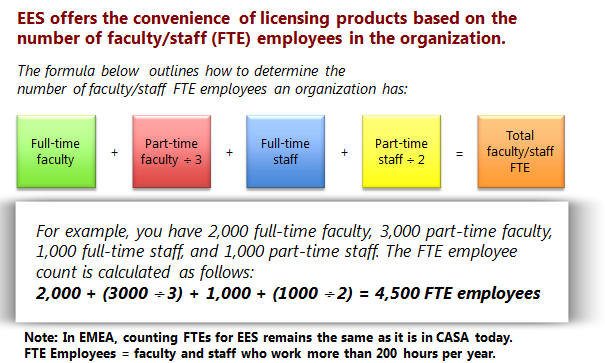
Perhaps not surprisingly, FTE isn’t quite as straight forward as just “Full Time Employees”! The actual calculation is:

image

“Non desktop PC Users” such as maintenance or food service staff can be excluded from the count. MS point out that you must include “student employees”, although I’m not sure what they are?!

Launch

EES is being made available at different time in different regions, and also through different channels. December 2010 will see the limited launch of EES.

In the US & Canada = December launch of EES under Campus Agreement via Distribution & Value Add Resellers (VARs).

In EMEA = December launch of EES to Campus Customer only via Large Account Resellers (LARs) only.

In APAC = December launch of EES under Campus Agreement via LAR only.

It won’t be available to primary & secondary schools in EMEA until March 1st 2011.